Set a Safe Retention Schedule for BigBlueButton Recordings
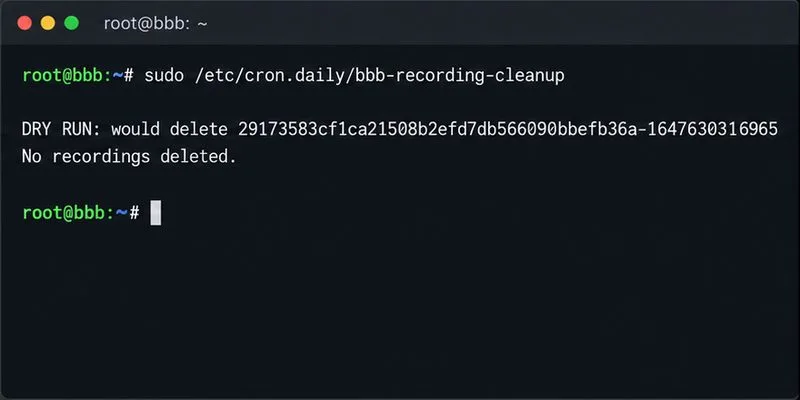
Preview which published recordings exceed your retention period, then schedule BigBlueButton cleanup with a logged daily script and a dry-run safeguard.
To automatically remove old published BigBlueButton recordings, use a root-run daily cleanup script that selects completed recordings by age and calls bbb-record --delete with each internal meeting ID. Start in dry-run mode, review every candidate against your retention policy, and only then enable deletion. For example, a university that keeps lecture recordings online for 90 days can set MAXAGE=90; choose a different period if your policy requires it.
BigBlueButton already has a separate daily cleanup for raw recording data: current customization documentation says published recordings’ raw data is removed after 14 days by default, configurable as published_days in /etc/cron.daily/bigbluebutton. That setting does not mean the published playback recording is deleted after 14 days. The official BigBlueButton server customization guide provides a second daily script for deleting recordings older than a chosen number of days.
Imagine Maya manages a BigBlueButton server for a college. The college wants published lecture recordings to remain available for 90 days, but it also wants to preserve raw source data for a shorter recovery window. Maya should set those two retention periods separately: MAXAGE=90 for deleting old recordings, and published_days for raw data in the built-in daily job. Keeping raw data longer can help rebuild a recording after a processing problem; deleting it sooner saves disk space but removes that recovery option.
Before scheduling deletion, confirm the server’s BigBlueButton version and that the installation uses the documented filesystem layout. This recipe applies to package-style Linux installations with the paths below. A managed hosting provider, container image, or custom recording integration may store recordings elsewhere or expose its own retention controls; use the provider’s supported method in that case.
Also decide whether the policy applies to every room, course, or user. The script below targets completed presentation recordings by age only. It does not distinguish courses or legal holds. Exclude protected recordings through an approved policy or maintain a review list before enabling automatic deletion.
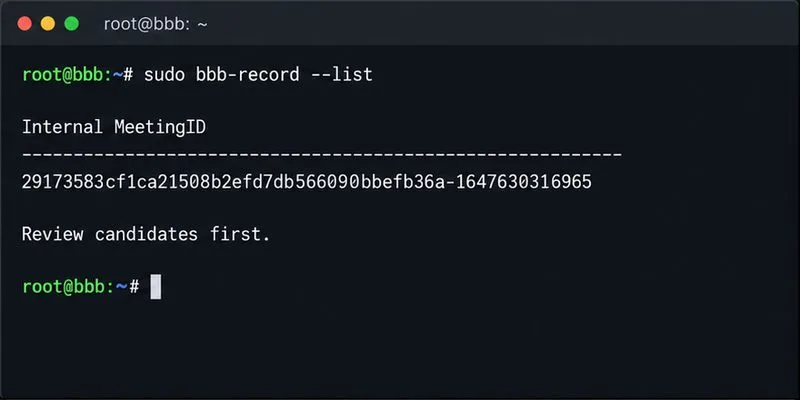
List existing recordings and identify the internal meeting IDs. An internal ID is the unique identifier BigBlueButton uses for one session; it differs from the external room or meeting name, which can repeat.
sudo bbb-record --listCheck that backups include the recordings that must be retained and that a restore has been tested. The BigBlueButton recording guide documents bbb-record --list and bbb-record --delete <internal meetingID>. It also warns that deleting a meeting can remove meeting-related data and can affect running meetings if the wrong ID is supplied. The script below selects only IDs found in completed published-presentation marker files, but review the candidates before switching off dry-run mode.
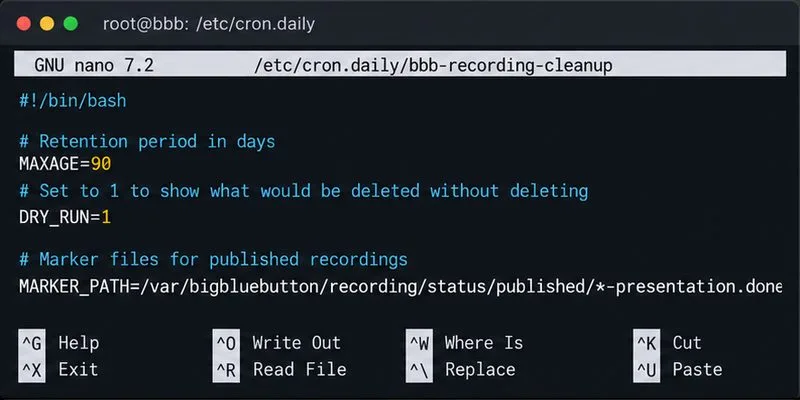
Create the file as root:
sudo nano /etc/cron.daily/bbb-recording-cleanupPaste the following script. It follows the marker-file approach in BigBlueButton’s customization guide and adds a dry-run switch so the first run only logs candidates:
#!/usr/bin/env bash

MAXAGE=90
DRY_RUN=1   # Keep 1 while reviewing; set to 0 to delete.
LOGFILE=/var/log/bigbluebutton/bbb-recording-cleanup.log

shopt -s nullglob
NOW=$(date +%s)

echo "$(date --rfc-3339=seconds) Starting cleanup; MAXAGE=${MAXAGE}; DRY_RUN=${DRY_RUN}" >>"$LOGFILE"

for donefile in /var/bigbluebutton/recording/status/published/*-presentation.done; do
    MTIME=$(stat -c %Y "$donefile") || continue
    AGE_DAYS=$(( (NOW - MTIME) / 86400 ))

    if (( AGE_DAYS > MAXAGE )); then
        MEETING_ID=$(basename "$donefile")
        MEETING_ID=${MEETING_ID%-presentation.done}

        if (( DRY_RUN == 1 )); then
            echo "DRY RUN: would delete ${MEETING_ID} (${AGE_DAYS} days old)" >>"$LOGFILE"
        elif bbb-record --delete "$MEETING_ID" >>"$LOGFILE" 2>&1; then
            echo "Deleted ${MEETING_ID} (${AGE_DAYS} days old)" >>"$LOGFILE"
        else
            echo "ERROR deleting ${MEETING_ID}" >>"$LOGFILE"
        fi
    fi
done

echo "$(date --rfc-3339=seconds) Cleanup finished" >>"$LOGFILE"
Save the file and make it executable:
sudo chmod 0750 /etc/cron.daily/bbb-recording-cleanupThe age check uses the modification time of BigBlueButton’s completed published marker, matching the documented script’s selection method. In this example, a recording is selected when its age in whole days is greater than 90. Change MAXAGE to the approved retention period; do not assume 90 days is suitable for your organization.
With DRY_RUN=1, run the script manually and read the log:
sudo /etc/cron.daily/bbb-recording-cleanup
sudo tail -n 50 /var/log/bigbluebutton/bbb-recording-cleanup.log
Confirm that each candidate is a completed published recording, is beyond the intended retention age, and is not subject to a hold. The preview must say DRY RUN; it must not report deletions. If the candidate list is correct and your backups are usable, edit the script, change DRY_RUN=1 to DRY_RUN=0, save it, and run it once during a maintenance window. The executable in /etc/cron.daily is then run by the system’s daily cron mechanism; check the log after the next scheduled run.
This script intentionally covers only recordings with a published presentation completion marker. It does not clean arbitrary folders, externally exported copies, or every cache and unpublished artifact. BigBlueButton’s built-in daily job has separate settings such as history, unrecorded_days, and published_days; review the installed /etc/cron.daily/bigbluebutton rather than deleting files directly from recording directories.
If recordings are deleted through the BigBlueButton 4.0 deleteRecordings API, the current privacy documentation describes a soft-delete directory at /var/bigbluebutton/deleted/ whose contents are not purged automatically. API deletion therefore may not immediately reclaim storage. Do not add a broad permanent purge without a separate backup, access, and retention review. See the BigBlueButton recording privacy documentation.
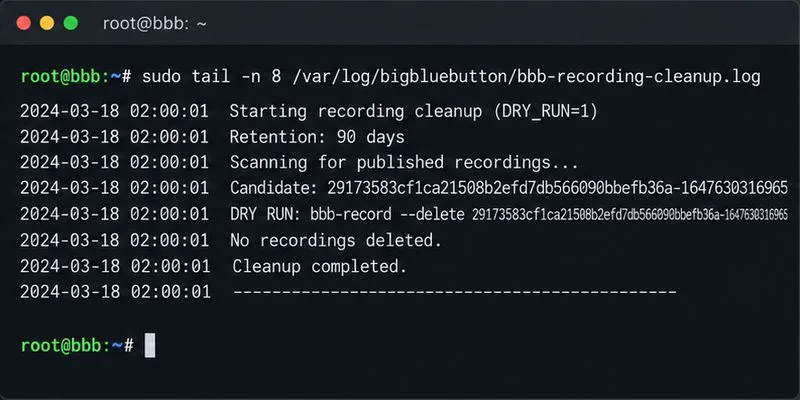
After the first live run, inspect the log for deleted IDs and errors, then run sudo bbb-record --list and confirm the intended recordings are gone while retained recordings remain. Check free space separately; deletion from the recording list and physical space reclamation can differ when an integration uses soft deletion or keeps exports elsewhere. If the log lists an unexpected candidate, set DRY_RUN=1 immediately and correct the scope before the next daily run.
Preview which published recordings exceed your retention period, then schedule BigBlueButton cleanup with a logged daily script and a dry-run safeguard.
Trace FreeSWITCH REGISTER requests, correct gateway or network settings, and confirm that your BigBlueButton SIP trunk registers successfully.
Enable a Jitsi Meet background, troubleshoot missing controls, and reduce video lag on slower laptops without risky configuration changes.
Trace M_FORBIDDEN to room power levels, membership, or Synapse server-admin access, then restore only the permission the blocked action needs.
Configure Synapse discovery, HTTPS, and proxy routing so other Matrix homeservers can find and contact your server.
Configure a Keycloak OIDC client and Synapse provider so Element Web users can sign in through your identity server without exposing client secrets.
Save a recovery key, verify your Element sessions, and check that encrypted message keys can be restored without confusing backup with your account password.
Diagnose Synapse out-of-memory failures during sync, adjust caching safely, identify request backlogs, and verify stable memory use.
Trace Matrix federation certificate failures to the correct server, repair the TLS chain or CA trust, and verify the fix without disabling security checks.
Route Matrix clients and federation through Cloudflare on HTTPS 443, preserve Synapse discovery, and avoid caching API traffic or breaking media uploads.