The social media platform, Instagram, has come a long way since its start in 2010 and its Facebook acquisition in 2012, and some people have been active on the app since the beginning. You may have been using it for so long now that it’s impossible to remember when you created your account.

Some people can remember the year and perhaps even the month, but many would draw a blank if they had to recall when, exactly, they entered the world of Instagram. If you have been using Instagram daily for years, it could be challenging to think of a time when your daily life was without it.
Therefore, remembering the exact date you created your Instagram account might give you better insight into how long you’ve had your profile, how your account has grown, and when certain events happened. You can check the date you started using an Instagram account on a PC, smartphone, or web browser.
How to View Your Instagram Created Date using Android/iOS
Most people use Instagram on their smartphones because it’s more convenient. Plus, it has more features than the desktop version. The Android/iOS apps now include the creation date, but you can still use a browser if preferred. All you have to do is follow the browser instructions below for a PC. The apps also display the created date for other profiles, which will be explained later.
Here’s how to view your “Creation Date” on Android/iOS/iPhone using the Instagram app.
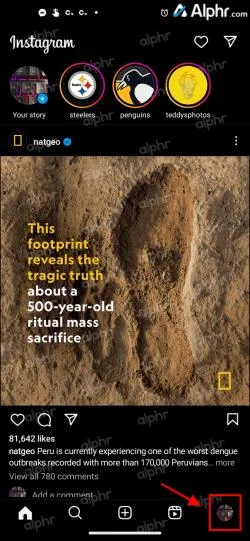
- Launch the Instagram app, then click on your profile icon in the bottom-right section to open your profile page.

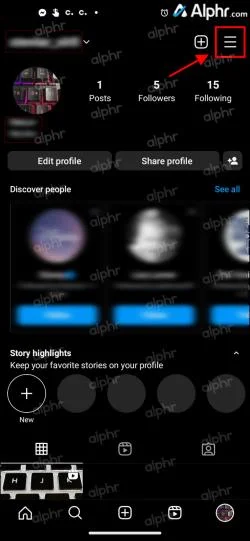
- Tap the hamburger icon (Menu) in the top-right section.

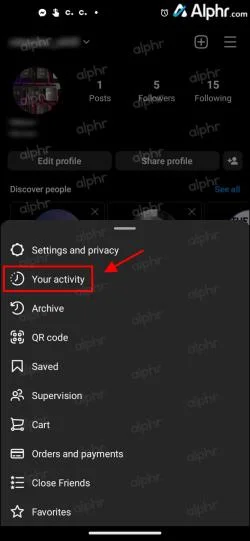
- Choose Your activity.

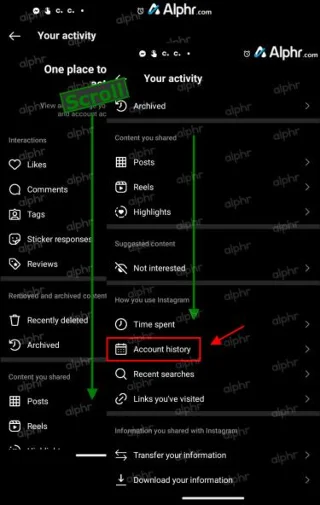
- Select Account history.

- You should now see the “Account created” section showing when your account began.
How to View Your Instagram Creation Date using a PC
If you’re used to checking Instagram on your laptop or desktop computer, you can use them to check the date you joined. Here’s how to do it.
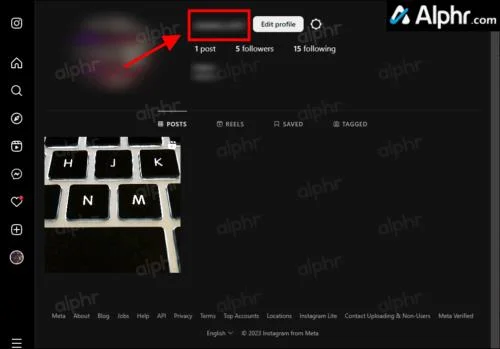
- Go to Instagram web, then click on your profile picture in the top right section to open your profile page.
- Click on your profile name at the top.

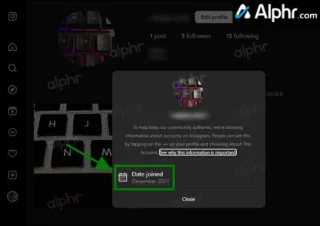
- In the popup window, you’ll see the date joined.

How to View Someone Else’s Instagram Creation Date using a PC
For many reasons, you may be curious about when another user created their account.
Perhaps you have been following a celebrity and want to see when they started their account. Maybe you’d like to check the authenticity of a profile? Perhaps you want to see if a new follower is a new account that could be a hacker/spammer pretending to be one of your friends. The possibilities are endless.
Thousands of Instagram users tend to create fake accounts, primarily for hacking or to leave anonymous comments that are often offensive, or they do it to pretend to be someone else. If you notice strange activity from an account, one of the first steps is to check the join date and see whether it is very recent.
You can check the age of the Instagram account created by someone else in two ways.
Check the Instagram ‘About This Account’ Section to Find the Created Date
In 2018, Instagram took two significant steps toward verification and authentication for accounts with many followers.
Once an Instagram account crosses a certain following threshold (Instagram doesn’t specify the number), it receives the “About This Account” section, containing all the relevant information, including its age.
If you don’t see an “About This Account” option, the profile has not reached the Followers threshold IG decided.
Even though an account has many followers, you can check whether they’ve acquired them recently or not. After all, automated services promise high follower counts, but Instagram’s artificial intelligence and bots constantly get updated to detect suspicious activities better. Regardless, you can find out the age of the Instagram account made by someone else using a PC browser or the Android or iOS/iPhone mobile app. Here’s how to do it.
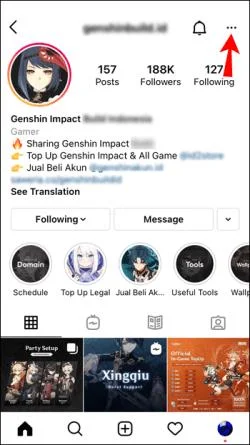
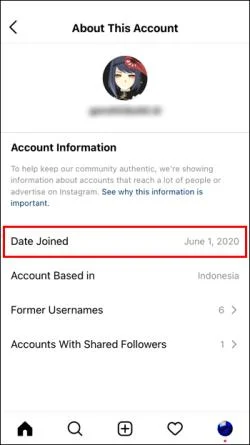
- Open the Instagram app on Android or iPhone. Navigate to the account you want to check, then tap on the horizontal ellipsis (three horizontal dots) in the top right corner.

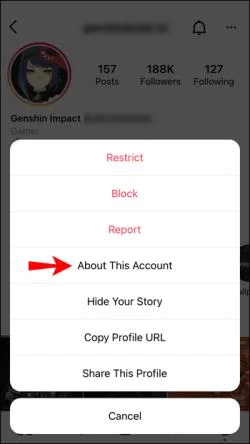
- Tap on the About This Account option.

- You should now see the Date Joined under Account Information.

Based on the date the account got created, you can judge the account’s authenticity. The concept is similar to checking for posts on a questionable Facebook profile. If it’s relatively new, it may not be genuine. The section will also tell which country the account is based in, list former usernames, and display the followers you share with them.
Check Posts to Estimate the Profile’s Instagram Joined Date
By default, Instagram doesn’t provide all profiles with the “About This Account” section. As mentioned, the account must reach a specific Follower threshold to get the added feature. Even those profiles with considerable follower numbers might not have it, in addition to older profiles with fewer ones. However, all verified accounts have the “About This Account” feature. So, what are you supposed to do if the section is missing from the account you want to check?
There isn’t much you can do. Your best option is to go to the Instagram account and scroll down to the first post. If it resembles a reasonably new profile, there won’t be much to scroll through, which may mean the account is a copy or a fake. In any case, the first post’s date could be around when the person or business joined the platform, provided they haven’t deleted any older posts or didn’t bring it up months later to start using it.
Unfortunately, the above method is not very accurate, but it can at least indicate how long the user has had their account.
In closing, you may find yourself surprised when you think about how long it has been since the day you created your Instagram account, or you might have opened a few accounts and don’t remember which one came first or second.
Regarding other users’ accounts, there are several benefits to knowing how long they’ve been on Instagram. There are many fake celebrity accounts out there. So, looking for the “About This Account” section can help determine authenticity.
If an Instagram profile doesn’t feature the Date Created option, your best way to figure out the age of the account is to look for the first post they have, although it is never guaranteed that it was the first one or when they opened the account.