Steam sets new record for concurrent users on the platform, reaching 40 million accounts

The gaming industry has just passed its peak season, but the recent release of several popular PC games has made the overall market extremely vibrant. This is clearly shown through the impressive statistics of global game library platforms, typically the case of Steam.

Valve’s digital platform Steam continues to set new records. In March 2024, Valve proudly announced a record of 36 million concurrent users on Steam. By December 2024, that record was raised to new heights, with the number of concurrent Steam users recorded at over 39 million accounts.

While this may seem like an unprecedented number, Steam has done even more. According to SteamDB’s current figures, the platform has surpassed the 40 million concurrent users milestone for the first time, peaking at 40,222,964 concurrent users on Sunday, March 2. This means that nearly 1 million people have joined Valve’s platform since December of last year and early February of this year.

The main reason for the large number of players online at the same time pushing the number of online accounts to a new high seems to be the extremely successful launch of Capcom's Monster Hunter Wilds. In addition, this number also represents a new peak in the online gaming market, showing continued growth in the world of PC gaming.

Released on February 28, Monster Hunter Wilds was an instant hit, recording an impressive 1.3 million concurrent players over the following three days, Friday, Saturday, and Sunday. This impressive achievement by Monster Hunter Wilds surpassed a series of records previously set by blockbuster games in the past such as DOTA 2, Cyberpunk 2077, Elden Ring, Hogwarts Legacy, Baldur's Gate 3, Path of Exile 2, and even massive free-to-play games like Marvel Rivals and Apex Legends.

According to SteamDB, Monster Hunter Wilds' record of 1.3 million concurrent players on Steam is behind only games like PUBG (3.7 million), Black Myth: Wukong (2.4 million), Palworld (2.1 million), and Counter-Strike 2 (1.7 million). Interestingly, every time a major game launches, it seems like millions of new people come to Valve's PC gaming platform, and they seem to stay. For example, Path of Exile 2's explosive early access launch last December helped Steam hit a record of 39 million concurrent users.

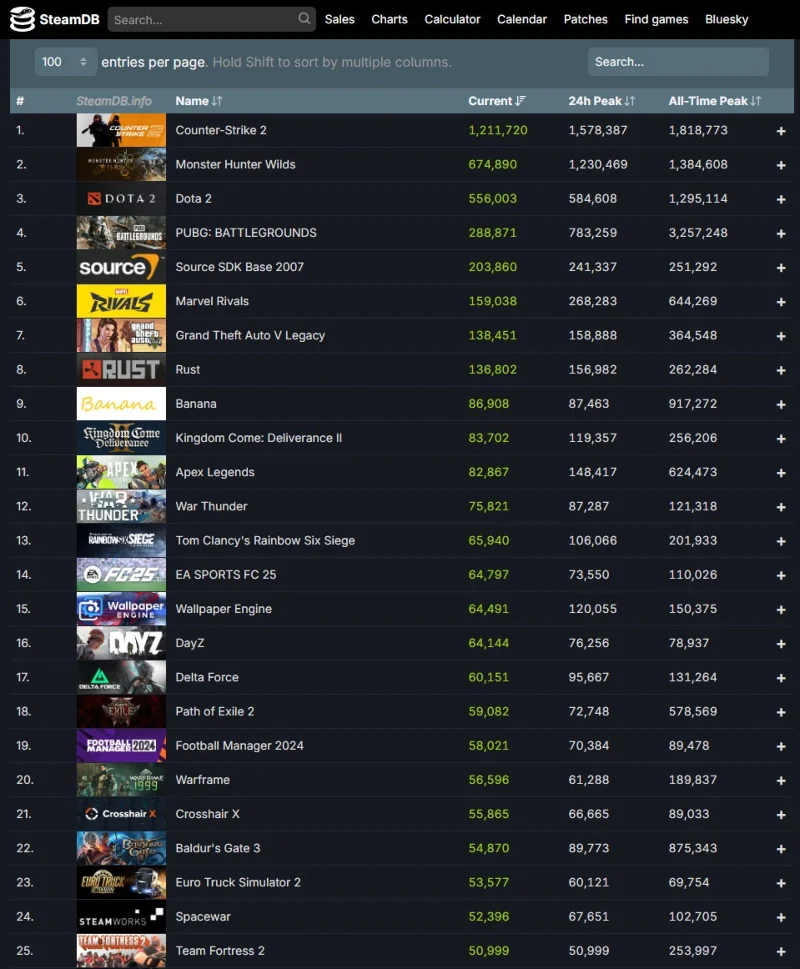
Here's a list of the most played games on Steam by rank over the past 24 hours:

  1. Counter-Strike 2
  2. Monster Hunter Wilds
  3. Dota 2
  4. PUBG: BATTLEGROUNDS
  5. Source SDK Base 2007
  6. Marvel Rivals
  7. Grand Theft Auto V Legacy
  8. Rust
  9. Banana
  10. Kingdom Come: Deliverance II
Steam sets new record for concurrent users on the platform, reaching 40 million accounts
25 best-selling games on Steam

With major titles like Doom: The Dark Ages, Elden Ring Nightreign, Assassin's Creed Shadows, Borderlands 4, and many more confirmed for release in 2025, it's likely that Steam's concurrent player count will continue to rise. Stay tuned!

Leave a Comment

Steam stops supporting Windows 7 and Windows 8

Steam stops supporting Windows 7 and Windows 8

Valve's Steam game distribution platform will stop working on outdated versions of Windows including Windows 7, Windows 8, and Windows 8.1 from January 1, 2024.

The hit game Palworld is now officially available on PlayStation 5

The hit game Palworld is now officially available on PlayStation 5

Without a doubt, Palworld is the hottest name in the global gaming scene in the past few days.

7 Types of Content You Can Find on Steam, Beyond Games

7 Types of Content You Can Find on Steam, Beyond Games

Have you ever come across a program on Steam that you didn't expect to see? Well, that's because Steam is a marketplace for more than just games.

Nearly Half of Steam Gamers Still Use Windows 10

Nearly Half of Steam Gamers Still Use Windows 10

Even though Windows 10 will stop being supported after October 14, 2025, many Steam users are still using the operating system.

How To Make A Steam Account In 2021

How To Make A Steam Account In 2021

How To Make A Steam Account In 2021.Valve’s Steam platform is the biggest repository of games, both online and offline, that anyone can enjoy at this time. If you plan on playing a game on Steam, you’ll need to make sure that you make an account first. The process is easy and can be completed in a few minutes. 

How to sign up for a Steam account

How to sign up for a Steam account

Creating a Steam account will help users buy, watch, even play a few games before it is released.

Instructions for registering a Uplay account

Instructions for registering a Uplay account

Uplay is originally a service portal that provides games. But unlike Steam in that it only contains exclusive games from Ubisoft's manufacturers such as Assasins Creed, Tom Clancys ... If you want to download these games on Ubisoft, you must register for an account

How to set up and disable Family Sharing on Steam

How to set up and disable Family Sharing on Steam

Steam Family Sharing is a new feature of Steam that allows users to share games on Steam with others in their family or friends.

Instruction for payment in Vietnamese Dong on Steam

Instruction for payment in Vietnamese Dong on Steam

Steam is currently the largest online game distribution platform. Players can buy games through Visa, Paypal or international intermediaries. Besides Steam, there is Origin, Uplay ... and a number of distribution software

Instructions to install Uplay on the computer

Instructions to install Uplay on the computer

Like Steam, installing Uplay will help us manage and play PC games more easily and scientifically.

What is Steam? What is the Steam game? How to download Steam game?

What is Steam? What is the Steam game? How to download Steam game?

Steam is basically a game copyright management software in Valve's system. It allows users to download, play and even buy any game license directly to use.

How to stream video games from PC to TV

How to stream video games from PC to TV

Stream games from PC to TV will bring a better experience. Here are a few methods that you can use to stream games from PC to TV.

How to turn off updates on Steam

How to turn off updates on Steam

Although Steam has many benefits, but if you do not disable the self-update feature of Steam, this is one of the annoying features.

How to download PUBG PC and configure the computer to play PUBG

How to download PUBG PC and configure the computer to play PUBG

PlayerUnknowns Battlegrounds, the survival shooter game is storming in the action game rankings, the current hot level of PlayerUnknowns Battlegrounds is undisputed, participating in the game, players will participate in the fierce battle. paralysis,

How to Fix Microsoft Teams Time Limit Error

How to Fix Microsoft Teams Time Limit Error

Tired of Microsoft Teams "Time Limit" Error crashing your meetings? Follow our proven, step-by-step guide to fix it quickly—update app, clear cache, and more for seamless collaboration. Works on latest versions!

How to Fix Microsoft Teams Layout Error After Update

How to Fix Microsoft Teams Layout Error After Update

Facing Microsoft Teams Layout Error after the latest update? Discover proven step-by-step fixes to resolve layout glitches, restore perfect UI, and boost productivity fast. No tech skills needed!

How to Fix Microsoft Teams Error K Security

How to Fix Microsoft Teams Error K Security

Struggling with Microsoft Teams "Error K" Security? Follow our step-by-step guide to fix it quickly—no tech expertise needed. Get back to seamless collaboration today!

How to Fix Microsoft Teams Update Error 0x80070002

How to Fix Microsoft Teams Update Error 0x80070002

Struggling with Microsoft Teams Update Error 0x80070002? Discover step-by-step fixes to resolve it quickly. Clear cache, repair files, and get back to seamless updates today!

Solving Microsoft Teams Web Error Browser Login

Solving Microsoft Teams Web Error Browser Login

Tired of Microsoft Teams "Web Error" blocking your browser login? Follow our step-by-step guide with proven fixes to resolve Teams web login issues fast and securely. Get back to work!

How to Fix Microsoft Teams Error O Offline

How to Fix Microsoft Teams Error O Offline

Stuck with Microsoft Teams "Error O" Offline? Discover proven, step-by-step fixes to get back online fast. Clear cache, restart, and more – no tech skills needed!

Where is Microsoft Teams in Outlook? Locating the Missing Icon

Where is Microsoft Teams in Outlook? Locating the Missing Icon

Frustrated by the missing Microsoft Teams icon in Outlook? Learn exactly where to find it, why it disappears, and proven steps to restore it for effortless meetings. Updated for the latest versions!

Solving Microsoft Teams Windows 10 Error Login Issues

Solving Microsoft Teams Windows 10 Error Login Issues

Struggling with Microsoft Teams "Windows 10 Error" login issues? Get instant fixes for cache clears, updates, and more. Step-by-step solutions to solve Microsoft Teams login error on Windows 10 fast and frustration-free.

Solving Microsoft Teams Website Error Tab Not Loading

Solving Microsoft Teams Website Error Tab Not Loading

Tired of the frustrating Microsoft Teams "Website Error" where tabs won’t load? Get step-by-step fixes to resolve it quickly and boost your productivity. Essential troubleshooting for seamless Teams experience.

How to Fix Microsoft Teams Web Error 503 Service Unavailable

How to Fix Microsoft Teams Web Error 503 Service Unavailable

Tired of the frustrating Microsoft Teams "Web Error" 503 Service Unavailable? Discover proven, step-by-step fixes for Teams 503 error on web. Get back online fast with our expert guide. Works on all browsers!

How to Fix Microsoft Teams Win 7 Error Compatibility

How to Fix Microsoft Teams Win 7 Error Compatibility

Struggling with Microsoft Teams "Win 7 Error" compatibility? Discover step-by-step fixes to restore seamless video calls and chats on unsupported Windows versions. Quick, reliable solutions inside!

Troubleshooting Microsoft Teams Breakout Rooms License Errors

Troubleshooting Microsoft Teams Breakout Rooms License Errors

Master troubleshooting Microsoft Teams Breakout Rooms license errors with this step-by-step guide. Quick fixes for common license issues, admin checks, and prevention tips to get your meetings running smoothly.

How to Fix Microsoft Teams Version History Error

How to Fix Microsoft Teams Version History Error

Struggling with Microsoft Teams "Version History" Error? Discover proven, step-by-step fixes to restore access instantly. Clear cache, update Teams, and more—no tech skills needed!

Solving Microsoft Teams Joining Error: Meeting ID Not Found

Solving Microsoft Teams Joining Error: Meeting ID Not Found

Tired of the frustrating Microsoft Teams Joining Error: Meeting ID Not Found? Get step-by-step fixes to rejoin meetings fast. Updated with the latest Teams patches for seamless collaboration. Solve it now!

Troubleshooting Microsoft Teams Video Error Green Screen

Troubleshooting Microsoft Teams Video Error Green Screen

Struggling with Microsoft Teams "Video Error" green screen? Discover proven, step-by-step troubleshooting fixes for seamless video calls. Quick solutions inside!








