Currently, 3uTools is one of the most widely used tools on the market today. With its attractive interface and scientific optimization, 3uTools helps users manage their device data more clearly and effectively. Let's explore with WebTech360 the outstanding features of this toolkit for optimal use.

Today's most popular tool
3uTools is a free utility tool designed for iOS devices, allowing users to manage files and applications seamlessly. It combines the best features of both iTunes and iTools, ensuring quick compatibility with the iOS operating system.
This product enhances performance with capabilities like jailbreaking, checking the device's origins, and verifying the IMEI number. Users can also enjoy additional functions such as customizable ringtones and free wallpaper downloads via the 3uTools online interface.
Despite being completely free, 3uTools offers numerous valuable features, including:
1. Support for Re-running Software and Jailbreak

Fast and simple software support
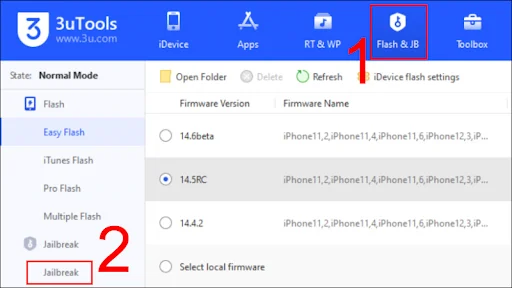
The Flash & JB function allows for efficient software re-execution, providing a much-needed alternative for users facing limitations with Apple's iCloud backup system.
2. iDevice Status Check
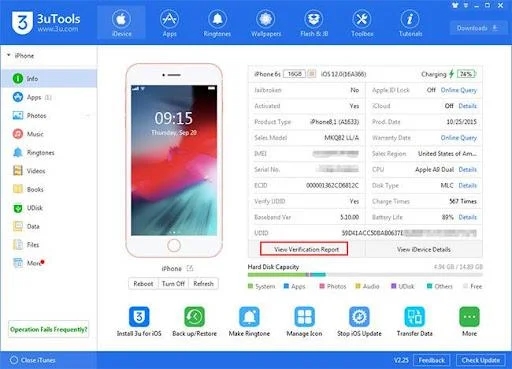
Users can access comprehensive device status checks, including device color, screen size, hard drive capacity, and serial number checks. Additionally, battery life can be easily monitored.
3. Application Interface of 3uTools
Understanding the app interface of 3uTools allows users to adapt quickly to the software's functionalities. The interface is intuitive and resembles the iPhone App Store, facilitating easy app downloads.

Clean and scientific interface
Users can easily link their computer with the iPhone to import and transfer multimedia files, enabling smooth management of photos, music, and videos with ease.
5. Ringtones Management
This section offers a wide range of available ringtones. Users can download and customize their ringtones as desired, with volume adjustments up to 200% enhanced loudness.
6. Data Management Interface
Worried about data backup? 3uTools allows for seamless data transfer between your computer and mobile device, providing a reliable solution for data management.
7. Software Files Management
This feature allows users to access, create, delete, and rename documents and files on their iOS devices with ease. Additional functionalities include deleting junk files and format conversions.
To download, visit the official link: http://www.3u.com/


Simple installation instructions
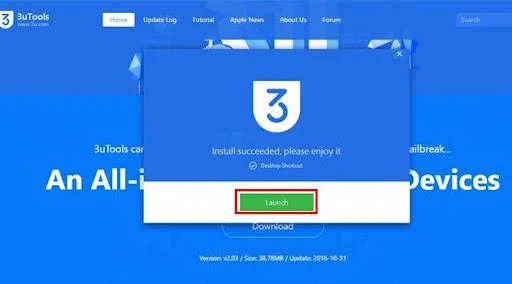
- Download 3uTools from the official site and install it on your computer.
- Open the downloaded file and follow the on-screen prompts to complete the installation.
- Upon installation, if you do not have iTunes installed, it will prompt you to install it before proceeding.
- Once iTunes is confirmed to be installed, launch 3uTools.
The Main Interface of the Software

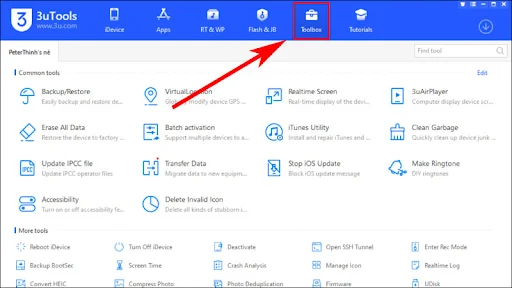
Software interface
The interface resembles that of iTools and makes usage intuitive, providing easy access to necessary tools for iOS management.
Account Login Interface
3uTools smartly integrates features of both iTools and iTunes, enhancing user experience significantly. The innovative interface is intuitive and user-friendly.

Simple instructions to install the Vietnamese version
- Visit the 3u.com website to download 3uTools and Vietnamese localization files.
- Install as per the standard instructions provided above.
- Replace the localization files in the specified directory to enable the Vietnamese interface.

To use 3uTools effectively, it’s necessary to utilize its features proficiently.
After downloading and installing, users can leverage multiple functionalities of 3uTools:
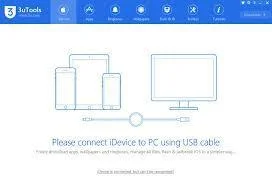
- Connect your device and allow 3uTools to scan for a few moments before use.
- Save application utilities for easy access to tasks like managing apps, ringtones, wallpapers, etc.
- To downgrade iOS, navigate to Flash & Jailbreak, select the Firmware section, and then choose the desired iOS version to downgrade.
- For file transfers, select the type of media in the left corner and proceed with the import operations.
With the aforementioned features, 3uTools emerges as a vital tool for efficient management of iOS devices. We hope this information from WebTech360 gives you a comprehensive overview of 3uTools software. Experience the ease of customizing and managing your iOS device with this incredible software.









Phúc IT -
I'm really looking to understand more about how 3uTools works. Any additional resources you guys can recommend
Sara Analytics -
Thanks for the awesome guide! I’m a newbie when it comes to technology, but I managed to install it without any issues
Samantha Brown -
This article is a lifesaver! I installed 3uTools and was able to back up my iPhone within minutes. Highly recommend
Jordan Baker -
I have to admit, I was skeptical at first, but after using 3uTools, I’m a believer! It's super efficient!
Dan the Man -
Just installed 3uTools following your guide! Can't wait to dive into the features. Do you think it can compete with iTunes?
John Smith -
I've been using 3uTools for a while now and it's simply amazing! The installation process was super easy to follow, just like you mentioned. Thanks for the detailed guide
Daisy Duck -
Whoa, I didn’t know 3uTools could also manage apps. This is so helpful for someone like me who likes keeping things organized
Rachel Green -
Has anyone else experienced glitches when using 3uTools? Sometimes it freezes on me. Just curious if it's my device.
Mike Johnson -
Great explanation on how to use 3uTools! I've always struggled with iTunes, but this software seems to provide a much better experience
Linda InTech -
Very detailed article! I managed to transfer photos from my iPhone to PC using 3uTools without any hassle
Johnny945 -
Just a tip, make sure to keep your 3uTools updated! I missed an update once and it caused some problems with my device.
Lisa Updates -
Just wanted to say thanks for the review! I downloaded it and have been using 3uTools for a week now. What an upgrade
Steve Jobs -
I appreciate how simple the installation was! Sometimes these tools can be so complicated, but this one is straightforward
Megan Fox -
I was skeptical at first, but I have to admit, 3uTools is really effective! Especially the file transfer feature, it’s quick
Lily White -
I had no idea 3uTools could do so much! From backups to transferring files, it's now a must-have on my computer.
Victor Modern -
I’m amazed! I’ve always found iTunes cumbersome, but 3uTools is so smooth. Great job on this article
Tommy the Cat -
Finally, a tool that makes managing my iPhone easier! I've been trying to find alternatives to iTunes and 3uTools is a breath of fresh air.
ClaraVision -
Has anyone figured out how to use the automation features in 3uTools? I feel like I'm missing out on something big
Chris IT -
This is great! 3uTools is like iTunes but 10 times better. Love the backup options it offers
Ellie the Explorer -
For those of you looking for an alternative to iTunes, definitely give 3uTools a try! It’s made my life easier.
Peter Pan -
I tried 3uTools because of this post and I must say, I’m impressed! The interface is user-friendly and intuitive
Anna Lee -
Can anyone tell me if 3uTools is safe to use? I've heard mixed reviews and I want to make sure my data is protected.
Milo the Techie -
Wow, this tool looks really promising! Can't believe I didn't hear about it sooner. Thanks for sharing
Alan Turing -
Quick question: can 3uTools help in restoring my iPhone if it gets stuck on the Apple logo? Need to know before trying it!