Skype Free Phone Calls

Skype Free Phone Calls let you connect with friends and family worldwide at no cost. Follow this guide to set up and start making free calls quickly and easily.
In gaming, the anti-aliasing works to make the image smoother, the character movement will not be rough anymore, from which you will have a better gaming experience. So what is anti-aliasing ? What are the meanings of SMAA, TAA, FXAA and MSAA ? Why do we need to use anti-aliasing for better gaming? Let's find out in this article.
Basically, anti-aliasing (English is Anti-aliasing) is the main adjustment mode that helps objects and people become softer and not angular, through which the image of the game will be noticeably softer. compared to the original, so that the game experience will also be better, creating a comfortable feeling when playing the game. The following example will show you how important it is to enable anti-aliasing.
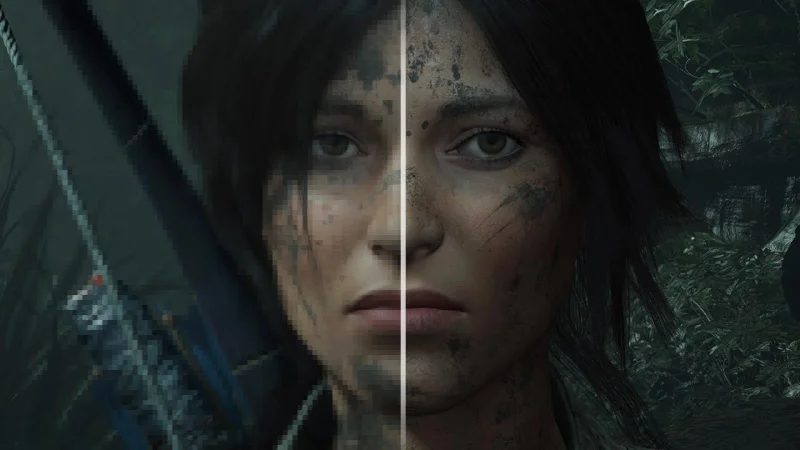
If we have not turned on anti-aliasing, you will find the image quite rough, due to the fact that the game's design shapes are created from millions of pixels combined. so the character when not anti-aliased will be quite rough and have many angles. In fact, with many games we will only notice the aliasing when zoomed in carefully, and now our character will appear countless jagged slots due to overlapping square corners called teeth. saw.
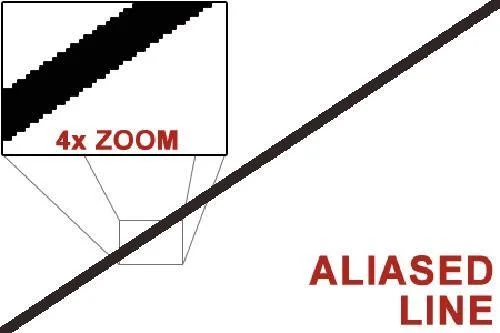
Therefore, the anti-aliasing is to blur those teeth marks, making the image more elegant, the edges will no longer be sharp. As for how it works, anti-aliasing takes the pixels at the edge of the object as a sample, then adjusts the color of the neighboring pixels to make them less curved, the image will be less annoying.

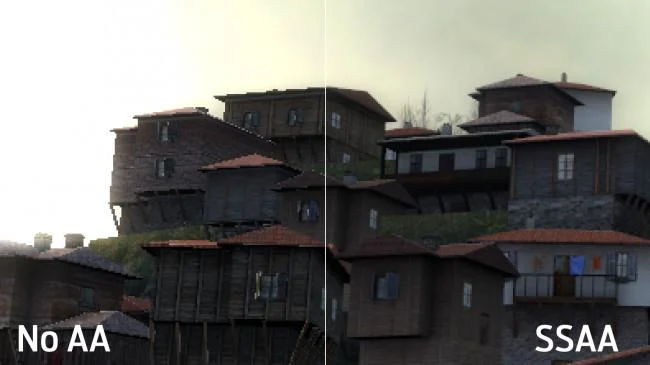
SSAA (Super Sampling Anti-aliasing): SSAA means anti-aliasing by rendering the image at a high resolution and then compressing it to a smaller resolution to achieve high image quality. Therefore, the image will then be more elaborate in quality. However, this form of anti-aliasing consumes a lot of hardware and causes your fps to drop quite a bit.
MSAA (Multi-Sampling Anti-aliasing) : With MSAA, the way it works is the same as SSAA above, but they are more about processing the pixel edges of shapes instead of processing SSAA as variable. large resolution to small resolution. Therefore, the image will sometimes not be of the same quality as SSAA's processing, and may cause the image to be blurred.
However, the common point of MSAA and SSAA lies in the fact that both are difficult to process detailed textures, because they have algorithms to determine the overall bias, the edges, so it is difficult to determine the transparent details. . So there have been a few games that have gradually called MSAA and SSAA the traditional forms of anti-aliasing, and if you want to see the anti-aliasing effect on transparent textures, the Adaptive Anti-aliasing form is a variable. MSAA can help solve this problem.
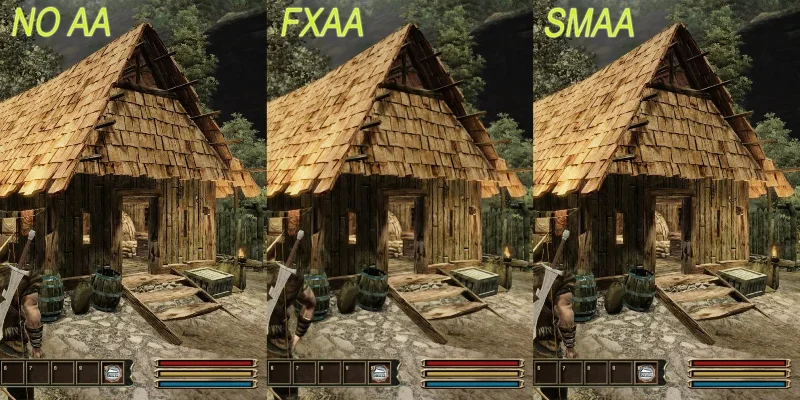
FXAA (Fast-Approximate Anti-aliasing): FXAA is a different form of anti-aliasing compared to MSAA and SSAA. FXAA treats aliasing by inserting opaque pixels on the edges, thereby making them look "smoother" without having to increase image detail and then process like MSAA or SSAA. This helps FXAA not to consume too much hardware but still ensures good quality compared to the two traditional reducers. Here is an example with FXAA enabled:
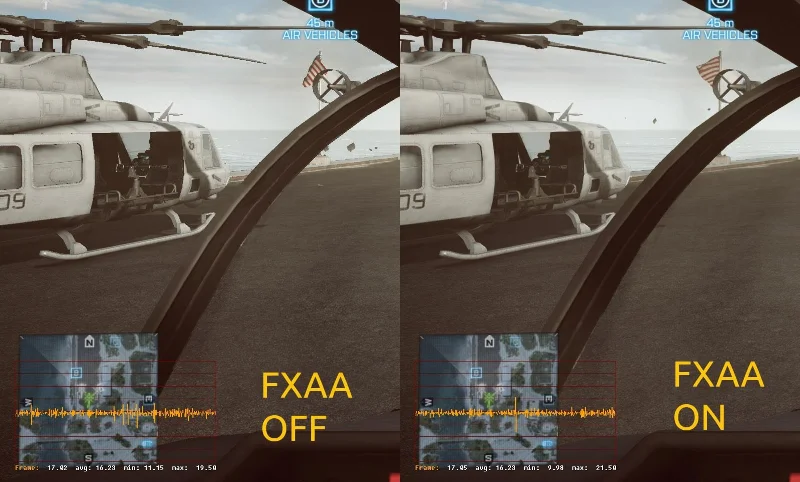
As a result, the image when turning on anti-aliasing will be fine and help the machine not overheat during operation. However, FXAA will not be suitable for gamers who like sharp details because FXAA will blur both of them and make most feel softer.
SMAA (Enhanced Subpixel Morphological Anti-Aliasing): is a combination of SSAA and MSAA with maximum reduction of blur while processing images and smoothing object edges. Similar to SSAA and MSAA, SMAA also has difficulty dealing with transparent textures.
TAA / TXAA (Temporal Anti-Aliasing): This is a new type of anti-aliasing and is heavily integrated by popular games. However, they are only available on NVIDIA's Kepler series of graphics cards and above and do not work for older video cards. TAA has a temporary anti-aliasing effect to help stabilize the fps and not cause the frame to drop like the forms of anti-aliasing above. This makes the inherent motion speed of the objects in the game better, the image is not much but still ensures the user has the best experience.
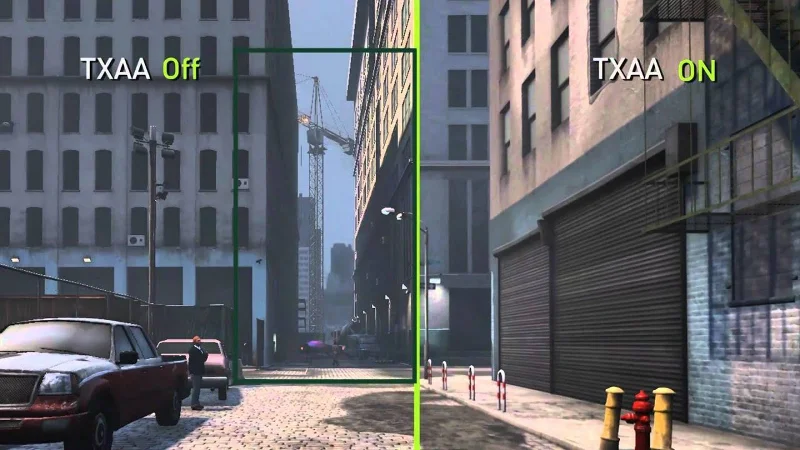
The way TAA works is to select frames that are close together and (temporarily) attach them to smooth the image in motion. Images in TAA also achieve high smoothness due to the combination of many forms of anti-aliasing so far. In addition, TAA is also gradually being used in mobile games, specifically Genshin Impact.
Those are popular anti-aliasing, of course they have many other variations created by manufacturers to enhance their influence. With NVIDIA, we have the following anti-aliasing: TAA, CSAA (Coverage Sampling) Anti-Aliasing) or MFAA (Multi-Frame Anti-Aliasing). Of course, rival AMD must also have its own form of anti-aliasing, which is CFAA (Custom-Filter Anti-Aliasing) or EQAA (Enhanced Quality Anti-Aliasing).
In addition to the above names, we will have anti-aliasing levels to easily customize the configuration to avoid fps drops. Currently anti-aliasing levels include 2x, 4x, 8x or 16x. As for how it works, the higher the number, the stronger the reduction. Often users will choose the highest level to bring the best experience of the image. However, WebTech360 recommends that you choose the right anti-aliasing to avoid the situation where the picture is beautiful but the frame is not moving, lag.
It is really difficult to choose the most suitable form of anti-aliasing today, because the nature of all forms of anti-aliasing will consume your hardware resources, of course the trade-off is the exchange image. Smoother, not angular. For FPS game players, the writer will not care much about anti-aliasing because it will reduce the frames per second a lot and the writer also tends to focus on the smooth transition experience rather than the beautiful.
So the right anti-aliasing will be chosen and chosen by you, if you are a gamer who likes beautiful graphics, surely anti-aliasing is the key factor. And if you don't need the image, you can choose not to anti-aliasing.
Hopefully this article has helped you understand what anti-aliasing is and the role it plays in the graphics of games as well as classifying the different types of anti-aliasing. If you find the article good, don't forget to support WebTech360 , if you need advice on computer configurations specializing in gaming, we will also answer your questions.
Skype Free Phone Calls let you connect with friends and family worldwide at no cost. Follow this guide to set up and start making free calls quickly and easily.
Stuck in the Discord Update Failed Loop? Follow these targeted fixes to break the cycle and complete the update without repeated failures or reinstalls.
Travel planning used to mean folders full of printed confirmations, handwritten notes, guidebooks, and a slightly terrifying number of browser tabs. Now, pretty much everything you need for a trip can live on the device already in your pocket.
Discover how Canva Free for Teachers gives educators full access to premium design tools at no cost. Verify your status and start creating classroom materials in minutes.
Skype How to Call International is simple and cost-effective once you set up credit and use the right country codes. Follow this guide to place clear calls from anywhere.
Make Skype to Skype Calls Free in minutes with this clear guide. Set up your account, add contacts, and start unlimited voice and video calls at no cost.
Fix the Your Connection is Not Private Chrome error quickly with these exact steps. Restore secure browsing by addressing certificate and settings issues in minutes.
Record heat has lifted air-conditioning demand while gas-market shocks have returned volatility to power prices. That creates a real risk of painful bills—but not a guaranteed, Europe-wide price explosion.
Large format printing has long faced criticism for its environmental impact. Traditional substrates, solvent-based inks, and short-lived promotional campaigns have all contributed to the perception that eye-catching graphics come at a high environmental cost.
Long-distance travel can involve heavy traffic, changing weather conditions, and rider fatigue. If you are also dealing with the responsibilities of moving home, such as packing belongings or coordinating accommodation, a long ride may add unnecessary pressure to an already busy schedule.





