
11 Tips Worth Sharing When Taking Photos with Your Phone

After a while of taking photos non-stop, you’ll realize that most of the advice about phone photography is just cliche. If you’re tired of generic tips that never work, here are some that have quietly transformed the way you take photos.

1. You can't do your own research to "develop your style"

New photographers often spend hours on YouTube watching videos about finding their photography style. Even though they’ve started taking photos, many still have no idea what they really want their images to look like.

You basically hear the same formulaic advice over and over again. This is fine if it helps you improve, but unfortunately it often doesn't. So you have to take matters into your own hands.

11 Tips Worth Sharing When Taking Photos with Your Phone
Interior of a Danny Library

2. Don't box yourself into one genre

Many photographers will tell you to stick to just one genre or style, but that’s simply not true – especially if you’re passionate about photography. No matter what creative pursuit you pursue, you’ll only stick with it for the long haul if you truly enjoy what you’re doing.

It's much better if you take pictures of whatever you want; it doesn't matter if they're in different genres.

11 Tips Worth Sharing When Taking Photos with Your Phone
Canals and houses in the city

As you take more photos, you'll see common themes - especially if you shoot things you like.

3. Be more selective with your photos as you progress

Many people tend to post everything they shoot in the early days. Without a reference point, they feel their photos look better than they actually are. But as they gain more experience, the frequency of sharing photos decreases.

By being more selective with the images you share, you'll also be more selective with what you capture in the first place.

4. You won't like most of your photos, and that's okay

When you look at other photographers’ work, you don’t initially realize that you’re looking at the best work they’ve chosen to share with the world. Instead, you wonder why you don’t like most of your own photos. Plus, you feel frustrated because you feel like there’s an unbridgeable gap between you and them.

The purpose of photography is to have fun and express your artistic personality; not every photo is going to be an all-time masterpiece and that's okay.

5. Don't ignore any lighting conditions!

Many photographers on YouTube and Reddit have said that you should only take photos at certain times of the day. For example, Golden Hour is an all-time classic time to take photos. In general, soft lighting is also one of the best aesthetic elements for smartphone photography .

11 Tips Worth Sharing When Taking Photos with Your Phone
The boat passed through the harbor

6. Equipment is only important after a certain point

The amount of marketing messages you have to navigate as a photographer is ridiculous. Every smartphone company claims their camera is the best ever, while camera manufacturers are, of course, trying to sell their products. This can lead to decision paralysis and indecision if you’re not careful.

If you want to be a professional, equipment is important. But for photography as a hobby, you don't need to worry too much about this. It's better to just go out and take pictures.

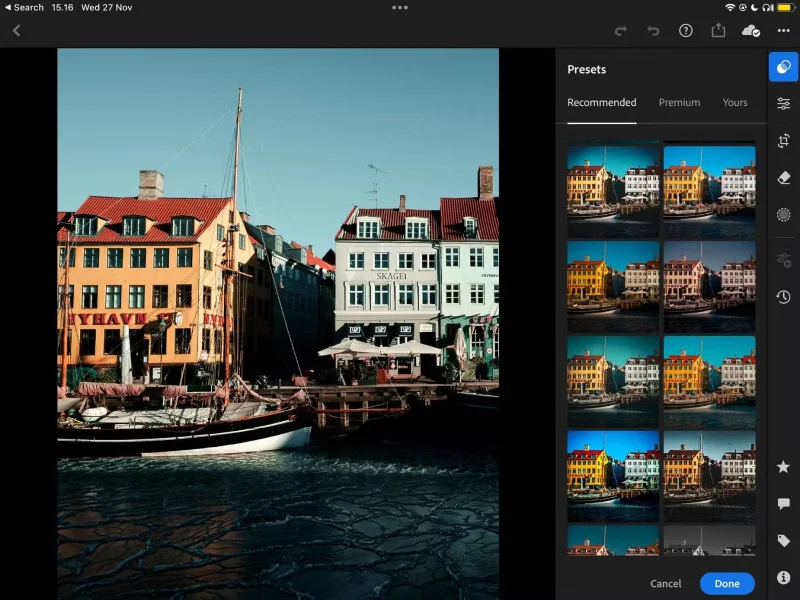
7. Photo editing is not cheating

Many purists think that photo editing is cheating, and they have believed this for a long time. However, the truth is that even the best cameras don't always capture a scene exactly as you see it. Editing your photos is often necessary to form your own perception.

11 Tips Worth Sharing When Taking Photos with Your Phone
Use the recommended preset settings feature in Adobe Lightroom

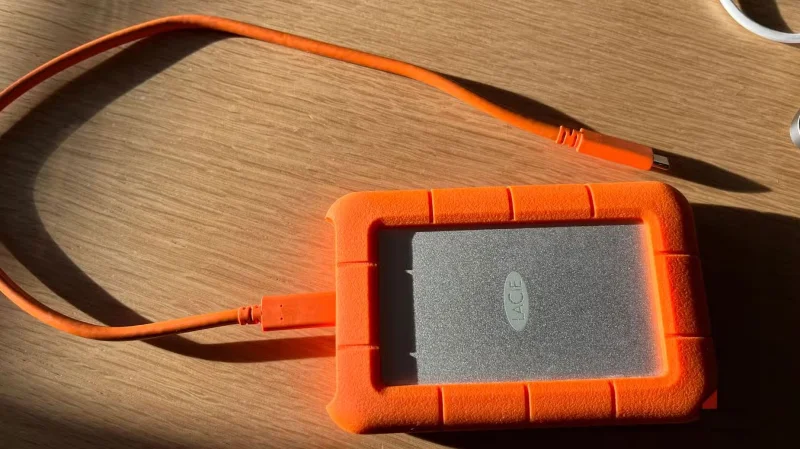
8. Always back up your favorite photos

Many people underestimate the importance of backing up their favorite photos until they drop their old external hard drive one day. In an instant, they’ve lost a bunch of photos – including some from recent trips that they haven’t edited yet. It’s incredibly frustrating, and it really underscores the importance of backing up everything.

11 Tips Worth Sharing When Taking Photos with Your Phone
LaCie External Hard Drive

9. Taking a break is a good idea

Many people love taking photos and do it without being told. But at the same time, they need a break sometimes. After taking photos every day for a year, you definitely need some time to decompress and come up with new ideas.

10. Adjust device default settings as needed

The default settings on your camera are usually fine to start with, but you can tweak them if you decide to get more serious. Simple adjustments, like turning on the camera grid, can make a big difference. This tip applies to both full-frame and DSLR cameras.

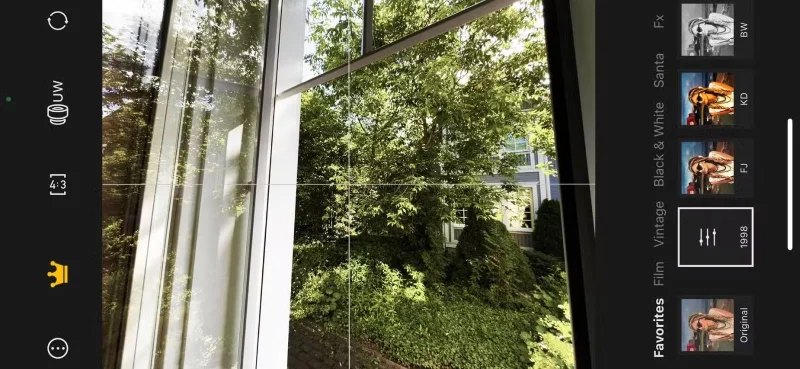
11. Consider using a camera app

While smartphone cameras are more than adequate for everyday photography, they do have their limitations. However, the good thing about using phones is that many creative developers have created apps that extend their capabilities.

11 Tips Worth Sharing When Taking Photos with Your Phone
Take a photo on Cam 1998 app

Photography is an interesting journey and you will learn a lot from taking photos regularly. Taking a photo every day for a year will improve your skills significantly and everyone should do this. Besides learning more about photography, it is a great way to speed up the process of finding your style.

Tags: #Android
Sign up and earn $1000 a day ⋙

Leave a Comment

How to Uninstall Any Android App Using ADB (Including System Apps and Bloatware)

How to Uninstall Any Android App Using ADB (Including System Apps and Bloatware)

ADB is a powerful set of tools that give you more control over your Android device. Although ADB is intended for Android developers, you don't need any programming knowledge to uninstall Android apps with it.

This setting can extend your phones battery life better than you think.

This setting can extend your phones battery life better than you think.

You might think you know how to get the most out of your phone time, but chances are you don't know how big a difference this common setting makes.

Android System Key Verifier protects you from scammers and impersonators without you even knowing it.

Android System Key Verifier protects you from scammers and impersonators without you even knowing it.

The Android System Key Verifier app comes pre-installed as a system app on Android devices running version 8.0 or later.

Simple trick to control Apple TV with any Android phone

Simple trick to control Apple TV with any Android phone

Despite Apple's tight ecosystem, some people have turned their Android phones into reliable remote controls for their Apple TV.

What to do when mobile data is not working on Android device?

What to do when mobile data is not working on Android device?

There are many reasons why your Android phone cannot connect to mobile data, such as incorrect configuration errors causing the problem. Here is a guide to fix mobile data connection errors on Android.

How to run PlayStation 3 games on Android using aPS3e

How to run PlayStation 3 games on Android using aPS3e

For years, Android gamers have dreamed of running PS3 titles on their phones – now it's a reality. aPS3e, the first PS3 emulator for Android, is now available on the Google Play Store.

7 tips to lock your smartphone to protect against phone theft

7 tips to lock your smartphone to protect against phone theft

If you really want to protect your phone, it's time you started locking your phone to prevent theft as well as protect it from hacks and scams.

How to use Android Picture-in-Picture mode

How to use Android Picture-in-Picture mode

Android Picture-in-Picture mode will help you shrink the video and watch it in picture-in-picture mode, watching the video in another interface so you can do other things.

Tips for using AI chatbot without internet connection

Tips for using AI chatbot without internet connection

The common point of most of these AI chatbot tools is that they need an Internet connection to use. But with the article below, you will learn more tips for using AI chatbots without the Internet on your phone.

6 Pixel-Exclusive Features You Can Transfer to Any Android Phone

6 Pixel-Exclusive Features You Can Transfer to Any Android Phone

Depending on your needs, you'll likely get a set of Pixel-exclusive features running on your existing Android device.

10 Open Source Android Apps You Cant Live Without

10 Open Source Android Apps You Cant Live Without

After years of using Android phones, many people have become familiar with a number of open source Android apps. These apps are better than their closed source counterparts.

Youre Missing Out on Your Phone Cameras Potential: This Free App Will Change That!

Youre Missing Out on Your Phone Cameras Potential: This Free App Will Change That!

Samsung's camera app works well out of the box, but Camera Assistant adds new features that you wish were built in from the start.

Top 21 ADB Commands Android Users Should Know

Top 21 ADB Commands Android Users Should Know

Android Debug Bridge (ADB) is a powerful and versatile tool that allows you to do many things like find logs, install and uninstall apps, transfer files, root and flash custom ROMs, create device backups.

Tricks to help you use Chrome on Android effectively that you may not know

Tricks to help you use Chrome on Android effectively that you may not know

Chrome on Android is a great browser out of the box, but you can make it even better. These tips and features will help you browse the web faster.

7 Ways Smartphones Are Getting Worse

7 Ways Smartphones Are Getting Worse

When you compare smartphones from nearly two decades ago and today, you can't help but notice that they've gotten worse in a variety of ways.

How to Check Purchase History on Apple App Store

How to Check Purchase History on Apple App Store

Through your purchase history on the App Store, you will know when you downloaded that app or game, and how much you paid for the paid app.

Instructions for receiving strange calls on iPhone

Instructions for receiving strange calls on iPhone

iPhone mutes iPhone from unknown callers and on iOS 26, iPhone automatically receives incoming calls from an unknown number and asks for the reason for the call. If you want to receive unknown calls on iPhone, follow the instructions below.

Quick tips to check WiFi security on iPhone when connecting

Quick tips to check WiFi security on iPhone when connecting

Apple makes it easy to find out if a WiFi network is safe before you connect. You don't need any software or other tools to help, just use the built-in settings on your iPhone.

How to Turn Off Headphone Volume Limit Warning on iPhone

How to Turn Off Headphone Volume Limit Warning on iPhone

iPhone has a speaker volume limit setting to control the sound. However, in some situations you need to increase the volume on your iPhone to be able to hear the content.

How to Uninstall Any Android App Using ADB (Including System Apps and Bloatware)

How to Uninstall Any Android App Using ADB (Including System Apps and Bloatware)

ADB is a powerful set of tools that give you more control over your Android device. Although ADB is intended for Android developers, you don't need any programming knowledge to uninstall Android apps with it.

This setting can extend your phones battery life better than you think.

This setting can extend your phones battery life better than you think.

You might think you know how to get the most out of your phone time, but chances are you don't know how big a difference this common setting makes.

Android System Key Verifier protects you from scammers and impersonators without you even knowing it.

Android System Key Verifier protects you from scammers and impersonators without you even knowing it.

The Android System Key Verifier app comes pre-installed as a system app on Android devices running version 8.0 or later.

Simple trick to control Apple TV with any Android phone

Simple trick to control Apple TV with any Android phone

Despite Apple's tight ecosystem, some people have turned their Android phones into reliable remote controls for their Apple TV.

What to do when mobile data is not working on Android device?

What to do when mobile data is not working on Android device?

There are many reasons why your Android phone cannot connect to mobile data, such as incorrect configuration errors causing the problem. Here is a guide to fix mobile data connection errors on Android.

How to run PlayStation 3 games on Android using aPS3e

How to run PlayStation 3 games on Android using aPS3e

For years, Android gamers have dreamed of running PS3 titles on their phones – now it's a reality. aPS3e, the first PS3 emulator for Android, is now available on the Google Play Store.

How to create and manage iMessage iPhone chat groups

How to create and manage iMessage iPhone chat groups

The iPhone iMessage group chat feature helps us text and chat more easily with many people, instead of sending individual messages.

8 best book reading software on iPhone

8 best book reading software on iPhone

For ebook lovers, having a library of books at your fingertips is a great thing. And if you store your ebooks on your phone, you can enjoy them anytime, anywhere. Check out the best ebook reading apps for iPhone below.

Picture in Picture on iPhone: How to Enable and Use Picture in Picture (PIP)

Picture in Picture on iPhone: How to Enable and Use Picture in Picture (PIP)

You can use Picture in Picture (PiP) to watch YouTube videos off-screen on iOS 14, but YouTube has locked this feature on the app so you cannot use PiP directly, you have to add a few more small steps that we will guide in detail below.

How to find downloaded files on iPhone/iPad

How to find downloaded files on iPhone/iPad

On iPhone/iPad, there is a Files application to manage all files on the device, including files that users download. The article below will guide readers on how to find downloaded files on iPhone/iPad.

7 tips to lock your smartphone to protect against phone theft

7 tips to lock your smartphone to protect against phone theft

If you really want to protect your phone, it's time you started locking your phone to prevent theft as well as protect it from hacks and scams.