How to Update Google Chrome Browser

Learn how to update Google Chrome browser on Windows, Mac, and Android in minutes to enjoy better security, speed, and new features. Follow these clear steps.
Need the latest WhatsApp App Update Download? Keeping WhatsApp current delivers improved privacy tools, faster media sharing, and important security fixes that protect your chats. This guide shows exactly how to complete the process on Android and iOS without risks from unofficial sources.
WhatsApp releases updates several times per month. Each release adds features such as improved voice message transcription, new sticker packs, or enhanced group controls. Skipping updates leaves devices exposed to known vulnerabilities that attackers target. Official stores automatically check for new versions when connected to Wi-Fi, but manual checks ensure you never miss a release. Users who update promptly also gain compatibility with the newest phone operating systems.
Before starting, confirm you have a stable internet connection and at least 150 MB of free storage. Battery level should be above 30 percent to avoid interruptions. Both Android and iOS users follow similar paths through their respective app stores, which verify the app signature and prevent malware.

On Android phones, tap the Google Play Store icon. On iPhones, open the App Store. Search for the exact term WhatsApp Messenger published by WhatsApp LLC to reach the official listing. Avoid any third-party results that appear in web searches.
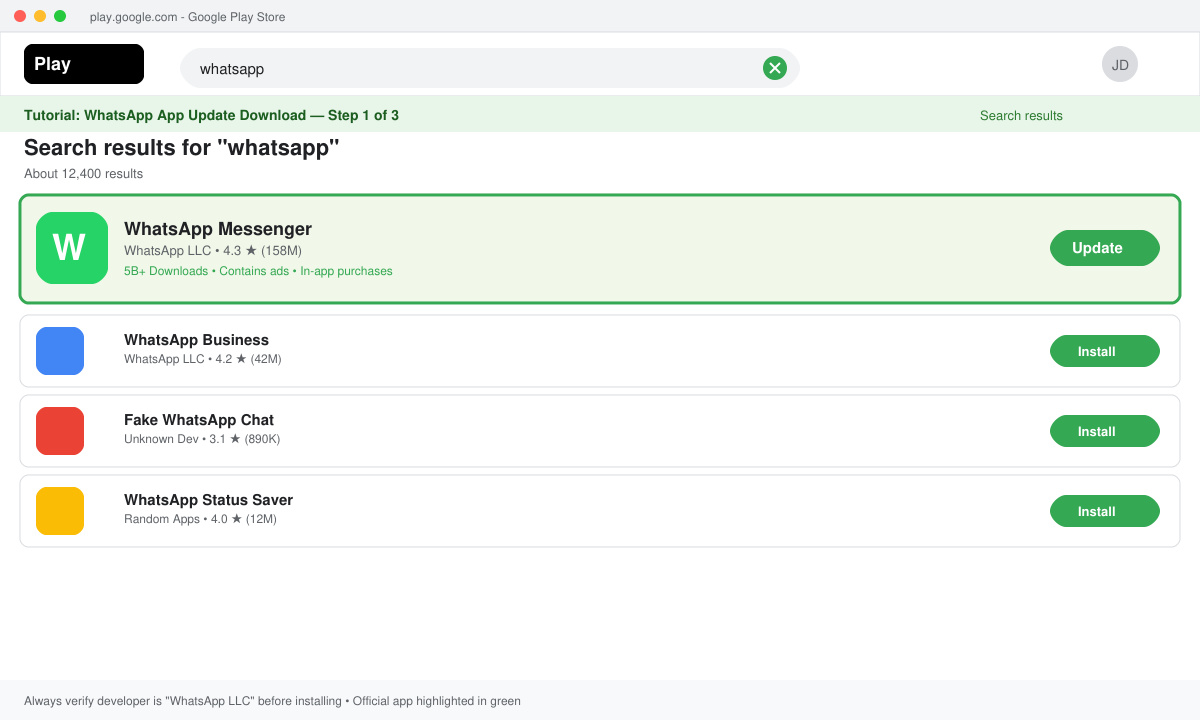
Once on the WhatsApp listing, look for a green Update button. If the button reads Open instead, your version is already current. Tap Update and wait for the download progress bar to finish. The process usually takes under two minutes on a standard connection.
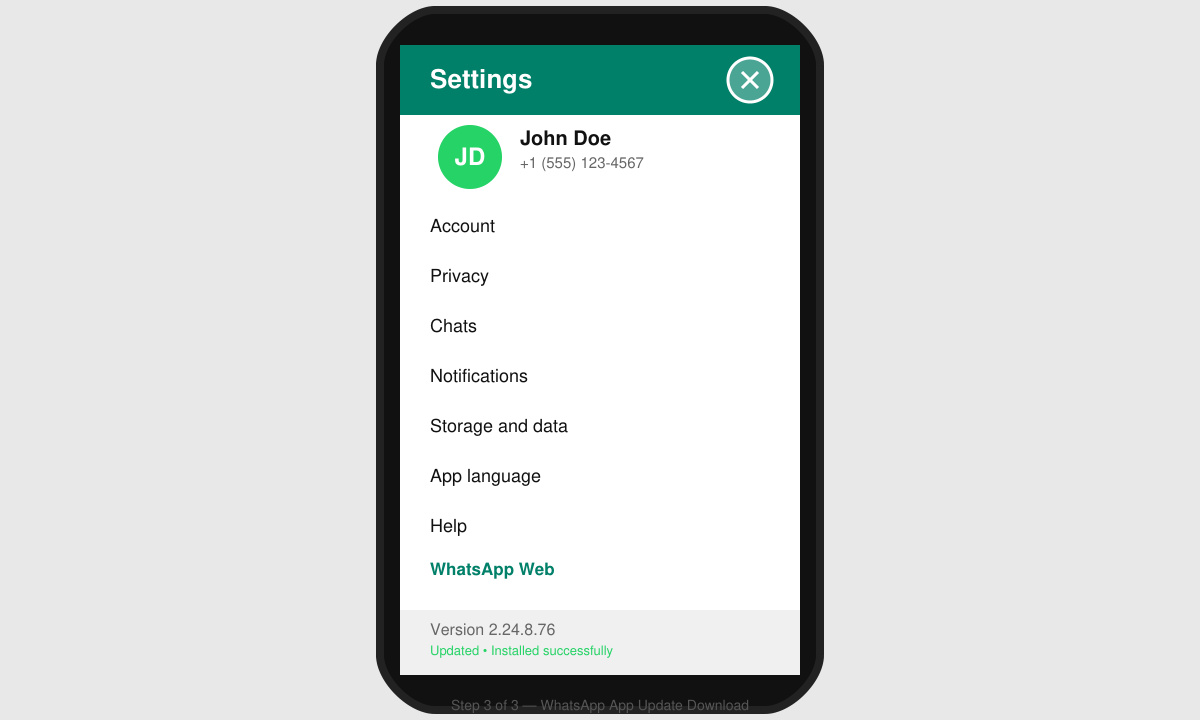
After the download completes, the store installs the update automatically. Open WhatsApp and confirm the version number by going to Settings > Help > App info. The displayed number should match the latest release listed on the store page.
Force close WhatsApp from your recent apps menu, then reopen it. Send a test message, make a quick voice call, and check that media uploads work correctly. If any issue appears, restart your phone once before contacting WhatsApp support through the in-app help section.
WhatsApp directs all users to Google Play or the App Store. The website only provides links back to those stores to maintain security and automatic update checks.
No. Your messages remain stored locally and in the cloud backup. The update process only replaces the app files while preserving your existing data.
Check once every two weeks. WhatsApp pushes critical security updates quickly, so regular checks keep you protected without constant monitoring.
Following these steps guarantees a safe and complete WhatsApp App Update Download that brings the newest capabilities to your device.
Learn how to update Google Chrome browser on Windows, Mac, and Android in minutes to enjoy better security, speed, and new features. Follow these clear steps.
Learn how to download old media from WhatsApp and recover photos or videos from past chats. Follow these clear steps to save files that no longer appear in your gallery.
Facebook Messenger Isn T Working on your device? Use these exact troubleshooting steps to restore chats, calls, and notifications fast on Android, iOS, or desktop.
How to See Deleted WhatsApp Messages using your phone's built-in tools. Follow these exact steps to recover messages that contacts have deleted from chats.
Learn how to clear browser history in Chrome on desktop and Android with this exact step-by-step process. Keep your browsing private and free up storage space quickly.
Master how to use CapCut with this practical walkthrough covering project setup, editing tools, effects, and export options for high-quality video results.
Get the latest WhatsApp App Update Download from official sources to access new features and security improvements. Follow these clear steps for Android and iOS devices.
Learn how to safely Download WhatsApp App for Android from the official Google Play Store. Follow our clear step-by-step instructions to install the latest version quickly and securely.
Google Download WhatsApp App safely through the Google Play Store with this clear guide. Get the official version on your Android device quickly and avoid fake downloads.
Facebook and Messenger not working can disrupt your day. Follow these targeted fixes to restore access quickly on mobile and desktop.







