5 tips for traveling through space and time with Google Earth

Google Earth is one of the most powerful tools for exploring the earth and space right from your desktop. You can easily navigate through any terrain, route, highway, forest, hill and anywhere in the world. It is not only an earth map viewer but also a giant knowledge center to find information about anywhere on earth and its history.

Google Earth for iOS

Google Earth for Android

Google Earth for Mac

In general, Google Earth is a great application and it can surprise you in ways you cannot imagine. To help you make the most of this app, the following article will introduce 5 useful Google Earth tips that you should know.

1. Join a journey

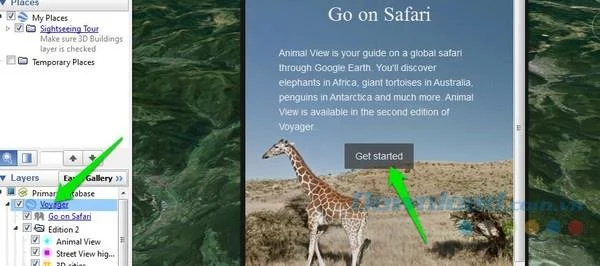
Google Earth really allows you to take on a journey while sitting in front of a computer screen. You can explore the animals in their natural habitat and even use street view or ground view to get as close as possible. Of course, it will still be still images, but you can navigate around and observe them as closely as possible. To do that, in the Layers section in the bottom left corner, click on Voyager.
5 tips for traveling through space and time with Google Earth

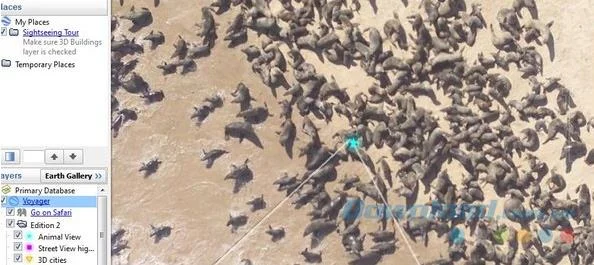
Google Earth will ask you to start a journey. You can let Google take you on a journey using hand-picked locations where Google knows there are different animals or you can "roam" yourself. Google Earth will highlight places with the opportunity to find different animals, and you can zoom in to that location to see if you are lucky and spot a favorite animal.

5 tips for traveling through space and time with Google Earth

2. Back to history

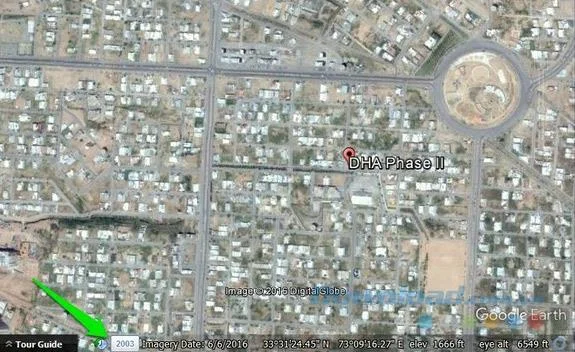
Google Earth lets you see what an area looked like in the past with a database of over 10 years across all locations. If you move to a new place, you can check out its history to know what it was like before and gain more knowledge.

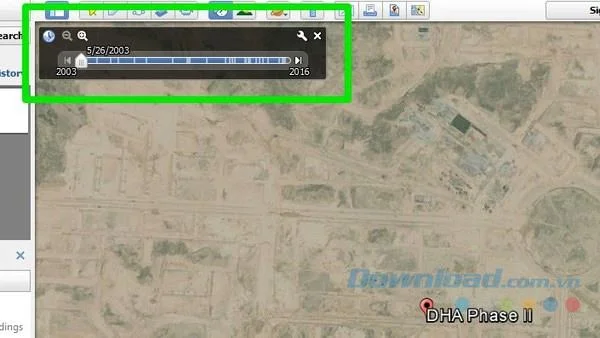
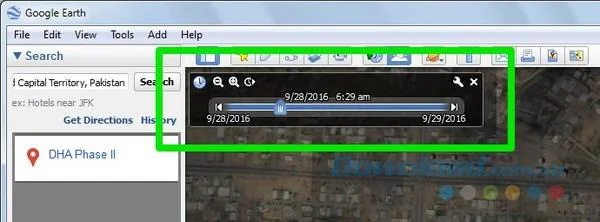
While viewing any location on Google Earth, you will see a small clock at the bottom with many year markers displayed next to it. Just click on it and you will switch to historical mode.

5 tips for traveling through space and time with Google Earth

You can move the slider above to move between timelines and see how an area has changed over the years.

5 tips for traveling through space and time with Google Earth

3. Get more knowledge about the Moon, Mars, and Sky.

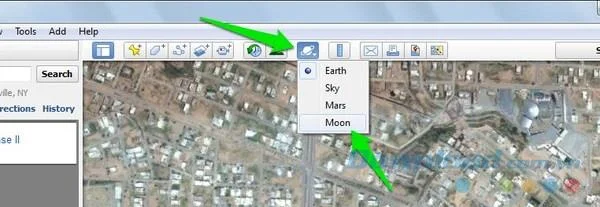
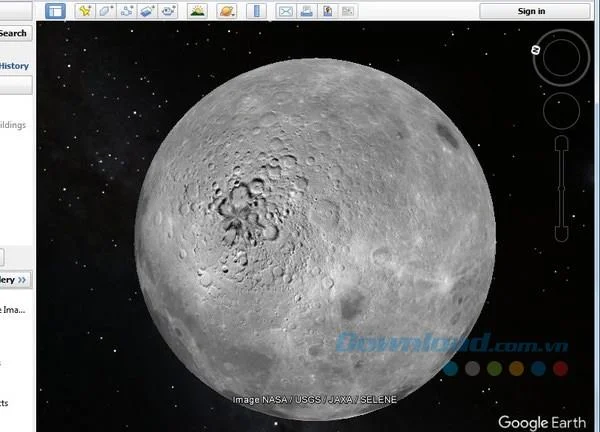
By default, Google will open Earth mode , but you can also switch to Moon, Mars, Sky mode to learn more about them. Click on the planet icon (like Saturn) in the menu bar above and select the mode you want to explore.

5 tips for traveling through space and time with Google Earth

The planet will open and you can navigate it the same way you navigate the Earth . Click on the location and the link will display their location, history and information.

5 tips for traveling through space and time with Google Earth

4. See a place at different times of the day

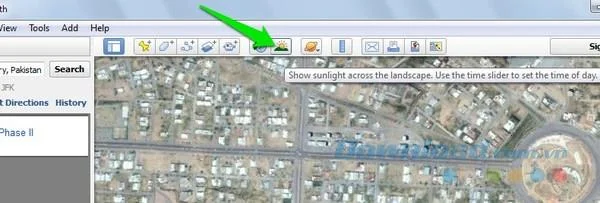
You can also see what a location looks like at a specific time of day, like morning, afternoon, or evening.

5 tips for traveling through space and time with Google Earth

Click on the sun icon on the top menu bar and the light slider will display. You can move the slider to see what a place looks like at different times of the day.

5 tips for traveling through space and time with Google Earth

5. Use the great flight simulator

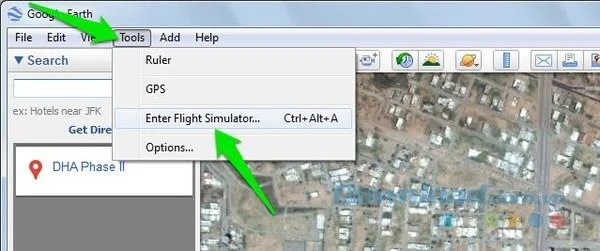
Using Google you can wander around the world by jet. It sounds like a myth but it is true. Google has an integrated flight simulator that allows you to fly with a virtual jet anywhere on earth and travel around. To use Flight Simulator , click Tools in the top menu bar and select Enter Flight Simulator.

5 tips for traveling through space and time with Google Earth

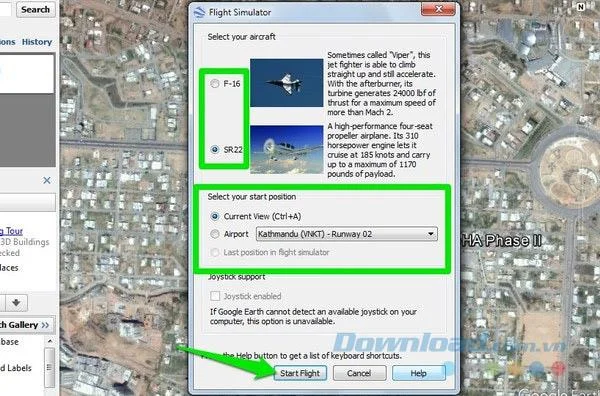
On the next page, you can choose the type of jet plane and the place where the flight begins. In addition, you can also start from your current location or any airport.

5 tips for traveling through space and time with Google Earth

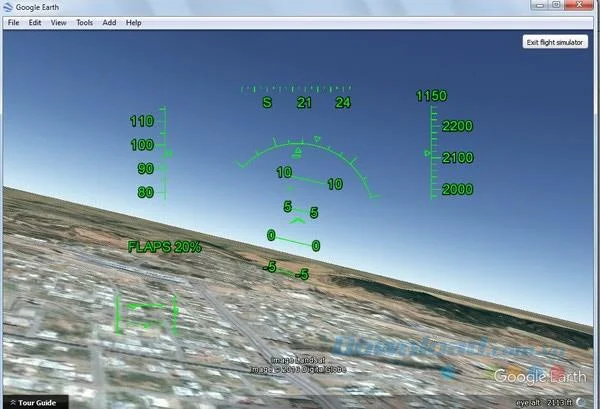
Once the simulator starts, you can use the arrow keys to move. However, this is not as simple as you think. Google already uses controls like real jets, so the controls are very sensitive and you need to change basic flight.

5 tips for traveling through space and time with Google Earth

Google Earth is a great tool to explore the beauty of the Earth in many different ways and to learn about places you've never known before. The above Google Earth tips will help you use this application more effectively and help you explore the world from a different perspective.
Leave a Comment

Vinyl Is Back: A Practical Guide to the Resurgence of Physical Media

Vinyl Is Back: A Practical Guide to the Resurgence of Physical Media

Vinyl is growing again, while CDs and 4K UHD serve distinct collector needs. Compare formats, buying trade-offs, and storage tips for physical media.

How to Support Independent Artists Online: Choose the Help That Fits Your Budget

How to Support Independent Artists Online: Choose the Help That Fits Your Budget

Learn how to support independent artists online through direct purchases, memberships, tips, commissions, streaming, sharing, and respectful reposting.

Must-Watch Documentaries for Fall 2026: 10 Picks Worth Your Time

Must-Watch Documentaries for Fall 2026: 10 Picks Worth Your Time

A practical fall 2026 documentary watchlist with confirmed release dates, themes, viewing tradeoffs, and picks for history, AI, music, biography, and adventure.

Language Learning Hacks for Busy People: Evidence-Based Ways to Make Short Sessions Count

Language Learning Hacks for Busy People: Evidence-Based Ways to Make Short Sessions Count

Use short, evidence-based language learning routines for vocabulary, listening, speaking, and retention—without relying on cramming or unrealistic fluency claims.

The Cultural Impact of Viral TikTok Trends: A Beginner’s Guide to Reading the Hype

The Cultural Impact of Viral TikTok Trends: A Beginner’s Guide to Reading the Hype

Learn how viral TikTok trends shape music, books, language, identity and buying behavior—and how to interpret or join them thoughtfully.

Microlearning and Adult Education: Why the Future Is Short Lessons Plus Deeper Practice

Microlearning and Adult Education: Why the Future Is Short Lessons Plus Deeper Practice

See how microlearning can fit adult education through a hypothetical learner, with research-backed benefits, limits, and a model for building lasting skills.

Streaming Wars in 2026: Which Platforms Are Actually Worth Keeping?

Streaming Wars in 2026: Which Platforms Are Actually Worth Keeping?

Compare Netflix, Disney+/Hulu, HBO Max, Peacock, Paramount+, Apple TV, and Prime Video to decide which streaming subscriptions are worth keeping in 2026.

How the Creator Economy Is Rewriting Entertainment From the Feed to Prime Time

How the Creator Economy Is Rewriting Entertainment From the Feed to Prime Time

Creators are reshaping TV, podcasts, fandom and entertainment business models. See what is changing, the trade-offs, and who benefits most.

Indie Gaming in 2026: What Changed, What Matters, and Where Small Studios Go Next

Indie Gaming in 2026: What Changed, What Matters, and Where Small Studios Go Next

A practical 2026 guide to indie gaming: demos, storefront economics, cross-platform tools, engine choices, AI rules, and launch strategy for small studios.

10 Most Anticipated Book Releases for Fall 2026: What to Read Based on Your Taste

10 Most Anticipated Book Releases for Fall 2026: What to Read Based on Your Taste

Compare 10 standout fall 2026 book releases by genre, release date, series commitment, length, and reading mood to find the right pick for you.