When to Start Decorating for Halloween in 2026

Use a simple 2026 Halloween decorating timeline for indoor décor, outdoor displays, and fresh pumpkins, with practical adjustments for weather and events.
It’s frustrating to see smartphone manufacturers chasing trends that don’t seem to add much value to the overall experience. Whether it’s impractical design choices or features that no one really asked for, some of these trends need to go away forever.
Table of Contents
Artificial intelligence (AI) may be the biggest focus of smartphone trends in 2025, but honestly, it’s not that impressive. In fact, AI is actually hindering smartphone innovation instead of pushing it forward. The Samsung Galaxy S25 5 series is a prime example of this. The entire lineup feels uninspiring, and the main reason is that there’s little to differentiate the S25 from the previous S24, aside from some added AI features. It’s disappointing to see such minimal progress when it comes to actual hardware or meaningful improvements.
The same sentiment applies to the iPhone, and many people have been thoroughly disappointed with Apple’s AI. While some features, like Magic Eraser, are certainly useful, the vast majority of the AI-driven extras are little more than gimmicks. As a power user, you’ll find yourself rarely using these features, and even non-tech-savvy users will never really take advantage of them. This leaves many wondering – who exactly are these features designed for?
We certainly want to see continued advancements in AI, but not at the expense of other important aspects of smartphones, especially hardware improvements.
Even with fairly large hands, many people still find large phones uncomfortable to use – especially when trying to reach the top of the screen. Despite this, most manufacturers continue to push for larger and larger screens, especially on flagship phones, making it difficult to find a premium compact phone.
One of our favorite Android phones of 2022 was the ASUS Zenfone 10, as it was one of the few smaller devices to offer top-of-the-line specs. However, its successor, the ASUS Zenfone 11 Ultra, is a complete departure. Instead of keeping the same compact 5.9-inch display, it has a massive 6.9-inch display, which is a big change from what made the Zenfone 10 so appealing in the first place.
While Google and Apple still offer Pro phones with 6.3-inch screens, those are really mid-sized phones rather than truly small phones. Many people are hoping that Apple will bring back the iPhone Mini line in some form.
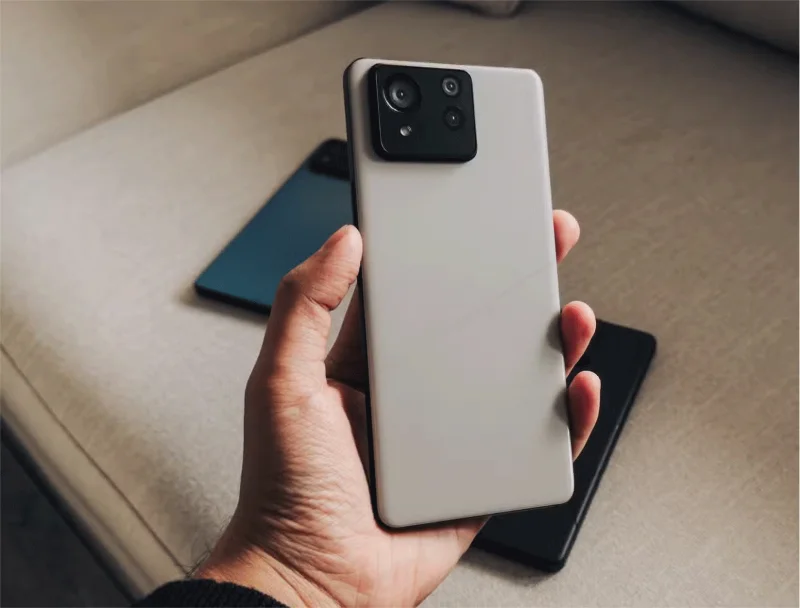
Glass backs on smartphones have never been particularly appealing. They’re much more fragile and add unnecessary weight to the phone. Metal backs, however, can interfere with wireless charging, making them less practical. That’s why plastic is the next best thing.
Recycled plastic backs are much easier to replace, and with the right finish, can feel just as premium as other materials. Since plastic is also significantly lighter, it feels much better in the hand. It would be great to see a more premium plastic version implemented across the price range.
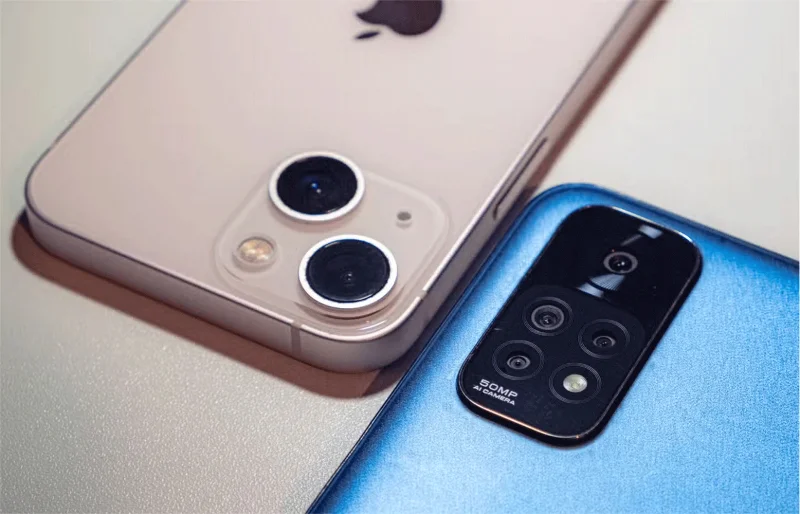
Manufacturers often rely on marketing tactics that mislead customers into thinking that more camera lenses automatically mean a better camera system. However, this is not always true, especially in the mid-range and low-cost phone segment. Many of these devices pack four lenses into one phone, but none of them work well for their intended purpose.
People would rather have a great camera that takes great pictures and does its job than a bunch of mediocre cameras that don’t deliver on any of the quality fronts. This is one area where Apple gets it right. Its mid-range phones typically have two high-quality cameras instead of trying to cut costs by adding secondary, low-quality lenses just to increase the number of lenses. Honestly, no one is excited about a poorly implemented 2MP macro lens or an ultra-wide camera that struggles to capture enough light to take good photos.
There’s no need to have thinner bezels on a phone unless there’s a practical reason. Most phones look great with moderately sized bezels, especially if you use dark mode on an OLED display. In that case, the bezels blend into the screen easily, making them barely noticeable.
There’s a reason Samsung stopped making phones like the Galaxy S7 Edge, and why many phones are returning to flat screens instead of curved ones. Curved screens tend to lead to accidental touches, increase costs, and make replacing screens more complicated and expensive. The trend toward ever-thinner bezels with each new phone release has many wondering if we’re headed back to curved screens.
Use a simple 2026 Halloween decorating timeline for indoor décor, outdoor displays, and fresh pumpkins, with practical adjustments for weather and events.
Mix five vivid, approachable Halloween cocktails with measured recipes, simple prep tips, and an alcohol-free option for your party guests.
Find 15 office-friendly Halloween costume ideas for 2026, with practical checks for dress codes, respectful themes, comfort, and workplace safety.
Plan a fun elementary school Halloween party with easy crafts, games, inclusive treats, costume tips, and a sample 75-minute classroom schedule.
Compare realistic side hustles for 2026 by startup cost, fees, flexibility, and income control, with current tax and scam guidance from official sources.
Upgrade your home office ergonomics with current OSHA and NIOSH guidance on chair fit, monitor height, laptop setup, lighting, and movement.
Learn why emotional intelligence matters in leadership, where it helps most, how to strengthen it, and how to tell whether your approach is working.
A practical roadmap for moving into tech without a degree: choose an accessible role, build job-ready skills, prove them with projects, and use hiring feedback to improve.
Build a credible LinkedIn personal brand in 2026 with current profile, content, newsletter, analytics, verification, and visibility guidance from LinkedIn.
Quiet quitting and quiet firing are catchy labels, not diagnoses. Learn what is verified, what depends on context, and what employees and managers can do next.








