


5 Halloween Cocktails That Are Easy to Serve at Your 2026 Bash

Mix five vivid, approachable Halloween cocktails with measured recipes, simple prep tips, and an alcohol-free option for your party guests.
You can tell a travel agent your dates, where you want to go, and your budget, and expect a comprehensive itinerary of what to do there based on your preferences. But can AI do the same?
These free travel planning apps use AI and Machine Learning tools like ChatGPT to prepare your itinerary in seconds.
Table of Contents
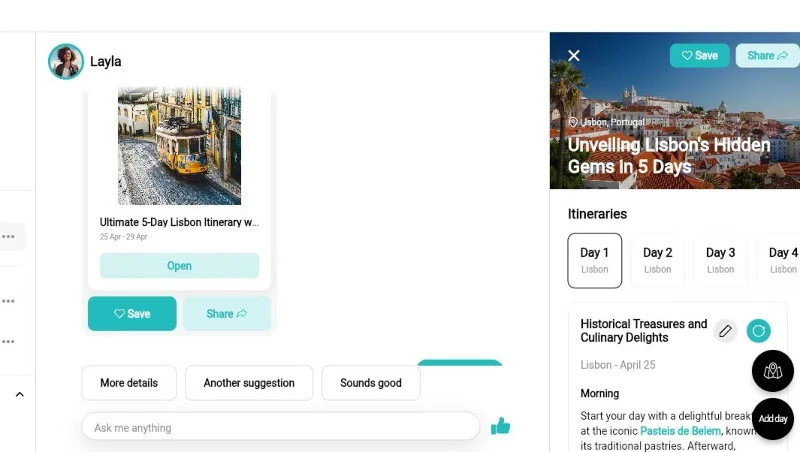
Layla is an AI-powered trip planner, meaning you can use it to decide on your vacation destination, create an itinerary, and find the right hotels and flights.
If you are unsure of your destination or want some suggestions, you can ask Layla for advice on your trip. Otherwise, enter your destination and ask Layla to create an itinerary for you. Within seconds, you will receive a detailed plan for your trip.
Since Layla is a chatbot, you can type in prompts to ask it to change your itinerary. For example, ask it to focus more on outdoor activities or include local restaurants. If you’re not happy with the activities planned for any particular day, you can give it instructions and have Layla recreate that section only.
Once you've completed your itinerary, you can share it with friends via URL or add it to your bucket list.
Wonderplan is a great AI tool to plan your trip. To create your itinerary, Wonderplan first asks you to enter your destination country and city, your budget for the number of days you will stay, and your preferences.
It then generates a travel plan within minutes, showing various places to visit, descriptions of them, and typical time spent at each location. While Wonderplan doesn’t show a map of the trip, it does provide a link to Google Maps for each location.
It also shows the different types of accommodation available (like Airbnb, hotels, or hostels) and their respective costs. Likewise, there are details about transportation, food, and activities. This way, you can estimate the potential cost of your trip.
In addition to your itinerary, Wonderplan also displays essential information about the country you're visiting. This includes currency conversion rates, power plug types, languages spoken, weather, and popular modes of transportation.
PLAN by ixigo starts by asking you about your dream destination. It then gives you an option to describe the type of experience you want to have. This is similar to the ChatGPT prompt, so you can type in whatever you want.
For example, you can specify your length of stay, your interests, what type of activities you're looking for, whether you have family with you, etc.
But if you can't think of any reminders, PLAN by ixigo will provide some trip ideas so you can always pick those up. PLAN by ixigo then displays a day-by-day plan, showing what you can do in the morning, afternoon, and evening.
However, if the suggested itinerary doesn't seem appealing, you can re-enter the prompt to edit it.
While iplan.ai doesn’t mention the AI or machine learning algorithms it uses, the results are pretty good enough to make that clear. The app works really well on your phone to give you a full itinerary for any city at a time, depending on how many days you’re there.
The app first asks you to select your destination city. From our testing, iplan.ai works best for popular tourist cities. Next, note how many days you’ll be there and then select your free time each day — a nice step to ensure a better itinerary if you already have several plans for the day.
Tell iplan.ai if you're traveling alone, as a couple, with family or with friends, then choose your preferences from topics like history, art and culture, nature, entertainment, shopping, food, sports, relaxation, etc. Finally, choose between budget, budget or luxury.
After a few minutes, iplan.ai will provide you with a suitable itinerary for the day of your trip. It is plotted on a map so you can see all the locations and each point of interest has a brief description along with an estimated travel time.
The app has both free and paid plans. With a paid account, you can share your trip plans with friends and access them offline. Another limitation of iplan.ai is that you can’t get itineraries for multi-city trips. For now, you’ll need to plan for each city you’re visiting.
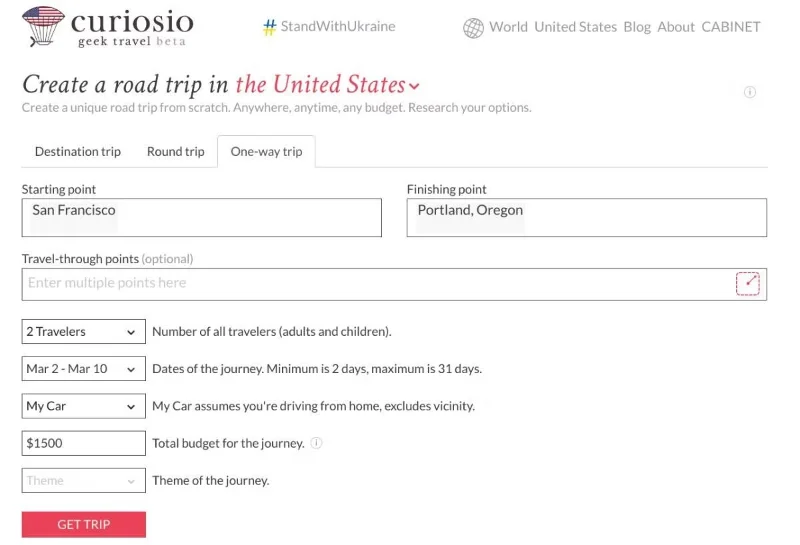
Curiosio is an AI-based trip planning app that gives you several parameters to fine-tune your itinerary before mapping out a route based on your preferences.
The easiest last-minute travel plan is to get in your car and drive. Curiosio specializes in helping you plan itineraries for trips to some of the biggest countries on every continent. While it doesn't cover everything, the current collection is impressive.
Curiosio uses its own AI engine, Ingeenee, which is trained on a number of crowdsourced travel-based resources, such as Wikivoyage, Wikipedia, Wikidata, Freebase, DBpedia, GeoNames, OSMNames, and OpenStreetMap. Through this dataset, it can map out itineraries that meet your requirements according to various parameters.
You can set up a round trip or one-way trip with a starting and ending point. If there are any places you want to visit along the way, add them in. Then set the number of passengers, travel dates, mode of transport you’re using, total budget, and whether you want to visit any curiosity spots. Curiosio will usually provide you with multiple plans and itineraries for these options.
The itinerary includes a map of your route and detailed information for the day about where you’ll go and what you’ll see. Each point of interest is clickable for more information. There are easy ways to share your itinerary with fellow travelers, print it out, or even export it to Google Maps. Curiosio is one of the best trip planning tools for your next adventure.
Trip Planner AI plans the perfect trip to your dream destination. Start creating an itinerary by entering the city you want to visit and your travel dates. You can add multiple destinations here.
Then, select your preferred activity type, number of people, and whether you're traveling with friends or family. Trip Planner AI will also ask about your food preferences and budget.
As an optional step, specify where you'll be staying so the tool can create a tailored itinerary. If you're undecided about where to stay, explore hotels suggested by Trip Planner AI.
Finally, Trip Planner AI creates a detailed itinerary, maps, and basic information about the cities you will visit. For each destination, it provides details about the location, estimated travel time, and cost. While Trip Planner AI provides a complete trip plan, users can manually add or remove activities from their itinerary. You can also invite friends to edit the itinerary and download it as a PDF file.
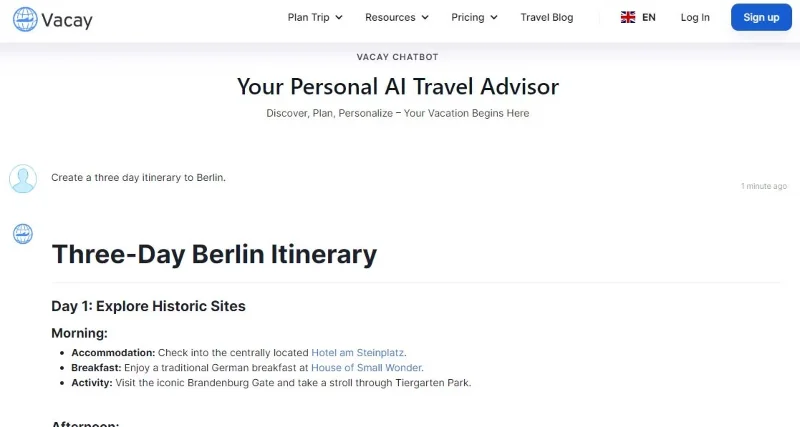
Vacay Chatbot is not a dedicated itinerary builder but an AI chatbot that acts like a travel advisor. So you can ask it to make travel recommendations, compare different destinations, and of course, create itineraries. If you have used AI chatbots like ChatGPT before, you will find this trip planner very easy to use.
Simply enter a query stating your destination and trip details and ask Vacay Chatbot to create an itinerary. This can include details like trip duration, budget, interests, number of travelers, etc. The more details you provide, the better the itinerary will be. One of the downsides of using Vacay Chatbot is that it does not provide a map for the trip.
All of these AI travel planning apps recommend that users only use the provided itineraries as suggestions or guides to start planning their trips. This is because they currently have some limitations, such as databases that are not updated most recently or require specific information from the user.
A real travel agent will still give you a better itinerary, but of course you’ll have to pay for their service. If you want basic guidance for free, more basic travel planning apps are a good place to start.
Mix five vivid, approachable Halloween cocktails with measured recipes, simple prep tips, and an alcohol-free option for your party guests.
Find 15 office-friendly Halloween costume ideas for 2026, with practical checks for dress codes, respectful themes, comfort, and workplace safety.
Plan a fun elementary school Halloween party with easy crafts, games, inclusive treats, costume tips, and a sample 75-minute classroom schedule.
Compare realistic side hustles for 2026 by startup cost, fees, flexibility, and income control, with current tax and scam guidance from official sources.
Upgrade your home office ergonomics with current OSHA and NIOSH guidance on chair fit, monitor height, laptop setup, lighting, and movement.
Learn why emotional intelligence matters in leadership, where it helps most, how to strengthen it, and how to tell whether your approach is working.
A practical roadmap for moving into tech without a degree: choose an accessible role, build job-ready skills, prove them with projects, and use hiring feedback to improve.
Build a credible LinkedIn personal brand in 2026 with current profile, content, newsletter, analytics, verification, and visibility guidance from LinkedIn.
Quiet quitting and quiet firing are catchy labels, not diagnoses. Learn what is verified, what depends on context, and what employees and managers can do next.
Fractional executives offer senior leadership without a full-time hire. Learn when the model works, what to ask, and the risks to manage.








