Not freezing is a common problem when using a refrigerator for a long time. Let's find out the causes and how to handle it when the refrigerator does not freeze in the article below!
Power supply
The first thing you need to do is check the power supply to the refrigerator.
Reason
- Power supply is unstable: Power supply is weak or unstable.
- Refrigerator has no power: Loose power cord or power failure.
How to handle
- Check the voltage and install a voltage stabilizer for the refrigerator if necessary.
- Check the plugs and sockets for loose or damaged plugs. In some cases, broken wires due to mice chewing on them can also cause the refrigerator to not run.
Refrigerator door does not close properly or gasket is broken
A loose refrigerator door is sometimes the simple reason why the refrigerator is not freezing or making ice.
Main cause
- Refrigerator door is open: Too much food inside causes the refrigerator door to be pressed and open, causing the ventilation holes to be blocked or the cold air to not circulate in the refrigerator.
- The refrigerator gasket is broken.
How to handle
- Arrange food neatly. Use food storage containers to protect food and prevent cold air from penetrating the food.
- Follow the principle of “First in – First out”, the food that is stored first is used first.
- Repair the refrigerator gasket yourself at home or replace it with a new one.
The temperature control knob or air flow control knob is in the wrong position.
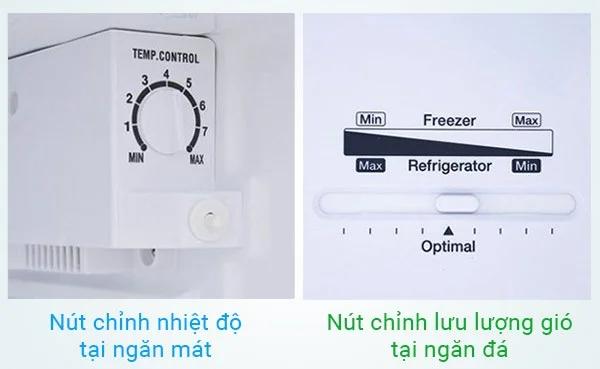
Refrigerators usually have 2 control buttons : temperature adjustment in the refrigerator compartment and air flow adjustment in the freezer compartment.
Reason
Many people mistakenly think that the control knob only works for the refrigerator compartment, so they adjust it down. As a result, the refrigerator does not freeze.
How to handle
- In normal state, you should adjust these 2 buttons to the middle position for best results.
- Need to increase the coldness of the freezer: Increase the temperature control knob in the refrigerator compartment + pull the air flow knob in the freezer compartment to the right from 1-2 lines.
- Need to increase the cooling intensity of the refrigerator compartment: Increase the temperature control knob in the refrigerator compartment + pull the air flow knob in the freezer compartment to the left from 1-2 lines.
Blocked cold air duct to the refrigerator compartment
The refrigerator's cool compartment is cold because there is a pipe that leads cold air down there.
Reason
When the evaporator is frozen or the vents in the refrigerator compartment are frozen or covered by food, the cold air duct will be blocked and not cold.
How to handle
- For blockages caused by ice buildup in the cold air duct or ventilation fan, you just need to turn off the power, drain the refrigerator for about 4-5 hours to let the ice melt naturally, use a towel to absorb the water, then plug the refrigerator back in.
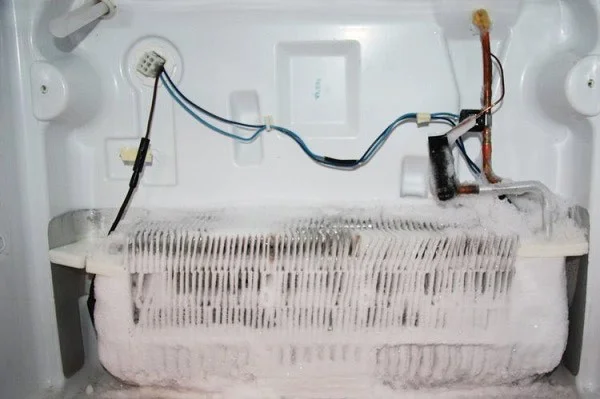
The defrost system is not working, causing the evaporator to freeze.

The refrigerator defroster is very important. When the defroster is not working, it will cause the evaporator to freeze. A frozen evaporator is one of the very common reasons to answer the question of why the refrigerator is not freezing.
The evaporator is the part that receives the cold temperature of -18 degrees Celsius from the gas inside the copper pipes of the evaporator. Then, the fan will blow cold air from the evaporator into the refrigerator compartment to bring the refrigerator compartment back to -18 degrees Celsius. Part of the cold air will be sent to the refrigerator compartment to cool the food.
Thus, if the evaporator is frozen, the temperature will not reach -18 degrees Celsius and will hinder the circulation of cold air.
How to handle
- You can fix this problem in the same way as you can fix a clogged cold air duct to the refrigerator compartment.
The timer is broken, causing the evaporator to freeze.
The timer (also known as a time relay) is a device located inside the temperature control box in the refrigerator compartment. It is responsible for turning the refrigerator and the defrost unit on and off. When the relay is broken, the defrost unit will not work, causing the evaporator to freeze. As a result, the refrigerator will not freeze ice or it will take a long time to make ice.
How to handle
- You can replace the relay yourself if you are technically savvy.
- Call a repairman or service center for assistance.

Fan
1. Damaged
When the fan is broken, cold air from the evaporator will not be transmitted to the freezer and refrigerator compartments, so the refrigerator will not be cold and the ice will not freeze.
How to check
- Open the freezer door while the refrigerator is still running, if you see the fan blades are not rotating, then the fan is 100% broken and needs to be replaced.
- Some refrigerator models may not have a fan, so you can put your hand into the vents. If you don't see any air coming out, the fan is broken and needs to be replaced.
2. Fan running in reverse
This case is quite rare in newly purchased refrigerators. The reason is that when repairing, the technician wired the fan in reverse, causing the fan to "spin backwards". Instead of blowing cold air from the evaporator to the 2 compartments of the refrigerator and freezer, the fan "sucks" air from the freezer into the evaporator, causing the refrigerator not to cool.
How to check
- Feel for air coming out of the freezer. If the fan is still spinning but not cooling, it means the fan is in reverse.
How to handle
- Call a repairman.
- Fix it yourself if you have technical knowledge.
Out of gas or low on gas
Gas is an important medium in the cooling process. When the refrigerator runs out of gas or lacks gas, it will cause the refrigerator to freeze slowly, the cooling time will be prolonged...
How to handle
- Call a repairman to fix the problem.
Refrigerator block is broken
The refrigerator block (also known as the refrigerator compressor) is the main part, the “heart” of the refrigeration system. The block helps pump compressed gas into the condenser and recover gas from the evaporator. A damaged or weak refrigerator block is one of the reasons why the refrigerator does not freeze.
In addition, when the cooling fan is damaged, it can cause the refrigerator block to be damaged. Therefore, it is necessary to check both to completely fix the problem of the refrigerator not freezing.
How to handle
- For this reason, you need to ask a technical service to repair and replace the block if necessary. They will check, replace the block, weld copper pipes, pump gas and test run.
- If your refrigerator is too old, you should consider repairing it instead of buying a new one.
The above article has fully and detailedly summarized the reasons why the refrigerator cannot freeze and how to handle them. Hopefully you have found the cause and how to fix it if your refrigerator does not freeze.