Skype Free Phone Calls

Skype Free Phone Calls let you connect with friends and family worldwide at no cost. Follow this guide to set up and start making free calls quickly and easily.
So Apple has just officially released iOS 16 and its latest software versions after a long period of beta testing. While some users are excited about the new lock screen and other new features, many people want to wait a while before installing iOS 16.
Understanding this psychology, Apple allows users to stay with iOS 15 while still receiving security updates before upgrading to iOS 16.
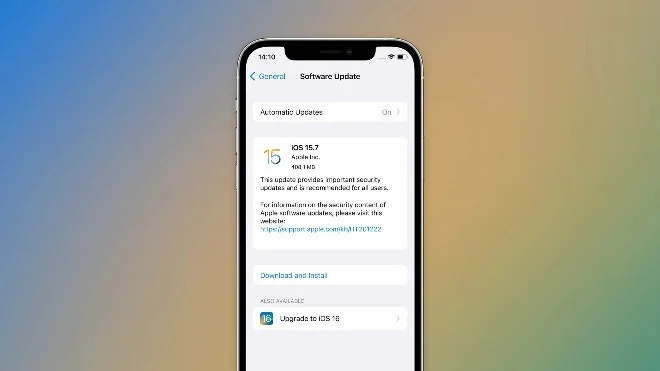
In fact, in addition to iOS 16 being all over the news, Apple also released iOS 15.7 today. This iOS 15 update does not include major changes but only improvements and security fixes, and users running iOS 15 now have two options: upgrade to iOS 15.7 or iOS 16.
This isn’t the first time Apple has offered users the option to stay on older iOS. Last year, when iOS 15 was released, users could choose to stay on iOS 14 while still receiving important security updates. Apple removed that option a few months after iOS 15 launched.
This year, things could be similar, with the option to stay on iOS 15 possibly disappearing a few months after iOS 16 launches.
How to stay with iOS 15.7
When you tap the Software Update menu in the Settings app, your iPhone will show the iOS 15.7 update. Upgrading to iOS 16 will appear as an option instead. Select the version you want to install and wait for the installation to complete.
If you don't want to install iOS 16, you can disable automatic updates on your device.
Of course, you should keep in mind that iOS 15 will only receive security updates for a limited time.
Skype Free Phone Calls let you connect with friends and family worldwide at no cost. Follow this guide to set up and start making free calls quickly and easily.
Stuck in the Discord Update Failed Loop? Follow these targeted fixes to break the cycle and complete the update without repeated failures or reinstalls.
Travel planning used to mean folders full of printed confirmations, handwritten notes, guidebooks, and a slightly terrifying number of browser tabs. Now, pretty much everything you need for a trip can live on the device already in your pocket.
Discover how Canva Free for Teachers gives educators full access to premium design tools at no cost. Verify your status and start creating classroom materials in minutes.
Skype How to Call International is simple and cost-effective once you set up credit and use the right country codes. Follow this guide to place clear calls from anywhere.
Make Skype to Skype Calls Free in minutes with this clear guide. Set up your account, add contacts, and start unlimited voice and video calls at no cost.
Fix the Your Connection is Not Private Chrome error quickly with these exact steps. Restore secure browsing by addressing certificate and settings issues in minutes.
Record heat has lifted air-conditioning demand while gas-market shocks have returned volatility to power prices. That creates a real risk of painful bills—but not a guaranteed, Europe-wide price explosion.
Large format printing has long faced criticism for its environmental impact. Traditional substrates, solvent-based inks, and short-lived promotional campaigns have all contributed to the perception that eye-catching graphics come at a high environmental cost.
Long-distance travel can involve heavy traffic, changing weather conditions, and rider fatigue. If you are also dealing with the responsibilities of moving home, such as packing belongings or coordinating accommodation, a long ride may add unnecessary pressure to an already busy schedule.





