The 503 Service Unavailable error is an HTTP status code that indicates that the web server is currently unavailable. This error occurs mainly because the server is too busy or in the process of repairing.
Error message 503 displays differently depending on the web or the server software that created it. Here are extremely useful ways to fix 503 errors.
Common 503 error messages
- 503 Service Unavailable
- 503 Service Temporarily Unavailable
- Http / 1.1 Service Unavailable
- HTTP Server Error 503
- Service Unavailable - DNS Failure
- 503 Error
- HTTP 503
- HTTP Error 503
- Error 503 Service Unavailable
Error 503 Service Unavailable can appear in any browser on any operating system, including from Windows XP to Windows 10 , macOS, Linux ..., even on smartphones or other non-traditional computers. If you access the Internet, you may see 503 errors in certain situations. 503 Service Unavailable displays in the browser window like a web page.
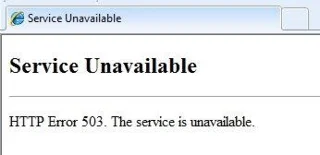
Note : Pages using Microsoft IIS can provide more information about the cause of the 503 Service Unavailable error by entering a number after 503, for example: HTTP Error 503.2 - Service Unavailable, i.e. exceeding the request limit. Bridge handle simultaneously.
How to fix 503 Service Unavailable error
503 Service Unavailable is an error on the web server. Sometimes computer problems can cause 503 errors, but this is very rare. Whatever the cause, you can try the following:
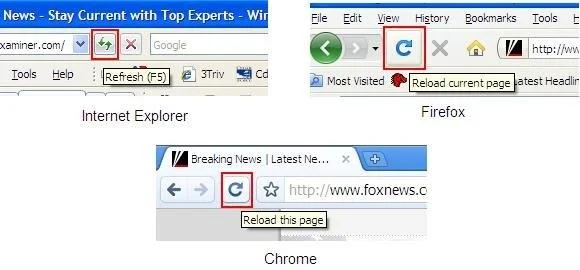
1. Run the URL from the address bar by clicking the button Reload / Refresh or press F5 or the key combination Ctrl + R . Although 503 Service Unavailable is due to an error on another computer, the problem is only temporary. Occasionally, reloading the page may fix this problem.

Important note : If a 503 error occurs when paying for an online purchase, do not try to pay it multiple times as it may generate multiple orders and be charged. Most payment systems & some credit companies offer protection for situations like these but you should still be cautious.
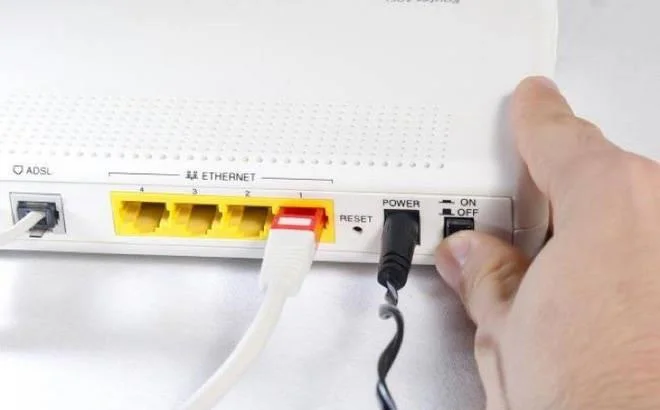
2. Restart the router & modem, then the computer or device, especially when you see the " Service Unavailable - DNS Failure " error . Despite the high possibility that the web server you are viewing causes a 503 error, the problem may still stem from the DNS server configuration on the router or computer. And just a simple reboot is all the problem will be solved.

Quick tip : If restarting your device doesn't fix the 503 DNS Failure error, this may be a temporary problem on the DNS server itself. In this case, choose new DNS servers and change them on your computer or router.
3. Another option is to contact the web host directly for assistance. Although the webmaster is always notified of this problem as soon as it happens, your feedback is still helpful. Most current websites have social networking accounts, even including phone numbers and email addresses.

Tip : If a 503 error occurs on a common site, it is likely to be crashing. You can search for information quickly on Twitter with hastag #websitedown, replacing websites with site names like #facebookdown or #youtubedown. You'll find lots of discussions whenever a major website goes down on Twitter .
4. Come back later. Because 503 DNS Failure is a common mistake on many popular websites when traffic increases causing server overload. Just wait for that time to pass and you can access the web normally. In fact, this is the most commonly used 503 error correction. As more and more people exit the web, the chances of you successfully loading the page increase.
Fix 503 error on your own website
Too many web server options, even, the main reasons why your service is not working more, so handling 503 errors is not easy. This error warns of problems arising on the system and you must find it in order to resolve the problem. Restart the process to see if everything returns to normal. In addition, consider issues that may be interrupted, such as connection limitations, bandwidth throttling, total system resources, fail-safe that may have triggered, etc. Increased web access is one of the most common causes of error 503. This error will surely make you both happy and worried, right? Therefore, prepare the server well, make sure to fix the problem promptly when the number of viewers increases.
Other 503 error cases
In Windows applications that access the Internet directly, the 503 error is usually HTTP_STATUS_SERVICE_UNAVAIL or The service is temporarily overloaded. Windows Update can also report an HTTP 503 error but it displays as error code 0x80244022 or WU_E_PT_HTTP_STATUS_SERVICE_UNAVAIL. Some common but less common error messages include 503 Over Quota and Connection Failed (503). However, the way to handle them is exactly the same.
If the web reports a 503 error that occurs when running Microsoft's IIS server software, you may receive a more specific error message as one of the following:
| 503.0 |
Application pool unavailable |
| 503.2 |
Concurrent request limit exceeded |
| 503.3 |
ASP.NET queue full |
The error is similar to 503 Service Unavailable
There are many server-related errors like 503, such as 500 Internal Server Error, 502 Bad Gateway error, 504 Gateway Timeout, etc. Some HTTP status codes on the client are similar to 503, for example: 404 Not Found.
Hope the article is helpful to you!