Instructions for registering a Uplay account

Video Instructions for registering a Uplay account

Uplay is originally a service portal that provides games. But unlike Steam in that it only contains exclusive games from Ubisoft's manufacturers such as Assasin's Creed, Tom Clancy's ... If you want to download these games on Ubisoft, you must register for a Uplay account to use the service. this.
 
How to register a Uplay account is not difficult and similar to how to register a Steam account, Download.com.vn will guide you in detail how to register for a Uplay account.
Instructions for registering a Uplay account

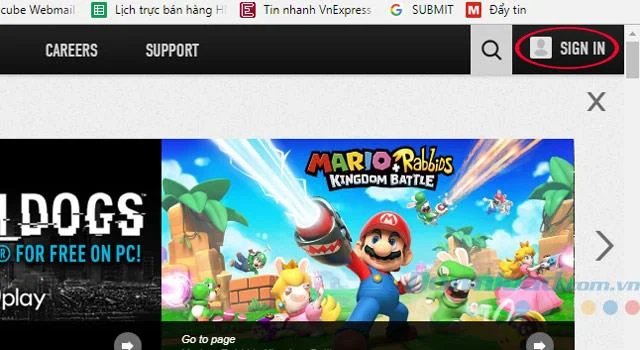
Step 1: Visit this link to register, access and click Sign In on the right corner of the screen.
Instructions for registering a Uplay account
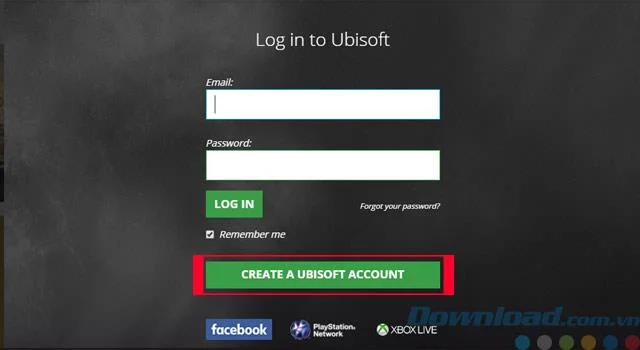
Step 2: Click Create A Ubisoft Account to create an account.
Instructions for registering a Uplay account
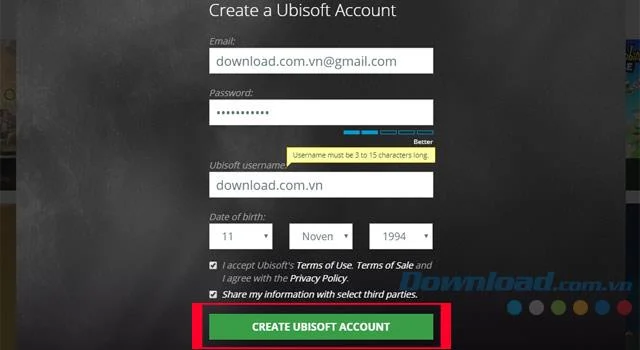
Step 3: Complete account information such as:
  • Your email
  • password
  • User name
  • Date of birth
  • Finally agree to the terms of Ubisoft
Then click Create Ubisoft Account
Instructions for registering a Uplay account
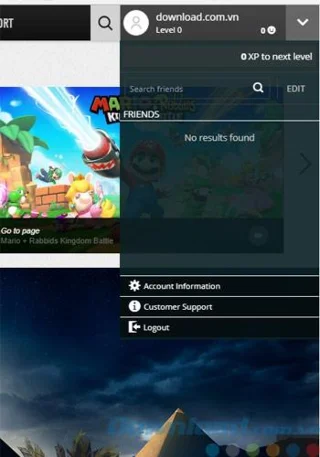
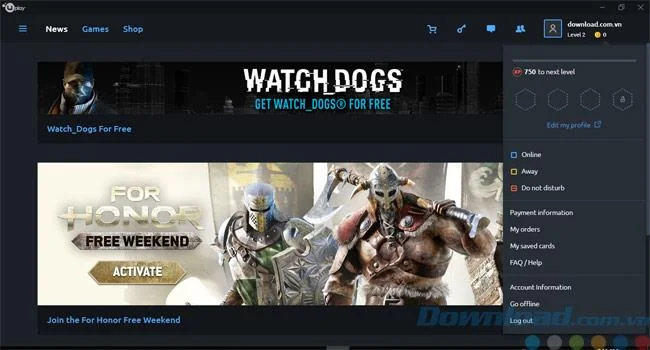
Step 4: Then log in and your account will appear like this.
Instructions for registering a Uplay account
 
Instructions for registering a Uplay account
After completing the account registration, please refer to the article on installing Uplay on the computer to be able to download games from Ubisoft.
 
Hope the article will help you

Leave a Comment

How to Use Microsoft Edge Group Tabs to Stay Organized

How to Use Microsoft Edge Group Tabs to Stay Organized

Master Microsoft Edge Group Tabs with this step-by-step guide. Learn to create, manage, and customize groups for ultimate tab organization and productivity boost.

How to Fix Microsoft Edge Error Code RESULT_CODE_KILLED_BAD_MESSAGE

How to Fix Microsoft Edge Error Code RESULT_CODE_KILLED_BAD_MESSAGE

Struggling with Microsoft Edge Error Code RESULT_CODE_KILLED_BAD_MESSAGE? Discover proven, step-by-step fixes to stop crashes and get back to browsing smoothly. Updated with the latest solutions for optimal performance.

How to Enable Sleeping Tabs in Microsoft Edge to Save RAM

How to Enable Sleeping Tabs in Microsoft Edge to Save RAM

Discover how to enable Sleeping Tabs in Microsoft Edge to dramatically save RAM and boost performance. Step-by-step guide, tips, and tweaks for maximum efficiency.

How to Fix Microsoft Edge Secure Network Encountered an Error

How to Fix Microsoft Edge Secure Network Encountered an Error

Tired of the frustrating Microsoft Edge Secure Network Error blocking your browsing? Follow our proven, step-by-step guide to fix it quickly—no tech expertise required. Get back online fast with the latest solutions.

How to Fix Microsoft Edge Wallpaper Engine Conflict Fix

How to Fix Microsoft Edge Wallpaper Engine Conflict Fix

Tired of Microsoft Edge crashing with Wallpaper Engine? Follow our step-by-step guide to fix the Microsoft Edge Wallpaper Engine conflict quickly. Proven methods for smooth browsing and stunning wallpapers.

Troubleshooting Microsoft Edge PDF Preview Handler Errors

Troubleshooting Microsoft Edge PDF Preview Handler Errors

Stuck with Microsoft Edge PDF preview handler errors? Discover proven fixes for thumbnail issues, blank previews, and more. Step-by-step guide to restore smooth PDF previews in Edge.

How to Set Microsoft Edge as Your Default PDF Viewer

How to Set Microsoft Edge as Your Default PDF Viewer

Master how to set Microsoft Edge as your default PDF viewer in minutes. Say goodbye to slow apps and hello to lightning-fast reading on Windows – step-by-step guide with tips for seamless setup.

How to Restore Previous Microsoft Edge Sessions After a Crash

How to Restore Previous Microsoft Edge Sessions After a Crash

Frustrated by Microsoft Edge crashes wiping your tabs? Discover proven steps to restore previous sessions effortlessly. Quick fixes for the latest Edge versions—no tab loss forever!

How to Fix Microsoft Edge Result_Code_Killed_Bad_Message

How to Fix Microsoft Edge Result_Code_Killed_Bad_Message

Tired of Microsoft Edge crashing with "Result_Code_Killed_Bad_Message"? Discover proven, step-by-step fixes to resolve this error quickly and restore smooth browsing. Updated for the latest Edge versions!

How to Disable Microsoft Edge Game Assist on Windows 11

How to Disable Microsoft Edge Game Assist on Windows 11

Struggling with Microsoft Edge Game Assist interrupting your games? Learn how to disable Microsoft Edge Game Assist on Windows 11 step-by-step. Simple, effective methods for gamers. Boost your performance now!

Troubleshooting Microsoft Edge Mica Effect Not Working

Troubleshooting Microsoft Edge Mica Effect Not Working

Troubleshooting Microsoft Edge "Mica Effect" not working? Discover step-by-step fixes to enable beautiful Mica transparency in Edge on Windows 11. Quick, easy solutions that work!

Troubleshooting Microsoft Edge Extensions Not Working

Troubleshooting Microsoft Edge Extensions Not Working

Microsoft Edge extensions not working? Discover proven troubleshooting steps to fix crashes, loading issues, and more. Get your browser extensions running smoothly today with our expert guide.

How to Disable Microsoft Edge Sidebar and Notifications

How to Disable Microsoft Edge Sidebar and Notifications

Struggling with annoying Microsoft Edge sidebar and notifications? Discover simple, step-by-step methods to disable Microsoft Edge sidebar and notifications for good. Enjoy a cleaner, faster browsing experience today!

Troubleshooting Microsoft Edge BitLocker Recovery Key

Troubleshooting Microsoft Edge BitLocker Recovery Key

Facing BitLocker Recovery Key issues in Microsoft Edge? This step-by-step troubleshooting guide fixes common errors fast. Retrieve your key securely from your Microsoft account without stress. Updated with latest tips!

Solving Microsoft Edge Ssl Version or Cipher Mismatch

Solving Microsoft Edge Ssl Version or Cipher Mismatch

Tired of the frustrating Microsoft Edge "SSL Version or Cipher Mismatch" error blocking your sites? Discover step-by-step fixes, from quick resets to advanced tweaks, that work on the latest Edge versions. Get back online in minutes!