Instructions on how to use the Panasonic refrigerator control panel on the freezer

Normally, the Panasonic fridge freezer above will have two types of control panels: mechanical control panel - knob and mechanical control panel - push button led display. The following article, WebTech360 will guide you on how to use the above Panasonic refrigerator control panel, please refer!

Instructions to see product names on Panasonic refrigerators

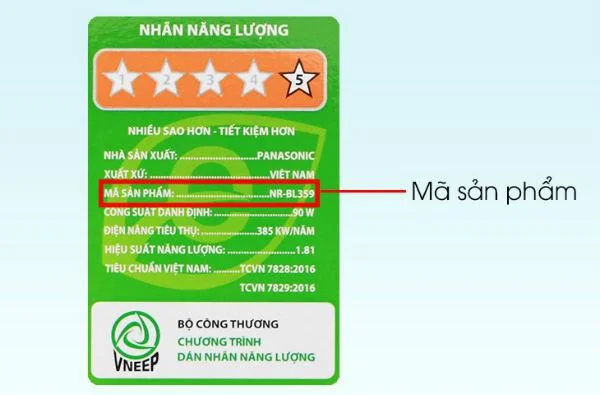
Panasonic refrigerator models with freezer on many doors belong to typical models such as BL, BA. You can see the product line on the green energy stamp affixed to the front of the refrigerator.
Instructions on how to use the Panasonic refrigerator control panel on the freezer

See Panasonic refrigerator product line on stamp

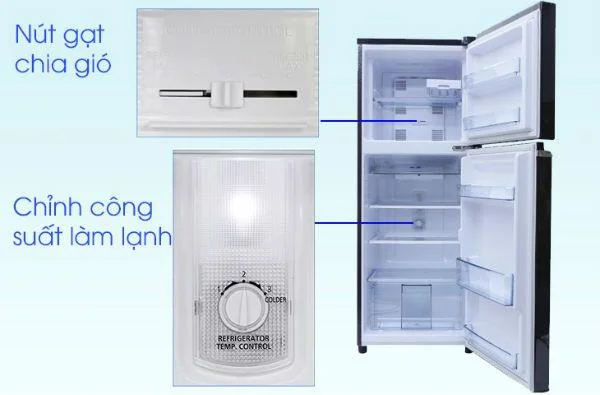
The knob control panel is introduced

Instructions on how to use the Panasonic refrigerator control panel on the freezer

The function buttons of the knob control panel

- Wind divider: function to adjust the air level for the cooler and freezer compartment. This adjustment button will be located in the freezer of the refrigerator and is divided into 3 modes. If you move to the left "REFRIGE.MAX", the wind will give priority to the cooler compartment, move to the right "FREEZER MAX", the wind will give priority to the freezer compartment, and the "NORMAL" mode will be divided equally among the 2 compartments.

- The button to adjust the cooling capacity of the refrigerator: a button to adjust the cooling capacity of the whole refrigerator. This knob is located in the cooler compartment, divided into 3 levels from 1-3, with level 1 being the lowest cooling capacity and level 3 being the highest power level. However, normally we recommend that you should preserve a moderate amount of food and choose level 2. Unless you need to refrigerate quickly, or you store too much or too little food, you can choose the rate respectively.

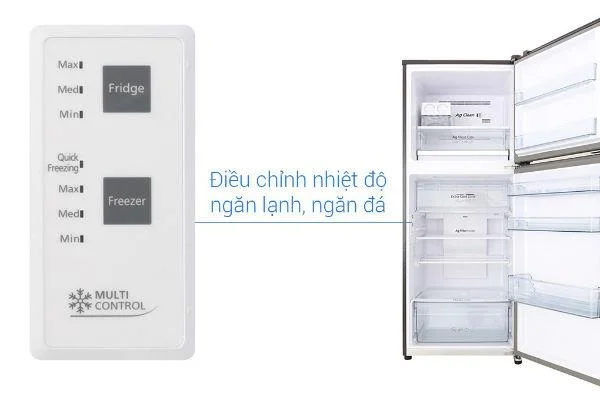
About the panel push button led display

Instructions on how to use the Panasonic refrigerator control panel on the freezer

Led panel function buttons

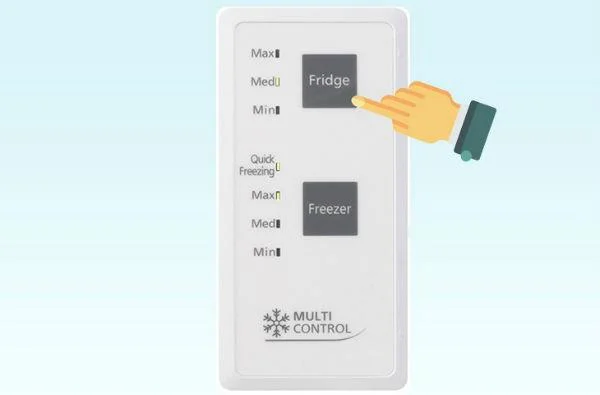
- Adjust the temperature of the cooler compartment: to adjust the cooler compartment temperature, press the "Fridge" button, select "Min - Med - Max" to select the desired temperature, in which the Min level is the least cold, Max is the coldest. .

Instructions on how to use the Panasonic refrigerator control panel on the freezer

Adjust cool compartment mode

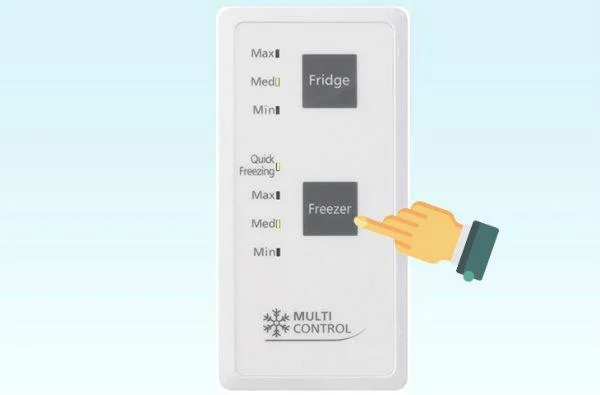
- Adjust the temperature of the freezer: to adjust the temperature of the freezer, press the "Freezer" button, select "Min - Med - Max" to select the desired temperature, in which the Min level is the least cold, the Max is cold. Best.

Instructions on how to use the Panasonic refrigerator control panel on the freezer

Adjust the freezer mode

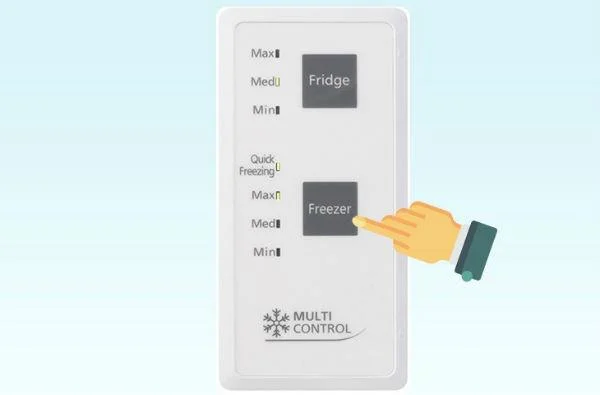
- Turn on the quick freezing feature: in addition, to turn on the quick freezing feature simply press the "Freezer" button repeatedly until the "Quick Freezing" light is on and the fast freezing mode is activated. The quick freeze mode will operate for 60 minutes - 150 minutes and return to normal mode, depending on the ambient temperature, the amount of food you keep inside, the number of times the refrigerator has been opened. .

Instructions on how to use the Panasonic refrigerator control panel on the freezer

Adjust the quick freezing mode

Above is the article on how to use the above Panasonic refrigerator freezer panel that WebTech360 has just shared with you. Hope to bring you useful information in using the refrigerator, helping you to effectively promote the features of the product as well as help preserve food in the most optimal way.
Leave a Comment

What to Plant in Chicago in October 2026: A Week-by-Week Garden Guide

What to Plant in Chicago in October 2026: A Week-by-Week Garden Guide

Plan Chicago’s October garden with Illinois Extension advice on garlic, bulbs, indoor herbs, microgreens, frost protection, and a week-by-week checklist—using climate normals separately from the live forecast.

National Voter Registration Day 2026 Is Today: How to Register or Check Your Status

National Voter Registration Day 2026 Is Today: How to Register or Check Your Status

National Voter Registration Day is September 15, 2026. Learn how to register online, by mail, or in person and verify your voter status.

Podcasting Trends You Need to Know in 2026: A Beginner’s Roadmap

Podcasting Trends You Need to Know in 2026: A Beginner’s Roadmap

New to podcasting? Learn the 2026 trends shaping video, discovery, transcripts, AI, analytics, monetization, and a practical launch plan.

UGC Masterclass: Build User-Generated Content That Earns Trust and Drives Action

UGC Masterclass: Build User-Generated Content That Earns Trust and Drives Action

A practical UGC masterclass for sourcing, permissioning, briefing, publishing, and measuring customer and creator content without losing authenticity.

Why Community Building Is the New Marketing — and When It Is Not

Why Community Building Is the New Marketing — and When It Is Not

Community building can deepen trust, retention, feedback, and advocacy, but it is not a replacement for every marketing channel. Compare the tradeoffs and choose the right model.

Navigating Social Media Algorithm Changes in 2026: What’s Confirmed, Contextual, and Still Unknown

Navigating Social Media Algorithm Changes in 2026: What’s Confirmed, Contextual, and Still Unknown

Learn what major social platforms have actually confirmed about ranking changes in 2026, what depends on context, and how to adapt without chasing myths.

Authentic Storytelling in Brand Marketing: How to Build Trust Without Sounding Scripted

Authentic Storytelling in Brand Marketing: How to Build Trust Without Sounding Scripted

Learn how to make brand storytelling feel credible, human, and specific—using proof, real tension, ethical customer stories, and a practical authenticity check.

Email Marketing Strategies for Q4 Success: What to Prioritize, Test, and Trade Off

Email Marketing Strategies for Q4 Success: What to Prioritize, Test, and Trade Off

Build a smarter Q4 email strategy by balancing reach, frequency, discounts, automation, deliverability, and measurement for profitable holiday growth.

How to Create Short-Form Video That Converts: A Practical Framework

How to Create Short-Form Video That Converts: A Practical Framework

Learn how to create short-form video that converts by balancing hooks, format, authenticity, CTA, platform fit, and testing across TikTok, Reels, and Shorts.

The Shift from Influencers to Key Opinion Consumers (KOCs): What Brands Need to Know in 2026

The Shift from Influencers to Key Opinion Consumers (KOCs): What Brands Need to Know in 2026

Why are brands testing KOCs instead of relying only on influencers? Learn what KOCs are, why social commerce favors them, common myths, and how to run a measurable pilot.