Apart from AVG AntiVirus FREE, Avira Free Antivirus is one of the reliable security options for computers. But compared to Avast Free Antivirus, which tool is more powerful?
In fact, both have similar feature sets. Recently, Avira has been in the top 1 antivirus software through many tests, especially in the field of virus detection and low number of errors. On the other hand, Avira is more flexible about the price of upgrading to the paid version and eliminating annoying pop-ups. Of course, Avast also has them but not by Avira. The following article will help you better understand these two antivirus software.
Avira also recently launched a new product, called Avira Free Security Suite , which combines all free Avira products - Antivirus, Phantom VPN (500 MB / month), Password Manager, System Speedup, Scout (browser) and Software Updater. Obviously, this freeware suite consumes more system resources, so it's best to use the basic Free Antivirus and add the components you need.
Comparison table of Avira vs Avast features?
Avast certainly provides many advanced features and tools such as Home Network Security to regularly scan for router vulnerabilities, Browser Cleanup to scan browser extensions or Software Updater to scan for software updates in the system. Avira is professional antivirus software. Both products offer the option to create a bootable disc with the latest version of antivirus to clean the system before it has booted.
The only feature that makes Avira stand out from Avast is Firewall management. It is not integrated into the Firewall, it only provides front-end management for the default Windows Firewall. Another great feature is that Avira does not require users to register / activate the product. Therefore, you can install and use this security software for free for life.
Impact on system resources - Which product is lighter?
Measurement of software influence on system resources is done in two ways:
- Time to boot the Windows computer.
- Computer activity in many different regions (CPU, Graphics, Memory, Disk ...).
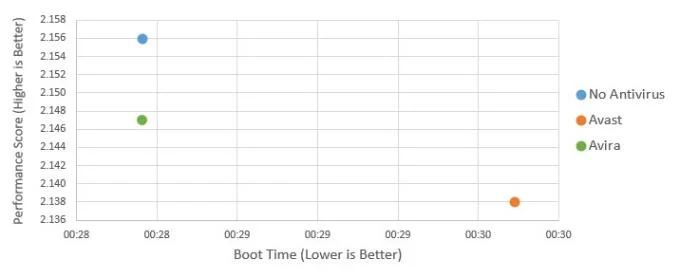
Less boot time is better: the computer installs Avira Free Antivirus takes only 28 seconds, while Avast Free Antivirus is 30 seconds. The average time to start the computer without any antivirus software takes about 28 seconds. Obviously, Avira does not slow down or affect the system boot process.

Performance in other parts of the computer. Avast reaches 2,138 points, Avira is slightly higher - 2,147 points. The default computer performance when not installing anti-virus software is 2,156 points. Thus, the overall system performance impact of both software is really low, of which Avira is the "winner".
The final performance is highlighted highlighted in the table below. You can immediately see the difference between Avast and the current Avira. Note, the vertical axis 'Performance Score' does not start from 0, but from 2,116 there is a clear difference.
User interface - Is Avast easier to use than Avira?
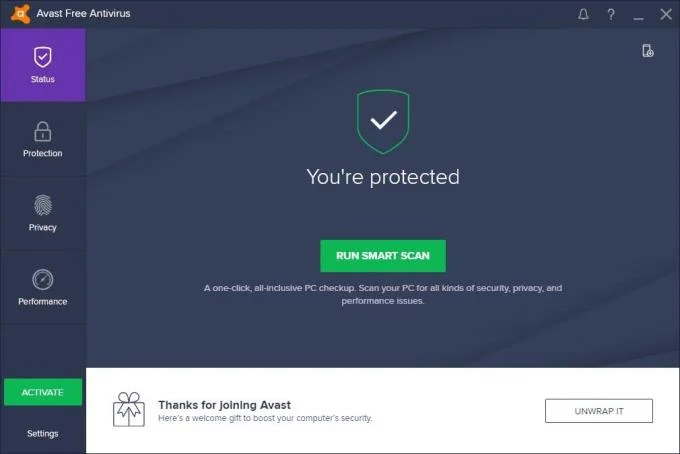
The Avast user interface is really nice and clear. Smart Scan will help you run all 7 scans: compatibility, viruses, outdated software, browser add-ons, router errors, performance and weak passwords. The green "Upgrade" button (or "Active") leads to a comparison of Avast Free Antivirus and the special Avast product (Avast Internet Security).

The status bar turns green means "You are protected" (you are protected). The left menu is easy to navigate and is divided into 4 groups - Status (main screen), Protection, Privacy, Performance. The section below always has a banner to offer to buy the product. It is quite nice and harmonious with the Avast interface.
Avast interface is quite large (1010 x 674 pixels) and will not work on 800 x 600 pixel screens. It takes up most screen space of 1024x768 pixels.
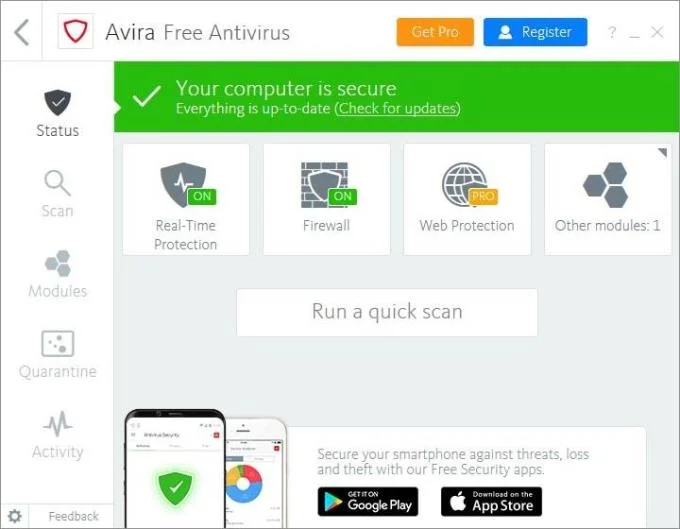
Avira 2018 user interface has been completely redesigned, looking better than before. However, the user experience is definitely not better. It lacks appeal. For example, the "Get Pro" and "Register" buttons in the title are virtually invisible in the quick scan mode.
The left menu is quite simple, allowing users to open virus isolation areas, schedule a scan or turn off specific modules (real-time, firewalls).

Similarly, when the Avast status bar appears blue, your computer is safe. 'Web Protection' and 'Mail Protection' are only available in the paid version. Game Mode is no longer in the 2018 version. Eye-catching interface and no upgraded invitation banners. This banner has been "scaled down" to the green "Upgrade Now" button.
You can start the system scan or update directly from the main page even though they are not displayed. The settings are accessible via the configuration icon located in the lower left corner of the interface. Sorry, you cannot change the language in settings.
Localization / Language interface
Both Avast and Avira support rich interface languages, of which, Avast provides more. Of course, they are free.
- Avast (46) interface languages : Arabic, Belorussian, Bengali, Bulgarian, Catalan, Simplified and Traditional Chinese, Croatian, Czech, Danish, Dutch, English (US / UK), Estonia, Finland, France, Germany, Greece, Israel, Hindi, Hungary, Indonesia, Italian, Japanese, Korean, Latvia, Lithuania, Malay, Norway, Persia, Pirate, Polish, Portuguese, Romanian, Russian, Serbian, Slovak, Slovenian, Spanish, Swedish, Thai, Turkish, Ukrainian, Urdu and Vietnamese.
- Avira's interface languages (12) : English, German, French, Spanish, Italian, Dutch, Portuguese, Turkish, Russian, Japanese, Simplified and Traditional Chinese.
It's annoying that you cannot change the manual language in Avira products. It automatically changes based on system settings.
Popularity
Which is better is sure to get more users. However, it is not easy to judge the best Avast or Avira. The figures below are taken from reliable, mainstream technology newspapers around the world.
1. Main sources
Through its official website, Avast is protecting more than 400 million users around the world, including AVG products. The latest publicity was 230 million before the AVG acquisition. Avira doesn't publish user statistics publicly after announcing it has reached over 100 million. In a recent newsletter, Avira said more than 500 million users are using their security technology. Based on these reliable claims, Avast has at least twice as many users as Avira.
2. The market share of antivirus software vendors is statistically determined by OPSWAT
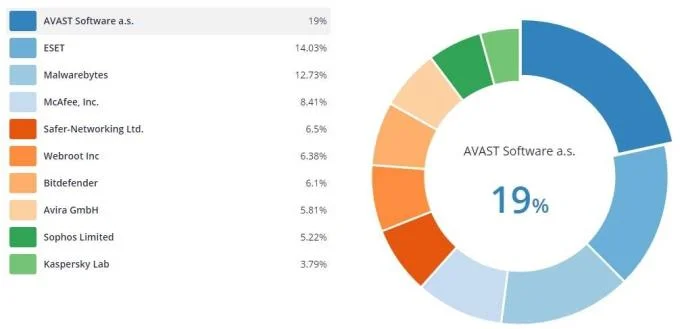
OPSWAT regularly provides reports on the antivirus market share. Data is based on OPSWAT GEARS software installed on clients. Avast accounts for 19%, currently dominating the worldwide market. Followed by ESET: 14.03% and Malwarebytes: 12.73%. 8th place is Avira: 5.81%.

3. Ranking on CNET Download.com
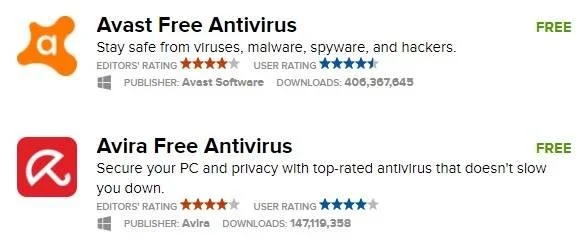
CNET's Download.com is the world's most popular download portal. In terms of its popularity, Avast has more total downloads, more than 406 million, while Avira "only" 147 million. Avast also topped the list of most popular downloads last week, while Avira is not even in the top 20.
However, this statistic is affected by each vendor's download model. Avira sends guests from Avast.com to Download.com while downloading Avira directly from their server. Download.com cannot statistically count this.

Both vendors have great reviews (4 stars = excellent), but Avast has a better rating from community / users: 4.5 stars, Avira only 4 stars.
4. Likes on social networks
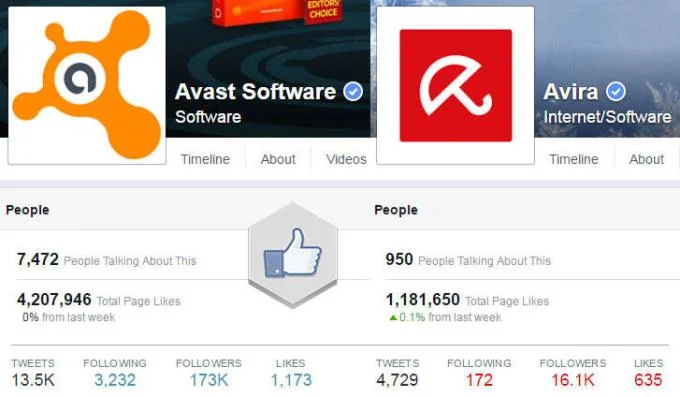
Another way to measure product / company popularity is the number of likes / followers on social networks like Facebook and Twitter. Avast leads the way on Facbook with 4.1 million fans vs Avira only 1.2 million. On Twitter, this number has a bigger difference. Avast has 181 followers and Avira only 19 thousand.

Results of independent tests
If you are looking for more in-depth comparisons on virus protection, the best source is through independent testing. In most of these tests, the winner always belongs to Avira, whether it is Real Word Protection Test or Performance Test. Avast is always in the top three. However, Avira sends their paid product for testing, while Avast is the free version.
You can refer to the test results below:
System Requirements & Compatibility
Both software run on most modern computers today. The main difference is that Avira does not support older versions of Windows (XP or Vista). Avast and Avira are fully compatible with the latest Windows 10 .
System requirements for using Avast Free Antivirus 2018
- Supported operating systems: Microsoft Windows 10 / 8.1 / 8/7 SP1 or higher / Vista / XP SP2 (any version, 32-bit or 64-bit).
- Processor: Intel Pentium 4 / AMD Athlon 64 and above.
- Memory: 256 MB RAM or higher.
- Free space: 2 GB available on the hard disk.
- Note Avast Free Antivirus 2018 does not run on Microsoft Windows 95/98 / ME / 2000 / Server, or any operating system not listed above.
System requirements for using Avira Free Antivirus 2018
- Operating system: Microsoft Windows 10 / 8.1 / 8/7 (both 32-bit & 64-bit).
- Processor: Intel Pentium 4 / AMD Athlon 64 and above.
- Memory: 2 GB RAM
- Capacity: 2 GB of free disk space.
- Note Avira Free Antivirus 2018 does not run on Microsoft Windows XP / Vista / 95/98 / ME / 2000 / Server or any operating system not listed above.
In short, both products have their advantages and disadvantages. Avira is certainly easier to use with many simple features. However, Avast offers better protection with many of the leading advanced features. You can try both to see which antivirus software is best for you.