Troubleshooting Microsoft Teams Offline Error in 2026
Stuck with Microsoft Teams offline error in 2026? Discover proven troubleshooting steps, common causes, and quick fixes to restore your connection fast. No tech skills required!
Google has officially announced that it will stop supporting Google Drive for Mac / PC and then it will remove the application early next year, welcoming a new storage and sync service.
Download Google Drive for iOS
Download Google Drive for Android
The Google Drive application released in April 2012 allows users to keep files, photos and other media synchronized across multiple devices. According to the official announcement from Google, Google Drive will no longer be supported from December 11, 2017 and then officially discontinued on March 12, 2018. Drive's successor is Backup and Sync , launched in March 2017, and a completely new app with various features called Drive File Stream .
Google discontinued the Drive app for Mac and PC
Google made the announcement via a blog post promoting the new Drive File Stream app that provides access to files similar to OneDrive On Demand:
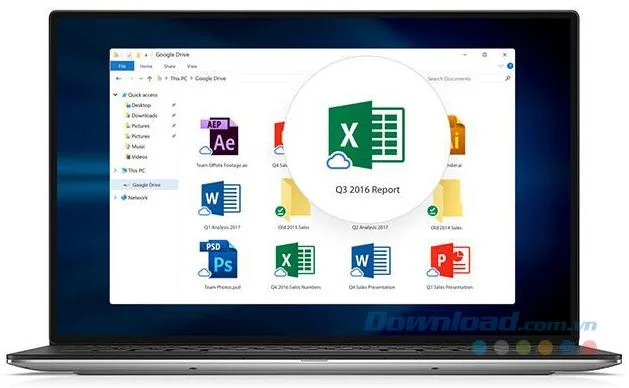
"With this launch, Google Drive for Mac/PC has been officially deprecated. It will no longer be supported starting December 11, 2017, and it will be completely removed on March 12 2018. We encourage you to use Drive File Stream. As an alternative or supplement to installing Drive File Stream, you can upgrade to the new version of Drive for Mac/PC, called Backup and Sycn" .
A few important things to note:
One of the most touted benefits of Google Backup and Sync is the ability to back up everything. You will have 15 GB of space provided for free to use. Users can always upgrade for additional capacity, starting at $1.99/month for 100 GB or 1 TB for $9.99/month.
Over the past few months, there have been a lot of announcements regarding hosting services. In late August, CrashPlan announced it was "dismantling" its home backup service, while Microsoft said in an article that a future feature update would remove support for legacy backup tools. like File History and System Image . It seems that the industry is being restructured with many great new alternatives.

Stuck with Microsoft Teams offline error in 2026? Discover proven troubleshooting steps, common causes, and quick fixes to restore your connection fast. No tech skills required!
Tired of Microsoft Teams crashing with "Error M" memory issues? Follow our step-by-step guide to fix Error M in Teams, clear cache, update software, and boost performance—no tech skills required!
Discover the easiest step-by-step guide to setting up Microsoft Teams Town Hall events. Host massive virtual gatherings effortlessly with pro tips for seamless execution. Perfect for leaders and organizers!
Struggling with Microsoft Teams "Download Error" on PC? Discover proven, step-by-step fixes to resolve download failed issues quickly. Get back to seamless collaboration in minutes—no tech skills needed!
Stuck with Microsoft Teams "Error L" License error? Follow this step-by-step troubleshooting guide to resolve licensing issues quickly, restore access, and boost productivity without IT hassle. Updated with latest fixes.
Tired of Microsoft Teams video call freezing mid-meeting? Follow this proven troubleshooting Microsoft Teams video call freezing guide with quick fixes, advanced tips, and real solutions to restore smooth video instantly.
Frustrated by Microsoft Teams 'Download Failed Due to Unexpected Error'? Discover proven, step-by-step solutions to fix this common issue quickly and get back to seamless collaboration. Updated with the latest fixes for peak performance.
Frustrated because your Microsoft Teams recording failed? Uncover the top common reasons like permissions issues, storage limits, and network glitches, plus step-by-step fixes to prevent future failures and record flawlessly every time.
Struggling with Microsoft Teams "Error B" connection? Discover step-by-step fixes for smooth connectivity. Clear cache, check networks, and more in this ultimate guide to resolving Error B instantly.
Tired of the frustrating Microsoft Teams "Application Is In A Bad State" error crashing your meetings? Discover proven, step-by-step fixes to resolve it quickly and restore smooth teamwork. Updated with the latest solutions.
Discover simple steps to check your Microsoft Teams version history and build number on desktop, web, and mobile. Stay updated with the latest features and fixes effortlessly. Perfect for IT pros and everyday users.
Tired of Microsoft Teams "Uninstall Error" Stuck? Discover proven, step-by-step fixes to completely remove Teams from your PC. Works on latest Windows versions – no tech skills needed!
Facing the frustrating Microsoft Teams "Where is My Team?" error? Discover step-by-step troubleshooting tips, common causes, and quick fixes to resolve it instantly and resume seamless collaboration. Updated with the latest solutions.
Tired of Microsoft Teams VDI errors crashing your virtual machine calls? Get step-by-step fixes for audio glitches, video freezes, and optimization issues on Citrix, VMware, or RDP setups. Boost productivity now!
Struggling with Microsoft Teams Error AADSTS70011? Discover step-by-step fixes for invalid scope errors, clear cache tips, and quick authentication resets to get back to seamless collaboration in minutes. Updated with latest Teams patches.








