
5 Halloween Cocktails That Are Easy to Serve at Your 2026 Bash

Mix five vivid, approachable Halloween cocktails with measured recipes, simple prep tips, and an alcohol-free option for your party guests.
Google's Pixel 6 and Pixel 6 Pro have a lot in common, but there are also some key differences that you should know if you're struggling to choose between the two devices. Let's compare the Google Pixel 6 and Pixel 6 Pro in detail in the following article!
Selling price
Let’s start with the most important part: price. The regular Pixel 6 starts at $599 for the base 128GB model and tops out at 256GB. The Pixel 6 Pro starts at $899 for the 128GB model and tops out at 512GB. The price difference is pretty big.
For the extra $300 you pay for the Pixel 6 Pro, you get much better hardware and a more premium look and feel overall. The software upgrades—including new camera features—are the same on both models.
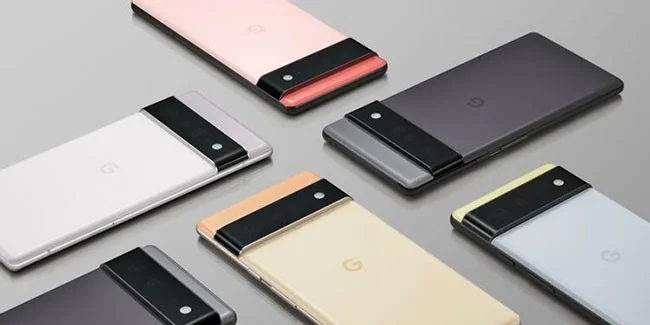
In terms of value, the regular Pixel 6 is definitely the way to go. While the Pixel 6 Pro looks more modern and premium, it's not worth $300.
The Pixel 6 Pro costs the same as the Samsung Galaxy S21 Ultra or iPhone 13 Pro. If you have the budget, the Pixel 6 Pro isn't a bad choice.
Camera
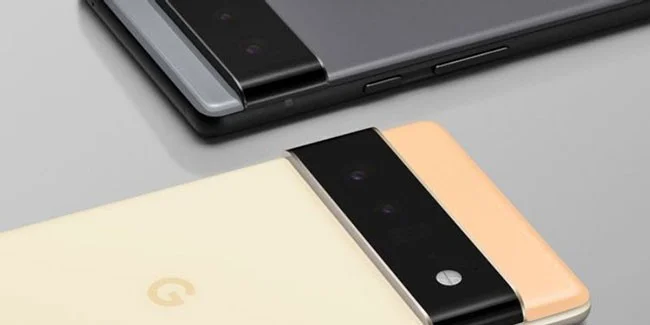
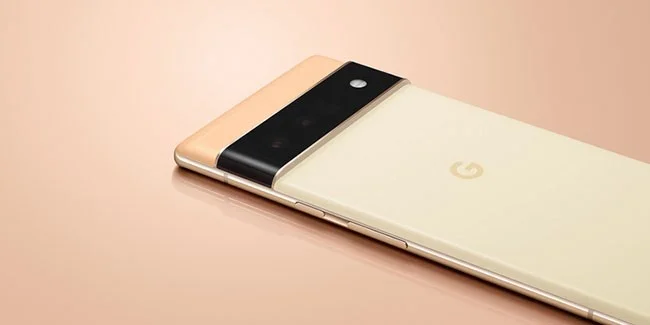
The camera on Pixel devices has always been a point of interest for many buyers. That's the case with the Pixel 6 devices. The main lens has a physically larger sensor to capture 2.5 times more light, and it also comes with a new "camera bar" housing that gives it a unique look.
According to the specifications, the Pixel 6 has a total of 3 cameras: 50MP f/1.85 main sensor with Laser Autofocus and Optical Image Stabilization (OIS), 12MP f/2.2 ultra-wide lens with 114-degree field of view and 8MP f/2.0 front camera.
The device is capable of recording 4K video at 60fps with the rear camera and 1080p video at 30fps with the front camera.
The Pixel 6 Pro has a total of four cameras: A main sensor and ultra-wide lens like the regular Pixel 6, plus an additional 48MP f/3.5 telephoto lens with OIS and 4x optical zoom (up to 20x by combining optical and digital zoom). On the front, the phone has a better 11.1MP f/2.2 ultra-wide front camera.
The device is capable of recording 4K video at 60fps with the rear camera and 4K video at 30fps with the front camera.
Efficiency
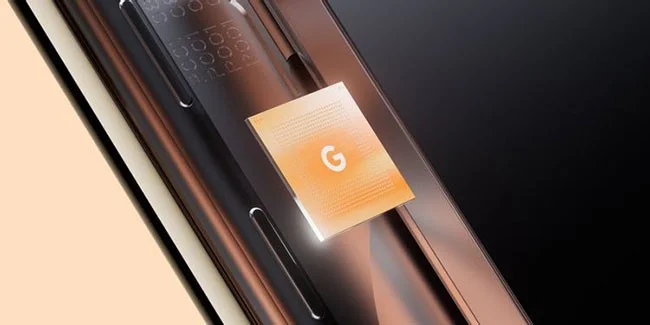
Both Pixel 6 phones are powered by Google's first processor, the Tensor chip . Tensor is said to be the most advanced AI-powered chip in any smartphone ever.
When it comes to raw performance, both devices have the same chip and software. However, the Pixel 6 Pro comes with more RAM (at 12GB, while the Pixel 6 is limited to 8GB). So naturally, gaming will be much smoother on the Pro model, especially for “heavy” titles.
Speaking of power, both devices offer 370% more GPU performance and 80% more CPU performance than the Pixel 5 — all thanks to the new Tensor chip. This makes tasks like photo editing and gaming much more seamless.
Screen
The Pixel 6 features a 6.4-inch 90Hz AMOLED display with an FHD+ resolution of 1080 x 2400 pixels. It comes with a 20:9 aspect ratio, 411ppi pixel density, and an 83.4% screen-to-body ratio.
The Pixel 6 Pro takes the display to the next level with a larger 6.7-inch 120Hz LTPO AMOLED panel with a QHD+ resolution of 1440 x 3120 pixels. It comes with a 19.5:9 aspect ratio, 512ppi pixel density, and an 88.8% screen-to-body ratio.
Both devices are protected by Corning Gorilla Glass Victus, support HDR10+ content, and have an Always On Display. However, the Pixel 6 Pro looks more modern with slightly curved glass and thinner bezels. And its display can switch between 10 and 120Hz depending on usage to save battery.
Battery and charger
If you've been following Pixel devices, you'll know how bad the battery life was on older Pixels. It wasn't until 2020 that we got the Pixel 5, which had a more respectable battery (4000mAh).
But with the Pixel 6, it seems like Google is finally taking battery life and charging more seriously. The Pixel 6 has an improved 4614mAh battery, while the Pixel 6 Pro has a whopping 5003mAh battery.
Both devices support reverse wireless charging and 30W fast wired charging. But when it comes to wireless charging, the Pixel 6 Pro has a slight edge with 23W charging compared to 21W on the Pixel 6.
Sadly, neither device comes with a charger. However, you do get a USB-C to USB-C cable and a USB-C to USB-A adapter.
Color and design
The Pixel 6 comes in three colors: Sorta Seafoam, Kinda Coral, and Stormy Black. The Pixel 6 Pro takes a safer, more subtle approach with Cloudy White, Sorta Sunny, and Stormy Black.
Design-wise, both devices feature square corners as opposed to the rounded corners typically found on Android flagships. The Pixel 6 Pro is arguably the better looking from both the front and back thanks to its slim bezels and curved glass display.
But keep in mind that curved screens can lead to accidental touches and commands on your phone. It's no surprise that curved screens have fallen out of fashion. While the obvious benefit of these types of screens is that they look more appealing in advertising, they can make the screen more susceptible to breakage after a fall.
The Pixel 6 and Pixel 6 Pro are both great phones at competitive prices. They have more in common than they do differences. And so if you’re trying to decide which one to buy, the Pixel 6 is a better choice. You don’t have to spend an extra $300 to get all of Google ’s new software features .
Mix five vivid, approachable Halloween cocktails with measured recipes, simple prep tips, and an alcohol-free option for your party guests.
Find 15 office-friendly Halloween costume ideas for 2026, with practical checks for dress codes, respectful themes, comfort, and workplace safety.
Plan a fun elementary school Halloween party with easy crafts, games, inclusive treats, costume tips, and a sample 75-minute classroom schedule.
Compare realistic side hustles for 2026 by startup cost, fees, flexibility, and income control, with current tax and scam guidance from official sources.
Upgrade your home office ergonomics with current OSHA and NIOSH guidance on chair fit, monitor height, laptop setup, lighting, and movement.
Learn why emotional intelligence matters in leadership, where it helps most, how to strengthen it, and how to tell whether your approach is working.
A practical roadmap for moving into tech without a degree: choose an accessible role, build job-ready skills, prove them with projects, and use hiring feedback to improve.
Build a credible LinkedIn personal brand in 2026 with current profile, content, newsletter, analytics, verification, and visibility guidance from LinkedIn.
Quiet quitting and quiet firing are catchy labels, not diagnoses. Learn what is verified, what depends on context, and what employees and managers can do next.
Fractional executives offer senior leadership without a full-time hire. Learn when the model works, what to ask, and the risks to manage.








