How to create animated messages on iMessage iOS 18

The new iMessage iOS 18 has been updated with animated messages, text effects with many options to use for the messages you send. You can add formatting to messages such as underlining, bolding or use animated effects for messages on iMessage. Here are instructions for creating animated iMessage messages on iOS 18

How to create animated messages iMessage iOS 18

Step 1:

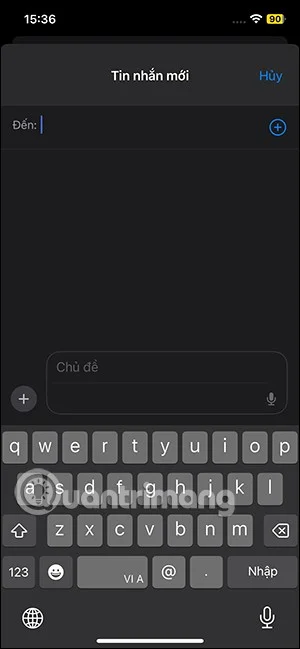
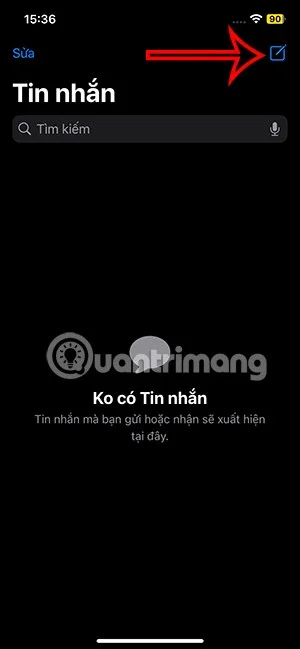
We also create new messages on iPhone as usual.

How to create animated messages on iMessage iOS 18

Step 2:

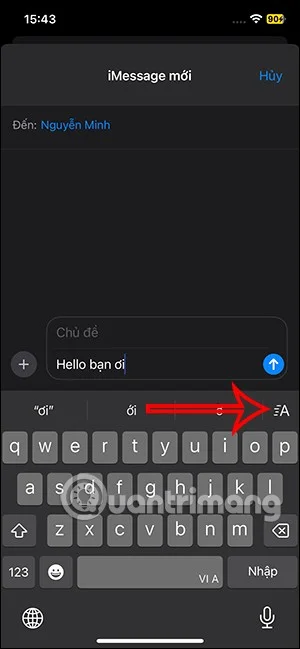
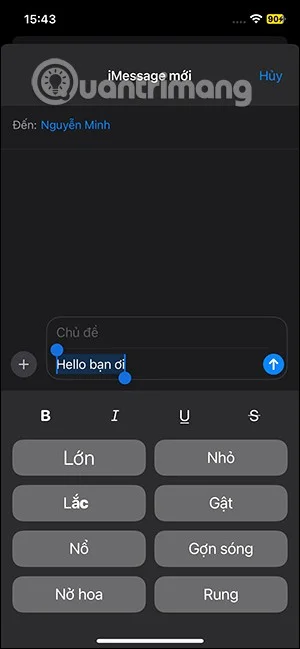
Next, in the message content, highlight the message content you want to create a dynamic message and then click on the letter A icon as shown below.

How to create animated messages on iMessage iOS 18

Step 3:

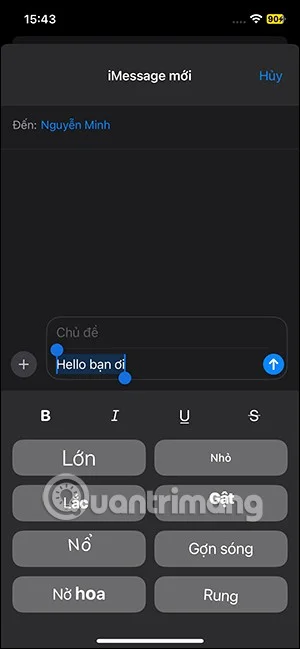
At this time, the options for effects and formats for messages on iMessage iOS 18 will be displayed below for you to choose from. Click on the message format options to use.

How to create animated messages on iMessage iOS 18

Step 4:

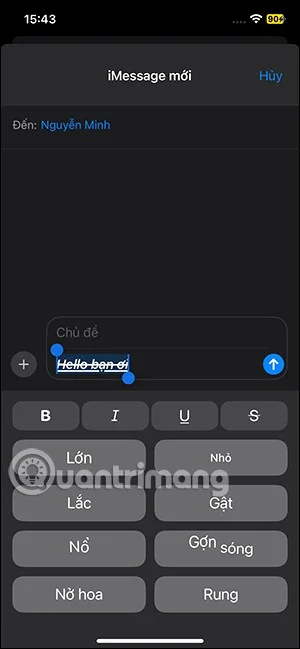
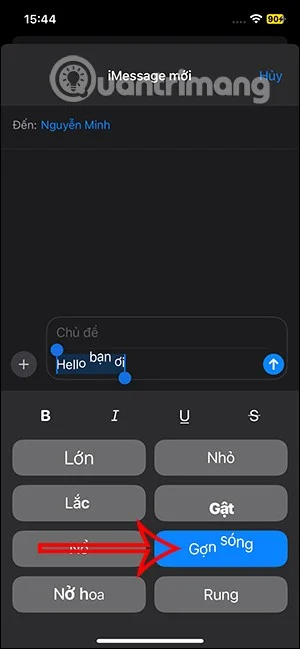
Next below are the animated effects for messages. You click on each effect to see how animated messages on iMessage iOS 18 are displayed. For example, with the ripple effect, the text will have a ripple effect as shown.

How to create animated messages on iMessage iOS 18

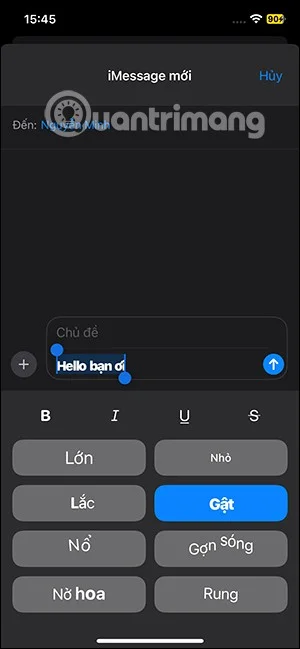
If you are not satisfied, you can use other animation effects for messages on iMessage iOS 18. Finally, send the message to the other person as usual.

These animation effects can be applied to regular text as well as emojis in iMessage.

Video tutorial on creating animated messages on iMessage iOS 18
Leave a Comment

How to Fix Microsoft Teams Disabled Error Account Blocked

How to Fix Microsoft Teams Disabled Error Account Blocked

Stuck with Microsoft Teams "Disabled Error" Account Blocked? Discover proven, step-by-step solutions to fix the issue fast, regain access, and prevent future blocks. No tech skills needed!

How to Use Microsoft Teams Copilot for AI-Powered Meetings

How to Use Microsoft Teams Copilot for AI-Powered Meetings

Master how to use Microsoft Teams Copilot for AI-powered meetings. Step-by-step guide with latest tips to generate recaps, answer questions, and boost productivity effortlessly. Transform your Teams experience today!

Microsoft Teams Breakout Rooms Tutorial for Beginners (2026)

Microsoft Teams Breakout Rooms Tutorial for Beginners (2026)

Master Microsoft Teams Breakout Rooms with this beginner-friendly tutorial. Step-by-step guide to creating, managing, and optimizing breakout rooms for dynamic 2026 meetings and workshops. Boost engagement now!

Solving Microsoft Teams Recording Save Error

Solving Microsoft Teams Recording Save Error

Stuck with Microsoft Teams Recording Save Error? Get instant, step-by-step fixes for saving recordings effortlessly. Proven solutions for all common issues – no tech skills needed!

How to Create a Wiki Page in Microsoft Teams

How to Create a Wiki Page in Microsoft Teams

Discover how to create a Wiki page in Microsoft Teams effortlessly. This ultimate guide covers step-by-step instructions, tips, and best practices to boost your team's knowledge sharing and productivity. Perfect for beginners!

How to Fix Microsoft Teams Error S Screen

How to Fix Microsoft Teams Error S Screen

Stuck on Microsoft Teams "Error S" screen? Discover proven, step-by-step solutions to fix Microsoft Teams Error S fast. Clear cache, restart, update & more for seamless teamwork. Works on latest versions!

How to Fix Microsoft Teams Proxy Error on Windows 10

How to Fix Microsoft Teams Proxy Error on Windows 10

Struggling with Microsoft Teams proxy error on Windows 10? Discover step-by-step fixes to resolve proxy authentication issues, connection failures, and more. Get Teams running smoothly in minutes with our expert guide.

Solving Microsoft Teams Town Hall Event Error

Solving Microsoft Teams Town Hall Event Error

Tired of Microsoft Teams Town Hall Event Error ruining your events? Get step-by-step fixes for scheduling, access, and registration issues. Restore seamless virtual town halls today with our ultimate guide.

How to Download Microsoft Teams for Mac and MacBook Air/Pro

How to Download Microsoft Teams for Mac and MacBook Air/Pro

Discover the simplest way to download Microsoft Teams for Mac, MacBook Air, and MacBook Pro. Step-by-step instructions, system requirements, and troubleshooting tips for seamless installation in the latest version. Get started now!

How to Fix Microsoft Teams Web Login Error

How to Fix Microsoft Teams Web Login Error

Stuck with Microsoft Teams Web Login Error? Get instant fixes for common issues like "Something went wrong" or login loops. Step-by-step guide to resolve Teams web login problems and stay productive. Updated with latest browser tweaks.

How to Fix Microsoft Teams Error 657rx Update Failed

How to Fix Microsoft Teams Error 657rx Update Failed

Struggling with Microsoft Teams Error 657rx Update Failed? Discover step-by-step fixes, from quick restarts to advanced troubleshooting, to get your Teams app updated and running smoothly in minutes. No tech skills required!

Solving Microsoft Teams VDI Error Lag

Solving Microsoft Teams VDI Error Lag

Tired of Microsoft Teams "VDI Error" Lag freezing your video calls? This ultimate guide delivers step-by-step fixes for VDI environments like Citrix and VMware. Optimize performance now for lag-free collaboration!

Solving Microsoft Teams Join Meeting Error via Direct Link

Solving Microsoft Teams Join Meeting Error via Direct Link

Struggling with Microsoft Teams "Join Meeting Error"? Discover proven steps to solve it via direct links. Quick fixes for seamless joining – no tech skills needed!

How to Test Your Microsoft Teams Audio and Camera Before a Call

How to Test Your Microsoft Teams Audio and Camera Before a Call

Discover simple steps to test your Microsoft Teams audio and camera before a call. Ensure crystal-clear sound and video for professional meetings every time with our easy guide. Perfect for desktop, mobile, and web users.

How to Fix Microsoft Teams Error 53003: Access Denied

How to Fix Microsoft Teams Error 53003: Access Denied

Struggling with Microsoft Teams Error 53003 Access Denied? Discover proven, step-by-step fixes to resolve it quickly. Clear cache, update Teams, bypass proxies & more for seamless collaboration. Works on Windows, Mac & web!