Heart-Healthy Snacks

Heart-healthy foods , such as fruits, vegetables, whole grains, and lean proteins, can significantly reduce your risk of cardiovascular disease. This article will summarize the best heart-healthy snacks for you .

Heart-Healthy Snacks

Snacking often gets a bad rap, but you can snack on the right foods and fit them into a heart-healthy diet. Choosing heart-healthy snacks can add extra nutrition to your diet and help keep you energized and full between meals.

Instead of snacking on foods high in saturated fat, sugar, and salt, consider eating whole foods, including fruits, vegetables, nuts, seeds, and whole grains. These healthy snack options can add fiber, antioxidants, minerals, and vitamins to your diet and improve your overall heart health.

The Best Heart-Healthy and Delicious Snacks

Apple

Research shows that eating just two apples a day can reduce your risk of heart disease and high blood pressure. All thanks to the rich amount of soluble fiber in apples.

Another reason is that apples contain polyphenols, which have been linked to lower serum cholesterol levels, increased good lipoprotein cholesterol, decreased bad lipoprotein cholesterol, and reduced inflammation.

Apples are not only good for your heart. They are also very nutritious. A medium apple contains 104 calories and 5 grams of fiber. It also contains vitamins C, K, E, B1, B6, copper and potassium.

Enjoy an apple with a little peanut or almond butter for a heart-healthy snack that's high in fiber and healthy fats. Or, add 1 cup of apple to a smoothie containing other heart-healthy fruits and vegetables.

Heart-Healthy Snacks

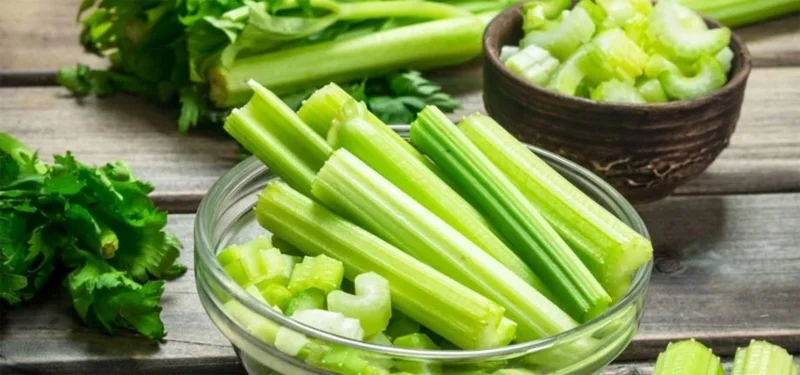
Celery

Celery is one of those amazing vegetables. It's a great source of vitamins, low in calories, and has many benefits, including promoting heart health.

Celery is high in water and fiber. It contains phenolic compounds and powerful antioxidants that help reduce inflammation and improve heart health. You can eat celery on its own or with a little nut butter for added flavor and as a healthy fat option.

Roasted chickpeas

According to a 2019 study reported in Advances in Nutrition, eating beans and legumes, including chickpeas, is associated with a 14% lower risk of heart disease. Most of the benefits of eating beans come from their fiber content. Beans also contain plant sterols, which can lower cholesterol and contribute to improved heart health.

Roasted chickpeas can be a heart-healthy snack to satisfy your craving for crunchy foods. You can make your own roasted chickpeas at home or buy some from your favorite store. When buying, avoid brands that are high in sodium or sugar.

Heart-Healthy Snacks

Yogurt and berries

Eating yogurt may reduce the risk of heart disease in people with high blood pressure, according to a 2018 study reported in the American Journal of Hypertension.

Greek yogurt pairs well with blueberries, which have also been linked to improved heart health. Blueberries contain fiber, potassium, folate, vitamins C and B6, and anthocyanins (rich in antioxidants and anti-inflammatory properties).

Smoothie

Smoothies are the perfect snack to boost your heart health. They can provide fiber, vitamins, antioxidants, omega-3 fatty acids, etc. Omega-3 fats help control inflammation and other bodily processes.

Smoothies are simple to make. You can blend frozen or fresh fruit with heart-healthy ingredients like low-fat milk and yogurt, nut butters, chia or flax seeds, applesauce, 100% fruit juice, and veggies.

Leave a Comment

Solving Microsoft Teams Wiki in Teams Error Loading

Solving Microsoft Teams Wiki in Teams Error Loading

Tired of the frustrating Microsoft Teams "Wiki in Teams" error loading? Get step-by-step fixes for Wiki not loading in Teams, clear cache, reset settings, and more. Resolve it fast with our expert guide.

How to Keep Microsoft Teams Active and Available All Day

How to Keep Microsoft Teams Active and Available All Day

Master how to keep Microsoft Teams active and "Available" all day. Proven tips, tools, and settings to avoid "Away" status, boost productivity, and never miss a beat in your workday.

How to Download Microsoft Teams for Windows 11 in 2026

How to Download Microsoft Teams for Windows 11 in 2026

Discover how to download Microsoft Teams for Windows 11 in 2026 with our ultimate guide. Official methods, troubleshooting, and pro tips for seamless installation and instant collaboration.

How to Fix Microsoft Teams Groups Visibility Error

How to Fix Microsoft Teams Groups Visibility Error

Tired of missing groups in Microsoft Teams? Discover how to fix the "Groups" Visibility Error with simple, up-to-date steps. Restore your teams visibility fast and frustration-free.

The Best Vitamins and Minerals for Your Eyes

The Best Vitamins and Minerals for Your Eyes

The eyes are the windows to the soul. So take good care of them with the following eye vitamins.

Solving Microsoft Teams For School Login Error

Solving Microsoft Teams For School Login Error

Stuck with Microsoft Teams "For School" login error? Follow our expert, step-by-step guide to solve it fast – no tech skills needed. Get back to classes without frustration!

How to Fix Microsoft Teams Media Error During Playback

How to Fix Microsoft Teams Media Error During Playback

Struggling with Microsoft Teams media error during playback? Discover step-by-step fixes for smooth video and audio in meetings. Updated with the latest troubleshooting tips for seamless collaboration.

Troubleshooting Microsoft Teams Where is Teams Folder Search

Troubleshooting Microsoft Teams Where is Teams Folder Search

Frustrated with Troubleshooting Microsoft Teams "Where is Teams" Folder Search issues? Follow our expert, step-by-step guide to locate hidden folders, fix search glitches, and restore smooth collaboration in the latest Teams updates. Quick fixes that work!

How to Fix Microsoft Teams Error AADSTS70008: Security Token Expired

How to Fix Microsoft Teams Error AADSTS70008: Security Token Expired

Struggling with Microsoft Teams Error AADSTS70008: Security Token Expired? Discover proven, step-by-step fixes to get back to seamless collaboration. Clear cache, re-authenticate, and prevent future issues fast!

How to Resolve Microsoft Teams Error Code 0x80070005

How to Resolve Microsoft Teams Error Code 0x80070005

Tired of Microsoft Teams Error Code 0x80070005 blocking your meetings? Follow our expert, step-by-step guide with quick fixes like permission resets, cache clears, and reinstalls to resolve access denied errors fast and get back to collaborating seamlessly.

Troubleshooting Microsoft Teams Error Message 80080005

Troubleshooting Microsoft Teams Error Message 80080005

Stuck with Microsoft Teams Error 80080005? This comprehensive guide delivers proven, step-by-step fixes for audio glitches, mic failures, and more. Restore seamless collaboration today!

Solving Microsoft Teams Error Code 404 on Web

Solving Microsoft Teams Error Code 404 on Web

Tired of Microsoft Teams Error Code 404 on web blocking your meetings? Follow our proven, step-by-step guide to clear cache, troubleshoot browsers, and resolve the "Not Found" error fast for seamless collaboration. Updated with the latest fixes!

Why is the Microsoft Teams Add-in Missing from My Outlook?

Why is the Microsoft Teams Add-in Missing from My Outlook?

Frustrated because the Microsoft Teams add-in is missing from Outlook? Uncover the top reasons and easy step-by-step fixes to bring back seamless Teams-Outlook integration without hassle. Works for latest versions!

How to Set Up and Link Microsoft Teams to Your Outlook Calendar

How to Set Up and Link Microsoft Teams to Your Outlook Calendar

Master how to set up and link Microsoft Teams to your Outlook Calendar with this ultimate step-by-step guide. Enjoy effortless meeting scheduling, seamless sync, and boosted teamwork – no tech headaches!

How to Find the Microsoft Teams Installation Folder

How to Find the Microsoft Teams Installation Folder

Struggling to locate the Microsoft Teams installation folder? This step-by-step guide reveals exact paths for Windows, macOS, and more. Master how to find the Microsoft Teams installation folder effortlessly and boost your productivity today!









