How AI Art Generators Enhance Your Everyday Photos

Want to give your everyday photos a new look? AI art tools can add a unique and creative touch that you might not achieve with manual editing.

1. Getimg.ai - Most accurate results

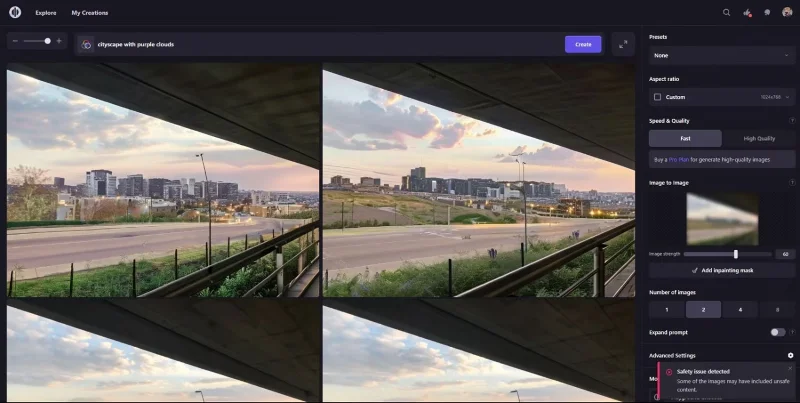
The Image-to-Image feature and Similarity slider give you a lot of control, which can turn boring photos into works of art. Landscapes and cityscapes are arguably the easiest photos to work with.

How AI Art Generators Enhance Your Everyday Photos

Getimg can be a great tool for adding subtle enhancements to your photos, especially since you can control every aspect of it. Try out a few different prompts for nice color grading or filter-like effects, and play with the Similarity slider to change the difference from the original.

2. Adobe Express - Completely transform images

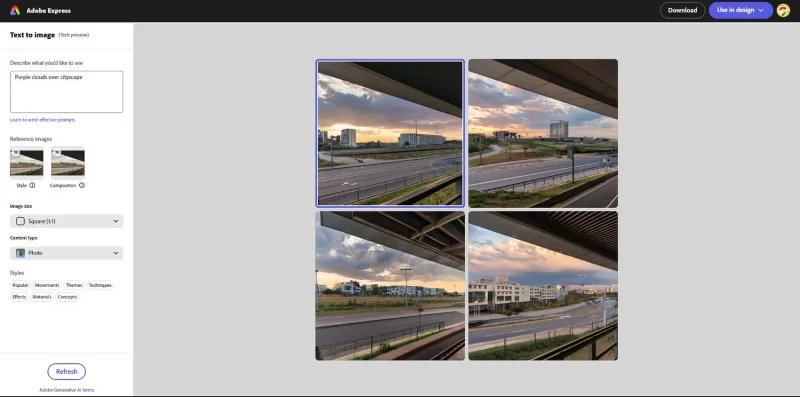
If you have an Adobe account, you can use Adobe Firefly 's AI text-to-image tool for free in Adobe Express (with limited credits). It has two reference image features, one for Composition and one for Style, but no intensity slider.

Unlike Getimg, Adobe has changed the original image quite a bit, but kept the colors, textures, and overall layout intact.

How AI Art Generators Enhance Your Everyday Photos

This is a great AI art generator and one of the top recommendations for creating high quality AI art.

3. Playground.com - Create interesting compositions in photos

Playground has Image-to-Image feature and Image Strength slider, but the results are a bit different than Getimg.ai.

How AI Art Generators Enhance Your Everyday Photos

The additional buildings it creates look quite interesting with attractive color schemes. However, this tool focuses more on creating cityscapes than purple clouds.

Unfortunately, Playground still warps some elements in your images. This can be fixed with a tool like Photoshop’s Generative Fill, but it’s not free. If you still want to experiment with the text-to-image tool, you can sign up for free and create 50 images per day.

4. Hotpot.ai - Create favorite results

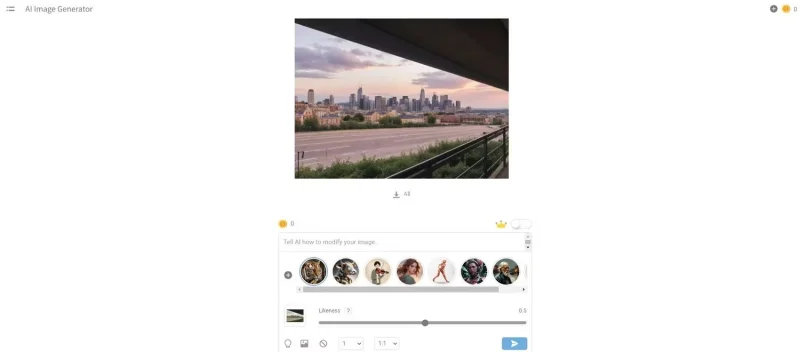
This tool will amaze you, not only because of its beautiful results and accuracy, but also because it is free and does not even require registration. Like other generators, it also has image reference feature and Likeness slider.

How AI Art Generators Enhance Your Everyday Photos

Hotput has added an entire neighborhood to the scene, filling the background with beautiful buildings. One thing to note, however, is that the free version downloads low-resolution images, so you’ll have to pay a subscription fee or purchase credits if you want to download higher quality. This may not be a big deal if you want to use the images as social media thumbnails or profile pictures, or want to view them on a small screen.

You can always run it through a photo enhancement app like Remini or upload it to Picsart's online AI Enhance tool.

5. DreamStudio.ai - The best cosmetic results

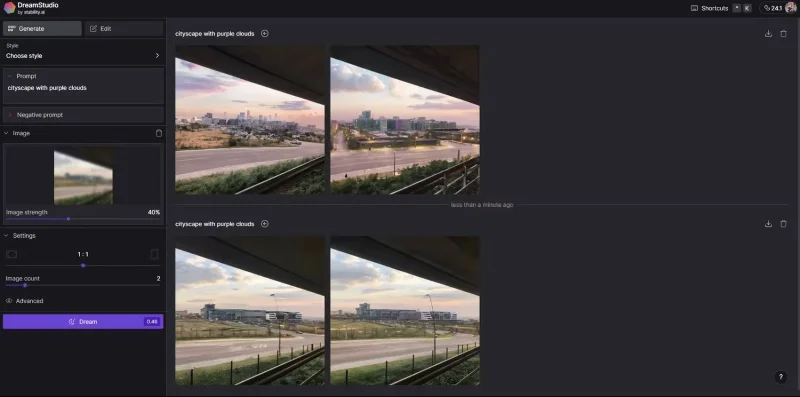
The free version of DreamStudio powered by Stability.ai also features image reference with sliders! These results are close to Hotpot and may be your favorite depending on your preferences.

How AI Art Generators Enhance Your Everyday Photos

If you’re looking to improve your everyday photos, you should try an AI art generator with some sort of reference image feature. While every photo editing app out there has AI features to streamline the editing process, using AI art generators will give you faster and more interesting results.

Leave a Comment

Microsoft Teams vs Slack: Which is Better for Work in 2026?

Microsoft Teams vs Slack: Which is Better for Work in 2026?

Discover Microsoft Teams vs Slack in 2026: in-depth comparison of features, pricing, integrations, and AI tools. Find out which is better for your work team productivity and collaboration.

Troubleshooting Microsoft Teams Video call Error

Troubleshooting Microsoft Teams Video call Error

Struggling with Microsoft Teams video call error? Discover proven, step-by-step troubleshooting fixes for video issues, camera problems, and more. Get seamless calls back in minutes!

Solving Microsoft Teams Mac Error Keychain Issues

Solving Microsoft Teams Mac Error Keychain Issues

Struggling with Microsoft Teams Mac Error Keychain Issues? Discover proven, step-by-step fixes to resolve Keychain errors on Mac, restore smooth login, and boost productivity fast. No tech expertise needed!

Solving Microsoft Teams Hard Error (2026 Guide)

Solving Microsoft Teams Hard Error (2026 Guide)

Tired of Microsoft Teams crashing with "Hard Error"? This 2026 guide delivers step-by-step fixes for seamless video calls and chats. Clear cache, update, reinstall—solve it now!

How to Fix Microsoft Teams DLL Missing Errors (msvcp140.dll)

How to Fix Microsoft Teams DLL Missing Errors (msvcp140.dll)

Tired of Microsoft Teams crashing due to msvcp140.dll missing errors? Discover proven, step-by-step fixes to restore smooth video calls and chats. Works on Windows 10/11 with latest updates.

How to Fix Microsoft Teams Meeting ID Not Working

How to Fix Microsoft Teams Meeting ID Not Working

Tired of Microsoft Teams Meeting ID not working? Get instant fixes for join errors on desktop, mobile, or web. Step-by-step troubleshooting with latest updates to rejoin meetings seamlessly. No tech skills needed!

How to Fix Microsoft Teams Welcome Error Startup Loop

How to Fix Microsoft Teams Welcome Error Startup Loop

Struggling with Microsoft Teams "Welcome Error" startup loop? Discover step-by-step fixes to resolve the issue quickly. Clear cache, reset app, and more for seamless Teams experience. Updated with latest solutions.

How to Fix Microsoft Teams Disabled Error Account Blocked

How to Fix Microsoft Teams Disabled Error Account Blocked

Stuck with Microsoft Teams "Disabled Error" Account Blocked? Discover proven, step-by-step solutions to fix the issue fast, regain access, and prevent future blocks. No tech skills needed!

How to Use Microsoft Teams Copilot for AI-Powered Meetings

How to Use Microsoft Teams Copilot for AI-Powered Meetings

Master how to use Microsoft Teams Copilot for AI-powered meetings. Step-by-step guide with latest tips to generate recaps, answer questions, and boost productivity effortlessly. Transform your Teams experience today!

Microsoft Teams Breakout Rooms Tutorial for Beginners (2026)

Microsoft Teams Breakout Rooms Tutorial for Beginners (2026)

Master Microsoft Teams Breakout Rooms with this beginner-friendly tutorial. Step-by-step guide to creating, managing, and optimizing breakout rooms for dynamic 2026 meetings and workshops. Boost engagement now!

Solving Microsoft Teams Recording Save Error

Solving Microsoft Teams Recording Save Error

Stuck with Microsoft Teams Recording Save Error? Get instant, step-by-step fixes for saving recordings effortlessly. Proven solutions for all common issues – no tech skills needed!

How to Create a Wiki Page in Microsoft Teams

How to Create a Wiki Page in Microsoft Teams

Discover how to create a Wiki page in Microsoft Teams effortlessly. This ultimate guide covers step-by-step instructions, tips, and best practices to boost your team's knowledge sharing and productivity. Perfect for beginners!

How to Fix Microsoft Teams Error S Screen

How to Fix Microsoft Teams Error S Screen

Stuck on Microsoft Teams "Error S" screen? Discover proven, step-by-step solutions to fix Microsoft Teams Error S fast. Clear cache, restart, update & more for seamless teamwork. Works on latest versions!

How to Fix Microsoft Teams Proxy Error on Windows 10

How to Fix Microsoft Teams Proxy Error on Windows 10

Struggling with Microsoft Teams proxy error on Windows 10? Discover step-by-step fixes to resolve proxy authentication issues, connection failures, and more. Get Teams running smoothly in minutes with our expert guide.

Solving Microsoft Teams Town Hall Event Error

Solving Microsoft Teams Town Hall Event Error

Tired of Microsoft Teams Town Hall Event Error ruining your events? Get step-by-step fixes for scheduling, access, and registration issues. Restore seamless virtual town halls today with our ultimate guide.