How to convert time to decimal in Excel

Microsoft Excel is one of the most optimal and indispensable calculation software on each person's computer. When using this software, users will be provided with many different types of functions, helping their calculations to be completed quickly and easily.

In the calculation process, sometimes we have to convert time into numbers, to do this in addition to performing the value conversion operation, we can also use some basic functions of Excel . Here we invite you to follow the article instructions on converting time to decimal numbers in Excel .

Download Microsoft Office 2016 Download Microsoft Office 2019

1. How to convert time by calculation in Excel

To be able to implement this method you first need to remember the unit of time and date conversion as:

  • 1 day = 24 hours.
  • 1 hour = 60 minutes = 3,600 seconds.
  • 1 minute = 60 hours.

Step 1: First, open up the value table you want to convert and click on any empty cell.

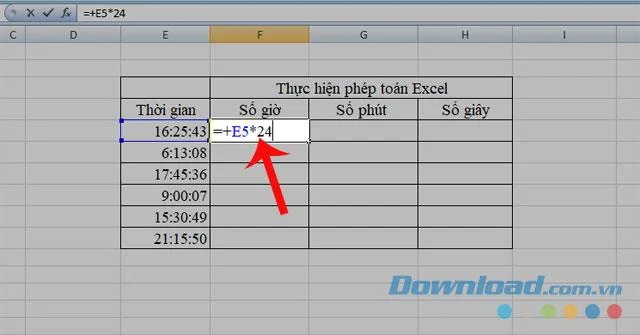
Step 2: Enter the formula: = + "Value to convert" * 24 , in the value cell in the hour column.

How to convert time to decimal in Excel

Step 3: To perform the remaining columns you also enter the following formula:

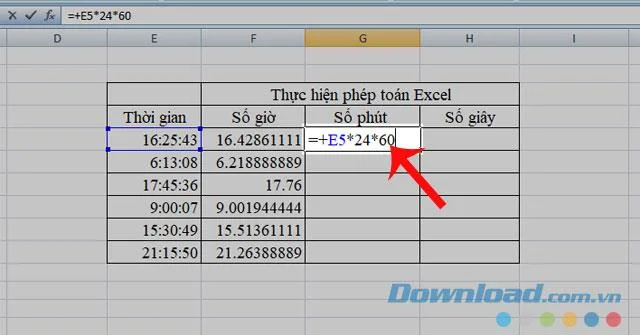
  • Minutes column: = + "Value to convert" * 24 * 60 .

How to convert time to decimal in Excel

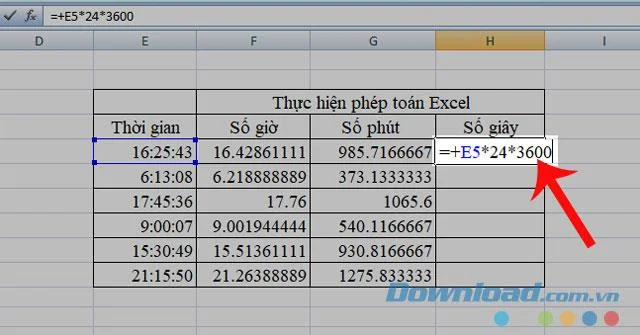
  • Second column: = + "Value to change" * 24 * 3600 .

How to convert time to decimal in Excel

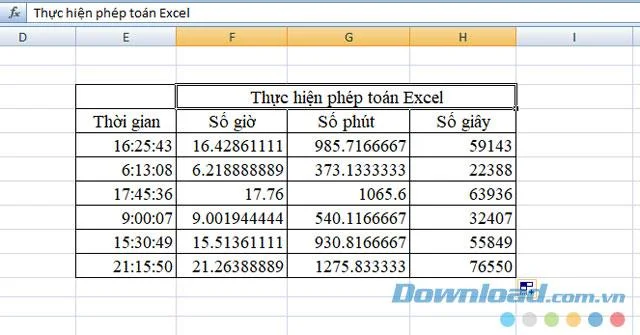
Step 4: Finally, after performing the formulas we will get a table of values ​​as follows: 

How to convert time to decimal in Excel

2. Use the CONVERT function to transfer time in Excel

The CONVERT function is a function used to convert the values ​​of measurement units. To convert time to decimal using this function, we perform the following steps:

Step 1 : Click on any empty cell in the value table.

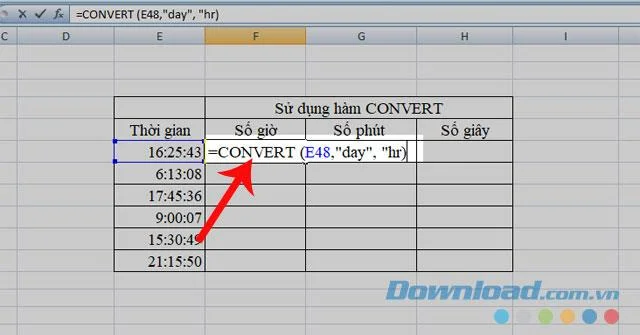
Step 2: Enter the formula: = CONVERT ("Value", "from_unit", "to_unit") . Inside:

  • CONVERT: is the name of the function.
  • Value: Number to transfer.
  • From_unit: Unit of original number. 
  • T o_unit: Units to be converted.

Units of conversion:

  • day: unit is day.
  • hr: units are hours.
  • mn: unit is day.
  • sec: units are seconds.

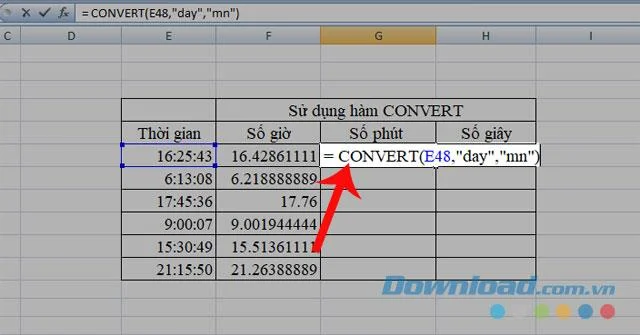
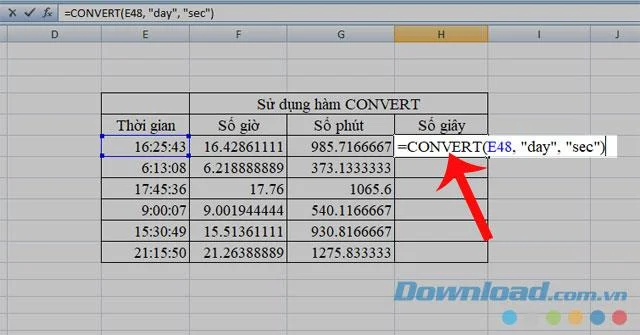
Note: In this article, From_unti will be "day" and convert time to number of hours / minutes / seconds, we replace the units in To_unti as "hr / mn / sec" respectively .

How to convert time to decimal in Excel
Use the CONVERT function to convert values ​​to hours
How to convert time to decimal in Excel
Use the CONVERT function to convert values ​​to minutes
How to convert time to decimal in Excel
Use the CONVERT function to convert values ​​to seconds

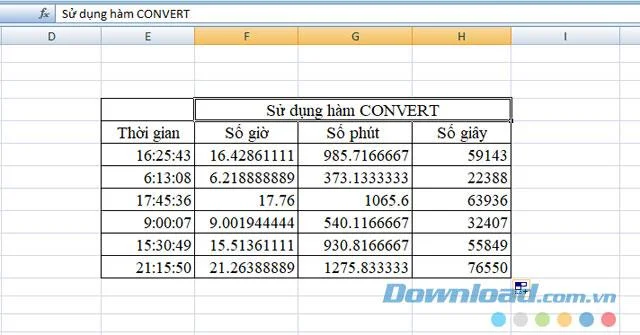
Step 3: Do the same with the remaining cells in each value column, finally we will get a table of values ​​as below:

How to convert time to decimal in Excel

Above are some ways to convert time to decimal in Excel, we hope that these things will help you can easily and quickly complete your work.

In addition, you can also refer to some articles such as: 
I wish you successful implementation!

Leave a Comment

Side Hustles That Actually Pay in 2026: 7 Realistic Options and the Tradeoffs to Know

Side Hustles That Actually Pay in 2026: 7 Realistic Options and the Tradeoffs to Know

Compare realistic side hustles for 2026 by startup cost, fees, flexibility, and income control, with current tax and scam guidance from official sources.

Remote Work Ergonomics in 2026: Upgrade Your Home Office Without Overbuying

Remote Work Ergonomics in 2026: Upgrade Your Home Office Without Overbuying

Upgrade your home office ergonomics with current OSHA and NIOSH guidance on chair fit, monitor height, laptop setup, lighting, and movement.

Why Emotional Intelligence Matters in Leadership—and How to Build It

Why Emotional Intelligence Matters in Leadership—and How to Build It

Learn why emotional intelligence matters in leadership, where it helps most, how to strengthen it, and how to tell whether your approach is working.

How to Transition to a Tech Career Without a Degree: A Results-First Roadmap for 2026

How to Transition to a Tech Career Without a Degree: A Results-First Roadmap for 2026

A practical roadmap for moving into tech without a degree: choose an accessible role, build job-ready skills, prove them with projects, and use hiring feedback to improve.

Building a Personal Brand on LinkedIn in 2026: What Still Works, What Changed, and What to Ignore

Building a Personal Brand on LinkedIn in 2026: What Still Works, What Changed, and What to Ignore

Build a credible LinkedIn personal brand in 2026 with current profile, content, newsletter, analytics, verification, and visibility guidance from LinkedIn.

Quiet Quitting vs. Quiet Firing in 2026: What’s Really Changing at Work

Quiet Quitting vs. Quiet Firing in 2026: What’s Really Changing at Work

Quiet quitting and quiet firing are catchy labels, not diagnoses. Learn what is verified, what depends on context, and what employees and managers can do next.

The Rise of the Fractional Executive: When Part-Time C-Suite Leadership Makes Sense

The Rise of the Fractional Executive: When Part-Time C-Suite Leadership Makes Sense

Fractional executives offer senior leadership without a full-time hire. Learn when the model works, what to ask, and the risks to manage.

How to Negotiate a Raise During Q4 Performance Reviews: A Practical 2026 Decision Guide

How to Negotiate a Raise During Q4 Performance Reviews: A Practical 2026 Decision Guide

Prepare a stronger Q4 raise request with current wage data, timing options, compensation tradeoffs, and scripts for yes, partial, or no outcomes.

6 High-Income Skills You Can Start Learning Before 2026 Ends

6 High-Income Skills You Can Start Learning Before 2026 Ends

Choose a high-income skill you can realistically start before 2026 ends, with current pay data, learning priorities, and a practical self-check.

Mastering the Hybrid Work Schedule: A Practical Framework That Actually Holds Up

Mastering the Hybrid Work Schedule: A Practical Framework That Actually Holds Up

Build a hybrid work schedule around tasks, team overlap, and measurable outcomes. See sample patterns, warning signs, and when to adjust your plan.