How to Create a Custom AI Bot on Google Gemini

Google is aggressively integrating its Gemini AI assistant into most of its apps and devices, from the Pixel 9 to video calls. But if you need a more personalized AI assistant for yourself, try Gemini's Gems feature, which lets you create AI bots with your own instructions and rules.

How to create new Gems

You can access Gems on any device signed in to your Google account, but creating Gems is only available via the Gemini web

Step 1: Click Gem Manager in the bottom left corner of the screen, if the menu column is hidden, select the 3-bar icon in the upper corner. You will see a list of available Gems.
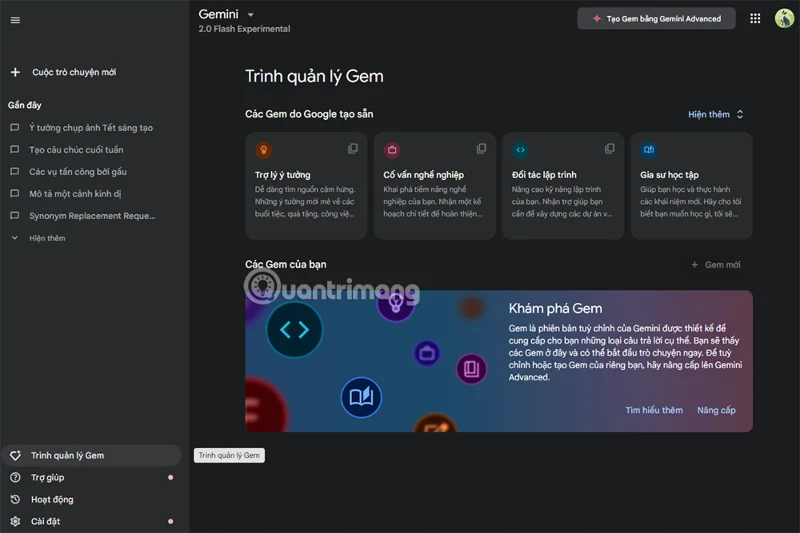
How to Create a Custom AI Bot on Google Gemini

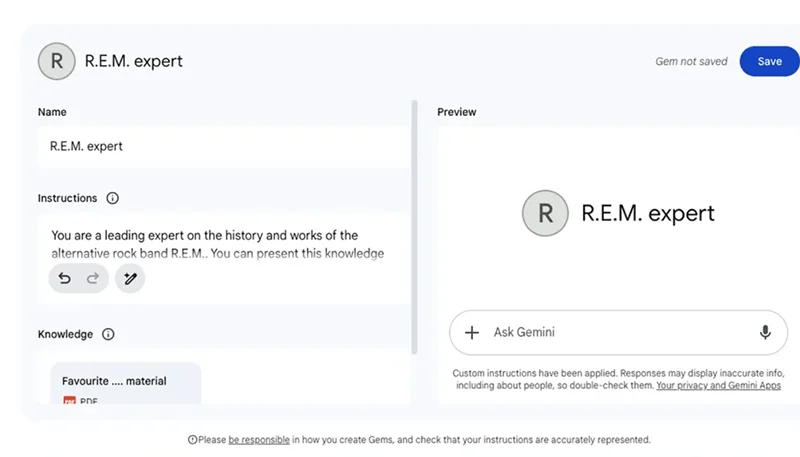
Step 2: Copy and edit existing Gems or click New Gems below to create a completely new Gem. Next, name and provide detailed instructions for the Gem such as: focus on topic, language style, tone...

Step 3: There is a section called Knowledge, where you can upload references like a scientific paper or personal writing sample, giving Gem custom knowledge.

How to Create a Custom AI Bot on Google Gemini

Step 4: Use the input box on the right to test the Gem's performance. When you're done, click Save to save.

How to Create a Custom AI Bot on Google Gemini

Once created, your Gems can be accessed from the Gem Manager or via the Gemini mobile app. Select the desired Gem before starting to enter commands.

What are Gems and how do they work?

Gems are customized versions of Gemini with specific purposes. You can create a Gem that explains difficult concepts in a simple way, or a Gem that focuses on helping you improve your programming skills.

It’s worth noting that Gems don’t offer new features beyond what Gemini already has. However, their value lies in their focus and specificity. You can also upload documentation to provide additional knowledge to Gems, allowing them to work beyond Gemini’s default training data.

Currently, the Gems feature is only available to Gemini Advanced users, with a subscription fee of 489,000 VND per month.
Leave a Comment

What Young Riders Should Know About Moving Their Motorcycles Across Cities

What Young Riders Should Know About Moving Their Motorcycles Across Cities

Long-distance travel can involve heavy traffic, changing weather conditions, and rider fatigue. If you are also dealing with the responsibilities of moving home, such as packing belongings or coordinating accommodation, a long ride may add unnecessary pressure to an already busy schedule.

Solving Microsoft Teams Shortcut Error Not Opening

Solving Microsoft Teams Shortcut Error Not Opening

Tired of Microsoft Teams shortcut error preventing you from opening the app? Follow our expert, step-by-step guide with the latest fixes for instant resolution. Works on Windows, Mac & web – no tech skills needed!

Solving Microsoft Teams Task Management Sync Error

Solving Microsoft Teams Task Management Sync Error

Tired of Microsoft Teams Task Management Sync Error halting your workflow? Follow our proven, step-by-step fixes to resolve sync issues fast and restore seamless task collaboration. No tech expertise needed!

Troubleshooting Microsoft Teams Wiki Error Formatting

Troubleshooting Microsoft Teams Wiki Error Formatting

Struggling with Microsoft Teams Wiki Error Formatting? This step-by-step guide reveals proven fixes for common wiki tab issues, ensuring smooth editing and collaboration in Teams. Get back to productive wikis fast!

How to Fix Microsoft Teams Installation Error for Linux

How to Fix Microsoft Teams Installation Error for Linux

Struggling with Microsoft Teams installation error on Linux? Discover step-by-step fixes for Ubuntu, Fedora & more. Resolve dependency issues, crashes, and errors quickly with our ultimate guide. Get Teams running smoothly today!

Solving Microsoft Teams Error Page Not Loading

Solving Microsoft Teams Error Page Not Loading

Struggling with Microsoft Teams "Error Page" not loading? Get step-by-step fixes for desktop, web, and mobile. Solve Microsoft Teams Error Page issues quickly and resume seamless teamwork today.

Solving Microsoft Teams Error Screenshot Issues

Solving Microsoft Teams Error Screenshot Issues

Tired of Microsoft Teams "Error Screenshot" blocking your workflow? Get proven, step-by-step solutions to resolve screenshot errors in Teams instantly and boost productivity. No tech skills needed!

How to Fix Microsoft Teams Error U User

How to Fix Microsoft Teams Error U User

Tired of Microsoft Teams "Error U" User blocking your chats? Get proven, step-by-step fixes to clear cache, reset, and restore seamless collaboration instantly.

Where are Microsoft Teams Registry Keys Located on Windows 11?

Where are Microsoft Teams Registry Keys Located on Windows 11?

Unlock the precise locations of Microsoft Teams registry keys on Windows 11. Step-by-step guide to find, access, and safely tweak them for optimal performance and troubleshooting. Essential for IT pros and Teams enthusiasts.

How to Fix Microsoft Teams Training Error Video Lag

How to Fix Microsoft Teams Training Error Video Lag

Tired of Microsoft Teams "Training Error" Video Lag ruining your meetings? Follow our step-by-step guide with the latest fixes for smooth video calls—no more frustration!






