How to Update Google Chrome Browser

Learn how to update Google Chrome browser on Windows, Mac, and Android in minutes to enjoy better security, speed, and new features. Follow these clear steps.
How to Delete Cookies from Chrome helps protect your browsing privacy and often resolves slow page loads or login problems. Cookies store site preferences and tracking data, so clearing them resets this information without affecting your saved passwords or bookmarks. This guide covers the exact steps for desktop and mobile devices.
Cookies allow websites to remember your login status and preferences, but they can also track your activity across multiple sites. Over time, accumulated cookies increase browser storage use and may cause compatibility errors. Deleting them periodically keeps Chrome running smoothly and limits data shared with advertisers.
Chrome separates cookies by site, so you can remove data from specific domains instead of clearing everything at once. This selective approach avoids losing useful settings on frequently visited pages.
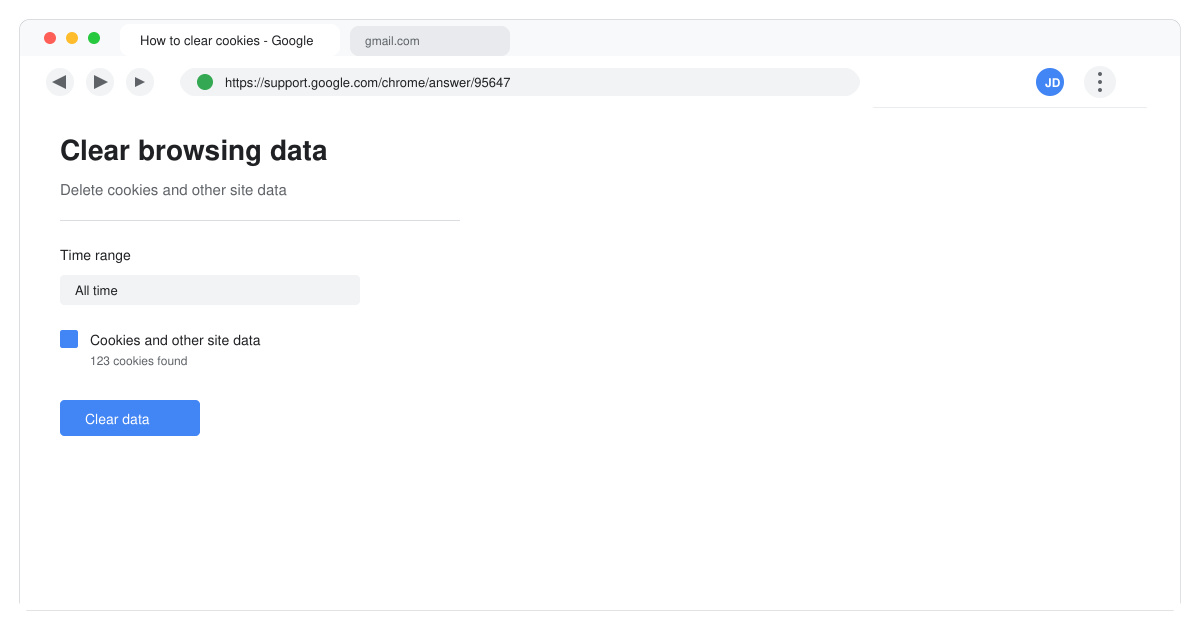
Launch Google Chrome on your Windows or Mac computer. Click the three-dot menu icon in the top-right corner of the browser window. Select Settings from the dropdown list.
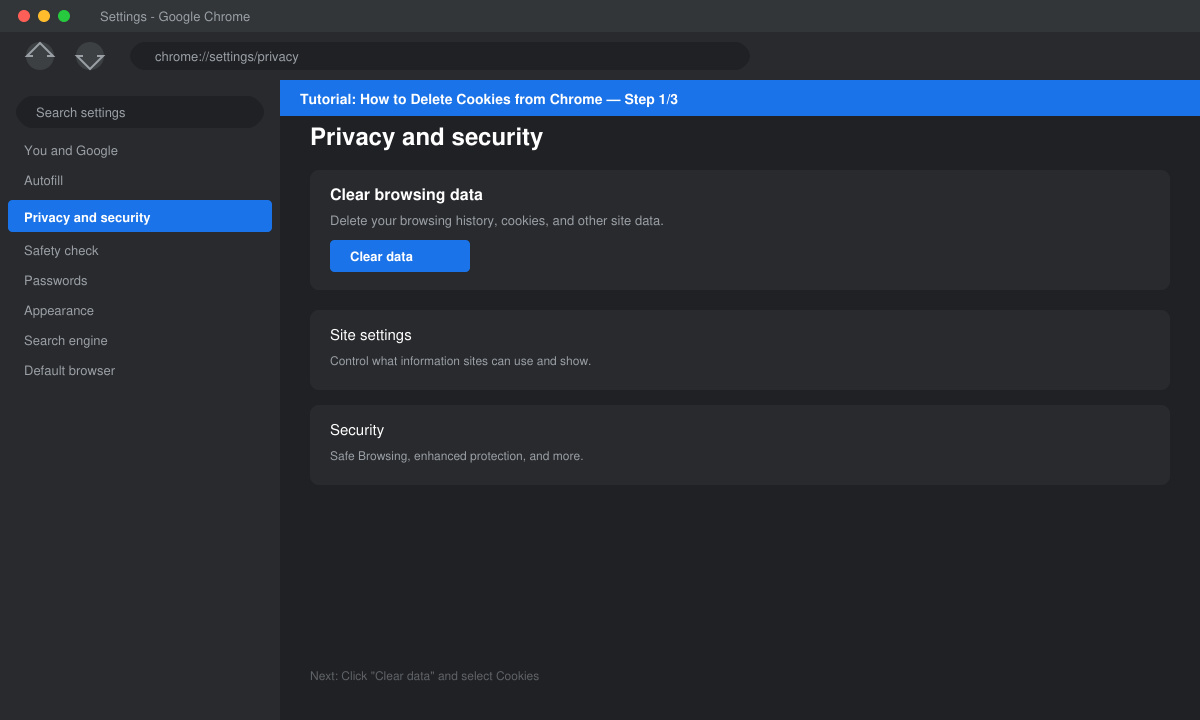
In the left sidebar, click Privacy and security. Then select Clear browsing data from the main panel.
Switch to the Advanced tab if needed. Check the box for Cookies and other site data. You can also select Cached images and files if you want to clear additional storage. Leave other boxes unchecked to keep your history and passwords intact.
Use the Time range dropdown to choose All time for a complete removal. Click the Clear data button at the bottom. Chrome will immediately delete the selected cookies.
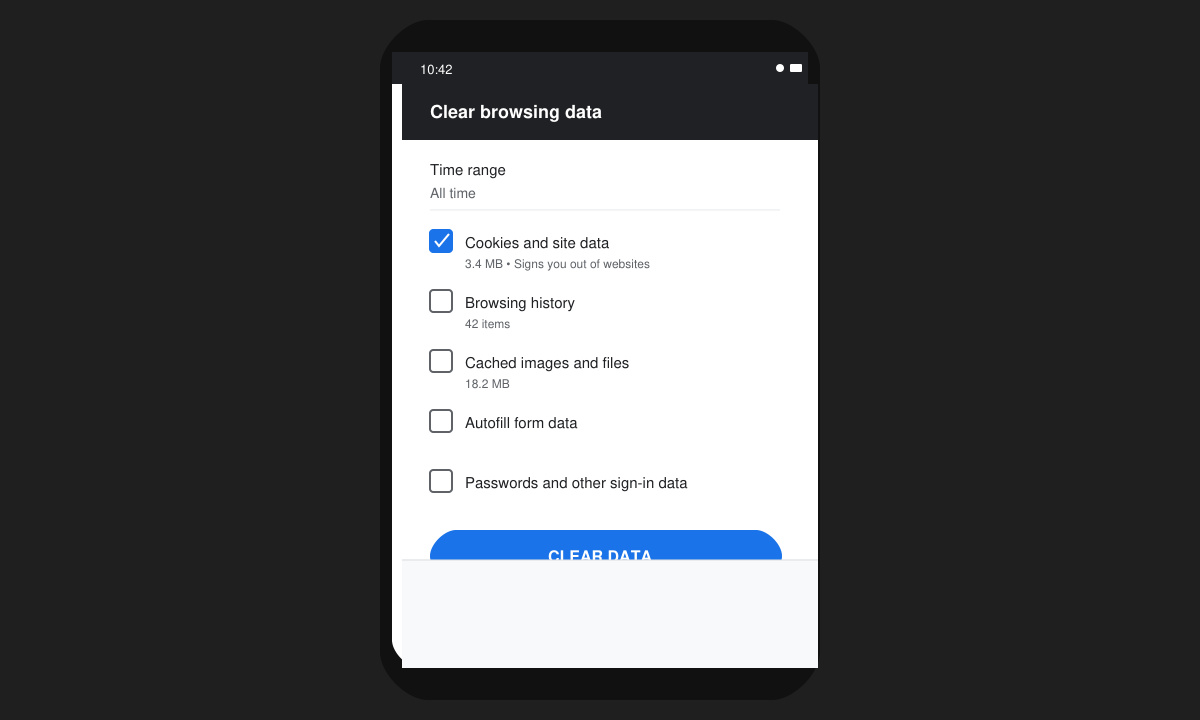
On mobile devices the path differs slightly. Open the Chrome app, tap the three-dot menu, then go to Settings followed by Privacy and security. Select Clear browsing data, check Cookies and site data, and tap Clear data to finish. On iOS you must also confirm through the system prompt that appears.
Yes. Most sites require you to log in again after cookies are removed because session information is stored in those files.
Yes. In Settings go to Privacy and security, click Cookies and other site data, then Site Settings. Search for the domain and choose Remove for that specific site.
No. Passwords remain stored in Chrome’s password manager unless you also select Passwords and other sign-in data during the clear process.
Regularly performing how to delete cookies from Chrome keeps your browser fast and your data private. Follow the steps above whenever you notice performance issues or want a fresh start with site tracking.
Learn how to update Google Chrome browser on Windows, Mac, and Android in minutes to enjoy better security, speed, and new features. Follow these clear steps.
Learn how to download old media from WhatsApp and recover photos or videos from past chats. Follow these clear steps to save files that no longer appear in your gallery.
Facebook Messenger Isn T Working on your device? Use these exact troubleshooting steps to restore chats, calls, and notifications fast on Android, iOS, or desktop.
How to See Deleted WhatsApp Messages using your phone's built-in tools. Follow these exact steps to recover messages that contacts have deleted from chats.
Learn how to clear browser history in Chrome on desktop and Android with this exact step-by-step process. Keep your browsing private and free up storage space quickly.
Master how to use CapCut with this practical walkthrough covering project setup, editing tools, effects, and export options for high-quality video results.
Get the latest WhatsApp App Update Download from official sources to access new features and security improvements. Follow these clear steps for Android and iOS devices.
Learn how to safely Download WhatsApp App for Android from the official Google Play Store. Follow our clear step-by-step instructions to install the latest version quickly and securely.
Google Download WhatsApp App safely through the Google Play Store with this clear guide. Get the official version on your Android device quickly and avoid fake downloads.
Facebook and Messenger not working can disrupt your day. Follow these targeted fixes to restore access quickly on mobile and desktop.








