How to Check Purchase History on Apple App Store
Through your purchase history on the App Store, you will know when you downloaded that app or game, and how much you paid for the paid app.
Advances in technology today can allow you to extract text directly from images captured with your smartphone camera. This is an extremely useful feature and this article will show you how to use it on your iPhone.
Extract, copy text from photos taken on iPhone
In iOS 15, Apple introduced a number of useful new features in the Photos app. While “Visual Lookup” helps you identify and search for information about objects in a photo, “Live Text” lets you extract plain text from a photo. This text can then be copied, translated, or used for searching.
The convenience that Live Text brings is probably unquestionable, and the way to use this feature on iPhone is not complicated. You just need to perform the following operations.
First, enable the Live Text feature on iOS 15, by going to " Settings " > " Camera ", then enable the " Live Text " option.
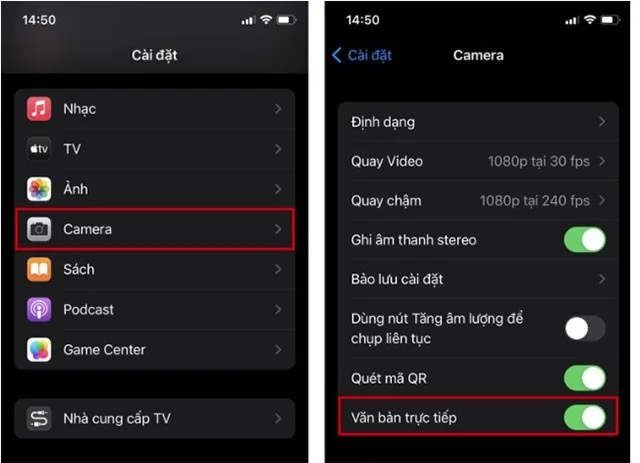
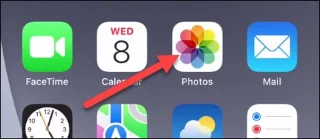
Live Text is now enabled. Now you will need to take a photo of the text you want to extract using your iPhone camera (if you don’t have one already). Then, go to the “ Photos ” app on your device.
Select the image containing the text you want to extract.
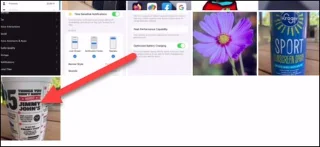
Live Text is automatically enabled. So if Live Text detects and recognizes text in your photo, you'll see a small barcode scanner icon appear in the bottom right corner of the image.

The text that Live Text has identified will be highlighted (bold). You can now handle it just like selecting a regular text on iPhone. Tap and hold to reveal additional options.

Immediately, a toolbar will appear, allowing you to copy, select all, translate, or share the selected text.
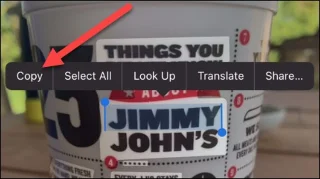
That's it! It's a small but handy feature that can save you a lot of time by not having to manually type text in images like before.
Through your purchase history on the App Store, you will know when you downloaded that app or game, and how much you paid for the paid app.
Apple makes it easy to find out if a WiFi network is safe before you connect. You don't need any software or other tools to help, just use the built-in settings on your iPhone.
iPhone mutes iPhone from unknown callers and on iOS 26, iPhone automatically receives incoming calls from an unknown number and asks for the reason for the call. If you want to receive unknown calls on iPhone, follow the instructions below.
iPhone has a speaker volume limit setting to control the sound. However, in some situations you need to increase the volume on your iPhone to be able to hear the content.
ADB is a powerful set of tools that give you more control over your Android device. Although ADB is intended for Android developers, you don't need any programming knowledge to uninstall Android apps with it.
You might think you know how to get the most out of your phone time, but chances are you don't know how big a difference this common setting makes.
The Android System Key Verifier app comes pre-installed as a system app on Android devices running version 8.0 or later.
Despite Apple's tight ecosystem, some people have turned their Android phones into reliable remote controls for their Apple TV.
There are many reasons why your Android phone cannot connect to mobile data, such as incorrect configuration errors causing the problem. Here is a guide to fix mobile data connection errors on Android.
For years, Android gamers have dreamed of running PS3 titles on their phones – now it's a reality. aPS3e, the first PS3 emulator for Android, is now available on the Google Play Store.