How to Update Google Chrome Browser

Learn how to update Google Chrome browser on Windows, Mac, and Android in minutes to enjoy better security, speed, and new features. Follow these clear steps.
Telegram makes it simple to locate communities on almost any topic once you know where to look. This guide explains how to find a group in Telegram using the app's built-in tools on both mobile and desktop. Follow the steps below to locate and join relevant groups quickly.
Telegram's search bar is the fastest way to locate public groups. You can enter keywords related to your interests, such as hobbies, locations, or professional topics. Results show both groups and channels, so check the member count and description before joining.
Make sure your app is updated to the latest version for the most accurate search results. Public groups appear immediately, while some invite-only groups require a direct link.
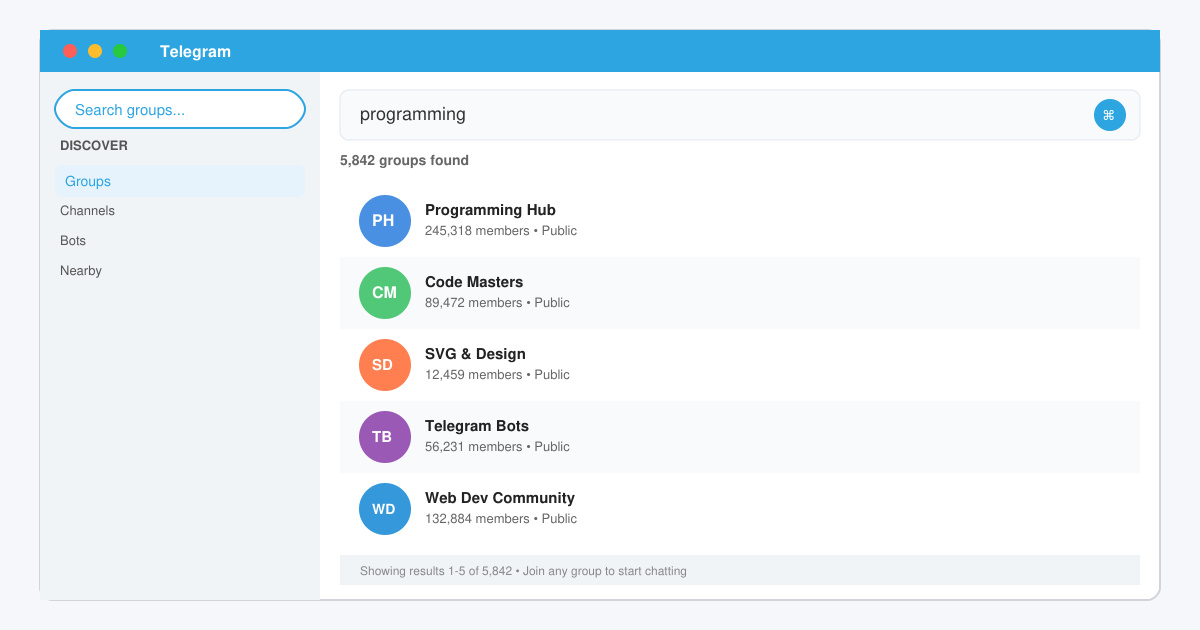
Launch Telegram on your phone or desktop. Tap the magnifying glass icon at the top of the main chat list on mobile, or click the search field in the top-left corner on desktop. This opens the global search that scans all public groups.

Type specific terms such as "photography" or "local hiking". Telegram displays matching groups with member counts and short descriptions. Scroll through results and tap any group to preview its recent messages and rules.
Read the group description and check the number of members. If the group looks active and matches your needs, tap the Join button at the top. You will immediately see the chat history and can start participating.

Browse Telegram's built-in categories by searching for terms like "directory" or visit known public group lists shared by official Telegram channels. You can also ask contacts for direct invite links to private groups.
No. Private groups do not appear in search results. You need a direct invite link from a current member.
These are often newly created groups or test channels. Avoid joining until they have at least a few hundred active members.
Yes. Use the Telegram desktop app or web version at web.telegram.org and follow the same search steps described above.
Mastering how to find a group in Telegram opens access to thousands of active communities. Apply the search process consistently and you will quickly locate groups that match your interests.
Learn how to update Google Chrome browser on Windows, Mac, and Android in minutes to enjoy better security, speed, and new features. Follow these clear steps.
Learn how to download old media from WhatsApp and recover photos or videos from past chats. Follow these clear steps to save files that no longer appear in your gallery.
Facebook Messenger Isn T Working on your device? Use these exact troubleshooting steps to restore chats, calls, and notifications fast on Android, iOS, or desktop.
How to See Deleted WhatsApp Messages using your phone's built-in tools. Follow these exact steps to recover messages that contacts have deleted from chats.
Learn how to clear browser history in Chrome on desktop and Android with this exact step-by-step process. Keep your browsing private and free up storage space quickly.
Master how to use CapCut with this practical walkthrough covering project setup, editing tools, effects, and export options for high-quality video results.
Get the latest WhatsApp App Update Download from official sources to access new features and security improvements. Follow these clear steps for Android and iOS devices.
Learn how to safely Download WhatsApp App for Android from the official Google Play Store. Follow our clear step-by-step instructions to install the latest version quickly and securely.
Google Download WhatsApp App safely through the Google Play Store with this clear guide. Get the official version on your Android device quickly and avoid fake downloads.
Facebook and Messenger not working can disrupt your day. Follow these targeted fixes to restore access quickly on mobile and desktop.








