How to Update Google Chrome Browser

Learn how to update Google Chrome browser on Windows, Mac, and Android in minutes to enjoy better security, speed, and new features. Follow these clear steps.
Making Google your default web browser ensures links from emails, documents, and other apps open directly in Chrome. This article gives precise instructions for Windows, macOS, Android, and iOS so the change takes effect immediately.
Install Google Chrome from the official site if it is not already present. Close all browser windows and note your current default browser so you can verify the switch afterward. On mobile devices, also check that Chrome has completed its initial setup and signed into your Google account.
Press the Windows key, type “Default apps,” and press Enter. Scroll down and click the current default browser listed under “Web browser.”
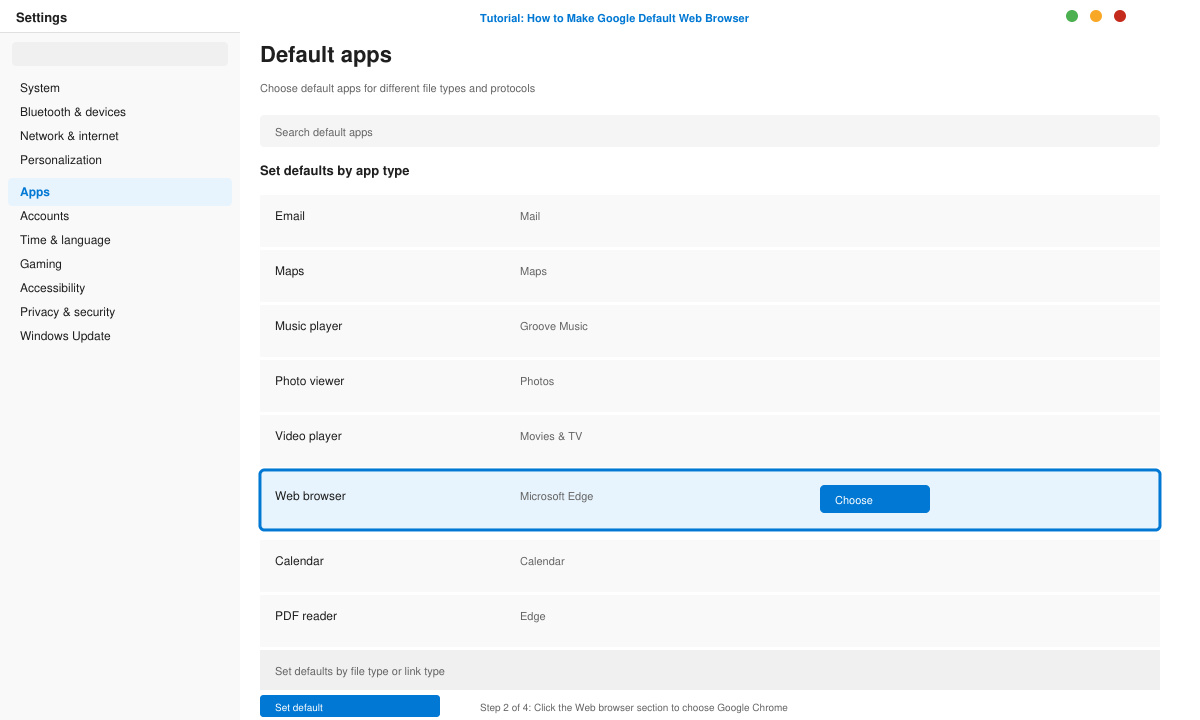
Click Google Chrome in the popup window. Windows immediately applies the change and shows a confirmation message.
Return to the Default apps page and confirm “Google Chrome” now appears under Web browser. Open a link from File Explorer to test the change.
Launch Google Chrome, click the three-dot menu in the top right, and select Settings. Scroll to the Default browser section and click “Make default.”
Go to Apple menu > System Settings > Desktop & Dock. Under “Default web browser,” choose Google Chrome from the dropdown menu.
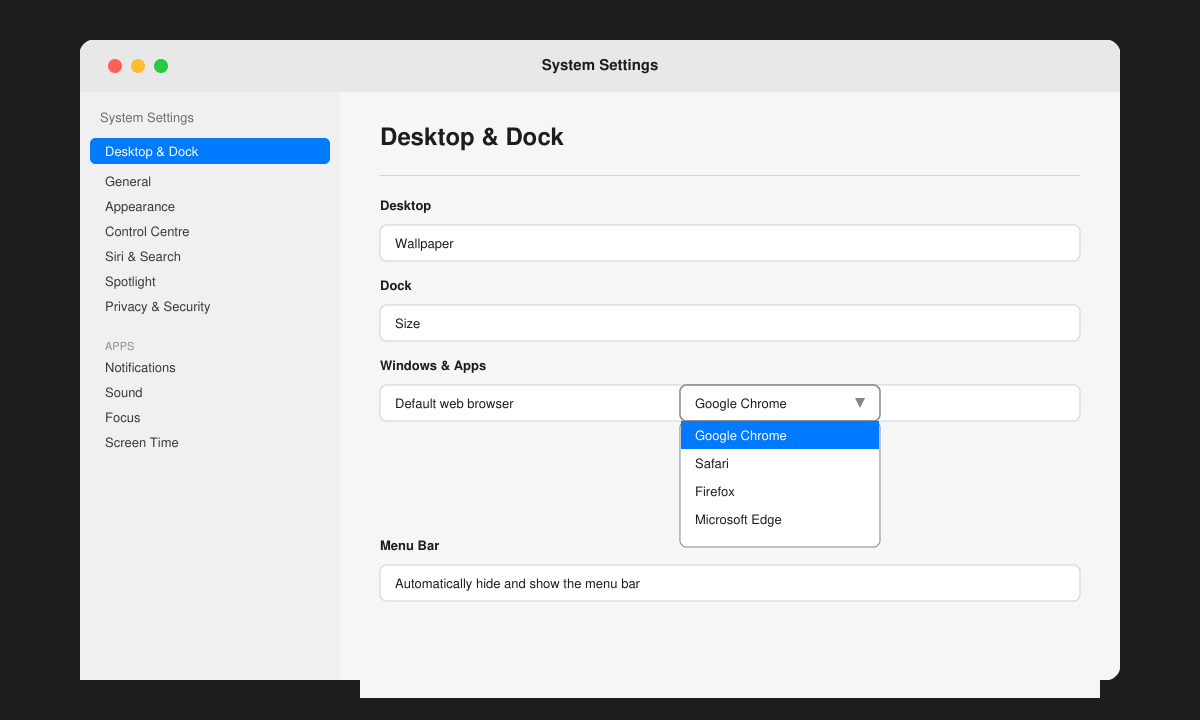
Click any hyperlink in Mail or another app. The page should open in Chrome instead of the previous browser.
Open the phone’s Settings app, tap Apps, then tap Default apps. Select Browser app and choose Chrome from the list.
Go to Settings > Chrome. Tap Default Browser App and select Chrome. Return to the home screen to complete the switch.
No. Bookmarks remain inside Chrome regardless of the default browser setting.
Yes. The default setting only controls which app opens links; other browsers stay available for manual use.
Sync works only after you sign into the same Google account inside Chrome on each device.
Once Google Chrome is set as the default web browser, all future links open automatically in Chrome with your saved passwords and extensions ready.
Learn how to update Google Chrome browser on Windows, Mac, and Android in minutes to enjoy better security, speed, and new features. Follow these clear steps.
Learn how to download old media from WhatsApp and recover photos or videos from past chats. Follow these clear steps to save files that no longer appear in your gallery.
Facebook Messenger Isn T Working on your device? Use these exact troubleshooting steps to restore chats, calls, and notifications fast on Android, iOS, or desktop.
How to See Deleted WhatsApp Messages using your phone's built-in tools. Follow these exact steps to recover messages that contacts have deleted from chats.
Learn how to clear browser history in Chrome on desktop and Android with this exact step-by-step process. Keep your browsing private and free up storage space quickly.
Master how to use CapCut with this practical walkthrough covering project setup, editing tools, effects, and export options for high-quality video results.
Get the latest WhatsApp App Update Download from official sources to access new features and security improvements. Follow these clear steps for Android and iOS devices.
Learn how to safely Download WhatsApp App for Android from the official Google Play Store. Follow our clear step-by-step instructions to install the latest version quickly and securely.
Google Download WhatsApp App safely through the Google Play Store with this clear guide. Get the official version on your Android device quickly and avoid fake downloads.
Facebook and Messenger not working can disrupt your day. Follow these targeted fixes to restore access quickly on mobile and desktop.








