How to play Shyvana season 7, build Shyvana Dragon God

Among the Dragon God generals of DTCL season 7 , Shyvana and Shi Oh Yu are two characters with the ability to control opponents. Shyvana's Dragon is ranked higher because this is a general with a higher price and is supported quite a bit by the Dragon God generals of DTCL season 7.

Even with a 3-star Shyvana and full items, you still need to have more forces behind her. So what will Shyvana need and who should go with her to get the greatest effect, please see the content below.

Shyvana's base stats and skills, race

Clan

How to play Shyvana season 7, build Shyvana Dragon God

How to play Shyvana season 7, build Shyvana Dragon God

How to play Shyvana season 7, build Shyvana Dragon God

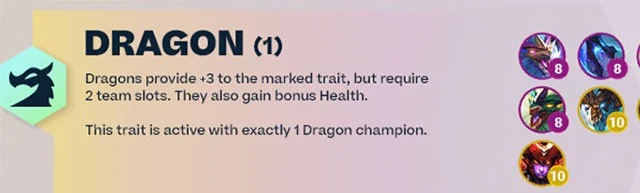
Shapeshifter provides extra health when transforming, Dragon's Bloodsteal and attack speed support, so Shyvana only needs to appear in the team with +3 of her clan to max out Dragon's buff. She is a late game champion and is needed to complete the Dragon's lineup this season 7.

Skills and personal stats

How to play Shyvana season 7, build Shyvana Dragon God

  • Price: 10 gold
  • Health: 1200 / 2160 / 3888
  • Mana: 30
  • Armor: 60
  • Magic Resistance: 60
  • DPS: 80/144/259
  • Base Damage: 100/180/324
  • Attack Speed: 0.8
  • Crit Rate: 25%
  • Attack Range: 1

Shyvana transforms into Dragon form for the remainder of the round, replacing her abilities with Flame Breath. She then flies around untargetable before diving into the largest group of enemies, dealing magic damage and stunning them for 1.5 seconds.

Dragon's Breath: Shyvana breathes fire in a cone, dealing magic damage equal to a percentage of the enemy's maximum health.

Shyvana build in Truth Arena season 7, Shyvana build in Truth Arena season 7

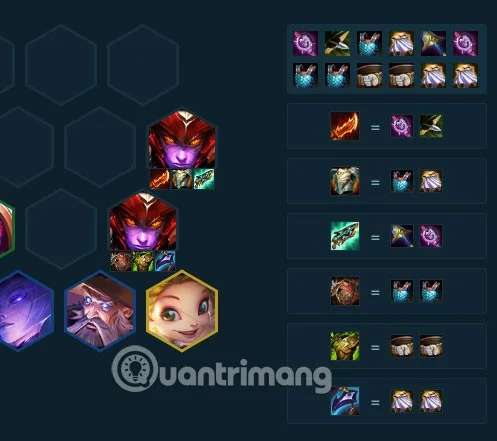
Most of these will be defensive items like Blood Armor, Thornmail, Dragon's Claw, Gargoyle Stoneplate. Some support items like Hextech Gunblade, Redemption, Cloak of Darkness, and Quicksilver Cloak, if you have them, throw them to Shyvana.

Since she's already getting the health and attack speed buffs from Dragon's Rage and Shapeshift, defensive items will keep Shyvana up longer.

How to play Shyvana season 7, build Shyvana Dragon God

Shyvana DTCL season 7 lineup, build Shyvana DTCL season 7

Shyvana 9 Dragon's Rage

How to play Shyvana season 7, build Shyvana Dragon God

Shyvana will be the last character to appear and is also the champion that you can use to get 9 Dragons. You can also get 9 Dragons without Shyvana but it is very difficult to do so.

When you find Shyvana, give her all your defensive items. Shen, Hecarim, and Sett can all carry Shyvana's items. Below Swain, Senna and Xayah will be the damage dealers. Xayah will be the team's main force, Swain, who uses magic items, will be the secondary carry.

See more: Build Xayah DTCL season 7 , build Xayah Rage of the Dragon Archer

6 Metamorphosis

How to play Shyvana season 7, build Shyvana Dragon God

Put Neeko next to Shyvana and you'll have a "fake" Shyvana supporting the "real" line. This team doesn't have Xayah so the main damage comes from Swain and Elise. Elise is a pretty annoying champion as she can jump around the board continuously if her bite kills the enemy.

You can rotate to this comp from a 9 Dragons comp, find Shapeshifters like Elise, Gnar, and Nidalee early in the game, and rotate your cards as you level up to 8 to find Shyvana.

Now, it's not like high-priced 3-gold champions can take on everyone like in previous seasons. Shyvana is really good, but if she doesn't have a support team like Cuong Long or Hoa Hinh, even if she has full items and is 3 stars, she will still get beaten up like normal, because anyone can have BARD in the squad.

See also:

Leave a Comment

How to Fix Microsoft Teams Web Login Error

How to Fix Microsoft Teams Web Login Error

Stuck with Microsoft Teams Web Login Error? Get instant fixes for common issues like "Something went wrong" or login loops. Step-by-step guide to resolve Teams web login problems and stay productive. Updated with latest browser tweaks.

How to Fix Microsoft Teams Error 657rx Update Failed

How to Fix Microsoft Teams Error 657rx Update Failed

Struggling with Microsoft Teams Error 657rx Update Failed? Discover step-by-step fixes, from quick restarts to advanced troubleshooting, to get your Teams app updated and running smoothly in minutes. No tech skills required!

Solving Microsoft Teams VDI Error Lag

Solving Microsoft Teams VDI Error Lag

Tired of Microsoft Teams "VDI Error" Lag freezing your video calls? This ultimate guide delivers step-by-step fixes for VDI environments like Citrix and VMware. Optimize performance now for lag-free collaboration!

Solving Microsoft Teams Join Meeting Error via Direct Link

Solving Microsoft Teams Join Meeting Error via Direct Link

Struggling with Microsoft Teams "Join Meeting Error"? Discover proven steps to solve it via direct links. Quick fixes for seamless joining – no tech skills needed!

How to Test Your Microsoft Teams Audio and Camera Before a Call

How to Test Your Microsoft Teams Audio and Camera Before a Call

Discover simple steps to test your Microsoft Teams audio and camera before a call. Ensure crystal-clear sound and video for professional meetings every time with our easy guide. Perfect for desktop, mobile, and web users.

How to Fix Microsoft Teams Error 53003: Access Denied

How to Fix Microsoft Teams Error 53003: Access Denied

Struggling with Microsoft Teams Error 53003 Access Denied? Discover proven, step-by-step fixes to resolve it quickly. Clear cache, update Teams, bypass proxies & more for seamless collaboration. Works on Windows, Mac & web!

Step-by-Step: Uploading Custom Backgrounds to Microsoft Teams

Step-by-Step: Uploading Custom Backgrounds to Microsoft Teams

Master uploading custom backgrounds to Microsoft Teams with this easy step-by-step guide. Personalize your meetings effortlessly on desktop, web, or mobile for a professional edge.

Troubleshooting Microsoft Teams Error on Phone (iOS/Android)

Troubleshooting Microsoft Teams Error on Phone (iOS/Android)

Struggling with Microsoft Teams "Error on Phone" on iOS or Android? Discover step-by-step fixes for calls, permissions, network issues, and more. Get back to seamless teamwork fast!

How to Fix Microsoft Teams OneDrive Error During File Sharing

How to Fix Microsoft Teams OneDrive Error During File Sharing

Tired of Microsoft Teams OneDrive error blocking file sharing? Follow our expert step-by-step guide to fix sync issues, permissions errors, and more quickly. Get back to seamless collaboration today!

Solving Microsoft Teams Error Screen Flickering

Solving Microsoft Teams Error Screen Flickering

Struggling with Microsoft Teams screen flickering? Discover step-by-step solutions to fix this annoying error, from disabling hardware acceleration to driver updates. Get smooth video calls today!

Solving Microsoft Teams Network Error on Public Wi-Fi

Solving Microsoft Teams Network Error on Public Wi-Fi

Struggling with Microsoft Teams "Network Error" on public Wi-Fi? Get instant fixes like VPN tweaks, port checks, and cache clears to restore calls and meetings seamlessly. Step-by-step guide for quick relief.

How to Fix Microsoft Teams Wheres My Team Search Error

How to Fix Microsoft Teams Wheres My Team Search Error

Tired of the frustrating Microsoft Teams "Where\

Microsoft Teams for Students: How to Join Classes in 2026

Microsoft Teams for Students: How to Join Classes in 2026

Unlock seamless learning with Microsoft Teams for Students! Step-by-step guide to joining classes in 2026, troubleshooting tips, and pro hacks for ultimate success. Perfect for students everywhere.

Solving Microsoft Teams License Error 0x80048504

Solving Microsoft Teams License Error 0x80048504

Tired of Microsoft Teams License Error 0x80048504 blocking your meetings? Get instant fixes with proven steps to resolve it permanently. Clear cache, reset licenses, and more – works every time!

How to Fix Microsoft Teams Remove Account Error

How to Fix Microsoft Teams Remove Account Error

Struggling with Microsoft Teams "Remove Account" error? Discover step-by-step fixes to resolve it quickly. Clear cache, reset app, and more for seamless account management in the latest Teams version.