When to Start Decorating for Halloween in 2026

Use a simple 2026 Halloween decorating timeline for indoor décor, outdoor displays, and fresh pumpkins, with practical adjustments for weather and events.
In the new One UI 3.0 version on Samsung, users can use many other interesting and attractive features, such as reviewing deleted notifications on the Samsung status bar. By default, Android devices will display notifications in the status bar so you can immediately read the latest information, from sent messages, Messenger messages, Facebook notifications, etc. In case the user accidentally deletes that notification, it is impossible to read the content of that notification again. With some Samsung devices installed with One UI 3.0, you can completely read notifications on Android without having to install additional support applications. The following article will guide readers on how to review notifications on Samsung.
Instructions for re-reading deleted notifications on Samsung
Step 1:
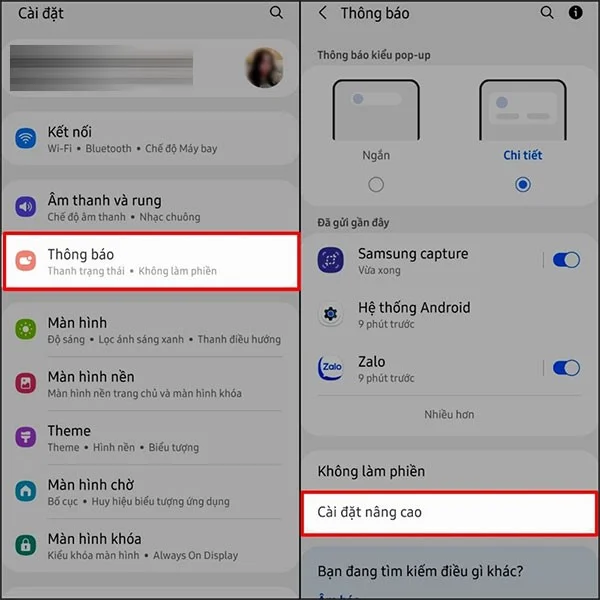
First, users access the Settings section on the device, then select Notifications and select Advanced Settings .
Step 2:
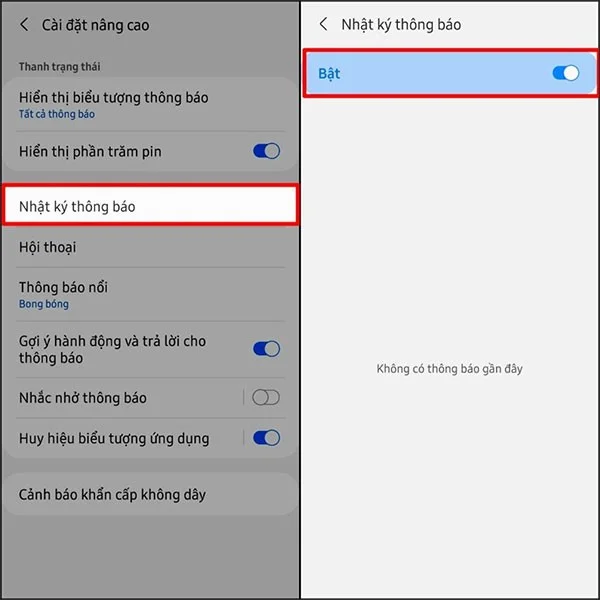
Switch to the new interface, the user clicks on the Notification Log item to set up notification content on the device. Next, the user activates this Notification Log feature . After activation, all notifications displayed on the device will be saved in the Notification Log item.
Step 3:
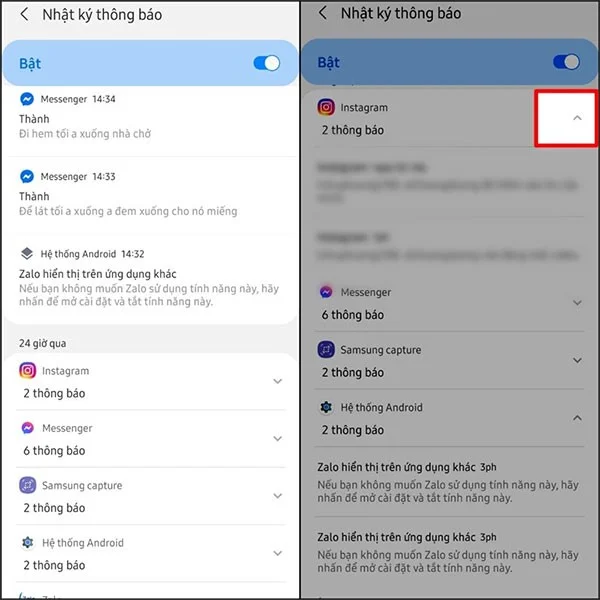
Now when you accidentally delete the notification displayed on the Samsung notification bar, we just need to access the Notification Log section to review all the notifications. If you want to see each notification in each application, you click on the arrow to the right of the application.
Use a simple 2026 Halloween decorating timeline for indoor décor, outdoor displays, and fresh pumpkins, with practical adjustments for weather and events.
Mix five vivid, approachable Halloween cocktails with measured recipes, simple prep tips, and an alcohol-free option for your party guests.
Find 15 office-friendly Halloween costume ideas for 2026, with practical checks for dress codes, respectful themes, comfort, and workplace safety.
Plan a fun elementary school Halloween party with easy crafts, games, inclusive treats, costume tips, and a sample 75-minute classroom schedule.
Compare realistic side hustles for 2026 by startup cost, fees, flexibility, and income control, with current tax and scam guidance from official sources.
Upgrade your home office ergonomics with current OSHA and NIOSH guidance on chair fit, monitor height, laptop setup, lighting, and movement.
Learn why emotional intelligence matters in leadership, where it helps most, how to strengthen it, and how to tell whether your approach is working.
A practical roadmap for moving into tech without a degree: choose an accessible role, build job-ready skills, prove them with projects, and use hiring feedback to improve.
Build a credible LinkedIn personal brand in 2026 with current profile, content, newsletter, analytics, verification, and visibility guidance from LinkedIn.
Quiet quitting and quiet firing are catchy labels, not diagnoses. Learn what is verified, what depends on context, and what employees and managers can do next.








