How to switch between old Outlook and new Outlook

The new Outlook application is significantly improved with a fresher interface, along with some different options compared to the old Outlook. However, not everyone is familiar with the new Outlook interface and wants to return to the old Outlook to use the full features and more customizations on Outlook. Below are instructions for switching between the old Outlook and the new Outlook.

Instructions for switching between old Outlook and new Outlook

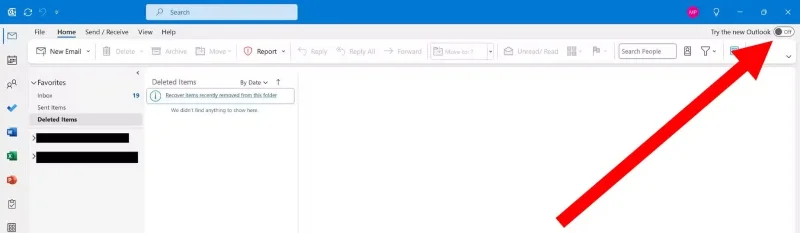
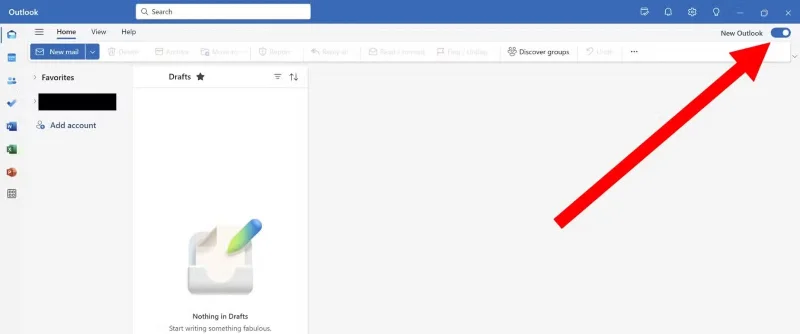
If you are using the old Outlook, to switch to the new Outlook, users just need to activate the New Outlook switch button in the top right corner of the interface.
How to switch between old Outlook and new Outlook

Immediately after that, the Outlook interface switched to a new version for users to experience.

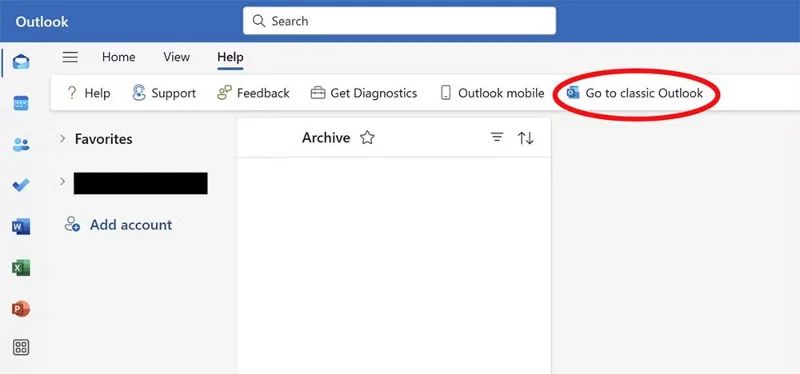
In case this New Outlook button is not available, click Help then to return to the old Outlook interface, click Go to Classic Outlook and you're done.

How to switch between old Outlook and new Outlook

Or we can switch to off mode at Try the New Outlook to turn off using the new version of Outlook.

How to switch between old Outlook and new Outlook

Leave a Comment

What Young Riders Should Know About Moving Their Motorcycles Across Cities

What Young Riders Should Know About Moving Their Motorcycles Across Cities

Long-distance travel can involve heavy traffic, changing weather conditions, and rider fatigue. If you are also dealing with the responsibilities of moving home, such as packing belongings or coordinating accommodation, a long ride may add unnecessary pressure to an already busy schedule.

Solving Microsoft Teams Shortcut Error Not Opening

Solving Microsoft Teams Shortcut Error Not Opening

Tired of Microsoft Teams shortcut error preventing you from opening the app? Follow our expert, step-by-step guide with the latest fixes for instant resolution. Works on Windows, Mac & web – no tech skills needed!

Solving Microsoft Teams Task Management Sync Error

Solving Microsoft Teams Task Management Sync Error

Tired of Microsoft Teams Task Management Sync Error halting your workflow? Follow our proven, step-by-step fixes to resolve sync issues fast and restore seamless task collaboration. No tech expertise needed!

Troubleshooting Microsoft Teams Wiki Error Formatting

Troubleshooting Microsoft Teams Wiki Error Formatting

Struggling with Microsoft Teams Wiki Error Formatting? This step-by-step guide reveals proven fixes for common wiki tab issues, ensuring smooth editing and collaboration in Teams. Get back to productive wikis fast!

How to Fix Microsoft Teams Installation Error for Linux

How to Fix Microsoft Teams Installation Error for Linux

Struggling with Microsoft Teams installation error on Linux? Discover step-by-step fixes for Ubuntu, Fedora & more. Resolve dependency issues, crashes, and errors quickly with our ultimate guide. Get Teams running smoothly today!

Solving Microsoft Teams Error Page Not Loading

Solving Microsoft Teams Error Page Not Loading

Struggling with Microsoft Teams "Error Page" not loading? Get step-by-step fixes for desktop, web, and mobile. Solve Microsoft Teams Error Page issues quickly and resume seamless teamwork today.

Solving Microsoft Teams Error Screenshot Issues

Solving Microsoft Teams Error Screenshot Issues

Tired of Microsoft Teams "Error Screenshot" blocking your workflow? Get proven, step-by-step solutions to resolve screenshot errors in Teams instantly and boost productivity. No tech skills needed!

How to Fix Microsoft Teams Error U User

How to Fix Microsoft Teams Error U User

Tired of Microsoft Teams "Error U" User blocking your chats? Get proven, step-by-step fixes to clear cache, reset, and restore seamless collaboration instantly.

Where are Microsoft Teams Registry Keys Located on Windows 11?

Where are Microsoft Teams Registry Keys Located on Windows 11?

Unlock the precise locations of Microsoft Teams registry keys on Windows 11. Step-by-step guide to find, access, and safely tweak them for optimal performance and troubleshooting. Essential for IT pros and Teams enthusiasts.

How to Fix Microsoft Teams Training Error Video Lag

How to Fix Microsoft Teams Training Error Video Lag

Tired of Microsoft Teams "Training Error" Video Lag ruining your meetings? Follow our step-by-step guide with the latest fixes for smooth video calls—no more frustration!

How to Fix Microsoft Teams Error occurred During Sign-In

How to Fix Microsoft Teams Error occurred During Sign-In

Frustrated by Microsoft Teams "Error occurred" during sign-in? Discover proven, step-by-step fixes to get back online fast. Clear cache, reset app, and more for seamless login. Works on Windows, Mac & web.

Troubleshooting Microsoft Teams Call Error Disconnecting

Troubleshooting Microsoft Teams Call Error Disconnecting

Struggling with Microsoft Teams "Call Error" Disconnecting? Discover proven, step-by-step fixes for call drops, network issues, and more. Get back to seamless meetings fast with our expert troubleshooting guide.

How to Fix Microsoft Teams Error 2603: Login Loop Fix

How to Fix Microsoft Teams Error 2603: Login Loop Fix

Stuck in Microsoft Teams Error 2603 login loop? Get proven step-by-step fixes to resolve the issue fast and restore seamless teamwork. Clear cache, reset, reinstall – all covered!

How to Fix Microsoft Teams Voice Call Error

How to Fix Microsoft Teams Voice Call Error

Tired of Microsoft Teams voice call errors? Follow our step-by-step guide to troubleshoot no audio, echo, or call drops. Proven fixes for crystal-clear calls every time.

How to Fix Microsoft Teams Workflows Error Power Automate

How to Fix Microsoft Teams Workflows Error Power Automate

Struggling with Microsoft Teams "Workflows Error" in Power Automate? Discover proven, step-by-step fixes to resolve connection issues, permissions, and more. Get your workflows running smoothly today!