Skype Free Phone Calls

Skype Free Phone Calls let you connect with friends and family worldwide at no cost. Follow this guide to set up and start making free calls quickly and easily.
Genshin Impact is receiving a lot of positive reviews on mobile platforms, PS4 and Genshin Impact PC . Although it is considered an open world game with quite heavy configuration on mobile, Genshin Impact is still loved by many gamers because of its attractive gameplay and storyline.
And just released but many gamers want to explore Genshin Impact. In Genshin Impact, in addition to gold, we also have some other currencies such as Genesis Stone, Primordial Stone...
In which Genesis Stone is the currency that you have to deposit cash to own. And with this currency, you can buy many valuable items in the game. To deposit money in Genshin Impact, please see the instructions below.
Top up Genshin Impact, how to top up Genshin Impact
A few notes:
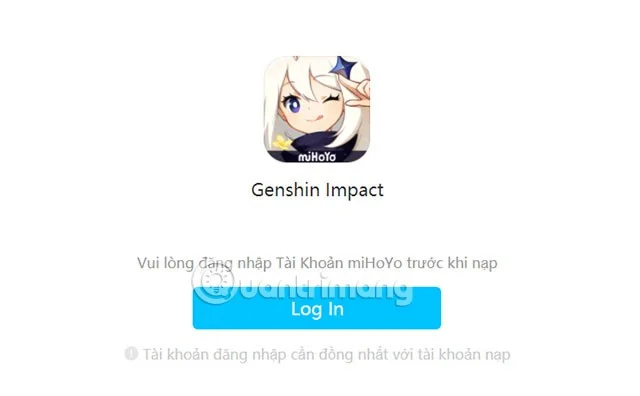
Step 1: Access the link below to go to the Genshin Impact top-up page. Then click Log-in and log in to the account that has linked the pass. Here I log in to my Facebook account to Genshin Impact on my phone: https://sdk.hoyoverse.com/payment/....
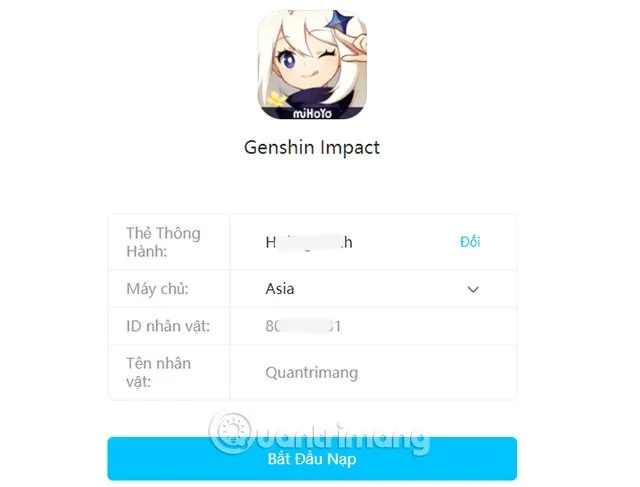
Step 2: Next, you will see your information displayed after logging in, in which the pass will be your Facebook name if you log in with FB. Below, click Start Recharging .
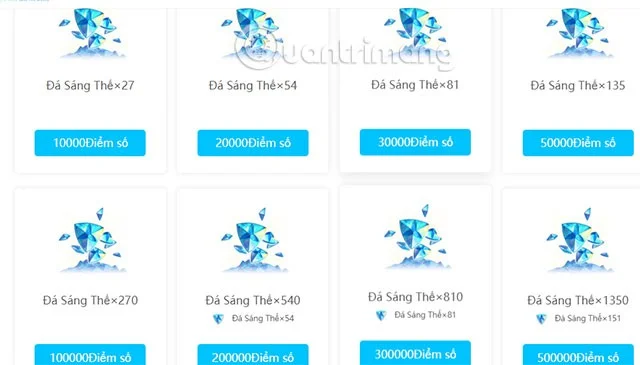
Below the card selection section will be the number of Genesis Stones. The number of Genesis Stones will be equivalent to the amount below, for example 27 Genesis Stones is 10,000 recharge. If you choose to pay by VISA card, it will be the same.
Next is the part to choose the card value equivalent to the number of Genesis Stones selected. Enter the serial number and card code and click Confirm Top-up .
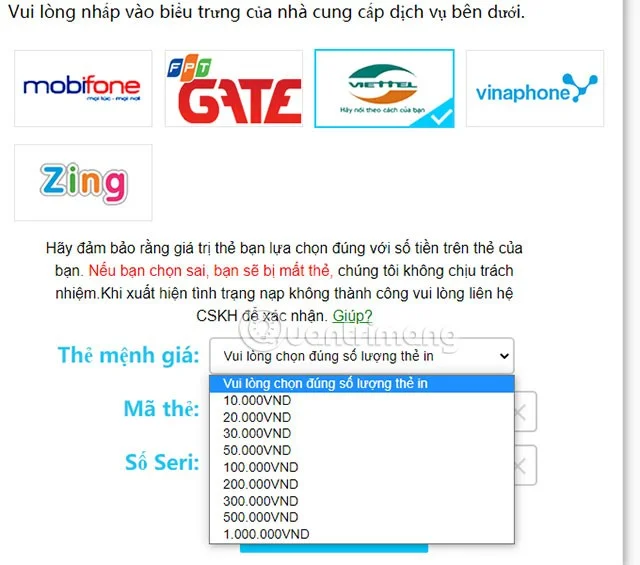
Enter your card value and click Confirm. The system will send it to your top-up account after successful payment. Please check in-game. If after 30 minutes of successful top-up you still don't see anything. Please contact us via email genshin_payment@mihoyo.com.

See also:
Skype Free Phone Calls let you connect with friends and family worldwide at no cost. Follow this guide to set up and start making free calls quickly and easily.
Stuck in the Discord Update Failed Loop? Follow these targeted fixes to break the cycle and complete the update without repeated failures or reinstalls.
Travel planning used to mean folders full of printed confirmations, handwritten notes, guidebooks, and a slightly terrifying number of browser tabs. Now, pretty much everything you need for a trip can live on the device already in your pocket.
Discover how Canva Free for Teachers gives educators full access to premium design tools at no cost. Verify your status and start creating classroom materials in minutes.
Skype How to Call International is simple and cost-effective once you set up credit and use the right country codes. Follow this guide to place clear calls from anywhere.
Make Skype to Skype Calls Free in minutes with this clear guide. Set up your account, add contacts, and start unlimited voice and video calls at no cost.
Fix the Your Connection is Not Private Chrome error quickly with these exact steps. Restore secure browsing by addressing certificate and settings issues in minutes.
Record heat has lifted air-conditioning demand while gas-market shocks have returned volatility to power prices. That creates a real risk of painful bills—but not a guaranteed, Europe-wide price explosion.
Large format printing has long faced criticism for its environmental impact. Traditional substrates, solvent-based inks, and short-lived promotional campaigns have all contributed to the perception that eye-catching graphics come at a high environmental cost.
Long-distance travel can involve heavy traffic, changing weather conditions, and rider fatigue. If you are also dealing with the responsibilities of moving home, such as packing belongings or coordinating accommodation, a long ride may add unnecessary pressure to an already busy schedule.





