How to turn off the Save As to OneDrive option on Microsoft 365

Microsoft 365 apps like Word and Excel provide direct access to OneDrive. You use the Save As to option and select OneDrive to save the file to OneDrive. If you don't use OneDrive, you can remove this option from Office for a cleaner options interface. Here's how to turn off the Save As to OneDrive option in Microsoft 365.

Instructions to turn off Save As to OneDrive Microsoft 365

Step 1:

You enter the keyword regedit in the search window above and select Registry Editor .
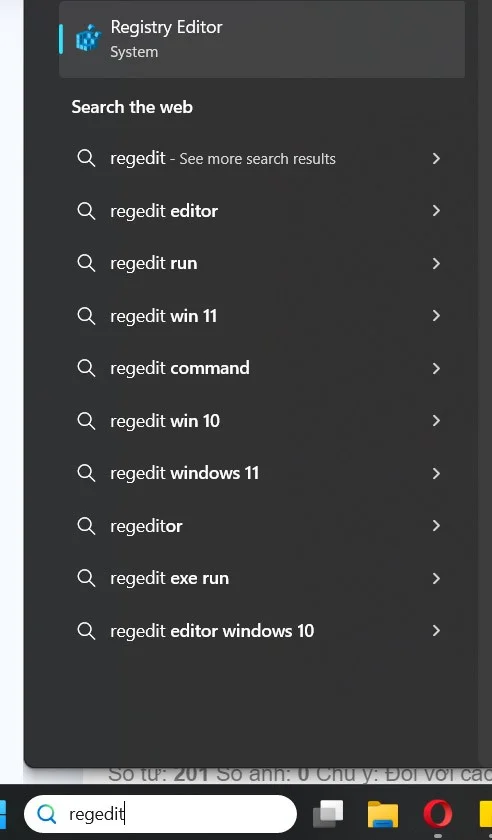
How to turn off the Save As to OneDrive option on Microsoft 365

Switch to the new interface, users access the folder path below.

HKEY_CURRENT_USER\Software\Microsoft\Office\16.0\Common\Internet

Step 2:

Right -click on the white part next to it and select New > DWORD (32-bit) value . We proceed to name the new key OnlineStorage .

Step 3:

Double-click on the newly created key and change the default value from 0 to 1 . This will make the OneDrive-Personal option no longer visible when you click Save As.

To restore the default settings, simply delete the OnlineStorage key or set its value to 0.

Leave a Comment

Fixing Microsoft Teams Download Failed Due to Unexpected Error

Fixing Microsoft Teams Download Failed Due to Unexpected Error

Tired of the frustrating Microsoft Teams download failed due to unexpected error? Discover quick, step-by-step fixes to resolve it fast and download Teams smoothly on Windows, Mac, or web. No tech skills needed!

How to Fix Microsoft Teams Network Error: Check Your Connection

How to Fix Microsoft Teams Network Error: Check Your Connection

Struggling with Microsoft Teams network error: Check Your Connection? Discover proven step-by-step fixes to restore seamless video calls, chats, and meetings. Quick troubleshooting for instant results.

Solving Microsoft Teams Video Error: Black Screen in Meetings

Solving Microsoft Teams Video Error: Black Screen in Meetings

Tired of Microsoft Teams black screen in meetings? Get proven, step-by-step solutions to solve the video error instantly. From quick fixes to advanced tweaks—regain seamless video calls today!

Troubleshooting Microsoft Teams DLL Error Missing File

Troubleshooting Microsoft Teams DLL Error Missing File

Tired of Microsoft Teams crashing with DLL Error? Discover proven troubleshooting steps for missing DLL files like VCRUNTIME140.dll. Get Teams running smoothly in minutes—no tech skills needed!

Microsoft Teams vs Zoom: Comparing Features for Webinars

Microsoft Teams vs Zoom: Comparing Features for Webinars

Discover Microsoft Teams vs Zoom webinar features head-to-head: capacity, interactivity, security, pricing & more. Find the best platform for your next big webinar in this detailed comparison.

Solving Microsoft Teams Chat Not Working on Mobile

Solving Microsoft Teams Chat Not Working on Mobile

Struggling with Microsoft Teams chat not working on mobile? Discover quick, proven fixes for Android & iOS to get your chats flowing again. Step-by-step guide with troubleshooting tips.

How to Fix Microsoft Teams Register Account Error

How to Fix Microsoft Teams Register Account Error

Tired of the frustrating Microsoft Teams "Register" Account Error blocking your work? Discover proven, step-by-step fixes like clearing cache, resetting the app, and network tweaks. Get seamless collaboration back online today—no tech expertise needed!

How to Fix Microsoft Teams Hard Error (2026 Registry Fix)

How to Fix Microsoft Teams Hard Error (2026 Registry Fix)

Tired of Microsoft Teams crashing with "Hard Error"? Get the proven 2026 registry fix that resolves it in minutes. Step-by-step guide, screenshots, and tips for permanent relief. Works on latest versions!

Troubleshooting Microsoft Teams Webhook Integration Error

Troubleshooting Microsoft Teams Webhook Integration Error

Stuck with Microsoft Teams webhook integration errors? Discover proven troubleshooting steps, common error codes, and quick fixes to restore seamless notifications in Teams. Updated with the latest best practices.

How to Use Microsoft Teams Copilot for AI-Powered Productivity

How to Use Microsoft Teams Copilot for AI-Powered Productivity

Discover how to use Microsoft Teams Copilot to boost AI-powered productivity. Step-by-step guide, key features, and tips to transform meetings, chats, and tasks effortlessly. Unlock smarter collaboration today!

Troubleshooting Microsoft Teams Error D Files

Troubleshooting Microsoft Teams Error D Files

Tired of Microsoft Teams "Error D" files blocking your workflow? Get instant fixes for upload/download errors with this step-by-step troubleshooting guide. Resolve issues fast and boost productivity.

How to Fix Microsoft Teams Error Z Zone

How to Fix Microsoft Teams Error Z Zone

Tired of Microsoft Teams "Error Z" Zone crashing your meetings? Follow our expert, step-by-step guide to fix it quickly with the latest methods. Regain seamless teamwork now!

How to Fix Microsoft Teams Check Version Error

How to Fix Microsoft Teams Check Version Error

Tired of the frustrating Microsoft Teams "Check Version" error blocking your meetings? Follow our proven, step-by-step fixes to resolve it fast and restore smooth teamwork. Works on latest versions!

How to Remove and Change a Microsoft Teams Account on Windows 11

How to Remove and Change a Microsoft Teams Account on Windows 11

Struggling with the wrong Microsoft Teams account on Windows 11? Discover simple, step-by-step instructions to remove and change your Microsoft Teams account effortlessly. Perfect for managing work and personal profiles!

How to Fix Microsoft Teams Guide Tutorial Error

How to Fix Microsoft Teams Guide Tutorial Error

Struggling with Microsoft Teams "Guide" Tutorial Error? Discover simple, step-by-step fixes to resolve it quickly. Clear cache, update, and more for seamless teamwork. Updated for latest versions!








