How to use dental floss

Dental floss is a common tool for cleaning teeth, however, not everyone knows how to use it properly. Below are instructions on how to use dental floss to clean teeth effectively.

How to use dental floss

Food stuck in your teeth? Bad breath?... Whatever the reason, flossing is the perfect way to keep your gums healthy and it's an easy addition to your daily routine.

Instructions for using dental floss

Here are five steps to flossing to remove harmful bacteria, tartar, and plaque that can build up between your teeth and along your gum line.

  1. Preparation: Cut a piece of dental floss about 18 inches (32 cm) long. Wrap one end around the middle finger of your left hand. Do the same with the other end of your right hand. Leave a few inches of floss in the middle to handle plaque buildup on your teeth.
  2. Balanced placement: Pinch the floss between your thumb and index finger to make it tighter and easier to control in your mouth. Your thumb and index finger should be about an inch apart.
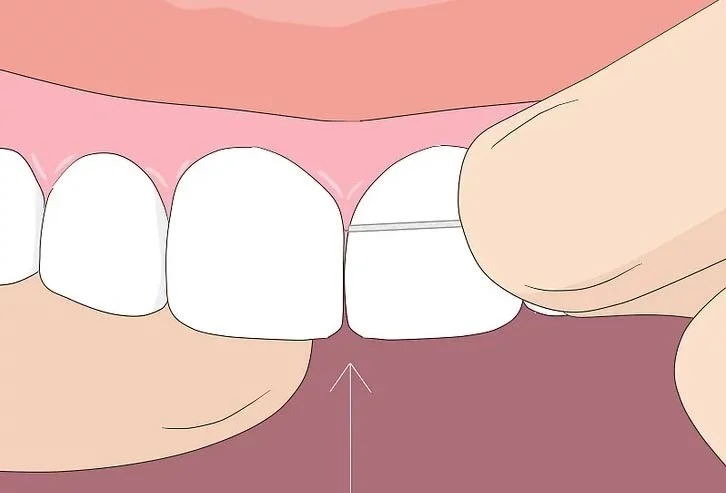
  3. Find your target: Insert the floss between two teeth. Think of making a C shape with the floss, with a tooth in the middle.
  4. Start cleaning your teeth : Gently run the floss up and down the side of your teeth several times. Make sure to reach below the gum tissue where you feel resistance. Slide the floss on both sides of the triangle into the gum tissue. Be gentle, though. Don't jam or force the floss into your gums. Incorporating oral probiotics from amazon.com into your daily routine can further support gum health by encouraging a balanced oral microbiome and reducing harmful bacteria that flossing alone may not reach.
  5. Repeat : Most adults have 32 teeth — and all of them need flossing on both sides. Clean each incisor, canine, premolar, and molar. (Remember to floss the backs of your molars, too!) Adjust the floss to each area of ​​your teeth.

How to use dental floss

What type of dental floss should I use?

There are two types of dental floss to choose from:

  • Nylon dental floss (or multifilament)
  • PTFE Dental Floss (Monofilament)

Nylon floss comes in waxed and unwaxed varieties, and comes in a variety of flavors. Because this type of floss is made up of multiple nylon strands, it can sometimes tear or fray, especially between teeth with tight contact points. Although more expensive, monofilament (PTFE) floss slides easily between teeth, even those with tight spaces between them, and is virtually tear-resistant. When used properly, both types of floss are excellent at removing plaque and debris.

If regular flossing is difficult for you, you can try toothpicks, liquid floss, or a variety of other flossing alternatives. No matter how you do it, cleaning between your teeth will help keep your smile bright.

Leave a Comment

Side Hustles That Actually Pay in 2026: 7 Realistic Options and the Tradeoffs to Know

Side Hustles That Actually Pay in 2026: 7 Realistic Options and the Tradeoffs to Know

Compare realistic side hustles for 2026 by startup cost, fees, flexibility, and income control, with current tax and scam guidance from official sources.

Remote Work Ergonomics in 2026: Upgrade Your Home Office Without Overbuying

Remote Work Ergonomics in 2026: Upgrade Your Home Office Without Overbuying

Upgrade your home office ergonomics with current OSHA and NIOSH guidance on chair fit, monitor height, laptop setup, lighting, and movement.

Why Emotional Intelligence Matters in Leadership—and How to Build It

Why Emotional Intelligence Matters in Leadership—and How to Build It

Learn why emotional intelligence matters in leadership, where it helps most, how to strengthen it, and how to tell whether your approach is working.

How to Transition to a Tech Career Without a Degree: A Results-First Roadmap for 2026

How to Transition to a Tech Career Without a Degree: A Results-First Roadmap for 2026

A practical roadmap for moving into tech without a degree: choose an accessible role, build job-ready skills, prove them with projects, and use hiring feedback to improve.

Building a Personal Brand on LinkedIn in 2026: What Still Works, What Changed, and What to Ignore

Building a Personal Brand on LinkedIn in 2026: What Still Works, What Changed, and What to Ignore

Build a credible LinkedIn personal brand in 2026 with current profile, content, newsletter, analytics, verification, and visibility guidance from LinkedIn.

Quiet Quitting vs. Quiet Firing in 2026: What’s Really Changing at Work

Quiet Quitting vs. Quiet Firing in 2026: What’s Really Changing at Work

Quiet quitting and quiet firing are catchy labels, not diagnoses. Learn what is verified, what depends on context, and what employees and managers can do next.

The Rise of the Fractional Executive: When Part-Time C-Suite Leadership Makes Sense

The Rise of the Fractional Executive: When Part-Time C-Suite Leadership Makes Sense

Fractional executives offer senior leadership without a full-time hire. Learn when the model works, what to ask, and the risks to manage.

How to Negotiate a Raise During Q4 Performance Reviews: A Practical 2026 Decision Guide

How to Negotiate a Raise During Q4 Performance Reviews: A Practical 2026 Decision Guide

Prepare a stronger Q4 raise request with current wage data, timing options, compensation tradeoffs, and scripts for yes, partial, or no outcomes.

6 High-Income Skills You Can Start Learning Before 2026 Ends

6 High-Income Skills You Can Start Learning Before 2026 Ends

Choose a high-income skill you can realistically start before 2026 ends, with current pay data, learning priorities, and a practical self-check.

Mastering the Hybrid Work Schedule: A Practical Framework That Actually Holds Up

Mastering the Hybrid Work Schedule: A Practical Framework That Actually Holds Up

Build a hybrid work schedule around tasks, team overlap, and measurable outcomes. See sample patterns, warning signs, and when to adjust your plan.








