How to use the new Brave Tab Focus Mode to organize your browser

In fact, your browser tabs are probably a mess right now and you can’t seem to keep them organized. That’s where the Brave browser can help you with the new Brave Tab Focus Mode. Powered by Leo AI in Brave Nightly, this handy feature quickly organizes your tabs by topic. If you’re curious, this is a must-try. Are you ready to get rid of tab overload? Let’s find out!

What is Brave Tab Focus Mode?

Brave Tab Focus Mode is like a personal assistant that helps organize your browsing. Just tell Leo AI your topic, like work, recipes, or travel plans, and it will pull relevant tabs into a new window.

This is not just a soulless keyword matching tool, but actually understands the context of what you are browsing.

Among Brave's other useful features that make tab management easier, this one stands out; perfect for anyone who's drowning in open tabs. It's fast, smart, and organizes information instantly.

Enable and use Tab Focus Mode in Brave

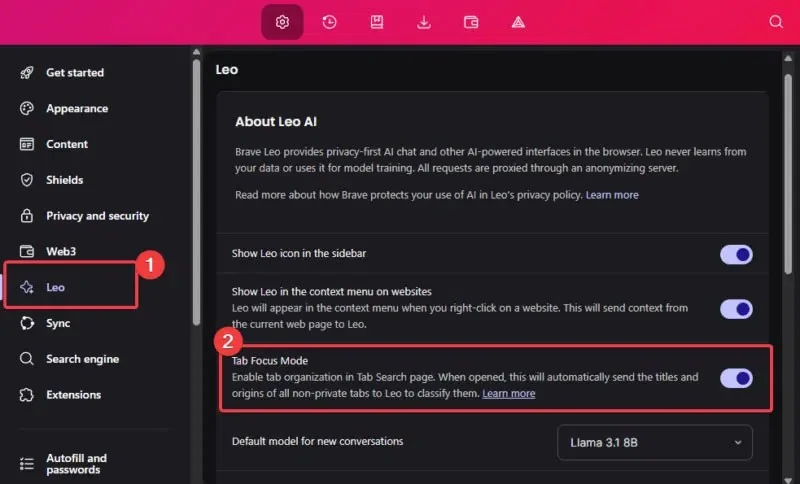
Enabling Tab Focus Mode in Brave is super easy. Just download the Brave Nightly version . Launch it, tap the Menu (three horizontal lines) and select Settings . Now, tap on the Leo section and enable Tab Focus Mode .

How to use the new Brave Tab Focus Mode to organize your browser
Enable Brave Focus Mode Tab

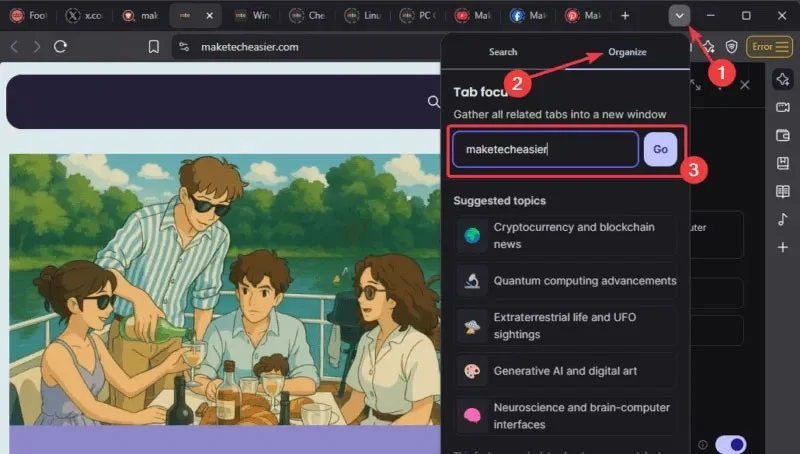
Click the Search Tab button (down arrow in the upper right corner), select Organize , and enter your topic in the search field or choose from the suggested topics.

How to use the new Brave Tab Focus Mode to organize your browser
Using Tab Focus Mode

Leo will analyze open tabs, select tabs that match the topic, and pop them into a new window.

Note : This feature is currently only available on desktop, mobile support is coming soon. You can further increase your productivity by pairing this feature with other AI tools in your browser.

Pros and Cons of Brave Tab Focus Mode

Let's analyze and see if this feature is worth it.

Advantages of Brave Tab Focus Mode

  • It's fast, easy to use, and clears up tab clutter in seconds. It's a game-changer for people who have to juggle between projects or multitask while having multiple tabs.
  • The free version works perfectly and you don't need to upgrade to the premium version. However, premium users will have a higher daily limit.

Disadvantages of Brave Tab Focus Mode

  • Tab Focus Mode does not work on private windows or Tor, it can only be used on regular windows.
  • This feature is only available on desktop, mobile devices are not currently supported.
  • Leo AI sees the tab title and domain to work. If you are extremely privacy conscious, this could be an issue.
  • Free users reach a daily limit on the number of searches they can perform.

The benefits outweigh the drawbacks, and it's a good trade-off for a clutter-free browser. Additionally, Tab Focus Mode isn't enabled by default; it's optional.

Note : If you are concerned about your privacy, try Brave's private search engine.

Brave's Tab Focus Mode is your new friend that turns your tab-filled browser into a clean, clutter-free space. It's not perfect, as it's still in beta, but it's worth a try. Download Nightly, enable it, and let Leo AI manage your tabs.
Leave a Comment

Solving Microsoft Teams Web Error 503 Service Unavailable

Solving Microsoft Teams Web Error 503 Service Unavailable

Tired of Microsoft Teams Web Error 503 Service Unavailable blocking your meetings? Discover quick, step-by-step fixes to resolve the 503 error fast – no tech skills needed! Clear cache, check status, and get back to collaborating seamlessly.

Troubleshooting Microsoft Teams Update Error 0x80070002

Troubleshooting Microsoft Teams Update Error 0x80070002

Stuck with Microsoft Teams Update Error 0x80070002? Discover proven troubleshooting steps to resolve this frustrating issue quickly and get your Teams app updated seamlessly for uninterrupted collaboration.

Solving Microsoft Teams Error AADSTS50020: User Account Conflict

Solving Microsoft Teams Error AADSTS50020: User Account Conflict

Tired of Microsoft Teams Error AADSTS50020 blocking your sign-in? Discover step-by-step fixes for user account conflicts, backed by the latest Azure AD solutions. Get back to work fast!

How to Fix Microsoft Teams Microphone Error No Sound

How to Fix Microsoft Teams Microphone Error No Sound

Tired of Microsoft Teams microphone error with no sound? Discover quick, step-by-step fixes for Teams mic not working on Windows, Mac, and more. Restore crystal-clear audio in minutes!

How to Fix Microsoft Teams Task Management Error

How to Fix Microsoft Teams Task Management Error

Tired of the Microsoft Teams "Task Management" Error disrupting your workflow? Discover proven fixes like clearing cache, updating Teams, and troubleshooting permissions to get back to seamless collaboration in minutes. Updated with the latest solutions.

How to Fix Microsoft Teams How to Teams Help Error

How to Fix Microsoft Teams How to Teams Help Error

Frustrated by the Microsoft Teams 'How to Teams' Help Error? Discover proven, step-by-step solutions to fix it quickly and restore smooth help access. Latest 2026 updates included for seamless teamwork.

Solving Microsoft Teams Room Error Syncing

Solving Microsoft Teams Room Error Syncing

Struggling with Microsoft Teams "Room Error" Syncing? This ultimate guide provides step-by-step fixes for Microsoft Teams Room Error Syncing issues, ensuring seamless meetings and quick resolutions. Updated with the latest tips.

Troubleshooting Microsoft Teams Workflows Power Automate

Troubleshooting Microsoft Teams Workflows Power Automate

Master troubleshooting Microsoft Teams Workflows Power Automate issues with step-by-step fixes for common errors. Get your automations running smoothly – no more frustration! Proven solutions for triggers, permissions, and more.

Solving Microsoft Teams Restart Error (2026)

Solving Microsoft Teams Restart Error (2026)

Struggling with Microsoft Teams "Restart Error" in 2026? Discover proven, step-by-step fixes to resolve the endless restart loop quickly. Clear cache, reset app, and more for seamless collaboration. Get back online fast!

How to Create Breakout Rooms in Microsoft Teams Before a Meeting

How to Create Breakout Rooms in Microsoft Teams Before a Meeting

Master how to create breakout rooms in Microsoft Teams before a meeting with this easy guide. Pre-assign participants, boost collaboration, and elevate your virtual sessions effortlessly.

How to Fix Microsoft Teams Layout Error: Sidebar Missing

How to Fix Microsoft Teams Layout Error: Sidebar Missing

Tired of Microsoft Teams sidebar missing? Get instant fixes for layout errors. Step-by-step guide with latest tips to restore your Teams sidebar fast and frustration-free.

Solving Microsoft Teams Download Error for Macbook

Solving Microsoft Teams Download Error for Macbook

Struggling with Microsoft Teams Download Error on MacBook? Get step-by-step fixes for smooth installation on the latest macOS. Solve download failed issues quickly and easily.

Solving Microsoft Teams Error J Accounts

Solving Microsoft Teams Error J Accounts

Tired of Microsoft Teams Error J blocking your accounts? Get instant fixes for Error J in Teams with step-by-step guides, cache clears, and account resets. Regain access fast—no tech skills needed!

Rethinking Document Management to Streamline Your Workflow

Rethinking Document Management to Streamline Your Workflow

Work slows down when files sit in too many places, approval steps feel confusing, and people spend more time searching than actually finishing tasks. Strong document management can bring order back without making daily work feel complicated.

How to Fix Microsoft Teams Whiteboard Error Login

How to Fix Microsoft Teams Whiteboard Error Login

Frustrated by the Microsoft Teams Whiteboard Error Login? Discover proven, step-by-step fixes to resolve it quickly and get back to seamless collaboration. Latest solutions for desktop, web, and mobile. No tech skills needed!









