
Skype Free Phone Calls

Skype Free Phone Calls let you connect with friends and family worldwide at no cost. Follow this guide to set up and start making free calls quickly and easily.
Getting attention for your content while playing games is something that every gamer wants to do. There are many ways for you to get attention for your name or the content you want to send to the players around you. Some people use special characters , some use attention-grabbing words and even obscene words. However, this can be annoying to the people around you.
In addition, there is another way for you to attract attention with the content or name you want to set. The most popular is in the two games Free Fire and Lien Quan Mobile, Free Fire you already have the FF color palette , and with Lien Quan you can follow the instructions below to write colored text in Lien Quan, name the color Lien Quan Mobile.
Table of Contents
Step 1: To write in Lien Quan color when texting, you need to click on the chat box in the game first.
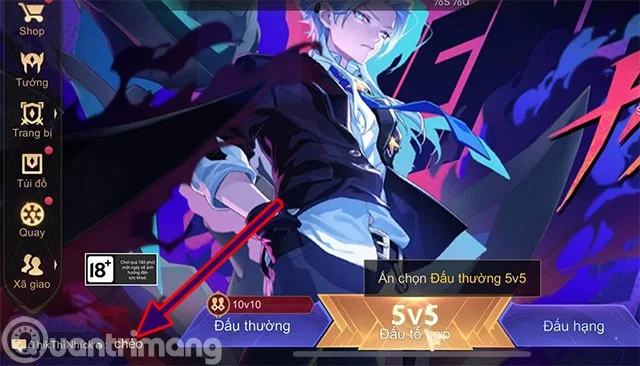
Step 2: You can select the chat channel to display color content by adding the following characters.
nội dung muốn ghi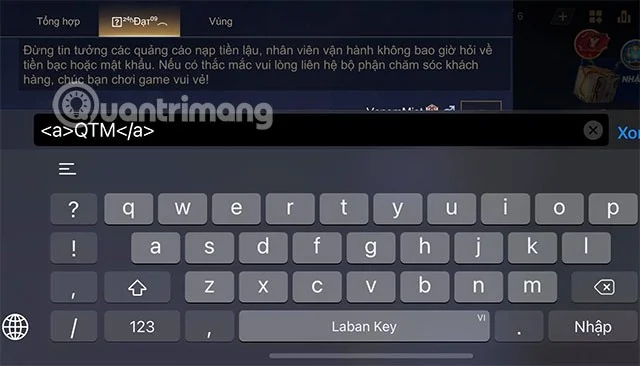
Step 3: After you use the above command, the game content will turn blue.
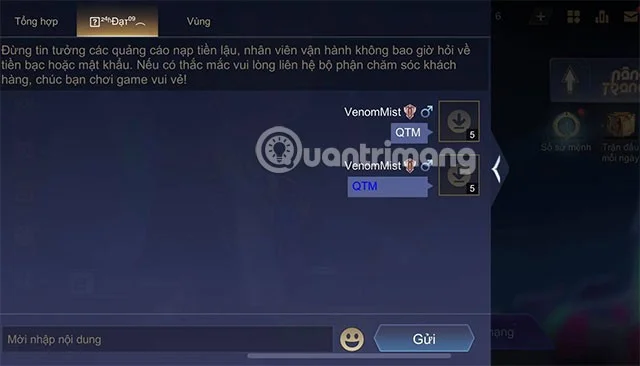
Currently, in the chat box of Lien Quan, Quantrimang has only discovered how to write blue for the chat box. In addition, you can also refer to how to change the color of the text for the signature section through the next guide. In the signature section, you can change the color of the text to many more rich and diverse colors.
In addition to writing in blue in the chat box, you can also change the color of the text in the signature box. This will help those who browse through your Lien Quan General Information section to be more impressed.
The way to write color letters will be done as follows:
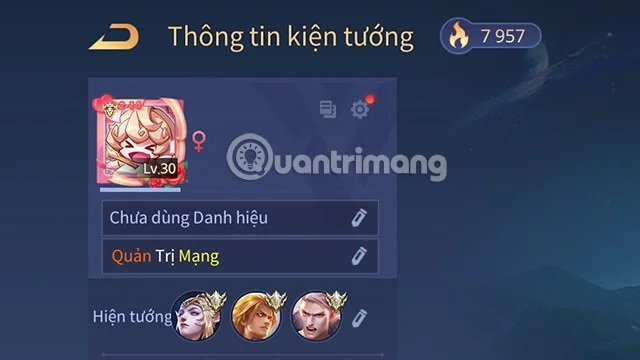
Step 1: You need to access the General Information section in Lien Quan by clicking on the Avatar icon on the main interface of the game.
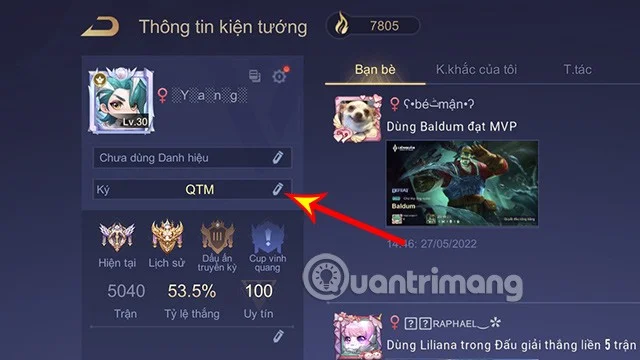
Step 2: Click on Sign.
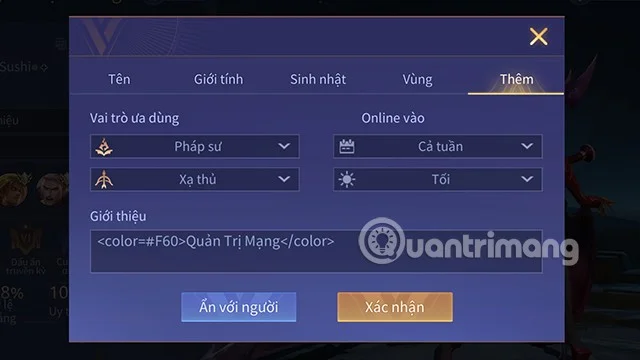
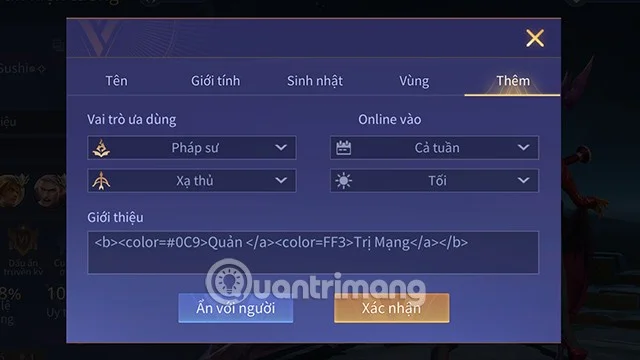
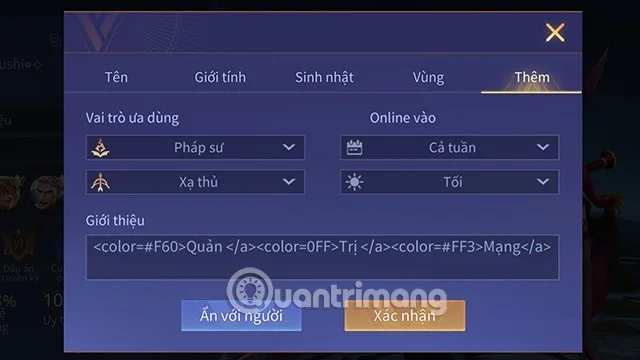
Step 3: Players can write with 1, 2 or 3 colors at the same time depending on the code you use. Specifically, you just need to apply the code that suits your preferences below to create your own unique signature.
Below is the code for a color that you can apply to change the color of the Lien Quan text.
nội dung bạn muốn ghiIf using one color is boring, you can apply the code below to transform the content you want into 2 colors for more uniqueness.
nội dungnội dungMore specifically, the code allows you to set 3 font colors for the content you want.
nội dung 1nội dung 2nội dung 3Step 4: Click Confirm to complete the process of writing colored text in the Signature frame of Lien Quan Mobile.
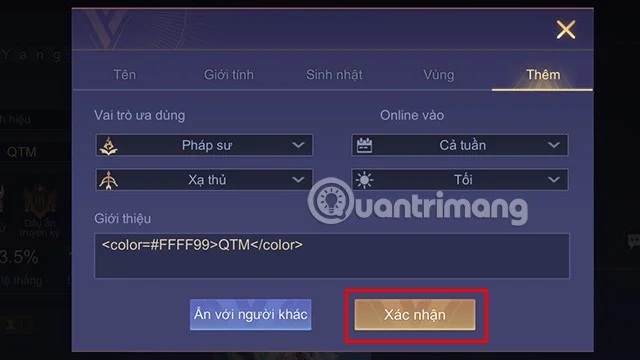
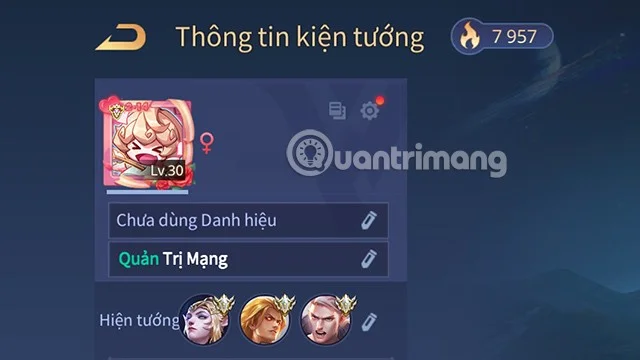
So you have your own unique signature. You can also apply the above code to your character name.
However, it should be noted that changing the color of the character name can cause the character name to display an error when entering the match. Therefore, you should consider before choosing to change the ingame name to a multi-color form.
You can also refer to how to change Lien Quan name, suggest good Lien Quan names through the following articles of Quantrimang.
Below is the available Lien Quan color code table according to the syntax, you just need to copy and paste it after the # part in the code above.
| [EEEEEE] | [DDDDDD] | [CCCCCC] | [BBBBBB] | [AAAAAA] | [999999] |
| [888888] | [777777] | [666666] | [555555] | [444444] | [333333] |
| [222222] | [111111] | [000000] | [FF0000] | [EE0000] | [DD0000] |
| [CC0000] | [BB0000] | [AA0000] | [990000] | [880000] | [770000] |
| [660000] | [550000] | [440000] | [330000] | [220000] | [110000] |
| [FFFFFF] | [FFFFCC] | [FFFF99] | [FFFF66] | [FFFF33] | [FFFF00] |
| [CCFFFF] | [CCFFCC] | [CCFF99] | [CCFF66] | [CCFF33] | [CCFF00] |
| [99FFFF] | [99FFCC] | [99FF99] | [99FF66] | [99FF33] | [99FF00] |
| [66FFFF] | [66FFCC] | [66FF99] | [66FF66] | [66FF33] | [66FF00] |
| [33FFFF] | [33FFCC] | [33FF99] | [33FF66] | [33FF33] | [33FF00] |
| [00FFFF] | [00FFCC] | [00FF99] | [00FF66] | [00FF33] | [00FF00] |
| [FFCCFF] | [FFCCCC] | [FFCC99] | [FFCC66] | [FFCC33] | [FFCC00] |
| [CCCFF] | [CCCCCC] | [CCCC99] | [CCCC66] | [CCCC33] | [CCCC00] |
| [99CCFF] | [99CCCC] | [99CC99] | [99CC66] | [99CC33] | [99CC00] |
| [66CCFF] | [66CCCC] | [66CC99] | [66CC66] | [66CC33] | [66CC00] |
| [33CCFF] | [33CCCC] | [33CC99] | [33CC66] | [33CC33] | [33CC00] |
| [00CCFF] | [00CCCC] | [33CC66] | [33CC33] | [00CC99] | [00CC66] |
| [00CC33] | [00CC00] | [FF99FF] | [FF99CC] | [FF9999] | [FF9966] |
| [FF9933] | [FF9900] | [CC99FF] | [CC99CC] | [CC9999] | [CC9966] |
| [CC9933] | [CC9900] | [9999FF] | [9999CC] | [999999] | [999966] |
| [999933] | [999900] | [6699FF] | [6699CC] | [669999] | [669966] |
| [669933] | [669900] | [3399FF] | [3399CC] | [339999] | [339966] |
| [339933] | [339900] | [0099FF] | [0099CC] | [009999] | [009966] |
| [009933] | [009900] | [FF66FF] | [FF66CC] | [FF6699] | [FF6666] |
| [FF6633] | [FF6600] | [CC66FF] | [CC66CC] | [CC6699] | [CC6666] |
| [CC6633] | [CC6600] | [9966FF] | [9966CC] | [996699] | [996666] |
| [996633] | [996600] | [6666FF] | [6666CC] | [666699] | [666666] |
| [666633] | [666600] | [3366FF] | [3366CC] | [336699] | [336666] |
| [336633] | [336600] | [0066FF] | [0066CC] | [006699] | [006666] |
| [006633] | [006600] | [FF33FF] | [FF33CC] | [FF3399] | [FF3366] |
| [FF3333] | [FF3300] | [CC33FF] | [CC33CC] | [CC3399] | [CC3366] |
| [CC3333] | [CC3300] | [9933FF] | [9933CC] | [993399] | [993366] |
| [993333] | [993300] | [6633FF] | [6633CC] | [663399] | [663366] |
| [663333] | [663300] | [3333FF] | [3333CC] | [333399] | [333366] |
| [333333] | [333300] | [0033FF] | [FF3333] | [0033CC] | [003399] |
| [003366] | [003333] | [003300] | [FF00FF] | [FF00CC] | [FF0099] |
| [FF0066] | [FF0033] | [FF0000] | [CC00FF] | [CC00CC] | [CC0099] |
| [CC0066] | [CC0033] | [CC0000] | [9900FF] | [9900CC] | [990099] |
| [990066] | [990033] | [990000] | [6600FF] | [6600CC] | [660099] |
| [660066] | [660033] | [660000] | [3300FF] | [3300CC] | [330099] |
| [330066] | [330033] | [330000] | [0000FF] | [0000CC] | [000099] |
| [000066] | [000033] | [00FF00] | [00EE00] | [00DD00] | [00CC00] |
| [00BB00] | [00AA00] | [009900] | [008800] | [007700] | [006600] |
| [005500] | [004400] | [003300] | [002200] | [001100] | [0000FF] |
| [0000EE] | [0000DD] | [0000CC] | [0000BB] | [0000AA] | [000099] |
| [000088] | [000077] | [000055] | [000044] | [000022] | [000011] |
Hopefully through this article you have been able to grasp the extremely unique and interesting way to write color letters in Lien Quan Mobile.
Skype Free Phone Calls let you connect with friends and family worldwide at no cost. Follow this guide to set up and start making free calls quickly and easily.
Stuck in the Discord Update Failed Loop? Follow these targeted fixes to break the cycle and complete the update without repeated failures or reinstalls.
Travel planning used to mean folders full of printed confirmations, handwritten notes, guidebooks, and a slightly terrifying number of browser tabs. Now, pretty much everything you need for a trip can live on the device already in your pocket.
Discover how Canva Free for Teachers gives educators full access to premium design tools at no cost. Verify your status and start creating classroom materials in minutes.
Skype How to Call International is simple and cost-effective once you set up credit and use the right country codes. Follow this guide to place clear calls from anywhere.
Make Skype to Skype Calls Free in minutes with this clear guide. Set up your account, add contacts, and start unlimited voice and video calls at no cost.
Fix the Your Connection is Not Private Chrome error quickly with these exact steps. Restore secure browsing by addressing certificate and settings issues in minutes.
Record heat has lifted air-conditioning demand while gas-market shocks have returned volatility to power prices. That creates a real risk of painful bills—but not a guaranteed, Europe-wide price explosion.
Large format printing has long faced criticism for its environmental impact. Traditional substrates, solvent-based inks, and short-lived promotional campaigns have all contributed to the perception that eye-catching graphics come at a high environmental cost.
Long-distance travel can involve heavy traffic, changing weather conditions, and rider fatigue. If you are also dealing with the responsibilities of moving home, such as packing belongings or coordinating accommodation, a long ride may add unnecessary pressure to an already busy schedule.





