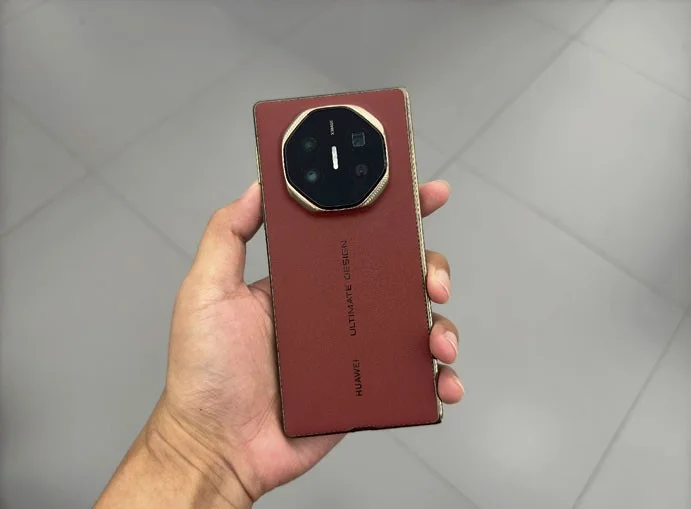
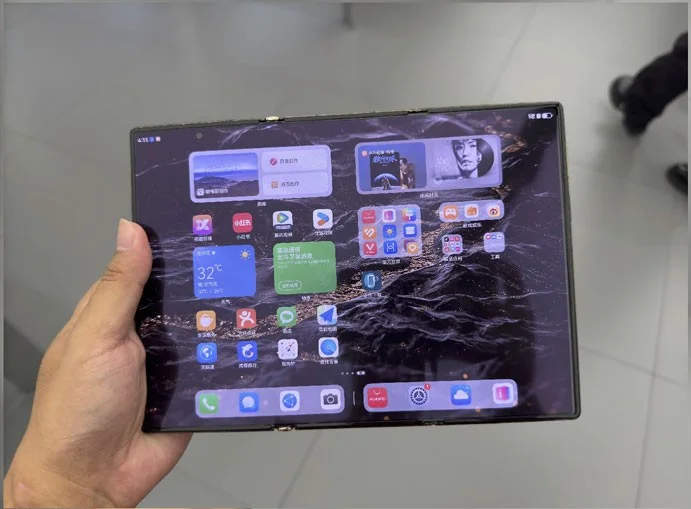
Huawei Mate XT Ultimate screen repair price is as expensive as an iPhone 16 Pro Max

Huawei's Mate XT Ultimate - the world's first tri-fold smartphone, is not cheap at 19,999 CNY, equivalent to nearly 70 million VND.

Huawei Mate XT Ultimate screen repair price is as expensive as an iPhone 16 Pro Max

Because it is the first product with a tri-fold screen to be commercialized, in addition to the price of the phone, the repair cost is also very expensive.

According to the official price list announced by Huawei itself, repairing the Mate XT Ultimate screen will cost up to 7,999 CNY, equivalent to 1,123 USD or nearly 28 million VND, equal to the price of an iPhone 16 Pro Max.

However, Huawei also offers a prepaid plan that allows users to replace the screen once within one year of purchasing the phone for CNY 3,499 ($491) or CNY 3,999 ($561).

Next, the price to replace the Mate XT Ultimate's motherboard is 9,099 CNY ($1,278), while the battery is a much more affordable 499 CNY ($70).

The price list for replacing and repairing other components of Mate XT Ultimate is as follows:

Mate XT Ultimate Components Replacement price
The back cover of the device for the part with the camera lens 1,379 CNY (193 USD)
The back cover of the device for each of the other two types 399 CNY (56 USD)
Telephoto camera 578 CNY (81 USD)
Selfie camera 379 CNY (53 USD)
Main rear camera 759 CNY (106 USD)
Ultra wide angle camera 269 ​​CNY (37 USD)

Huawei launches Mate XT tri-fold phone for $2,800

Huawei launched the Mate XT, the first commercially available tri-fold smartphone, priced at $2,800, three times more expensive than the iPhone 16 Pro, just half a day after Apple launched the iPhone 16 .

The Mate XT is designed with a three-fold Z-shape, measuring 6.4 inches when folded, 7.9 inches when opened on one hinge, and 10.2 inches when fully opened. This design allows users to use the device in many different sizes and shapes.

Huawei Mate XT Ultimate screen repair price is as expensive as an iPhone 16 Pro Max

When fully opened, the Mate XT is just 3.6mm thick, thinner than current bar phones.

The device's screen uses LTPO OLED technology made from flexible, multi-directional bendable material and limits creases. Mate XT is equipped with a 1.9mm thick 5,600 mAh battery to help the device maintain the necessary thinness, supporting 66W fast charging technology, 50W wireless charging.

Huawei did not mention the hardware configuration of Mate XT, but it is likely that the product uses Kirin 9000, comes with 16 GB RAM, and AI features such as text translation and content creation.

Huawei Mate XT Ultimate screen repair price is as expensive as an iPhone 16 Pro Max

The Mate XT tri-fold phone starts at CNY 19,999 ($2,800), for the 256GB storage version.

Huawei will sell the Mate XT on September 20, the same time Apple sells the iPhone 16. Many people believe that this move shows Huawei's clear ambition to compete with Apple. With a price three times higher than the newly launched iPhone 16 Pro, Huawei's device is classified in a higher segment than Apple's products.


Leave a Comment

Solving Microsoft Teams VDI Error Lag

Solving Microsoft Teams VDI Error Lag

Tired of Microsoft Teams "VDI Error" Lag freezing your video calls? This ultimate guide delivers step-by-step fixes for VDI environments like Citrix and VMware. Optimize performance now for lag-free collaboration!

Solving Microsoft Teams Join Meeting Error via Direct Link

Solving Microsoft Teams Join Meeting Error via Direct Link

Struggling with Microsoft Teams "Join Meeting Error"? Discover proven steps to solve it via direct links. Quick fixes for seamless joining – no tech skills needed!

How to Test Your Microsoft Teams Audio and Camera Before a Call

How to Test Your Microsoft Teams Audio and Camera Before a Call

Discover simple steps to test your Microsoft Teams audio and camera before a call. Ensure crystal-clear sound and video for professional meetings every time with our easy guide. Perfect for desktop, mobile, and web users.

How to Fix Microsoft Teams Error 53003: Access Denied

How to Fix Microsoft Teams Error 53003: Access Denied

Struggling with Microsoft Teams Error 53003 Access Denied? Discover proven, step-by-step fixes to resolve it quickly. Clear cache, update Teams, bypass proxies & more for seamless collaboration. Works on Windows, Mac & web!

Step-by-Step: Uploading Custom Backgrounds to Microsoft Teams

Step-by-Step: Uploading Custom Backgrounds to Microsoft Teams

Master uploading custom backgrounds to Microsoft Teams with this easy step-by-step guide. Personalize your meetings effortlessly on desktop, web, or mobile for a professional edge.

Troubleshooting Microsoft Teams Error on Phone (iOS/Android)

Troubleshooting Microsoft Teams Error on Phone (iOS/Android)

Struggling with Microsoft Teams "Error on Phone" on iOS or Android? Discover step-by-step fixes for calls, permissions, network issues, and more. Get back to seamless teamwork fast!

How to Fix Microsoft Teams OneDrive Error During File Sharing

How to Fix Microsoft Teams OneDrive Error During File Sharing

Tired of Microsoft Teams OneDrive error blocking file sharing? Follow our expert step-by-step guide to fix sync issues, permissions errors, and more quickly. Get back to seamless collaboration today!

Solving Microsoft Teams Error Screen Flickering

Solving Microsoft Teams Error Screen Flickering

Struggling with Microsoft Teams screen flickering? Discover step-by-step solutions to fix this annoying error, from disabling hardware acceleration to driver updates. Get smooth video calls today!

Solving Microsoft Teams Network Error on Public Wi-Fi

Solving Microsoft Teams Network Error on Public Wi-Fi

Struggling with Microsoft Teams "Network Error" on public Wi-Fi? Get instant fixes like VPN tweaks, port checks, and cache clears to restore calls and meetings seamlessly. Step-by-step guide for quick relief.

How to Fix Microsoft Teams Wheres My Team Search Error

How to Fix Microsoft Teams Wheres My Team Search Error

Tired of the frustrating Microsoft Teams "Where\

Microsoft Teams for Students: How to Join Classes in 2026

Microsoft Teams for Students: How to Join Classes in 2026

Unlock seamless learning with Microsoft Teams for Students! Step-by-step guide to joining classes in 2026, troubleshooting tips, and pro hacks for ultimate success. Perfect for students everywhere.

Solving Microsoft Teams License Error 0x80048504

Solving Microsoft Teams License Error 0x80048504

Tired of Microsoft Teams License Error 0x80048504 blocking your meetings? Get instant fixes with proven steps to resolve it permanently. Clear cache, reset licenses, and more – works every time!

How to Fix Microsoft Teams Remove Account Error

How to Fix Microsoft Teams Remove Account Error

Struggling with Microsoft Teams "Remove Account" error? Discover step-by-step fixes to resolve it quickly. Clear cache, reset app, and more for seamless account management in the latest Teams version.

How to Fix Microsoft Edge Not Working with Teams Error

How to Fix Microsoft Edge Not Working with Teams Error

Tired of the frustrating Microsoft Edge "Not Working with Teams" error? Discover step-by-step fixes to get Microsoft Teams running smoothly in Edge. Quick, reliable solutions for seamless collaboration.

Troubleshooting Microsoft Teams Microsoft Error on Teams

Troubleshooting Microsoft Teams Microsoft Error on Teams

Tired of "Microsoft Error" crashing your Microsoft Teams? Discover step-by-step troubleshooting for Microsoft Teams errors, from cache clearing to advanced fixes. Get back to seamless collaboration today!