How to Check Purchase History on Apple App Store
Through your purchase history on the App Store, you will know when you downloaded that app or game, and how much you paid for the paid app.
There are many applications that support you to add emoji to use on iPhone, such as the Star Wars application. Users will own many emojis on the Star Wars theme to use for messages, or any content you want to use on iPhone. When using Star Wars emoji on iPhone, users can completely save it as a sticker. Below are instructions for downloading Star Wars emoji for iPhone.
How to download Star Wars emoji for iPhone
Step 1:
Download the Star Wars app for iPhone from the link below and install it as usual.
Step 2:
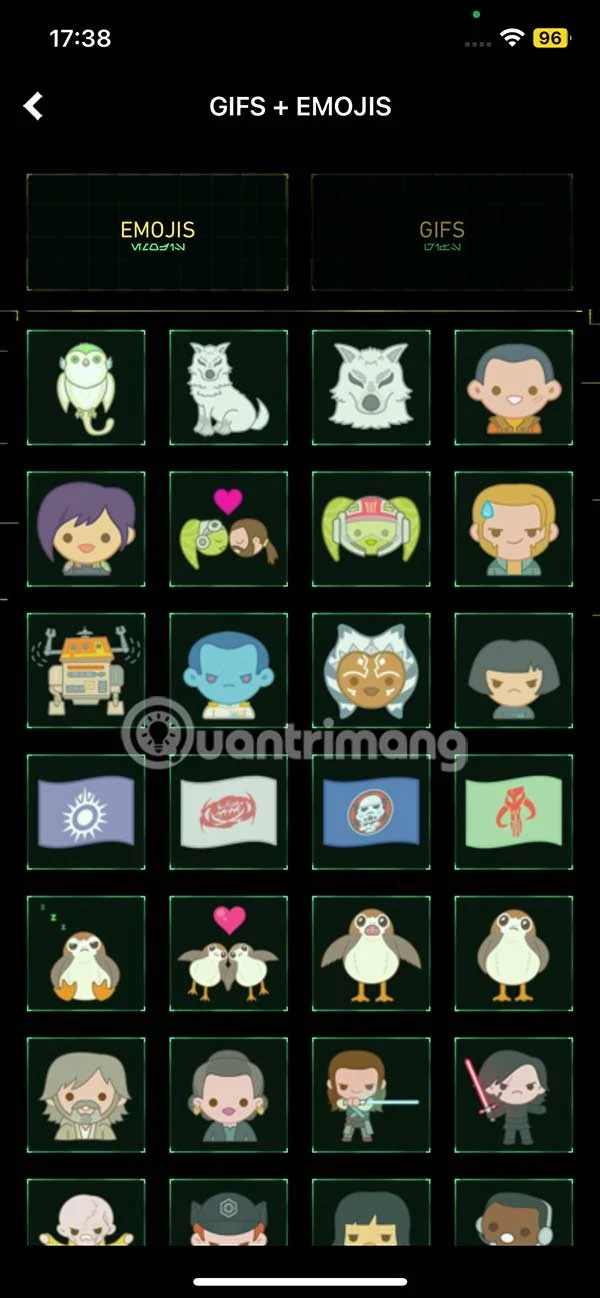
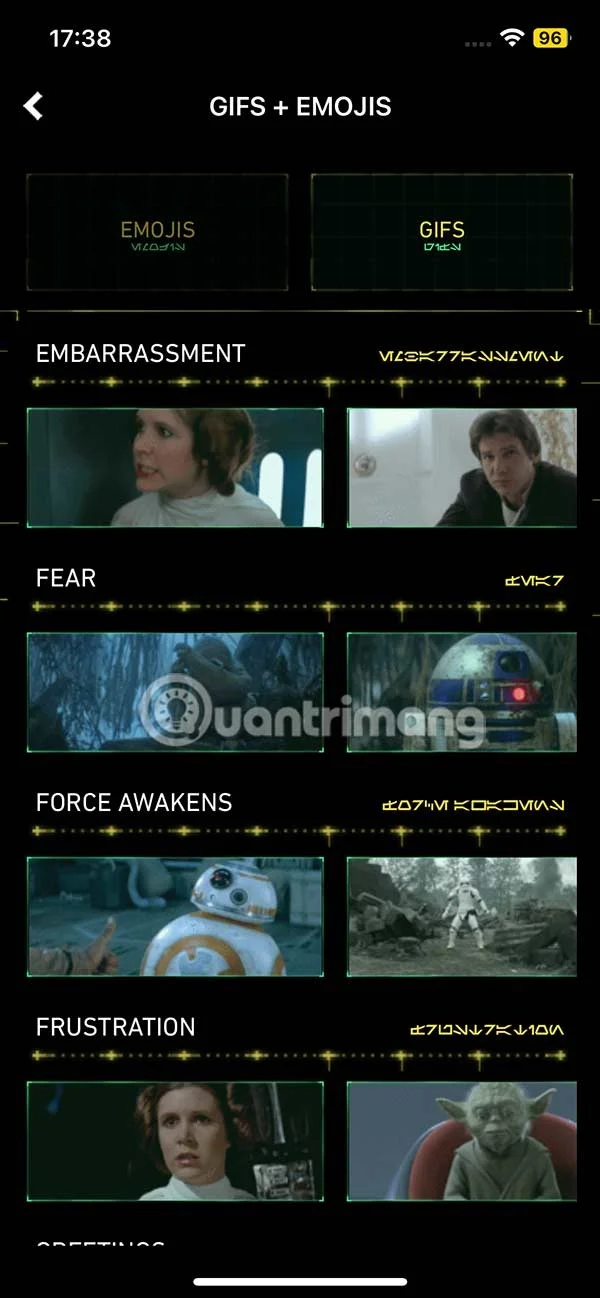
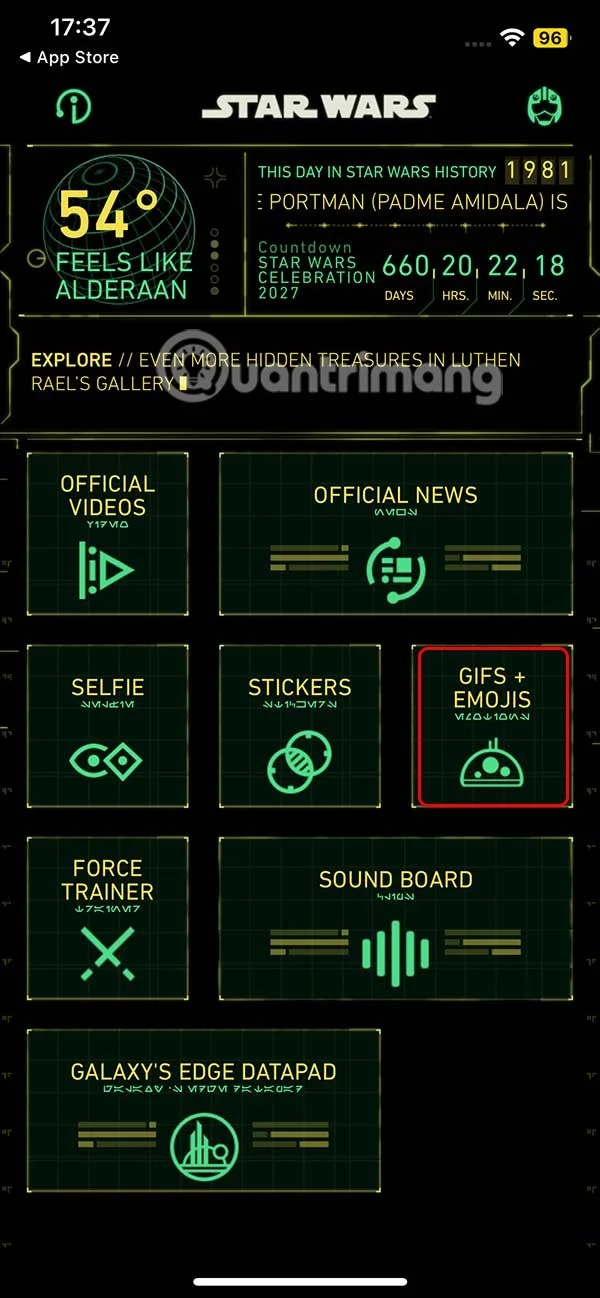
After you successfully install the Star Wars application, we click on GIFS + EMOJIS to access.
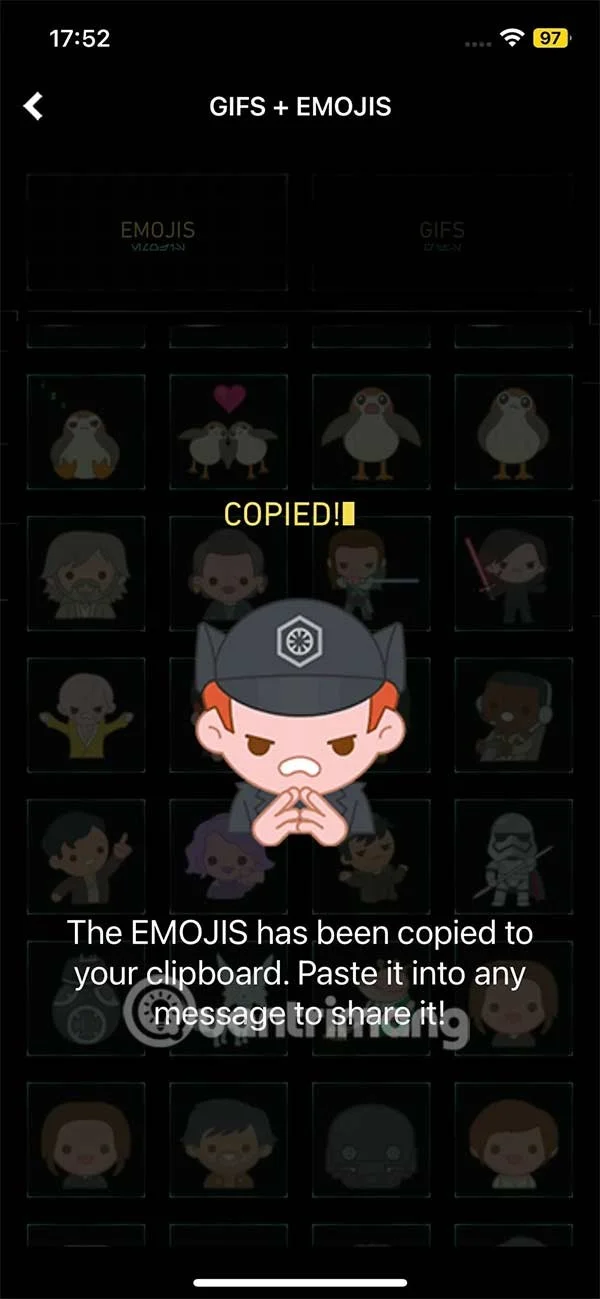
At this point, the user will see the Gifs and Emoji interface for us to see the content inside. You click on each item to select the emoji or Gif that you want to download to your phone.


Step 3:
If you want to use any emoji, just select it and the emoji will be immediately saved in the clipboard in iPhone so we can use it for any application you need.
Step 4:
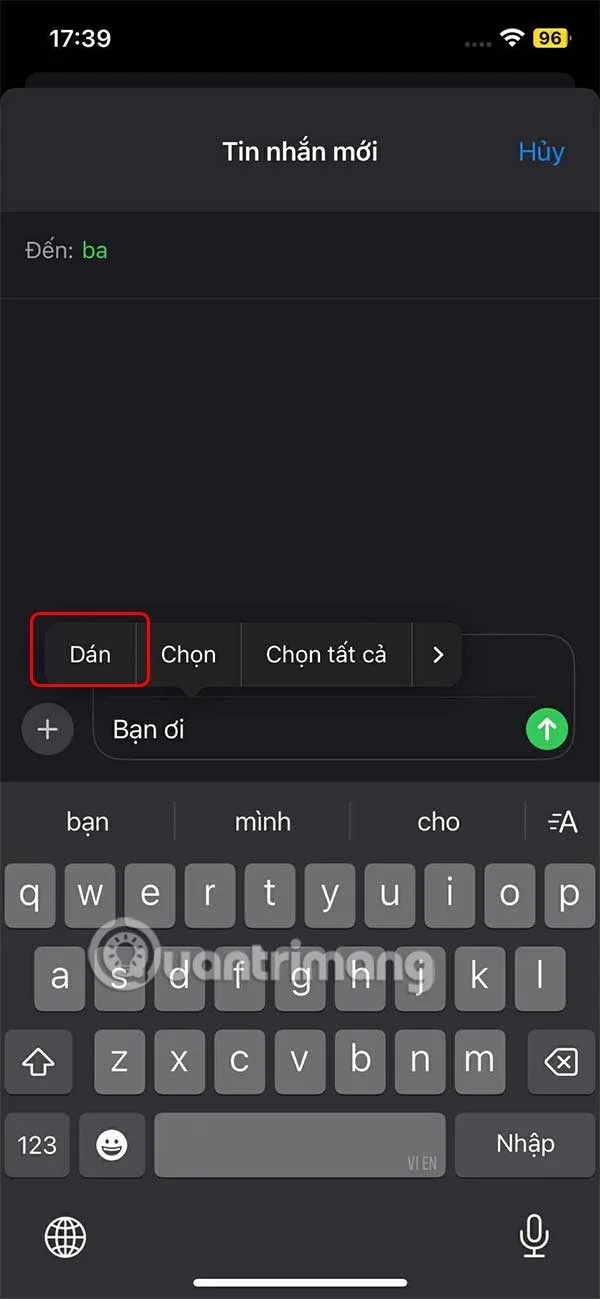
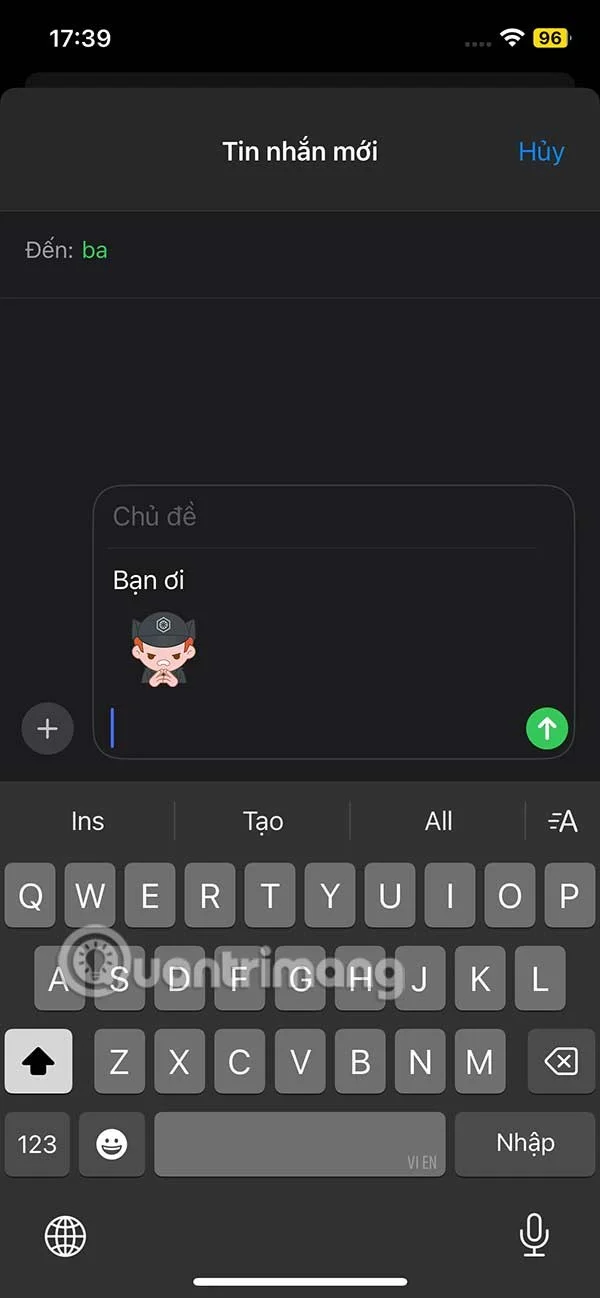
Now go to any app , like the Messages app on your iPhone , and then paste to send the Star Wars emoji.


Or on the Messnger app you can also paste and send emoji and you're done.
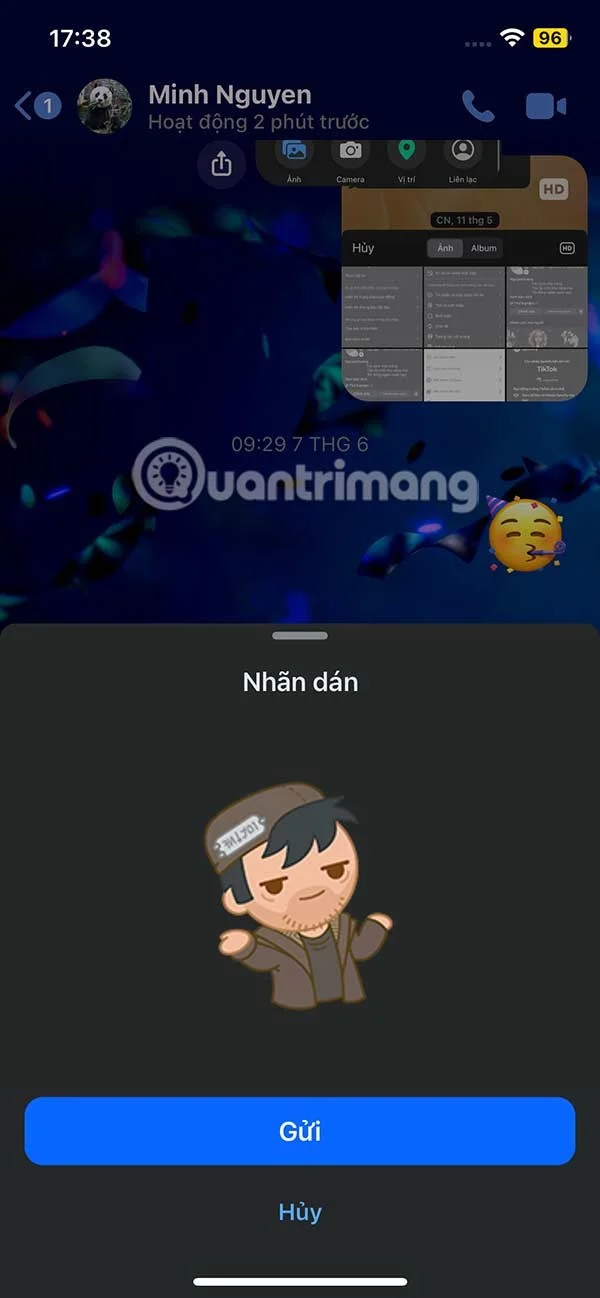
Video tutorial to download Star Wars emoji for iPhone
Through your purchase history on the App Store, you will know when you downloaded that app or game, and how much you paid for the paid app.
iPhone mutes iPhone from unknown callers and on iOS 26, iPhone automatically receives incoming calls from an unknown number and asks for the reason for the call. If you want to receive unknown calls on iPhone, follow the instructions below.
Apple makes it easy to find out if a WiFi network is safe before you connect. You don't need any software or other tools to help, just use the built-in settings on your iPhone.
iPhone has a speaker volume limit setting to control the sound. However, in some situations you need to increase the volume on your iPhone to be able to hear the content.
The iPhone iMessage group chat feature helps us text and chat more easily with many people, instead of sending individual messages.
For ebook lovers, having a library of books at your fingertips is a great thing. And if you store your ebooks on your phone, you can enjoy them anytime, anywhere. Check out the best ebook reading apps for iPhone below.
You can use Picture in Picture (PiP) to watch YouTube videos off-screen on iOS 14, but YouTube has locked this feature on the app so you cannot use PiP directly, you have to add a few more small steps that we will guide in detail below.
On iPhone/iPad, there is a Files application to manage all files on the device, including files that users download. The article below will guide readers on how to find downloaded files on iPhone/iPad.
Near Field Communication is a wireless technology that allows devices to exchange data when they are in close proximity to each other, typically within a few centimeters.
Apple introduced Adaptive Power, which works alongside Low Power Mode. Both extend iPhone battery life, but they work in very different ways.
If you frequently need to contact someone, you can set up speed calling on your iPhone, with a few simple steps.
Rotating the screen horizontally on iPhone helps you watch movies or Netflix, view PDFs, play games,... more conveniently and have a better experience.
Reverse image search on iPhone is very simple when you can use the browser on the device, or use some 3rd party applications for more search options.
Today's technological developments can allow you to directly extract text from images captured with a smartphone camera.
As soon as you update your iPhone to the official iOS 16 version, you will be able to set an iPhone wallpaper without covering your face when adjusting the wallpaper according to the depth effect.
Through your purchase history on the App Store, you will know when you downloaded that app or game, and how much you paid for the paid app.
iPhone mutes iPhone from unknown callers and on iOS 26, iPhone automatically receives incoming calls from an unknown number and asks for the reason for the call. If you want to receive unknown calls on iPhone, follow the instructions below.
Apple makes it easy to find out if a WiFi network is safe before you connect. You don't need any software or other tools to help, just use the built-in settings on your iPhone.
iPhone has a speaker volume limit setting to control the sound. However, in some situations you need to increase the volume on your iPhone to be able to hear the content.
ADB is a powerful set of tools that give you more control over your Android device. Although ADB is intended for Android developers, you don't need any programming knowledge to uninstall Android apps with it.
You might think you know how to get the most out of your phone time, but chances are you don't know how big a difference this common setting makes.
The Android System Key Verifier app comes pre-installed as a system app on Android devices running version 8.0 or later.
Despite Apple's tight ecosystem, some people have turned their Android phones into reliable remote controls for their Apple TV.
There are many reasons why your Android phone cannot connect to mobile data, such as incorrect configuration errors causing the problem. Here is a guide to fix mobile data connection errors on Android.
For years, Android gamers have dreamed of running PS3 titles on their phones – now it's a reality. aPS3e, the first PS3 emulator for Android, is now available on the Google Play Store.
The iPhone iMessage group chat feature helps us text and chat more easily with many people, instead of sending individual messages.
For ebook lovers, having a library of books at your fingertips is a great thing. And if you store your ebooks on your phone, you can enjoy them anytime, anywhere. Check out the best ebook reading apps for iPhone below.
You can use Picture in Picture (PiP) to watch YouTube videos off-screen on iOS 14, but YouTube has locked this feature on the app so you cannot use PiP directly, you have to add a few more small steps that we will guide in detail below.
On iPhone/iPad, there is a Files application to manage all files on the device, including files that users download. The article below will guide readers on how to find downloaded files on iPhone/iPad.
If you really want to protect your phone, it's time you started locking your phone to prevent theft as well as protect it from hacks and scams.