Instructions for setting automatic drying after washing

Some modern Samsung washing machines allow you to dry your clothes directly after washing with no extra worry. If you need to dry your clothes immediately after washing them, follow the steps below.
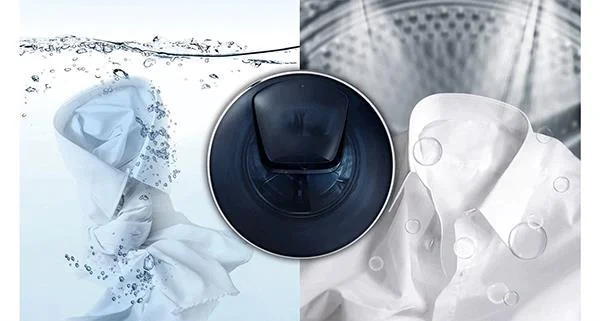
Instructions for setting automatic drying after washing

Easily wash and quickly dry the whole family's clothes with laundry technology built into the washing machine.

Set up washing and drying at the same time

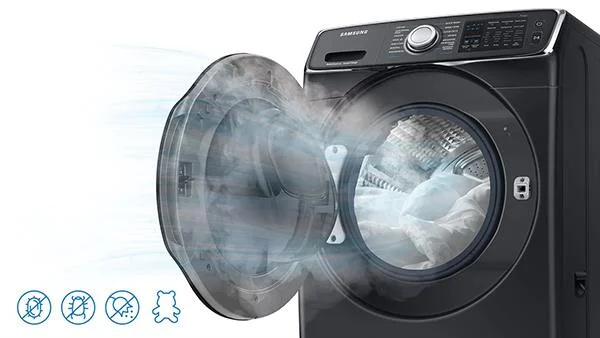
The washer's drying function reduces or eliminates drying time by heating the inside of the washer. The standard washing process is automatically selected and cannot be changed after it is started.

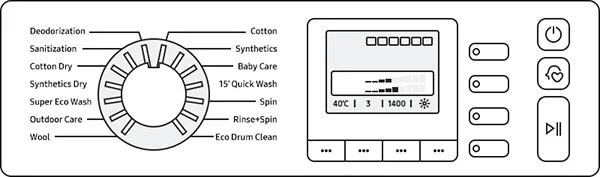
Step 1. Press the power button to turn on the washing machine.

Step 2. Select the desired process by rotating the selector.

Step 3. Press the Dry Level button to select it.

Step 4. Add detergent and softener according to the amount of laundry.

Step 5. Press the Start / Pause button to start the washing and drying cycle.

Instructions for setting automatic drying after washing

Set the washing and drying at the same time to save your hands free time to do other things.

Note:

- You should limit the type of laundry that cannot be dried safely as it can deform even at low temperatures.

- Dust can accumulate on the rubber rim during washing and especially drying, so please clean it after drying.

Be careful of the door temperature after the drying cycle has finished

- The temperature increases during the drying process, and the door needs to dissipate heat when the door is half or fully opened when the end and the door can be opened after waiting for 30-45 minutes.

Instructions for setting automatic drying after washing

Be cautious of high temperatures after the drying cycle ends.

- If you are notified of the temperature in the drum, it means it is overheating. Let the washing machine wait 30 minutes, then open the door once the washer has cooled.

- Please note that metal parts attached to laundry may also become hot.

Above is the guide to setting automatic drying after washing that WebTech360 has shared with you. Hopefully with this tutorial, you will have more experience to effectively use your washing machine .
Leave a Comment

Solving Microsoft Edge Microphone Background Noise

Solving Microsoft Edge Microphone Background Noise

Tired of annoying Microsoft Edge microphone background noise ruining your calls? Discover step-by-step solutions to solve Microsoft Edge microphone background noise for flawless video conferences and recordings in Edge.

How to Fix Microsoft Edge Extensions Crashing 2026

How to Fix Microsoft Edge Extensions Crashing 2026

Tired of Microsoft Edge extensions crashing? This step-by-step 2026 guide delivers quick, proven fixes to restore stability. Update, reset, and troubleshoot like a pro—no tech skills needed!

Solving Microsoft Edge Error 404: Page Not Found Troubleshooting

Solving Microsoft Edge Error 404: Page Not Found Troubleshooting

Stuck with Microsoft Edge Error 404 Page Not Found? Follow our proven step-by-step troubleshooting guide to fix it fast, clear cache, reset settings, and browse without interruptions. Get back online now!

Solving Microsoft Edge HTTP Error 500: Internal Server Problem

Solving Microsoft Edge HTTP Error 500: Internal Server Problem

Struggling with Microsoft Edge HTTP Error 500? Discover step-by-step fixes for Internal Server Problems, from cache clearing to advanced troubleshooting. Get back online fast!

Troubleshooting Microsoft Edge DirectX Runtime Compatibility Errors

Troubleshooting Microsoft Edge DirectX Runtime Compatibility Errors

Struggling with Microsoft Edge "DirectX Runtime" compatibility errors? Discover step-by-step fixes to resolve crashes, video glitches, and performance issues in Edge. Get back to smooth browsing today!

Troubleshooting Microsoft Edge SSL Protocol Errors (ERR_SSL_PROTOCOL_ERROR)

Troubleshooting Microsoft Edge SSL Protocol Errors (ERR_SSL_PROTOCOL_ERROR)

Struggling with ERR_SSL_PROTOCOL_ERROR in Microsoft Edge? Discover step-by-step fixes for SSL protocol errors, from clearing cache to advanced resets. Get back online fast with our ultimate guide.

How to Fix Microsoft Edge Script Error When Printing

How to Fix Microsoft Edge Script Error When Printing

Tired of Microsoft Edge "Script Error" ruining your prints? Follow our proven, step-by-step guide to fix it quickly—no tech expertise required. Works on the latest Edge versions for seamless printing.

How to Disable Microsoft Edge WebView2 Runtime Permanently

How to Disable Microsoft Edge WebView2 Runtime Permanently

Master how to disable Microsoft Edge WebView2 Runtime permanently and reclaim your PC resources for epic gaming. Step-by-step methods to stop background drain, boost FPS, and keep it gone forever – perfect for gamers!

How to Fix Microsoft Edge Too Many Redirects Error

How to Fix Microsoft Edge Too Many Redirects Error

Struggling with Microsoft Edge "Too Many Redirects" error? Discover step-by-step fixes to resolve ERR_TOO_MANY_REDIRECTS instantly. Clear cache, reset settings, and more for smooth browsing. Updated for latest Edge versions.

Solving Microsoft Edge Youtube Lag and Stutter (2026)

Solving Microsoft Edge Youtube Lag and Stutter (2026)

Tired of YouTube lag and stutter in Microsoft Edge? Get instant fixes for smooth playback in 2026. Step-by-step guide to resolve Microsoft Edge YouTube lag, clear cache, disable hardware acceleration, and more for seamless streaming.









