Instructions to block websites from accessing the camera on Edge

Web browsers all have their own section to manage access rights of websites when used, including camera access rights. With the option to adjust camera access rights on Microsoft Edge, users can easily change the options for websites, thereby protecting their privacy. Below are instructions for blocking websites from accessing the camera on Edge.

How to block websites from accessing the camera on Edge

Step 1:

In the Edge browser, click on the 3-dot icon and select Settings in the displayed list.

Step 2:

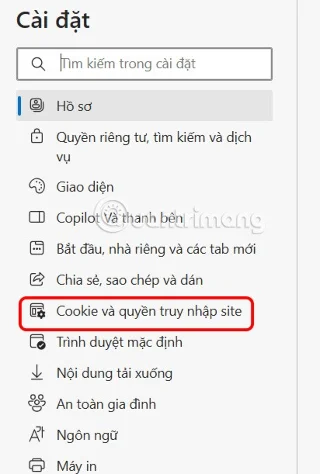
Switch to the new interface, users click on Cookies and site access rights .
Instructions to block websites from accessing the camera on Edge

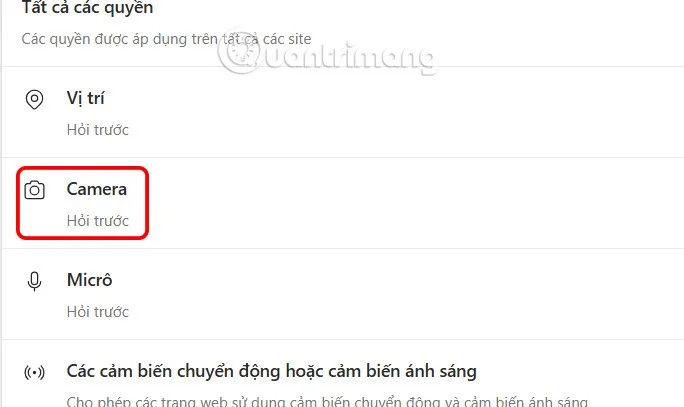
Look at the content next to you, find the All permissions group and then click on Camera to adjust.

Instructions to block websites from accessing the camera on Edge

Step 3:

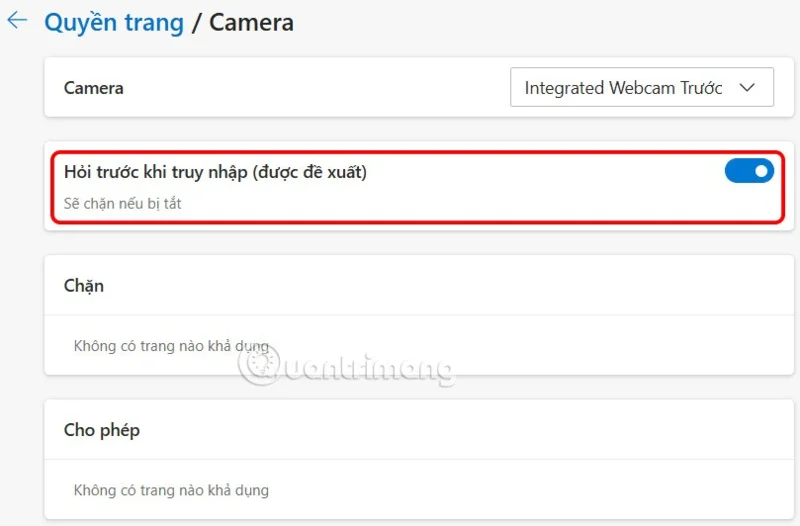
At this point, users will see the interface for adjusting camera access permissions on Edge. First, you need to enable the Ask before accessing (recommended) setting . Then any website that wants to use the camera on the browser must send a notification for your approval.

Below is the section to allow and block websites from using the camera on the Edge browser, if any. To remove a website from the list, click on the trash icon to delete it.

Instructions to block websites from accessing the camera on Edge

Leave a Comment

How to Check Your Microsoft Teams Version Using PowerShell

How to Check Your Microsoft Teams Version Using PowerShell

Discover how to check your Microsoft Teams version using PowerShell in seconds. Step-by-step guide for IT pros, admins, and everyday users to verify updates, troubleshoot issues, and stay ahead. Accurate, fast, and foolproof methods revealed!

Solving Microsoft Teams Guest Access Not Working

Solving Microsoft Teams Guest Access Not Working

Struggling with Microsoft Teams Guest Access Not Working? Discover proven fixes, from quick checks to advanced troubleshooting, to get guests collaborating seamlessly in no time.

Where is the Microsoft Teams Recycle Bin? How to Recover Deleted Files

Where is the Microsoft Teams Recycle Bin? How to Recover Deleted Files

Lost important files in Microsoft Teams? Discover the exact location of the Microsoft Teams Recycle Bin and follow our proven steps to recover deleted files quickly and easily—no tech skills required!

The Most Essential Vitamins for Women Over 50

The Most Essential Vitamins for Women Over 50

As you age, many of your bodys organs can weaken, but it doesnt have to be that way if you take care of yourself. Here are the most essential vitamins for women over 50.

Where to Find Your Microsoft Teams ID and Account Info

Where to Find Your Microsoft Teams ID and Account Info

Struggling to locate your Microsoft Teams ID or account details? This step-by-step guide shows exactly where to find your Microsoft Teams ID and account info on desktop, web, mobile, and more for seamless collaboration.

How to Enable Microsoft Teams Transcription for Meetings

How to Enable Microsoft Teams Transcription for Meetings

Unlock the power of Microsoft Teams transcription for meetings with this step-by-step guide. Learn how to enable transcription, prerequisites, and tips for accurate transcripts to boost productivity and accessibility. Perfect for teams in 2026.

Troubleshooting Microsoft Teams Unknown Error Fix

Troubleshooting Microsoft Teams Unknown Error Fix

Tired of Microsoft Teams "Unknown Error" crashing your meetings? Discover step-by-step troubleshooting fixes that work instantly. Clear cache, reset app, and more—no tech skills needed!

Supplements that people with irritable bowel syndrome should not take

Supplements that people with irritable bowel syndrome should not take

Not all supplements are beneficial for irritable bowel syndrome (IBS), some may even worsen your symptoms.

How to Fix Microsoft Teams Error AADSTS70008: Expired Security Token

How to Fix Microsoft Teams Error AADSTS70008: Expired Security Token

Struggling with Microsoft Teams Error AADSTS70008: Expired Security Token? Discover step-by-step fixes, from quick sign-outs to advanced cache clears, to get back to seamless collaboration instantly. Updated with the latest solutions.

How to Fix Microsoft Teams Error C Data

How to Fix Microsoft Teams Error C Data

Tired of Microsoft Teams Error C Data crashing your meetings? Get proven, step-by-step solutions to clear cache, reset, and restore seamless teamwork. Fast, reliable fixes for the latest Teams versions.

How to Use Microsoft Teams Background Images Effectively

How to Use Microsoft Teams Background Images Effectively

Discover how to use Microsoft Teams background images effectively with step-by-step guides, custom upload tips, and best practices to make your video calls professional and engaging. Elevate your remote work game today!

How to Use Microsoft Teams Web App on Any Browser

How to Use Microsoft Teams Web App on Any Browser

Discover how to use Microsoft Teams Web App on any browser effortlessly. Step-by-step guide, tips, and troubleshooting for smooth collaboration anywhere. No downloads needed!

How to Fix Microsoft Teams User Not Authorized Error

How to Fix Microsoft Teams User Not Authorized Error

Tired of the frustrating Microsoft Teams "User Not Authorized" error blocking your meetings? Discover proven, step-by-step solutions to fix it fast and reclaim your productivity. Works on desktop, web, and mobile.

How to Fix Microsoft Teams Error on iPhone and iOS

How to Fix Microsoft Teams Error on iPhone and iOS

Struggling with Microsoft Teams errors on iPhone or iOS? Discover step-by-step fixes for crashes, sign-in issues, and more. Get back to seamless teamwork in minutes—no tech expertise needed!

Troubleshooting Microsoft Teams Tasks Sync Error

Troubleshooting Microsoft Teams Tasks Sync Error

Battling Microsoft Teams Tasks sync error? Get instant relief with our proven, step-by-step fixes for Tasks not syncing in Teams. Boost productivity now—no tech expertise needed!