How to enable Adobe Reader Dark Mode
PDF is a common file format that you probably work with on a regular basis, so it's a shame that not all PDF readers have a Dark Mode.
You are trying to edit PDF files, then suddenly the power or computer "natural" reboot! You're "half crying" because the data has not been saved, what to do with this data?
Most people, even myself, usually have a habit after finishing the work to save. So, please refer to how to turn on the feature of automatically saving PDF files in Adobe Reader in the following article to fix this situation:
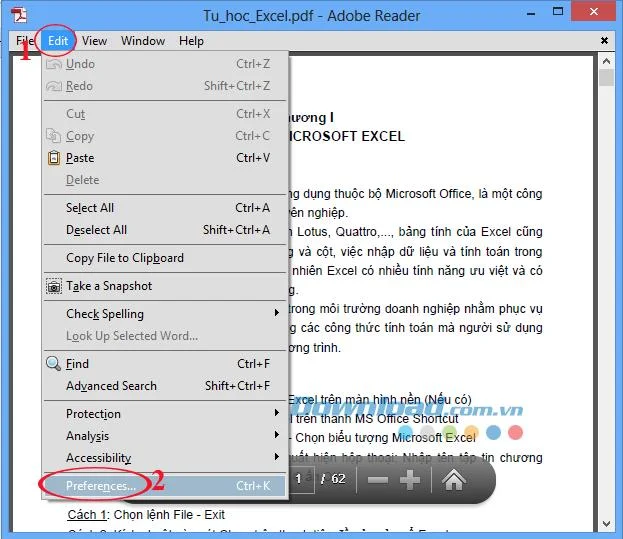
Step 1: Open Adobe Reader , on the toolbar click on the Edit tab , select Preferences ... (or use Ctrl + K key combination ) to set some options.
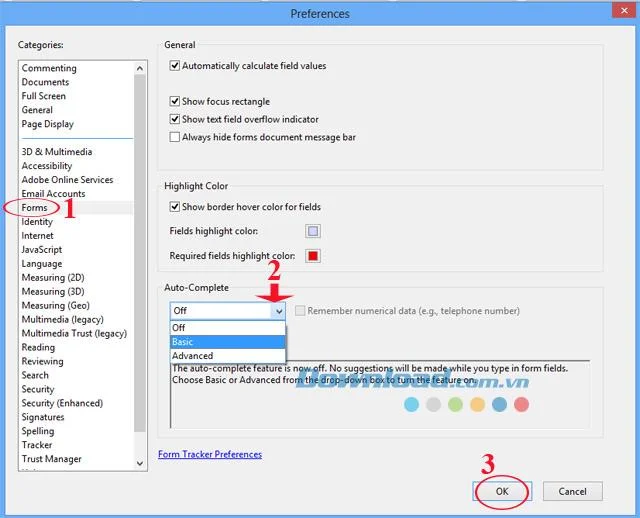
Step 2: Preferences window appears, in the Categories section on the left of the screen select Forms. In the right pane in Auto-Complete , select one of two modes:
After making your selection, click OK to save the settings.

Here we select Basic mode
Now you can rest assured not to lose data when something goes wrong again. This way helps you save a lot of time, save the work and save as before.
To ensure the safety of your computer system when using Adobe Reader, turn on the unsafe PDF file warning feature.
In addition, you can use some of the following software: Foxit Reader , eXPert PDF Reader , Nitro Reader to read and edit PDF files for free.
I wish you successful implementation!
PDF is a common file format that you probably work with on a regular basis, so it's a shame that not all PDF readers have a Dark Mode.
Adobe Reader XI, Adobe Reader 11 are the best and free PDF reader software available today. Adobe Reader XI supports users to view PDFs, print PDF files and take notes
TOP best ways to open and read PDF files on your computer. How to open PDF files on your computer is not too difficult. In fact, you have many ways to read PDF files. Join WebTech360
Adobe Reader is one of the best PDF reading tools available today, loved by many users. Support users to open, view, edit, print and share PDF documents easily.
Please refer to the following article to find out the causes and how to fix errors. .Pdf contains an invalid path easily and quickly.
Tired of Microsoft Teams workflows and Power Automate errors halting your productivity? Get step-by-step solutions to common issues like authentication failures, timeouts, and flow errors. Fix them in minutes and automate effortlessly!
Facing Microsoft Teams "Download Error" on MacBook? Discover proven troubleshooting steps to resolve download failures quickly, from cache clears to reinstalls, and get back to smooth teamwork.
Tired of the frustrating Microsoft Teams "Where is Teams" Folder Error? Discover proven, step-by-step troubleshooting fixes to resolve it quickly and restore smooth teamwork. Latest methods included!
Frustrated by Microsoft Teams JavaScript Error on desktop app? Discover proven steps to fix it fast: clear cache, update, reset, and reinstall. Get back to seamless collaboration in minutes!
Struggling with Microsoft Teams "Guest Login" Error? Discover step-by-step fixes, from quick cache clears to admin settings, to resolve guest access issues fast and collaborate seamlessly. Updated with the latest tips!
Tired of the Microsoft Teams "For PC" download error blocking your work? Follow our proven, step-by-step guide to resolve it quickly and get Teams running smoothly on your PC today.
Struggling with Microsoft Teams "Windows 7" login error? Discover step-by-step fixes for this frustrating issue on Windows 10/11. Clear cache, edit registry, and more – get back to seamless collaboration today!
Tired of Microsoft Teams Error Code 0x80070005 blocking your meetings? Follow this 2026 guide with step-by-step fixes for access denied issues. Get Teams running smoothly in minutes!
Master the installation of the Microsoft Teams Add-in for Outlook 2026 effortlessly. Boost your productivity with seamless scheduling and meetings. Follow our proven, up-to-date steps for instant success!
Struggling with Microsoft Teams "License Error" 2026? Discover proven, step-by-step solutions to resolve it fast. Clear cache, check licenses, and get back to seamless collaboration—no IT help needed!
Whether youre in your 50s, 60s, or even 70s, its not too late to prioritize your health and put yourself first. Here are the best exercises for people 50 and older.
Struggling with Microsoft Teams Error Caa50024 on Windows 10/11? Follow our step-by-step fixes to resolve crashes and launch issues quickly. Latest proven solutions for seamless teamwork.
Stuck with Microsoft Teams login error AADSTS50011? Discover proven, step-by-step fixes to resolve the reply URL mismatch issue and log in seamlessly. No tech skills needed!
Tired of the frustrating Microsoft Teams "Win 7" Compatibility Error blocking your meetings? Get instant fixes with our step-by-step guide, including workarounds for older Windows versions. Resolve it now and stay connected!
Tired of the endless Microsoft Teams "Error R" restart loop? Get step-by-step fixes to solve Microsoft Teams Error R quickly. Clear cache, reset, reinstall & more for smooth collaboration. Works on Windows, Mac & web.









