Iris in Free Fire: Skills, weapons, skill combos

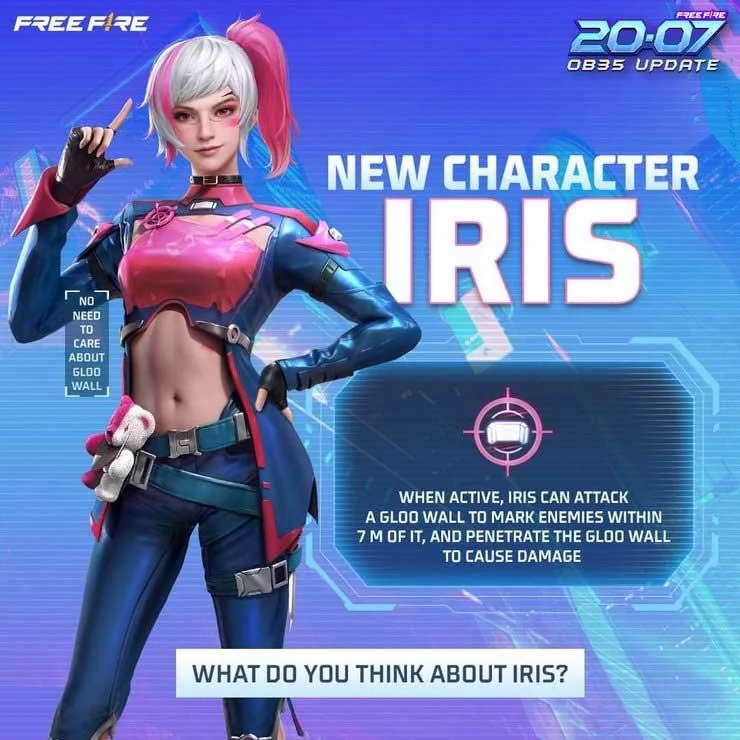
Iris is the newest female character in Free Fire OB35 , with the ability to break the meta. Here's everything you need to know about how to play Iris in Garena Free Fire .

Iris in Free Fire: Skills, weapons, skill combos

How to play Iris in Free Fire

Story and visual design by Iris

Story

With sharp vision, Iris in Free Fire is good at predicting enemy actions to seize opportunities to win. If you're worried that her flamboyance, carefreeness, and excessive individualism will affect the camaraderie, forget it. Iris never cooperates with anyone, except Homer - who accepts her unconditionally and always cleans up all her messes.

Temple Fire really had an interesting creation when combining Iris - a character with excellent eyesight and Homer - a blind person.

Design

Iris is designed quite eye-catching, similar to Steffie but with the main pink color tone.

Iris's skills in Free Fire

Active skill: Wall Brawl

Level  Skill
first Within 5 seconds after deploying the skill, the user can attack the glue bomb to mark the enemy position within 7m, and penetrate the glue bomb to deal damage. Maximum impact on 3 Gloo Walls. Recovery: 80 seconds.
2 For 6 seconds after deploying the skill, the user can attack the glue bomb to mark the enemy position within 7m, and penetrate the glue bomb to damage the enemy. Maximum impact on 3 Gloo Walls. Recovery: 75 seconds
3 For 7 seconds after deploying the skill, the user can attack the glue bomb to mark the enemy position within 7m, and penetrate the glue bomb to damage the enemy. Maximum impact on 4 Gloo Walls. Recovery: 70 seconds.
4 For 8 seconds after deploying the skill, the user can attack the glue bomb to mark the enemy position within 7m, and penetrate the glue bomb to damage the enemy. Maximum impact on 3 Gloo Walls. Recovery: 65 seconds.
5 For 9 seconds after deploying the skill, the user can attack the glue bomb to mark the enemy position within 7m, and penetrate the glue bomb to damage the enemy. Maximum impact on 5 Gloo Walls. Recovery: 60 seconds.
6 For 10 seconds after deploying the skill, the user can attack the glue bomb to mark the enemy position within 7m, and penetrate the glue bomb to damage the enemy. Maximum impact on 5 Gloo Walls. Recovery: 55 seconds.

Iris in Free Fire: Skills, weapons, skill combos

Combine skills for Iris in Free Fire

Iris's active skills can only be combined with passive skills. In general, when this skill encounters glue bombs, you should combine it with passive attack skills:

Maro

Maro is one of the few characters with the ability to increase damage from weapons. Players can combine this passive skill with Wall Brawl quite easily to increase damage to enemies.

Nairi

Ice Iron regenerates HP to deploy glue bombs. However, the most useful feature here is the 35% increased damage when using AR on Gloo Wall.

Nikita

Reload speed increased and the SMG's final bullets deal additional damage.
Leave a Comment

What Young Riders Should Know About Moving Their Motorcycles Across Cities

What Young Riders Should Know About Moving Their Motorcycles Across Cities

Long-distance travel can involve heavy traffic, changing weather conditions, and rider fatigue. If you are also dealing with the responsibilities of moving home, such as packing belongings or coordinating accommodation, a long ride may add unnecessary pressure to an already busy schedule.

Solving Microsoft Teams Shortcut Error Not Opening

Solving Microsoft Teams Shortcut Error Not Opening

Tired of Microsoft Teams shortcut error preventing you from opening the app? Follow our expert, step-by-step guide with the latest fixes for instant resolution. Works on Windows, Mac & web – no tech skills needed!

Solving Microsoft Teams Task Management Sync Error

Solving Microsoft Teams Task Management Sync Error

Tired of Microsoft Teams Task Management Sync Error halting your workflow? Follow our proven, step-by-step fixes to resolve sync issues fast and restore seamless task collaboration. No tech expertise needed!

Troubleshooting Microsoft Teams Wiki Error Formatting

Troubleshooting Microsoft Teams Wiki Error Formatting

Struggling with Microsoft Teams Wiki Error Formatting? This step-by-step guide reveals proven fixes for common wiki tab issues, ensuring smooth editing and collaboration in Teams. Get back to productive wikis fast!

How to Fix Microsoft Teams Installation Error for Linux

How to Fix Microsoft Teams Installation Error for Linux

Struggling with Microsoft Teams installation error on Linux? Discover step-by-step fixes for Ubuntu, Fedora & more. Resolve dependency issues, crashes, and errors quickly with our ultimate guide. Get Teams running smoothly today!

Solving Microsoft Teams Error Page Not Loading

Solving Microsoft Teams Error Page Not Loading

Struggling with Microsoft Teams "Error Page" not loading? Get step-by-step fixes for desktop, web, and mobile. Solve Microsoft Teams Error Page issues quickly and resume seamless teamwork today.

Solving Microsoft Teams Error Screenshot Issues

Solving Microsoft Teams Error Screenshot Issues

Tired of Microsoft Teams "Error Screenshot" blocking your workflow? Get proven, step-by-step solutions to resolve screenshot errors in Teams instantly and boost productivity. No tech skills needed!

How to Fix Microsoft Teams Error U User

How to Fix Microsoft Teams Error U User

Tired of Microsoft Teams "Error U" User blocking your chats? Get proven, step-by-step fixes to clear cache, reset, and restore seamless collaboration instantly.

Where are Microsoft Teams Registry Keys Located on Windows 11?

Where are Microsoft Teams Registry Keys Located on Windows 11?

Unlock the precise locations of Microsoft Teams registry keys on Windows 11. Step-by-step guide to find, access, and safely tweak them for optimal performance and troubleshooting. Essential for IT pros and Teams enthusiasts.

How to Fix Microsoft Teams Training Error Video Lag

How to Fix Microsoft Teams Training Error Video Lag

Tired of Microsoft Teams "Training Error" Video Lag ruining your meetings? Follow our step-by-step guide with the latest fixes for smooth video calls—no more frustration!









