Skype Free Phone Calls

Skype Free Phone Calls let you connect with friends and family worldwide at no cost. Follow this guide to set up and start making free calls quickly and easily.
Suppose you are looking to create engaging video content with the help of AI. In that case, Vidnoz AI offers a reliable platform where you can create professional-quality AI videos in just a few minutes. No expensive equipment or tools required. Vidnoz AI offers hundreds of studio-quality AI avatars, video templates, and a rich library of AI voices to create impressive content at a fraction of the cost.
So, if you want to simplify and automate the video production process for your TikTok or YouTube channel, check out all the cool features that Vidnoz AI has to offer through the article below.
Table of Contents
The most attractive feature of Vidnoz AI is that it can create AI videos from text in just a few minutes. You have to choose a template from a large library of amazing layouts.
Now, all you need to do is enter the text you want the AI avatar to narrate or simply create an AI script. You just need to provide basic information about the topic you want to discuss and the AI script tool will instantly generate content for you.
You can even change the tone of the script, choosing between formal, professional, friendly or casual. Moreover, you can also choose non-English languages as Vidnoz AI supports more than 140 languages, both global and regional languages around the world.
Not only that, you can add voiceovers to your AI videos by choosing from a library of over 800 voices. Voices can be filtered based on language, gender, emotion, situation, occupation, and age. Additionally, you can upload your own voice and have it transcribed within minutes. Vidnoz's AI voices are powered by Elevenlabs and Microsoft.
Basically, Vidnoz AI offers all kinds of pre-made assets, keeping in mind the user’s requirements and above all, allows for personalization. If you are looking for a service that can create AI videos in just a few minutes, Vidnoz is a platform that cannot be missed.
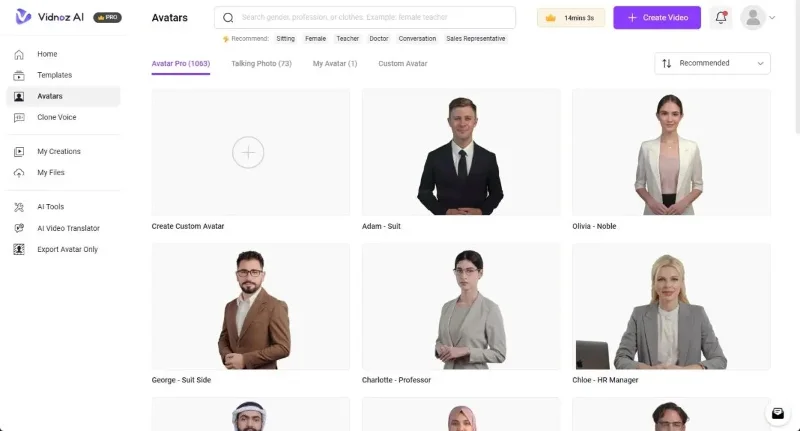
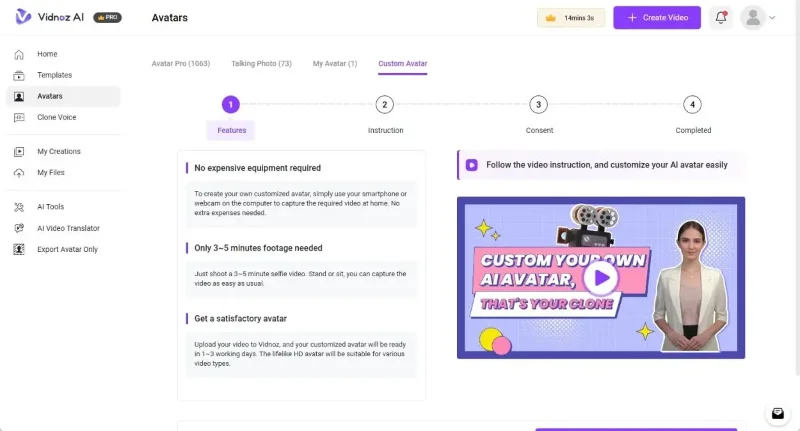
While Vidnoz offers over 1,000 realistic AI avatars, you can also create your own custom AI avatar. All you have to do is shoot a 3-5 minute selfie video and upload it to Vidnoz AI. It will process your uploaded video and create a custom AI avatar for you.
You can also create a talking face from your photos. Just upload one of your photos and Vidnoz will remove the background and create a talking face for your video with perfect lip sync. This is great for those who want to personalize their AI videos on the fly.
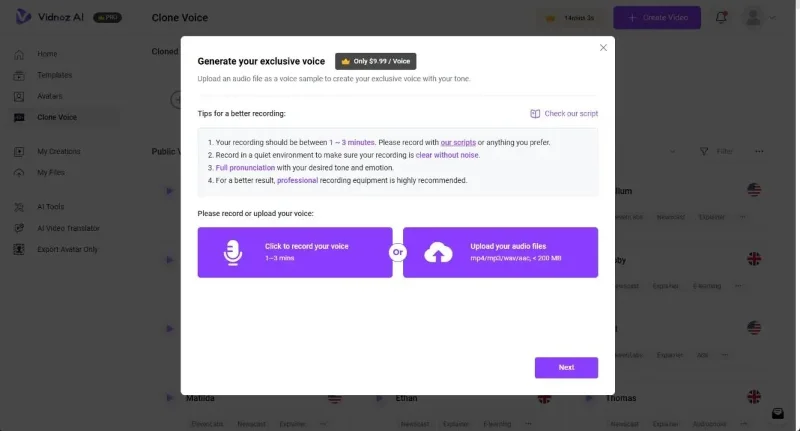
If you want to clone your voice to narrate content in AI videos with intact tone and emotion, Vidnoz AI allows you to do that too.
Just record your voice for 1 to 3 minutes in the desired tone and emotion, then upload the audio file to Vidnoz AI. It will process the file and create a voice transcript in just a few minutes. To narrate any scenario, you can use your transcribed voice, which will save a lot of time and effort.
What we love most about Vidnoz AI is that it is not just limited to creating tutorials but also unlocks applications for multiple use cases and platforms. For example, Vidnoz AI offers templates for explainer videos, tutorials, breaking news templates for media companies, educational content, social media content, etc.
Furthermore, you can create AI videos for health and medical content, sports, e-commerce, festivals, presentations, invitations, etc. There are plenty of templates to choose from and it supports both landscape and portrait orientations. For social media platforms like Instagram, TikTok, and YouTube Shorts, vertical content can help you reach a wide audience.
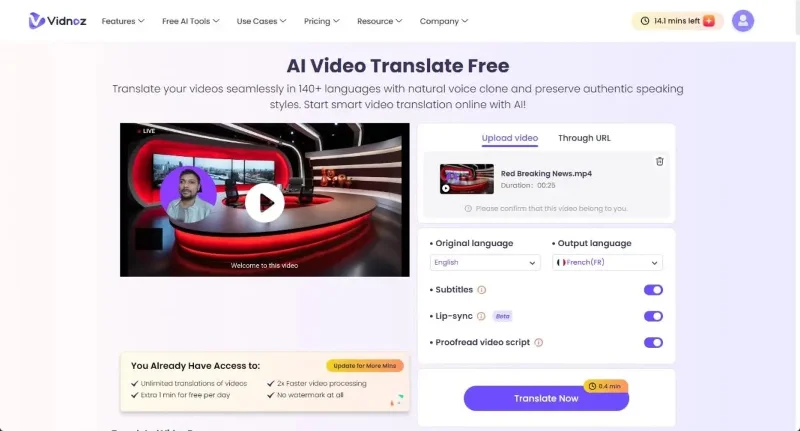
In today's era, content creators and news platforms have a global audience and videos are viewed in many non-English speaking regions. Therefore, you can translate videos into multiple languages using Vidnoz AI's powerful AI video translation tool to cater to all audiences.
You just need to upload the video in the original language and choose the output language of your choice. You can also add subtitles and sync the video in the new language. During testing, Vidnoz AI performed quite well and lip sync was very accurate. In just a few minutes, the tool translated the entire video.
Vidnoz AI supports video translation for over 140 languages, including Spanish, French, Arabic, German, Hindi, Bengali, etc.
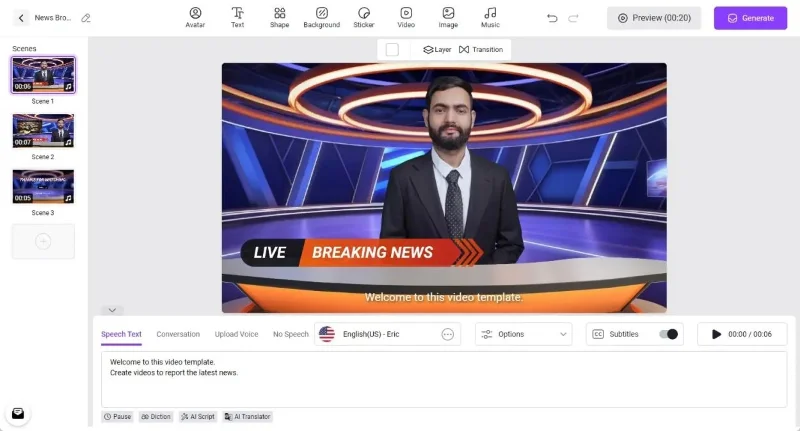
Now, coming to the Vidnoz AI video editor, this is actually the best feature of this tool. It has a clean and easy to understand user interface that even beginners can start using right away. Apart from creating AI scripts, custom avatars, and voiceovers, you can also edit the templates according to your preferences.
Every element of the template is customizable, you can edit the text, change the fonts, add a logo, insert stickers, create shapes, add layers and more. The best part is that it also offers stock videos and images from other providers, including Pexels, Unsplash, Freepik, etc. And for background music, you have a large audio library available within the video editor itself.
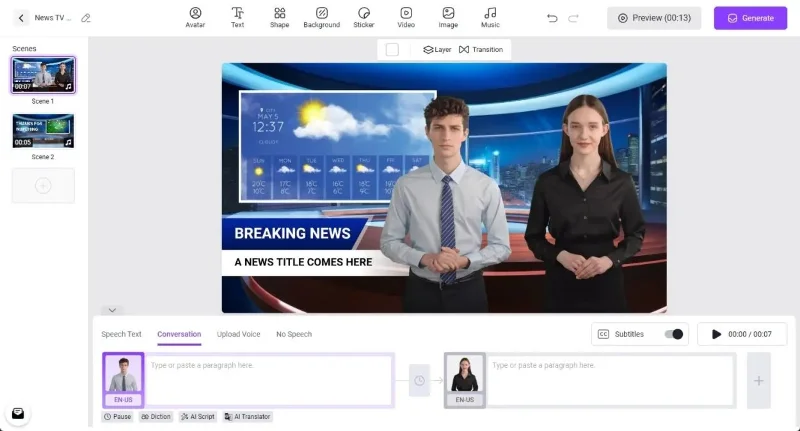
Next, you can add multiple scenes with different layouts and create AI videos, beyond the given template. Vidnoz AI also supports dual chat mode, where you can add 2 AI avatars to a scene and add scenarios for each character.
Finally, you can preview the video before exporting, but the lip-sync video is only generated after you hit the Generate button .
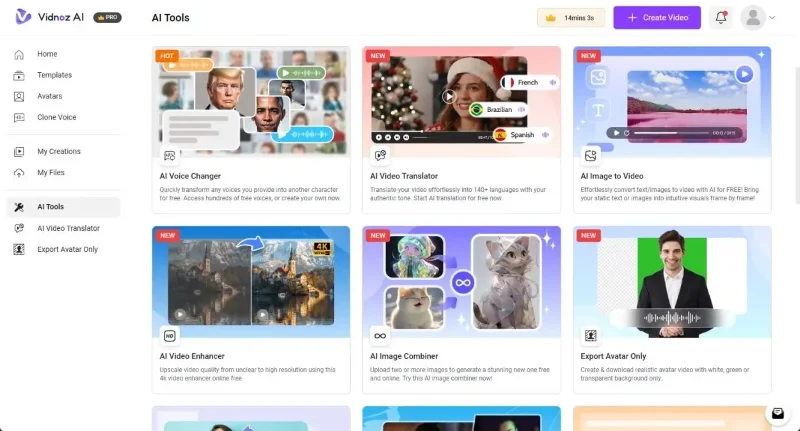
In addition to AI video creation, Vidnoz AI also offers a variety of AI tools that can help with various aspects of content creation. You can use AI text-to-speech to convert text into realistic speech in over 140 languages. Next, you can change the presenter’s voice to any celebrity voice like Barack Obama, Elon Musk, Morgan Freeman, etc.
To easily create videos from images, you can use the AI image-to-video tool. You can also turn still images into dance videos. Vidnoz AI also offers an AI video enhancer to upscale videos to 4K resolution. Finally, you have an AI voice removal tool, background removal tool, animation tool, portrait maker tool, and more.
Vidnoz AI offers most of its services for free with access to over 1000 AI avatars, video templates, and voices. Under the free plan, you can create videos for 1-3 minutes per day in 720p resolution.
If you’re serious about creating content and making money with AI, we recommend purchasing the Starter plan, which costs $19.99/month with an annual subscription. This unlocks the ability to create videos for up to 15 minutes per month with access to a larger library of AI avatars, video templates, and voiceovers. You can also export videos in 1080p resolution. Vidnoz AI doesn’t add a watermark when you purchase the Starter plan.
The Business plan costs $56.99/month, allows you to create 30 minutes of video per month and includes Voice Cloning. You also get all the features of the Starter plan. So, if you are impressed with the features of Vidnoz AI, go ahead and try this service.
Skype Free Phone Calls let you connect with friends and family worldwide at no cost. Follow this guide to set up and start making free calls quickly and easily.
Stuck in the Discord Update Failed Loop? Follow these targeted fixes to break the cycle and complete the update without repeated failures or reinstalls.
Travel planning used to mean folders full of printed confirmations, handwritten notes, guidebooks, and a slightly terrifying number of browser tabs. Now, pretty much everything you need for a trip can live on the device already in your pocket.
Discover how Canva Free for Teachers gives educators full access to premium design tools at no cost. Verify your status and start creating classroom materials in minutes.
Skype How to Call International is simple and cost-effective once you set up credit and use the right country codes. Follow this guide to place clear calls from anywhere.
Make Skype to Skype Calls Free in minutes with this clear guide. Set up your account, add contacts, and start unlimited voice and video calls at no cost.
Fix the Your Connection is Not Private Chrome error quickly with these exact steps. Restore secure browsing by addressing certificate and settings issues in minutes.
Record heat has lifted air-conditioning demand while gas-market shocks have returned volatility to power prices. That creates a real risk of painful bills—but not a guaranteed, Europe-wide price explosion.
Large format printing has long faced criticism for its environmental impact. Traditional substrates, solvent-based inks, and short-lived promotional campaigns have all contributed to the perception that eye-catching graphics come at a high environmental cost.
Long-distance travel can involve heavy traffic, changing weather conditions, and rider fatigue. If you are also dealing with the responsibilities of moving home, such as packing belongings or coordinating accommodation, a long ride may add unnecessary pressure to an already busy schedule.





