 to temporarily hide the popup window, select a cell on the worksheet, and then click Expand
 .
Would Europe Be Drawn into a Hypothetical U.S.-Israel-Iran Nuclear War? NATO Rules Explained

A guide to NATO Articles 4 and 5, UN self-defense rules, and why consultation does not mean automatic European entry into war.
Filtering unique values and deleting duplicate data is a basic operation that everyone needs to know when using Excel. Join us to learn how to do that on Excel for Office 365, Excel Online, Excel 2007 and above.

To highlight unique or duplicate values, use the Conditional Formatting command in the Style group on the Home tab .
Filtering for unique values or eliminating duplicate values are two similar tasks because the goal is to present a list of distinct values. However, there is an important difference. When you filter for unique values, the duplicate values are only temporarily hidden. Removing duplicate values means they are permanently removed from the spreadsheet.
Duplicate value is one of all minimum values in a row that is identical to all other rows' values. Comparing duplicate values depends on the data currently in the cell - not the value stored in the cell. For example, you have the same date value in different cells. One cell has the format 3/8/2006, the other is Mar 8, 2006. These values are unique.
Check before deleting duplicates: Before removing duplicate values, you should first try filtering or formatting according to the unique values to confirm you will achieve the expected results.
1. Select the range of cells or make sure the cell in use is in a table.
2. Click Data> Advanced (in the Sort & Filter group).
3. In the Advanced Filter popup , do the following:
Filter local range of cells or tables:
To copy filter results to another location:
The unique values in this range will be copied to the new location.
When deleting duplicate values, only values in cell range or table are affected. Any other values outside the range of cells or tables will not change or move. Once the duplicate data has been deleted, the first occurrence of this value in the list is retained and other identical values are deleted.
Because you are permanently deleting data, you should copy the original cell range or table into another worksheet or workbook before removing duplicate values.
The steps are as follows:
1. Select the cell range or make sure the active cell is in a table.
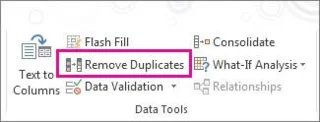
2. On the Data tab, click Remove Duplicates (in the Data Tools group ).
3. Do one or more of the following:
If the range of cells or table contains many columns and you want to select only a few columns, you can easily click Unselect All to remove it. Then, in Columns , select these columns.
Note: Data will be deleted from the entire column, even if you do not select all columns in this step. For example, if Column1 and Column2 are selected, but Column3 is omitted, the keyword used to find duplicates is the value of both columns 1 & 2. If duplicates are found in these columns, the entire row will be duplicated. remove, including other columns in the table or range above.
4. Click OK , the message number or number of duplicates will be deleted or deleted. Click OK to close this message.
5. Undo the change by clicking Undo or pressing Ctrl+ Zon the keyboard.
You cannot remove duplicate values from outlined or aggregated outline data. To eliminate duplicates, you must delete both of these data.
Note: You cannot format conditional fields in the Values area of a PivotTable report with unique or duplicate values.
Quick format
1. Select one or more cells in a range, worksheet, or PivotTable.
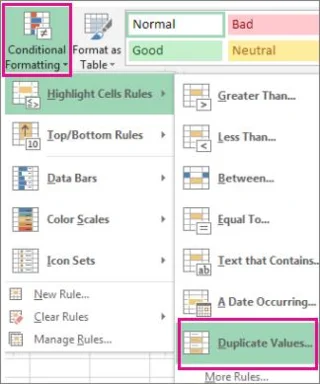
2. On the Home tab , in the Style group , click the small arrow in Conditional Formatting> Highlight Cells Rules and select Duplicate Values .
3. Enter the value you want to use, then select the format.
Advanced format
1. Select one or more cells by range, table, or PivotTable report.
2. On the Home tab , in the Styles group , click the arrow in Conditional Formatting > click Manage Rules to bring up the Conditional Formatting Rules Manager window .
3. Follow one of the following steps:
4. In Select a Rule Type , click Format only unique or duplicate values.
5. In the Format all list of Edit the Rule Description , choose unique or duplicate .
6. Click Format to display the Format Cells window .
7. Select the number, font, border or fill format you want to apply when the cell value meets the condition, then click OK . You can choose more than one format. The format you choose will be displayed in the Preview panel .
In Excel for Web, you can delete duplicate values.
When deleting a duplicate value, the effect only occurs on values in a range of cells or tables. Other values outside the cell range or table will not change or move. When the duplication is successfully deleted, the first occurrence of the value in the list will be retained, other identical values will be deleted.
Note: You can always click Undo to get back the data after deleting duplicates. Ideally, you should copy the original cell range or table into another worksheet or workbook before removing duplicate values.
The steps are as follows:
1. Select the cell range or make sure the active cell is in the table.
2. On the Data tab , click Remove Duplicates .
3. In Remove Duplicates , uncheck any column where you do not want to delete duplicate values.
Note: Data will be deleted from the entire column, even if you do not choose to do so. For example, if you select columns 1 & 2, remove column 3. The keyword used to find duplicates is the value in both columns 1 and 2. If a duplicate is found in these two columns, the entire row will be deleted, including data in column 3.
Click OK . Notice of the amount of duplicate value to be deleted will appear. Click OK to close it.
Note: If you want to retrieve the data, just click Undo or Ctrl+ Zon the keyboard.
A guide to NATO Articles 4 and 5, UN self-defense rules, and why consultation does not mean automatic European entry into war.
Assess claims about Iran in six steps, distinguishing uranium enrichment, weapons development and verified possession.
Understand nuclear decision authority in six steps, including US civilian control and the limits of public information about Israel.
A guide to official 2026 evidence on Hormuz shipping disruption, Iran-related claims, confirmed incidents, and what remains uncertain.
A source-based guide to nuclear escalation risks, UN Charter rules and NATO Article 5 in a strictly hypothetical Iran scenario.
Use five steps to prepare for an outage; nuclear and EMP scenarios are hypothetical, and official shelter instructions come first.
Use 5 defensive steps to verify a cyber disruption, protect household accounts, and avoid mistaking an outage for war.
Use these 5 steps to assess climate effects from a hypothetical Iran strike, compare model assumptions, and avoid unsupported predictions.
Explore six steps for reading research on climate, food and ecosystem recovery after a hypothetical nuclear conflict.
Build a practical fallout preparedness kit in six steps, with sealed food and water, a radio, medical supplies and shelter guidance.