Learn What is a Standee? And Standee Features

Standee plays an important role to help business people have more strategies for product marketing, especially business, so what is Standee and what are the characteristics of Standee, why it is an indispensable component. of a business? Please join  WebTech360  to find out the following information. 

What is Standee?

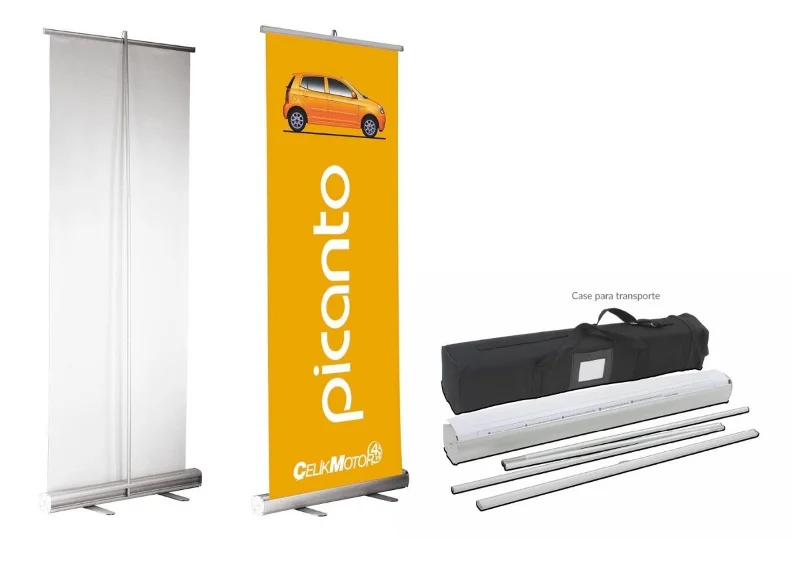
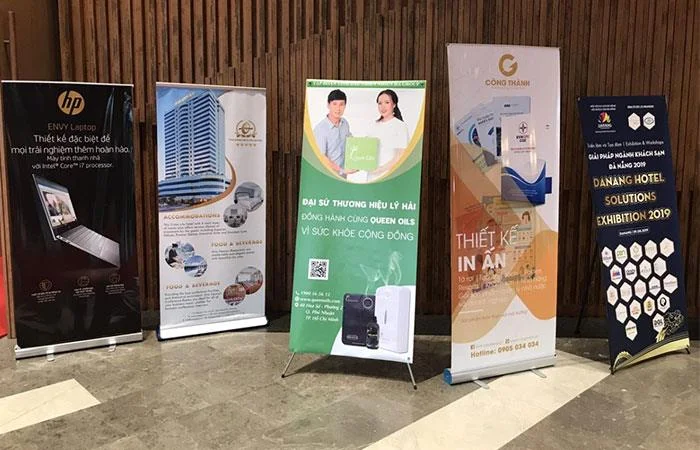
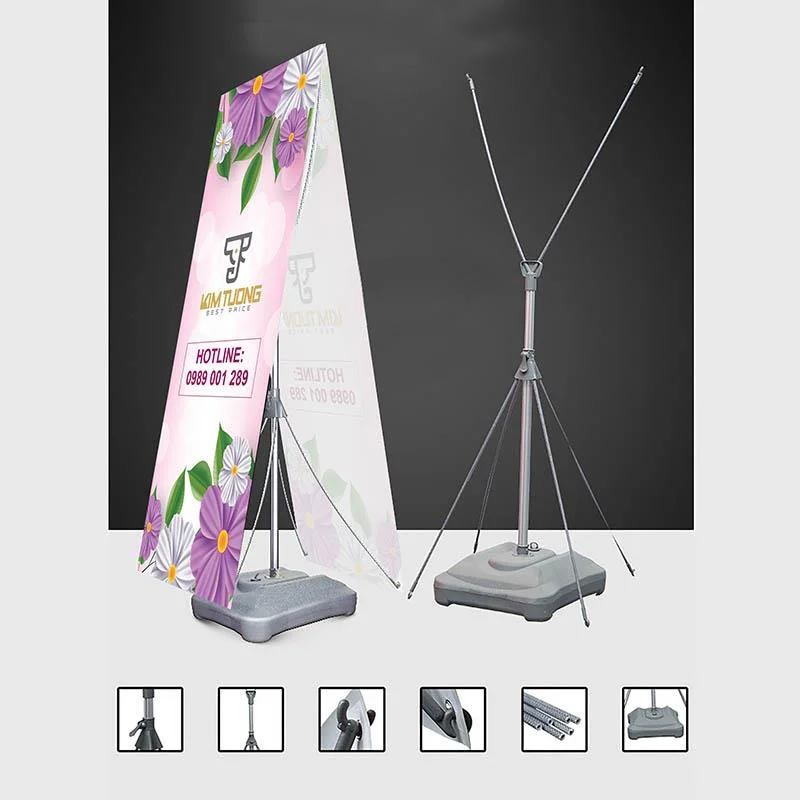
Standees  are banners designed vertically for cinemas and shops. With the right expertise, Standee is a product of today's popular design and printing technology. The two-part structure: the stand and the canvas are the hallmarks of Standee . In particular, the canvas is printed in offset or digital form. The stand is made from hiflex or PP and has an X shape. Usually, these two components are compact and easy to move, remove, roll and stow.

Standee does not have a fixed size that changes depending on the purpose of use. A standee is usually rectangular in shape with standard sizes of 6×16 (60cmx160cm), 8×18 (80cmx180cm) and 8×20 (80cmx200cm) . The reason Standee is used a lot is because the product has a low cost and is superior to other types.
Learn What is a Standee?  And Standee Features

What is Standee?

Uses of Standee

Standee's features are often associated with its use. So before learning about the outstanding features, you should know about the benefits of Standee:

- As a product of graphic design and high quality printing technology, Standee is artistic. Therefore, you can easily see Standee at exhibitions, exhibitions…

- Standee brings high efficiency for advertising purposes and marketing strategies. Because, Standee has the ability to convey messages in a concise and easy to understand way.

- Because it does not take up much space and is easy to arrange, you can put the Standee anywhere.

- Standee also has the effect of announcing, introducing, guiding at conferences , events, fairs, festivals...

- Standee attracts readers' attention through impressive designs, simple content. Therefore, readers quickly memorize the messages on the design.

Thanks to the above full uses, Standee is considered an effective form of advertising. If you are doing a marketing campaign or organizing any event, then Standee is the right choice.

Features of Standee

You can easily distinguish Standee from other types of advertising through the characteristics of Standee. Standee's main characteristics are often evident in style and design:

Standee Styles

In addition to the basic standard shape of an upright rectangle, the Standee has other styles such as:

- Standee water base: has a sandbox-shaped stand, usually placed in stores or outdoors. Because, the heavy sole can withstand the force of the wind.

Learn What is a Standee?  And Standee Features

- Standee shelf X: commonly used in marketing activities. The structure includes a printed canvas and a 4-legged stand, so the size can be adjusted arbitrarily.

Learn What is a Standee?  And Standee Features

- Aluminum rolling standee: has a compact design because it can be rolled up easily. Aluminum coil is one of the features of this Standee.

Learn What is a Standee?  And Standee Features

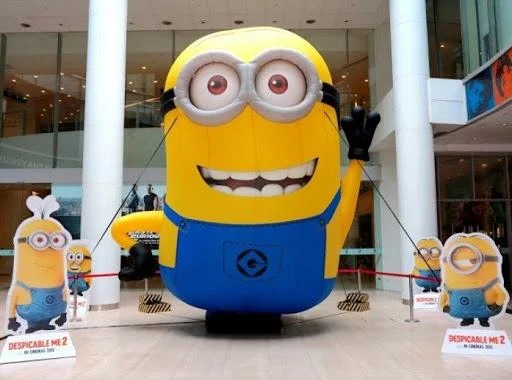
- Standee 3D: outshines other designs with true-to-life images and colors. Therefore, customers often pay more attention to 3D Standee models.

Learn What is a Standee?  And Standee Features

- Standee model: mainly placed in commercial centers and public places during product launches.

Learn What is a Standee?  And Standee Features

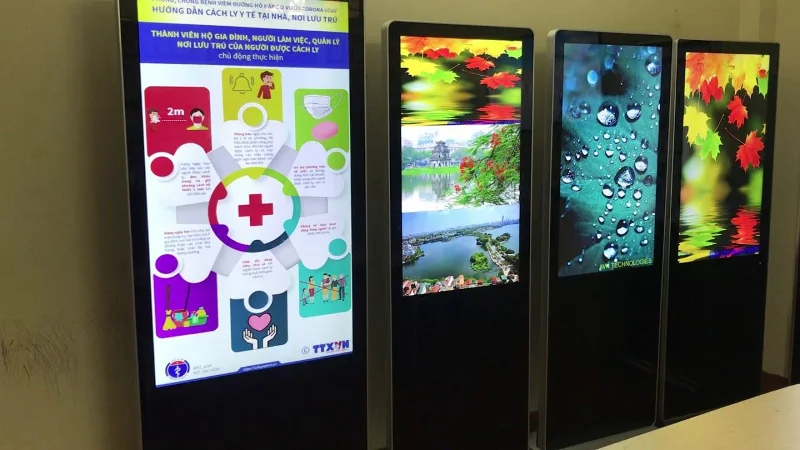
- Electronic Standee: Outstanding thanks to the LED system is one of the features of the Electronic Standee. Thanks to the application of modern technology, messages are conveyed to customers effectively.

Learn What is a Standee?  And Standee Features

Standee features

In addition to the design features, Standee 's characteristics are evident in the design. Some salient features are as follows:

- Standee's design style favors minimalism.

- Standee does not have many words but mainly focuses on the main message.

- Images on Standee are always unique, eye-catching, sharp and attractive.

- Priority design colors are simple, harmonious and elegant tones.

- Standee's structure or layout is always compact and space-saving.

- Standee always puts the logo image, the main message at the top position, the fastest visual access.

With an easy-to-remove design, you can reuse the Standee structure over and over again.

This is one of the features of Standee that you can easily recognize. With the above basic characteristics, you will know which advertising campaign Standee should use accordingly.

How to Use Standee

In terms of Standee's features, only Standee shelf X has a slightly complicated usage. For proper use and care of Standee, you should refer to the following instructions:

Step 1: Install the Standee frames so that the legs are maximized and form a balanced vertical plane.

Step 2: You use two elastic plastic rods through 2 pre-punched holes on the Standee.

Step 3: You attach the existing hiflex canvas to the Standee.

With the above simple steps, you've got the perfect X-shelf Standee right away.

With summary as well as overview of  Standee.  Hopefully WebTech360 has helped you better understand this type of advertising so that you can make quality ads. If you need to support any more related information, please contact WebTech360 immediately !

Tags: #Wiki

Leave a Comment

What is 3uTools? How to install and use 3uTools in detail

What is 3uTools? How to install and use 3uTools in detail

3uTools supports users to manage utility applications more than the traditional way. Easy-to-use interface, will bring interesting experiences to you.

What is rendering?

What is rendering?

Rendering is the process of creating an image from a model into a movie scene or image using computer software.

What is CPU? What are the popular CPU types today?

What is CPU? What are the popular CPU types today?

The CPU is the data processing center, or simply understood, it is the brain that controls most of the rest of the components in a computer.

What is GPU? How does GPU affect work and play?

What is GPU? How does GPU affect work and play?

The GPU is the processor that handles graphics-related tasks for the CPU's central processor. Features on GPUs go far beyond basic graphics drivers like Intel's GPU

What is a Flyer? 3 Secrets of Best Flyer Design

What is a Flyer? 3 Secrets of Best Flyer Design

Flyer is a form of advertising, a marketing product that has existed for a long time, also known as leaflets, product marketing brochures.

What is ECC RAM? Distinguishing Non-ECC, Registered ECC and Unbuffered ECC RAM

What is ECC RAM? Distinguishing Non-ECC, Registered ECC and Unbuffered ECC RAM

ECC RAM is a type of RAM that has the ability to control the flow of data accessed in it to help automatically correct errors. ECC RAM has very high stability which helps you to reduce risk.

What is Ray Tracing? Learn how Ray Tracing works

What is Ray Tracing? Learn how Ray Tracing works

Ray Tracing is a technique that helps a computer create an image by tracing the path of light through pixels on the same image plane.

What Is Chipset? Its Tasks in the Computer System

What Is Chipset? Its Tasks in the Computer System

Chipset is a collection of chips, chipset refers to the chip on the mainboard or on the expansion card. On PC, commonly known as northbridge and southbridge.

What is Hyperthreading? Without Hyper threading, what will the CPU performance be like?

What is Hyperthreading? Without Hyper threading, what will the CPU performance be like?

Hyper threading is a hyper-threading technology and is known as Intel HT technology by globally famous technology manufacturer Intel.

What is a VRM circuit?

What is a VRM circuit?

The VRM circuit is the voltage regulator in the motherboard. With the presence of VRM, the CPU and GPU will be provided with clean power to operate stably.

What is V-Sync, FreeSync on the monitor? Are they really useful?

What is V-Sync, FreeSync on the monitor? Are they really useful?

On the quality screen, they integrate a technology called V-Sync, FreeSync. Let WebTech360 explain to you about V-Sync, what is FreeSync?

What is Anti-Aliasing? The Role of Anti-Aliasing

What is Anti-Aliasing? The Role of Anti-Aliasing

Anti-aliasing is the main adjustment mode to help objects and people become softer and not angular, the game experience will also be better.

What is Animation? 3 Simplest Ways to Create Animation

What is Animation? 3 Simplest Ways to Create Animation

Animation is an age-old method in which people make motions of images based on still images.

What is Footage Video? The Secret To Owning A Movie-like Footage

What is Footage Video? The Secret To Owning A Movie-like Footage

Footage is unedited raw footage and footage. You can understand that footage is all the components that make up a video, and footage is very diverse.

What is Storyboard? Why Do You Need Storyboards?

What is Storyboard? Why Do You Need Storyboards?

Storyboard is a storyboard, consisting of a series of illustrations and accompanied by notes about what is going on, carrying the content of the story.

Solving Microsoft Teams Shortcut Error Not Opening

Solving Microsoft Teams Shortcut Error Not Opening

Tired of Microsoft Teams shortcut error preventing you from opening the app? Follow our expert, step-by-step guide with the latest fixes for instant resolution. Works on Windows, Mac & web – no tech skills needed!

Solving Microsoft Teams Task Management Sync Error

Solving Microsoft Teams Task Management Sync Error

Tired of Microsoft Teams Task Management Sync Error halting your workflow? Follow our proven, step-by-step fixes to resolve sync issues fast and restore seamless task collaboration. No tech expertise needed!

Troubleshooting Microsoft Teams Wiki Error Formatting

Troubleshooting Microsoft Teams Wiki Error Formatting

Struggling with Microsoft Teams Wiki Error Formatting? This step-by-step guide reveals proven fixes for common wiki tab issues, ensuring smooth editing and collaboration in Teams. Get back to productive wikis fast!

How to Fix Microsoft Teams Installation Error for Linux

How to Fix Microsoft Teams Installation Error for Linux

Struggling with Microsoft Teams installation error on Linux? Discover step-by-step fixes for Ubuntu, Fedora & more. Resolve dependency issues, crashes, and errors quickly with our ultimate guide. Get Teams running smoothly today!

Solving Microsoft Teams Error Page Not Loading

Solving Microsoft Teams Error Page Not Loading

Struggling with Microsoft Teams "Error Page" not loading? Get step-by-step fixes for desktop, web, and mobile. Solve Microsoft Teams Error Page issues quickly and resume seamless teamwork today.

Solving Microsoft Teams Error Screenshot Issues

Solving Microsoft Teams Error Screenshot Issues

Tired of Microsoft Teams "Error Screenshot" blocking your workflow? Get proven, step-by-step solutions to resolve screenshot errors in Teams instantly and boost productivity. No tech skills needed!

How to Fix Microsoft Teams Error U User

How to Fix Microsoft Teams Error U User

Tired of Microsoft Teams "Error U" User blocking your chats? Get proven, step-by-step fixes to clear cache, reset, and restore seamless collaboration instantly.

Where are Microsoft Teams Registry Keys Located on Windows 11?

Where are Microsoft Teams Registry Keys Located on Windows 11?

Unlock the precise locations of Microsoft Teams registry keys on Windows 11. Step-by-step guide to find, access, and safely tweak them for optimal performance and troubleshooting. Essential for IT pros and Teams enthusiasts.

How to Fix Microsoft Teams Training Error Video Lag

How to Fix Microsoft Teams Training Error Video Lag

Tired of Microsoft Teams "Training Error" Video Lag ruining your meetings? Follow our step-by-step guide with the latest fixes for smooth video calls—no more frustration!

How to Fix Microsoft Teams Error occurred During Sign-In

How to Fix Microsoft Teams Error occurred During Sign-In

Frustrated by Microsoft Teams "Error occurred" during sign-in? Discover proven, step-by-step fixes to get back online fast. Clear cache, reset app, and more for seamless login. Works on Windows, Mac & web.

Troubleshooting Microsoft Teams Call Error Disconnecting

Troubleshooting Microsoft Teams Call Error Disconnecting

Struggling with Microsoft Teams "Call Error" Disconnecting? Discover proven, step-by-step fixes for call drops, network issues, and more. Get back to seamless meetings fast with our expert troubleshooting guide.

How to Fix Microsoft Teams Error 2603: Login Loop Fix

How to Fix Microsoft Teams Error 2603: Login Loop Fix

Stuck in Microsoft Teams Error 2603 login loop? Get proven step-by-step fixes to resolve the issue fast and restore seamless teamwork. Clear cache, reset, reinstall – all covered!

How to Fix Microsoft Teams Voice Call Error

How to Fix Microsoft Teams Voice Call Error

Tired of Microsoft Teams voice call errors? Follow our step-by-step guide to troubleshoot no audio, echo, or call drops. Proven fixes for crystal-clear calls every time.

How to Fix Microsoft Teams Workflows Error Power Automate

How to Fix Microsoft Teams Workflows Error Power Automate

Struggling with Microsoft Teams "Workflows Error" in Power Automate? Discover proven, step-by-step fixes to resolve connection issues, permissions, and more. Get your workflows running smoothly today!

How to Fix Microsoft Teams Reddit Popular Error Fixes

How to Fix Microsoft Teams Reddit Popular Error Fixes

Tired of Microsoft Teams crashes, black screens, and sign-in loops? Unlock Reddit's most popular, proven fixes to resolve common Microsoft Teams errors quickly and get back to productive meetings. Step-by-step guides inside!