Desk Decorating Ideas for a Spooky Office Cubicle

Create a spooky office cubicle with Halloween desk decor ideas that keep your workspace usable, tidy, and mindful of workplace safety.
Taiwanese semiconductor giant MediaTek has just officially introduced the Dimensity 9400+, the successor to the flagship Dimensity 9400 chip line launched last year. This new mobile chip brings significant upgrades in many aspects including CPU, AI and many other features.
However, the most surprising improvement is probably the Bluetooth connectivity. This chip supports a Bluetooth connection range from phone to phone of up to 10km in “line of sight” conditions, without obstacles. The Dimensity 9400+ is equipped with Bluetooth 6.0 technology, providing peak data transfer speeds of up to 12Mbps.
For comparison, this Bluetooth range is more than six times the 1.5km of the previous generation, the Dimensity 9400. While many people are waiting for Starlink satellite internet to use in areas without signal, MediaTek asserts: "These direct long-range connections do not require cellular service, saving data and enhancing privacy."
In terms of processing configuration, the main Cortex-X925 CPU on the Dimensity 9400+ has a slightly higher clock speed at 3.73GHz compared to 3.62GHz of the previous generation. The chip uses the same NPU 890 but adds Speculative Decoding+ (SpD+) support to increase AI performance by 20%.
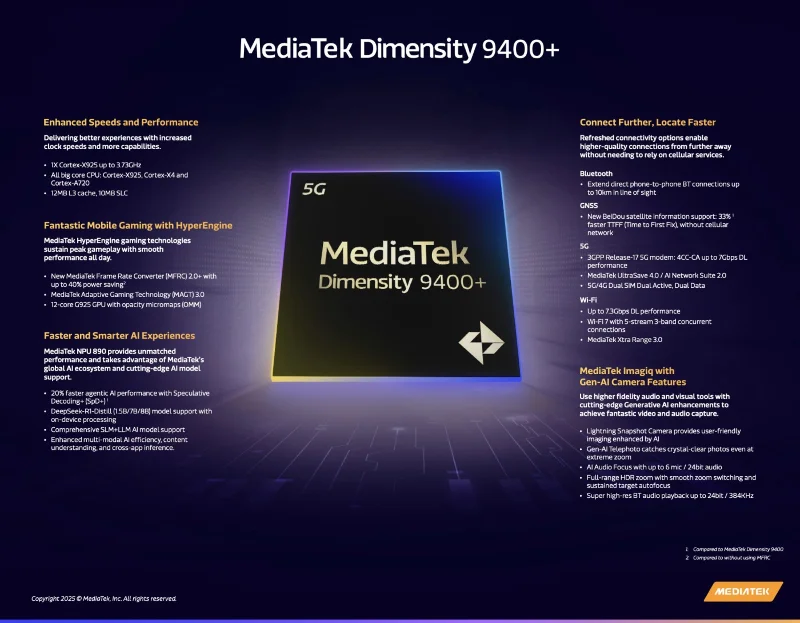
The Dimensity 9400+ seeks to improve the AI experience by supporting the latest large language models (LLMs) such as DeepSeek-R1-Distill (from 1.5B models to 8 billion parameters) with on-device processing. By integrating the new MediaTek Frame Rate Converter 2.0+ (MFRC 2.0+), the chip aims to "effectively double FPS while saving up to 40% power."
MediaTek also adds support for new BeiDou satellite information, which reduces the time to initial position (TTFF) by 33% even without a cellular connection. Wireless support is upgraded to concurrent tri-band Wi-Fi 7 with 5 streams (2x2 + 2x2 + 1x1) for increased data throughput and stability.
However, the Dimensity 9400+ still maintains the maximum Wi-Fi data rate at 7.3 Gbps and the wireless coverage increased by 30m. With 5G/4G Dual SIM Dual Active, Dual Data support, the processor promises to bring flexibility and convenience when being able to use two phone numbers at the same time with full calling, texting and high-speed internet functions.
MediaTek said in a press release that the first phones equipped with the Dimensity 9400+ will be available this month.
Create a spooky office cubicle with Halloween desk decor ideas that keep your workspace usable, tidy, and mindful of workplace safety.
Plan a recognizable Halloween 2026 look with pop culture costumes inspired by Spider-Man, Supergirl, Toy Story 5, Moana, Mario, and Wednesday.
Sort leftover Halloween candy safely, share or repurpose sealed treats, and choose food use or compost for pumpkins based on their condition.
Compare workplace Halloween costume choices by respect, dress code, mobility, and safety—and learn when a subtle accessory or a policy check is the better option.
Find a couples costume that fits your style, budget, and comfort level, from Addams Family classics to original inside-joke duos.
Need a last-minute high school Halloween costume? Compare 10 easy closet-based ideas by prep time, comfort, school-day practicality, and simple safety checks.
Use a simple 2026 Halloween decorating timeline for indoor décor, outdoor displays, and fresh pumpkins, with practical adjustments for weather and events.
Mix five vivid, approachable Halloween cocktails with measured recipes, simple prep tips, and an alcohol-free option for your party guests.
Find 15 office-friendly Halloween costume ideas for 2026, with practical checks for dress codes, respectful themes, comfort, and workplace safety.
Plan a fun elementary school Halloween party with easy crafts, games, inclusive treats, costume tips, and a sample 75-minute classroom schedule.








