OPPO Reno 5 Pro 5G Review: Other Competitors Beware

OPPO introduced the first product of the Reno series 2 years ago, targeting the flagship market with the Reno 10X Zoom. But the Chinese manufacturer has not ignored the lucrative mid-range market.

Reno 5 Pro 5G is not much different from its predecessor, still keeping the same 6.5-inch curved AMOLED screen. However, the processor of the device has been changed to the Dimensity 1000+ chip set, significantly improving performance.

OPPO Reno 5 Pro 5G Design

Most phones these days have a metal and glass design, and the Reno 5 Pro is no exception. The difference is that at just 7.6mm thick, this is one of the thinnest smartphones at the moment. Even the Pixel 4a and OnePlus Nord are 8.2mm thick.

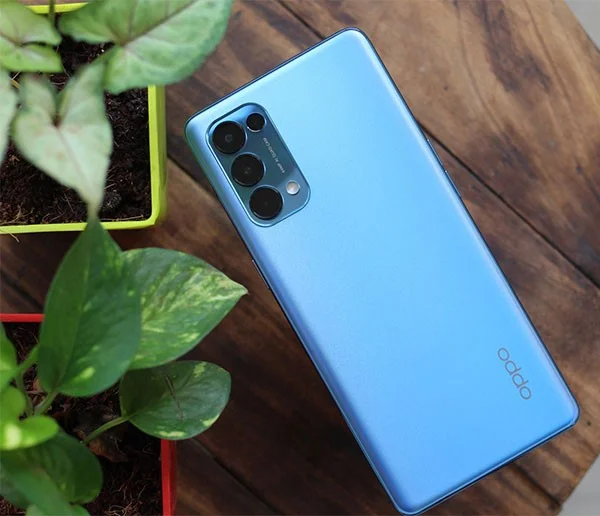
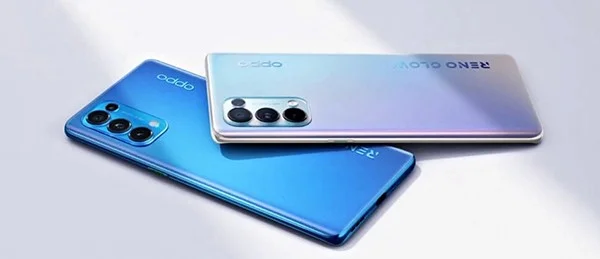
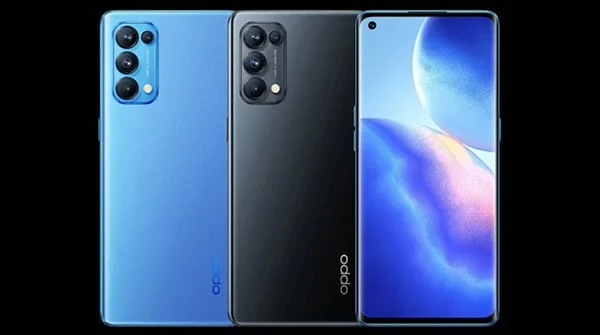
The device is finished in two colors, Astral Blue and Starry Black. The outer shell of the device is made of matte plastic, so it will not retain fingerprints. The structure of the device is very easy for users to use with one hand.

OPPO Reno 5 Pro 5G Review: Other Competitors Beware

The Reno 5 Pro has a curved display. The curvature of the display combined with the 7.6mm thickness means that there is only a very small strip between the display and the frame for your hand to rest when holding the device. The bezels are extremely thin, you will find a small hole on the left side. The power button is on the right side, the volume button on the left side and the speaker grille is located at the bottom of the device. The SIM tray is located on the left side of the USB-C port.

Overall, there is a lot to say about the design of the Reno 5 Pro. The Astral Blue color looks very attractive, and in terms of thinness, it is probably very popular in the market.

OPPO Reno 5 Pro 5G display

As for the display, there hasn't been much change from the Reno 4 series, which is actually a good sign. The Reno 5 Pro has a 6.5-inch AMOLED display, 90Hz refresh rate and FHD+ resolution, with vibrant colors.

OPPO Reno 5 Pro 5G Review: Other Competitors Beware

The main problem with the Reno 5 Pro's display is not the color, but the phone's curved screen design. Apart from the curved screen issue, the Reno 5 Pro is still a very good choice for watching movies and playing games.

The screen brightness is up to 1100 nits, has HDR10+ and a customization suite to adjust screen colors, dark mode intensity,... A special feature of the device is the always-on screen, there is a list of parts you can choose to appear on the screen.

OPPO Reno 5 Pro 5G Performance

The weak point of the Reno 4 Pro was the hardware, but it has been overcome on the Reno 5 Pro 5G. This is the first phone model running the latest chip of MediaTek Dimensity 1000+ and the performance it brings is surprising.

With normal daily tasks, Dimensity 1000+ works without any problems, there is no sign of lag while using Reno 5 Pro.

In addition, the device also integrates a 5G modem, there is no 3.5mm headphone jack but the device's speaker cluster works quite well. The fingerprint sensor inside the screen is fast, the face recognition unlocking feature is as good as on OnePlus products.

In terms of connectivity, the device has Wifi 6 along with Bluetooth 5.1 and NFC. The highlight of this phone is the 65W fast charging, just like last year. The 4350mAh battery is enough to comfortably use for a day.

OPPO Reno 5 Pro 5G Camera

The Reno 5 Pro 5G has a 64MP main sensor accompanied by an 8MP wide-angle lens, a 2MP macro lens, and a 2MP mono lens, in addition to a 32MP front camera. OPPO has focused on improving video quality, including better video stabilization and AI-assisted night mode and HDR video.

OPPO Reno 5 Pro 5G Review: Other Competitors Beware

Photos taken from the 64MP main sensor contain a lot of detail, vivid color range and good contrast levels. The Reno 5 Pro can also take good photos in low light conditions. Although the Reno 5 Pro focuses heavily on video recording, it is not capable of recording 4K video at 60fps.

OPPO Reno 5 Pro 5G Software

Reno 5 Pro runs ColorOS 11 based on Android 11. ColorOS 11 is similar to OxygenOS 11, users can customize a lot of things here such as app icons, change colors, fonts or other options.

The highlight of ColorOS 11 is its clean interface. OPPO has “renovated” its user interface many times to be on par with OxygenOS 11 and One UI 3.0 , you can see this very clearly on Reno 5 Pro.

All in all, OPPO is doing a great job with ColorOS, the UI finally feels fresh and modern, there are tons of other customization options, and Android 11 is also the latest OS, with tons of unique features.
Leave a Comment

How to Fix Microsoft Teams Đăng nhập Error (Login)

How to Fix Microsoft Teams Đăng nhập Error (Login)

Struggling with Microsoft Teams "Đăng nhập" login error? Discover step-by-step fixes for smooth sign-in. Clear cache, update app, and more – no tech skills needed! Works on Windows, Mac, and web.

Solving Microsoft Teams Web Error 503 Service Unavailable

Solving Microsoft Teams Web Error 503 Service Unavailable

Tired of Microsoft Teams Web Error 503 Service Unavailable blocking your meetings? Discover quick, step-by-step fixes to resolve the 503 error fast – no tech skills needed! Clear cache, check status, and get back to collaborating seamlessly.

Troubleshooting Microsoft Teams Update Error 0x80070002

Troubleshooting Microsoft Teams Update Error 0x80070002

Stuck with Microsoft Teams Update Error 0x80070002? Discover proven troubleshooting steps to resolve this frustrating issue quickly and get your Teams app updated seamlessly for uninterrupted collaboration.

Solving Microsoft Teams Error AADSTS50020: User Account Conflict

Solving Microsoft Teams Error AADSTS50020: User Account Conflict

Tired of Microsoft Teams Error AADSTS50020 blocking your sign-in? Discover step-by-step fixes for user account conflicts, backed by the latest Azure AD solutions. Get back to work fast!

How to Fix Microsoft Teams Microphone Error No Sound

How to Fix Microsoft Teams Microphone Error No Sound

Tired of Microsoft Teams microphone error with no sound? Discover quick, step-by-step fixes for Teams mic not working on Windows, Mac, and more. Restore crystal-clear audio in minutes!

How to Fix Microsoft Teams Task Management Error

How to Fix Microsoft Teams Task Management Error

Tired of the Microsoft Teams "Task Management" Error disrupting your workflow? Discover proven fixes like clearing cache, updating Teams, and troubleshooting permissions to get back to seamless collaboration in minutes. Updated with the latest solutions.

How to Fix Microsoft Teams How to Teams Help Error

How to Fix Microsoft Teams How to Teams Help Error

Frustrated by the Microsoft Teams 'How to Teams' Help Error? Discover proven, step-by-step solutions to fix it quickly and restore smooth help access. Latest 2026 updates included for seamless teamwork.

Solving Microsoft Teams Room Error Syncing

Solving Microsoft Teams Room Error Syncing

Struggling with Microsoft Teams "Room Error" Syncing? This ultimate guide provides step-by-step fixes for Microsoft Teams Room Error Syncing issues, ensuring seamless meetings and quick resolutions. Updated with the latest tips.

Troubleshooting Microsoft Teams Workflows Power Automate

Troubleshooting Microsoft Teams Workflows Power Automate

Master troubleshooting Microsoft Teams Workflows Power Automate issues with step-by-step fixes for common errors. Get your automations running smoothly – no more frustration! Proven solutions for triggers, permissions, and more.

Solving Microsoft Teams Restart Error (2026)

Solving Microsoft Teams Restart Error (2026)

Struggling with Microsoft Teams "Restart Error" in 2026? Discover proven, step-by-step fixes to resolve the endless restart loop quickly. Clear cache, reset app, and more for seamless collaboration. Get back online fast!

How to Create Breakout Rooms in Microsoft Teams Before a Meeting

How to Create Breakout Rooms in Microsoft Teams Before a Meeting

Master how to create breakout rooms in Microsoft Teams before a meeting with this easy guide. Pre-assign participants, boost collaboration, and elevate your virtual sessions effortlessly.

How to Fix Microsoft Teams Layout Error: Sidebar Missing

How to Fix Microsoft Teams Layout Error: Sidebar Missing

Tired of Microsoft Teams sidebar missing? Get instant fixes for layout errors. Step-by-step guide with latest tips to restore your Teams sidebar fast and frustration-free.

Solving Microsoft Teams Download Error for Macbook

Solving Microsoft Teams Download Error for Macbook

Struggling with Microsoft Teams Download Error on MacBook? Get step-by-step fixes for smooth installation on the latest macOS. Solve download failed issues quickly and easily.

Solving Microsoft Teams Error J Accounts

Solving Microsoft Teams Error J Accounts

Tired of Microsoft Teams Error J blocking your accounts? Get instant fixes for Error J in Teams with step-by-step guides, cache clears, and account resets. Regain access fast—no tech skills needed!

Rethinking Document Management to Streamline Your Workflow

Rethinking Document Management to Streamline Your Workflow

Work slows down when files sit in too many places, approval steps feel confusing, and people spend more time searching than actually finishing tasks. Strong document management can bring order back without making daily work feel complicated.