Red Karaoke for Windows 8/10 2.0.0.20 - Sing Karaoke Online on the Computer (2024 & 2025 Updates)
Red Karaoke for Windows 8/10, Sing and record online karaoke songs with Red Karaoke for Windows 8 - the world
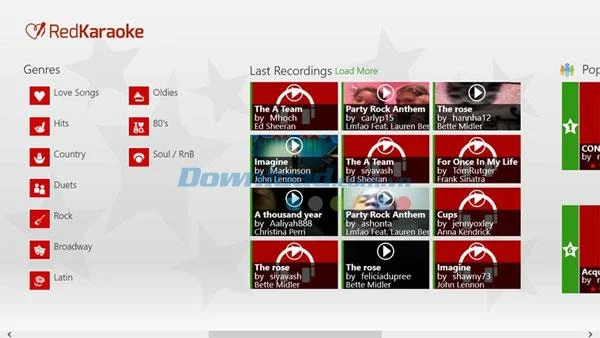
Experience the world's largest online karaoke service with Red Karaoke for Windows 8/10 - now with more than 45,000 songs available!
Red Karaoke includes a vast collection of beloved songs, ranging from classics to current hits, from romantic ballads to energetic dance tracks and much more…
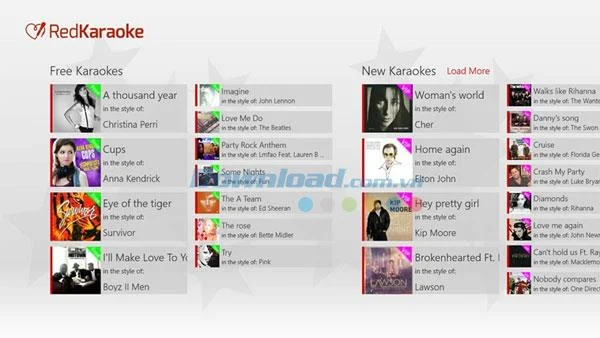
Start your karaoke journey with 10 free songs (the list updates monthly) and enhance your online karaoke experience on your PC by registering for a VIP membership to access all 45,000 new songs.
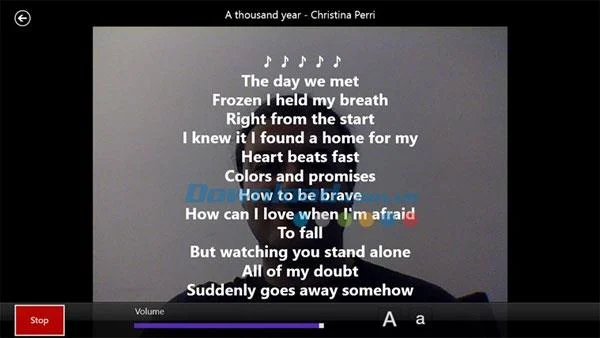
Join the Red Karaoke community to sing and record songs in karaoke form. The lyrics will display over the background image of your choice. You can also record videos of your performances to save on your computer or share with millions of other Red Karaoke members.

| Feature | Description |
|---|---|
| Extensive Song Collection | Discover new songs every week from top artists and classic hits. |
| Diverse Music Genres | Enjoy various genres including country, R&B, rock, 80s hits, Christmas music, and jazz. |
| Full-Screen Karaoke | Sing in full-screen mode with customizable background images. |
| Recording Feature | Record videos of your performances using your device’s built-in camera. |
| Adjustable Lyrics | Easily adjust font sizes to read lyrics comfortably. |
| Pitch Control | Modify the pitch of the music to fit your voice perfectly. |
| Favorites List | Create and manage a list of your favorite songs for quick access. |

The Red Karaoke application allows you to access various free features such as:
If you're a Red Karaoke user on Windows 8/10, you can directly reach out to the publisher via email at [email protected] for feedback, bug reports, or feature suggestions for future updates.
Interface languages: English, Spanish, Japanese.
Tired of Microsoft Teams Web Error 503 Service Unavailable blocking your meetings? Discover quick, step-by-step fixes to resolve the 503 error fast – no tech skills needed! Clear cache, check status, and get back to collaborating seamlessly.
Stuck with Microsoft Teams Update Error 0x80070002? Discover proven troubleshooting steps to resolve this frustrating issue quickly and get your Teams app updated seamlessly for uninterrupted collaboration.
Tired of Microsoft Teams Error AADSTS50020 blocking your sign-in? Discover step-by-step fixes for user account conflicts, backed by the latest Azure AD solutions. Get back to work fast!
Tired of Microsoft Teams microphone error with no sound? Discover quick, step-by-step fixes for Teams mic not working on Windows, Mac, and more. Restore crystal-clear audio in minutes!
Tired of the Microsoft Teams "Task Management" Error disrupting your workflow? Discover proven fixes like clearing cache, updating Teams, and troubleshooting permissions to get back to seamless collaboration in minutes. Updated with the latest solutions.
Frustrated by the Microsoft Teams 'How to Teams' Help Error? Discover proven, step-by-step solutions to fix it quickly and restore smooth help access. Latest 2026 updates included for seamless teamwork.
Struggling with Microsoft Teams "Room Error" Syncing? This ultimate guide provides step-by-step fixes for Microsoft Teams Room Error Syncing issues, ensuring seamless meetings and quick resolutions. Updated with the latest tips.
Master troubleshooting Microsoft Teams Workflows Power Automate issues with step-by-step fixes for common errors. Get your automations running smoothly – no more frustration! Proven solutions for triggers, permissions, and more.
Struggling with Microsoft Teams "Restart Error" in 2026? Discover proven, step-by-step fixes to resolve the endless restart loop quickly. Clear cache, reset app, and more for seamless collaboration. Get back online fast!
Master how to create breakout rooms in Microsoft Teams before a meeting with this easy guide. Pre-assign participants, boost collaboration, and elevate your virtual sessions effortlessly.
Tired of Microsoft Teams sidebar missing? Get instant fixes for layout errors. Step-by-step guide with latest tips to restore your Teams sidebar fast and frustration-free.
Struggling with Microsoft Teams Download Error on MacBook? Get step-by-step fixes for smooth installation on the latest macOS. Solve download failed issues quickly and easily.
Tired of Microsoft Teams Error J blocking your accounts? Get instant fixes for Error J in Teams with step-by-step guides, cache clears, and account resets. Regain access fast—no tech skills needed!
Work slows down when files sit in too many places, approval steps feel confusing, and people spend more time searching than actually finishing tasks. Strong document management can bring order back without making daily work feel complicated.
Frustrated by the Microsoft Teams Whiteboard Error Login? Discover proven, step-by-step fixes to resolve it quickly and get back to seamless collaboration. Latest solutions for desktop, web, and mobile. No tech skills needed!