5 Halloween Cocktails That Are Easy to Serve at Your 2026 Bash

Mix five vivid, approachable Halloween cocktails with measured recipes, simple prep tips, and an alcohol-free option for your party guests.
On January 3, Elon Musk's SpaceX launched the first six satellites that can provide mobile service to remote areas without the need for a terminal.
The new batch of satellites was launched along with 15 other Starlink satellites on SpaceX's Falcon 9 rocket. Elon Musk's company received approval from the US Federal Communications Commission (FCC) to connect directly to smartphones, partnering with carrier T-Mobile last month.
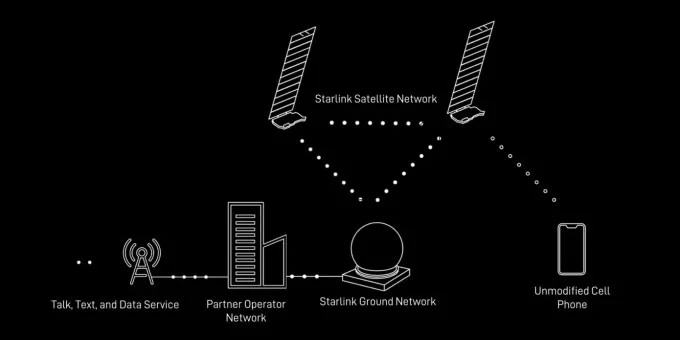
Later this year, SpaceX will test Internet connectivity for smartphones with the goal of launching 840 satellites that will transmit 4G connectivity to about 2,000 smartphone models on the list.
The new satellite will act as a “space-based cell phone tower,” allowing mobile phone connectivity anywhere on Earth. This is a great solution for places without cellular connectivity, but it won’t compete with existing cell towers on the ground.
SpaceX will launch satellite messaging this year, with voice and data services available as early as late 2024 or early 2025.
In addition to SpaceX, several other tech companies are also looking to help users connect to mobile waves from space, including Lynk, Amazon's Kuiper, and AST SpaceMobile. This creates a new space race ahead.
According to SpaceX statistics, Starlink has 3,000 Starlink satellites circling the Earth with more than 400,000 satellite Internet service users worldwide, as of mid-October last year. Starlink's goal is to have 42,000 satellites participating in the space Internet network by 2027. SpaceX's satellite Internet network currently reaches speeds of 50-150 Mbps, even up to 175 Mbps in some places.
Starlink satellites will stream internet directly to smartphones, eliminating 'out of coverage'
T-Mobile CEO Mike Sievert announced that they will partner with Elon Musk's Starlink so that phones using the T-Mobile network can connect directly to Starlink satellites.
At that time, T-Mobile phones could connect to the internet with a maximum bandwidth of 4Mbps even when outside the carrier's coverage area. This means that as long as you can see the sky, you have internet, and you can text, send MMS messages, and use messenger apps, even when there is no carrier signal. This service is called satellite-to-cellular, meaning from satellite to cellular network, and is part of the Coverage Above and Beyond project.
Elon Musk said this project will help eliminate the concept of 'out of coverage' in the world.
T-Mobile plans to test the service in select locations by the end of 2023. When it officially launches, subscribers in the United States, Hawaii, parts of Alaska, Puerto Rico, and U.S. territorial waters will be able to use the service.
Once fully operational, this satellite to cellular service will include voice calling and mobile broadband data.
Not stopping there, T-Mobile plans to cooperate with other carriers around the world on the Coverage Above and Beyond program so that all phones in the world will have signal, there will be no place outside the coverage area anymore.
Existing phones that are compatible with T-Mobile's network do not need any additional upgrades to use Coverage Above and Beyond.
Satellite-to-cellular service has both free (basic) and paid (advanced) plans for customers.
As expected, the second generation Starlink satellites with large antennas, 5-6 meters wide, will be launched next year, allowing mid-band transmission compatible with T-Mobile's network. When operating, the user's phone only needs to connect to 1 satellite to send messages, without having to connect to enough satellites (like how GPS works). However, the message will have to wait 30 minutes to be sent. But when the connection is working smoothly, in places with few users, the connection speed can reach 2 - 4Mbps, enough to watch videos.
T-Mobile's service will be compatible with certain messenger apps, so third parties like Facebook and Apple will have to work directly with T-Mobile and Starlink so that WhatsApp and iMessage apps can understand the satellite connection and send messages over it.
Mix five vivid, approachable Halloween cocktails with measured recipes, simple prep tips, and an alcohol-free option for your party guests.
Find 15 office-friendly Halloween costume ideas for 2026, with practical checks for dress codes, respectful themes, comfort, and workplace safety.
Plan a fun elementary school Halloween party with easy crafts, games, inclusive treats, costume tips, and a sample 75-minute classroom schedule.
Compare realistic side hustles for 2026 by startup cost, fees, flexibility, and income control, with current tax and scam guidance from official sources.
Upgrade your home office ergonomics with current OSHA and NIOSH guidance on chair fit, monitor height, laptop setup, lighting, and movement.
Learn why emotional intelligence matters in leadership, where it helps most, how to strengthen it, and how to tell whether your approach is working.
A practical roadmap for moving into tech without a degree: choose an accessible role, build job-ready skills, prove them with projects, and use hiring feedback to improve.
Build a credible LinkedIn personal brand in 2026 with current profile, content, newsletter, analytics, verification, and visibility guidance from LinkedIn.
Quiet quitting and quiet firing are catchy labels, not diagnoses. Learn what is verified, what depends on context, and what employees and managers can do next.
Fractional executives offer senior leadership without a full-time hire. Learn when the model works, what to ask, and the risks to manage.








