Home
» Games
»
Summary of basic mouse grip styles - Pros and cons
Summary of basic mouse grip styles - Pros and cons
You may not notice when you instinctively hold the mouse, but specifically there are 3 basic ways of holding the mouse that everyone can determine how to hold their mouse in one of these 3 ways.
Each way of holding the mouse has different advantages and disadvantages, in order to know what kind of grip you have, it is necessary to change to get the best performance?
Let's learn how to hold the mouse in this article.
Summary of basic mouse grip styles - Pros and cons
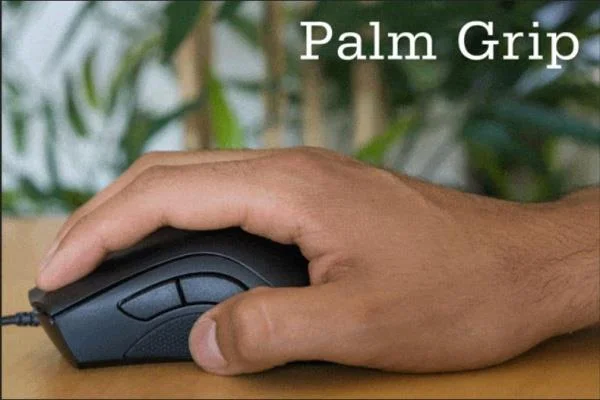
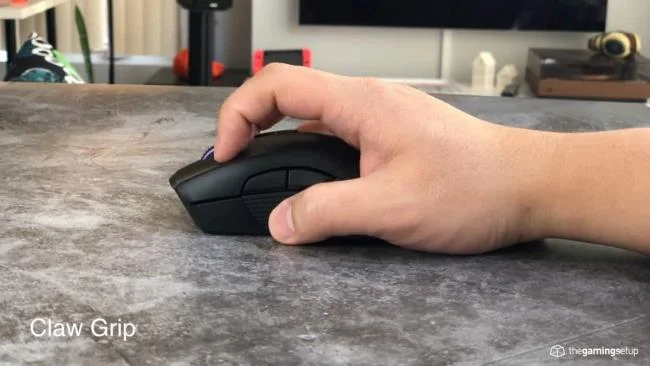
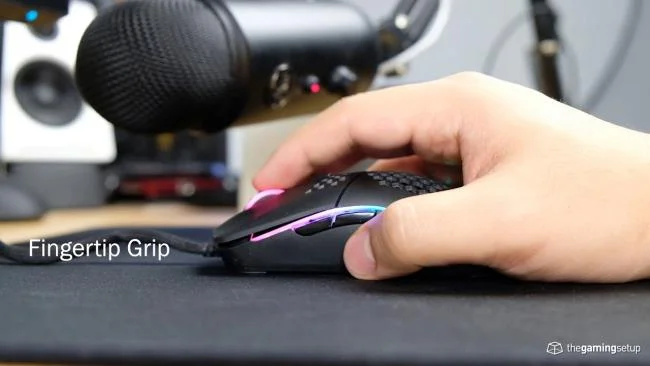
Holding the mouse is like holding a pen, so each person has a different grip, but it cannot be outside the following three main types:
Palm grip: This is a grip where your whole hand is completely around the body of the mouse, mice with a large body and ergonomic design will suit this grip perfectly.
Claw grip : This grip features the palm and fingertips in contact with the body of the mouse, usually medium-sized mice are most comfortable for this grip.
Fingertip grip : This grip will only touch the mouse at your fingertips, so mice that are small and lightweight are ideal.
Each style of holding the mouse above has its own advantages and disadvantages, let's learn more details below.
- Least fatigue in grip styles because your fingers touch the mouse, supported by the mouse except for the index and middle fingers.
- Gives good control, precise operation.
- This grip is usually the one that many people use the most because it is very convenient, but for beginners, it is also the easiest to get used to.
Defect:
- Easy to sweat, slippery. Doesn't suit you or gets sweaty hands.
The right mouse for this grip is usually big, ergonomically designed to help hold the hand and is therefore also very expensive.
- When using a mouse that consumes a lot of force, quickly tired hands due to the distance between the knuckles.
2. Claw grip
Advantages:
- This is a grip that combines palm grip and finger grip. Provides a feeling of good control and adequate ventilation.
- Because the finger slightly shrinks to help pull close to the knuckle distance, the click force will be lighter while still providing a sense of certainty.
- Easily change from palm grip to claw grip without wasting time getting used to.
Defect:
- The palm of the hand is still pressed against the mouse body, so it can still cause hand sweat.
- Must choose a mouse carefully with this grip because the average mouse size is not only estimated with the eyes but also has to try the feeling.
3. Fingertip grip
Advantages:
- Finger stretching is best utilized and flexible, allowing for quick response, increased hover range and reduced wrist fatigue.
- Airy and less sweaty because the hand-to-hand contact part is just the fingertips.
- The ideal mouse size is small and light so the price is also cheaper.
Defect:
- Requires good finger control, quite difficult to get used to when you first use it or want to change from the two above styles.
- Due to the palm and the MCP finger joint (the root joint of the finger) is not fixed, the operation is inaccurate and ineffective when playing the game.
- Fingers quickly tired.
Above are 3 basic and popular mouse grip styles, hope you can choose the right mouse style for you after this article.