Desk Decorating Ideas for a Spooky Office Cubicle

Create a spooky office cubicle with Halloween desk decor ideas that keep your workspace usable, tidy, and mindful of workplace safety.
The control and termination statements in ScratchJR are used to build more advanced programs, such as repeating a certain detail in a scene. The scene in ScratchJR is also much more vivid, creating the premise for students to develop more programs. Let's review the control and termination statements in ScratchJR.
Control commands in ScratchJR
| Command | Function |
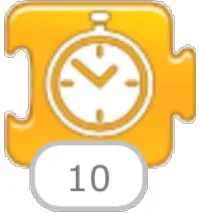 |
The wait command, measured in tenths of a second. As shown in the image, it will wait for 1 second. If we want to wait for 5 seconds, we will enter 50. |
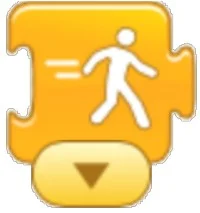 |
The command adjusts the speed of movement. This command has 3 options: Slow, Medium and Fast. As the command on the side is Medium speed |
 |
Repeat Statement: The statements between this block will be repeated the specified number of times. As shown in the figure below, it is repeated 4 times. |
 |
The command stops all activities in the program. This is a rarely used command. |
End Command Group in ScratchJR
These are the commands used when performing the character movement functions in ScratchJR. The numbers in these commands correspond to a square on the stage. When we turn the stage into a grid, we can easily visualize the number of moves.
| Command | Function |
 |
Forever loop statement: When this statement is encountered, the program will go back to the first statement and execute again. |
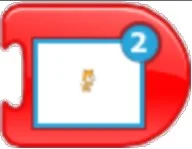 |
Scene transition command: This command is used quite commonly, used to switch to a certain scene. |
 |
The command ends the program at one scene and automatically moves to the next scene. |
Create a spooky office cubicle with Halloween desk decor ideas that keep your workspace usable, tidy, and mindful of workplace safety.
Plan a recognizable Halloween 2026 look with pop culture costumes inspired by Spider-Man, Supergirl, Toy Story 5, Moana, Mario, and Wednesday.
Sort leftover Halloween candy safely, share or repurpose sealed treats, and choose food use or compost for pumpkins based on their condition.
Compare workplace Halloween costume choices by respect, dress code, mobility, and safety—and learn when a subtle accessory or a policy check is the better option.
Find a couples costume that fits your style, budget, and comfort level, from Addams Family classics to original inside-joke duos.
Need a last-minute high school Halloween costume? Compare 10 easy closet-based ideas by prep time, comfort, school-day practicality, and simple safety checks.
Use a simple 2026 Halloween decorating timeline for indoor décor, outdoor displays, and fresh pumpkins, with practical adjustments for weather and events.
Mix five vivid, approachable Halloween cocktails with measured recipes, simple prep tips, and an alcohol-free option for your party guests.
Find 15 office-friendly Halloween costume ideas for 2026, with practical checks for dress codes, respectful themes, comfort, and workplace safety.
Plan a fun elementary school Halloween party with easy crafts, games, inclusive treats, costume tips, and a sample 75-minute classroom schedule.








